
As Amazon Associates, we earn from qualifying purchases. This means we may receive a small commission at no extra cost to you if you click through and make a purchase.
Choosing an everyday laptop often comes down to balancing display size, portability, physical layout, and processing capability. When exploring the Acer America Chromebook catalog, shoppers encounter several distinct form factors designed around Google Chrome OS. These range from traditional 15.6-inch desktop-replacement clamshells with dedicated number pads to compact 11.6-inch and 14-inch convertibles that flip completely into touch-driven tablets. Because these laptops rely on cloud-connected web applications and local Google Play Android software, deciding between models involves evaluating screen resolution, internal flash storage versus high-speed solid-state drives, system memory, and port selection for peripheral accessories.
Acer organizes its Chrome OS lineup into practical tiers that reflect varying levels of user demand. Standard clamshell options like the Acer Chromebook 315 and the Gateway Chromebook 314 emphasize spacious screen areas, anti-glare coatings, and essential dual-core Intel Celeron processing for coursework, video streaming, and office document editing. Meanwhile, convertible Spin devices introduce 360-degree hinges and touchscreens for interactive sketching and tablet use, stepping from compact educational builds up to premium Chromebook Plus devices equipped with multi-core Intel Core Ultra power. Gift-givers and first-time buyers seeking an acer – chromebook will find that each model provides a distinct combination of dimensions, input controls, and hardware capabilities.
Acer Chromebook Lineup at a Glance
| Model | Form Factor | Display Specifications | Processor and Memory | Storage Type |
|---|---|---|---|---|
| Acer Chromebook 315 Laptop | Clamshell | 15.6-inch Full HD IPS (1920 x 1080) | Intel Celeron N4500, 4GB RAM | 64GB eMMC |
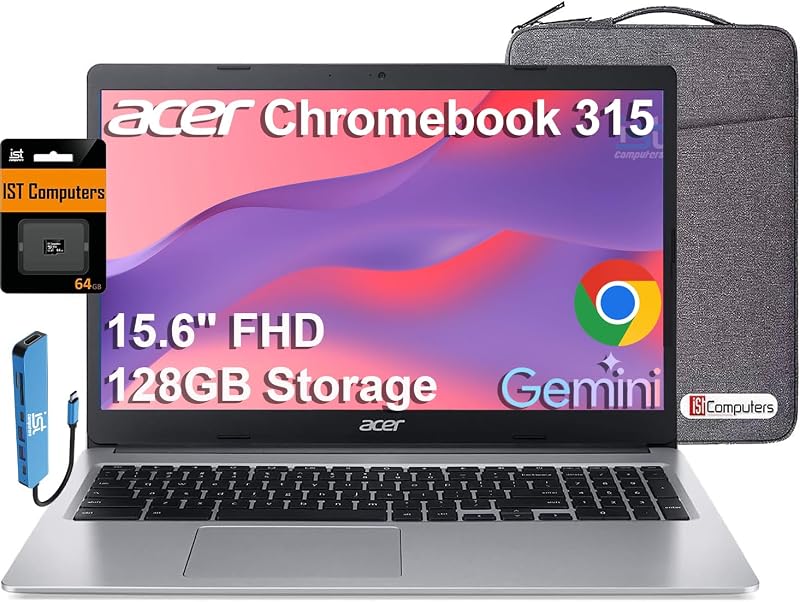
| Acer Chromebook 315 Laptop (Expanded Storage) | Clamshell | 15.6-inch Full HD (1920 x 1080) | Intel Celeron N4500, 4GB RAM | 128GB (64GB eMMC + 64GB SD Card) |
| acer Gateway Chromebook 314 CBO314-1H-C476 Laptop | Clamshell | 14-inch Full HD ComfyView (1920 x 1080) | Intel Celeron N4500, 4GB RAM | 64GB eMMC |
| Acer Chromebook Spin 311 R721T-62ZQ 11.6″ | Convertible 2-in-1 | 11.6-inch HD Touchscreen (1366 x 768) | AMD A6-9220C, 4GB RAM | 32GB Flash Memory |
| Acer Chromebook Plus Spin 714 2-in-1 | Convertible 2-in-1 | 14-inch WUXGA IPS Touchscreen (1920 x 1200) | Intel Core Ultra 5 115U, 8GB RAM | 256GB SSD |
| Acer Chromebook 2023 Flagship Laptop Computer | Clamshell | 15.6-inch HD Anti-Glare (1366 x 768) | Intel Celeron N4020, 4GB RAM | 64GB eMMC |
Figures as published on the product listings.
The Models in Detail
Acer Chromebook 315 Laptop
- Best for Spreadsheet work and number-heavy data entry
- Color Silver
- Size 15.6 inches
- Weight 3.59 pounds
- Dimensions 14.4 x 9.9 x 0.8 inches
Our score: 9.6/10
Pros
- Dedicated physical numeric keypad
- 128GB combined storage capacity
- Full HD anti-glare screen
Cons
- Standard 4GB memory ceiling
- Relatively wide desk footprint

Our score: 9.2/10
Best for: Everyday family web tasks and media streaming
Pros
- 6-inch Full HD IPS screen
- Modern Wi-Fi 6 networking
- Dual USB-C connectivity
Cons
- Fixed 64GB eMMC storage
- No touchscreen capability
The Acer Chromebook 315 Laptop is built around a roomy 15.6-inch Full HD IPS display with a resolution of 1920 x 1080, delivering wide viewing angles and crisp visuals for streaming media, remote lectures, and document management. Under the hood, it features an Intel Celeron N4500 dual-core processor that clocks up to 2.8GHz, alongside Intel UHD Graphics, 4GB of on-board LPDDR4X system memory, and 64GB of embedded eMMC storage. Connectivity includes fast Intel Wireless Wi-Fi 6 AX201 with 2×2 MU-MIMO technology, Bluetooth 5.1, two USB Type-C ports supporting power delivery and DisplayPort video output, and two traditional USB 3.2 Gen 1 Type-A ports. Audio is managed by two built-in stereo speakers enhanced with DTS Audio processing, accompanied by an integrated wide-angle high-dynamic-range webcam and an environmentally conscious OceanGlass touchpad.
This laptop suits home users, parents, and remote students who prefer an expansive screen workspace over extreme portability. Having a 15.6-inch panel makes working side-by-side with two browser windows comfortable, while the inclusion of Wi-Fi 6 ensures smooth reception when connected to modern home wireless networks. It gives way to more compact options when users need to pack their computer into a tight school bag every morning, or to higher-end configurations when users require touchscreen input or substantially larger local solid-state drives.
Acer Chromebook 315 Laptop
- Color Silver
- Size 15.6 inches
- Weight 3.59 pounds
- Dimensions 14.4 x 9.9 x 0.8 inches
This variant of the Acer Chromebook 315 Laptop shares the spacious 15.6-inch Full HD 1920 x 1080 narrow-bezel screen and Intel Celeron N4500 dual-core architecture, but incorporates expanded local storage. According to the listing specifications, the device delivers a total of 128GB of storage through a combination of 64GB internal eMMC memory and an included 64GB SD card, supported by an additional three-year warranty on the expanded card storage. It retains the smooth OceanGlass touchpad, integrated Intel UHD Graphics, and 4GB of system memory. Physical connectivity features two USB Type-C ports, two USB Type-A ports, a combined audio jack, Intel Wi-Fi, and Bluetooth 5, with the USB-C interface capable of outputting video to an external 4K monitor at 60Hz without requiring an external docking station.
An essential ergonomic feature of this model is its integrated full numeric keypad positioned directly next to the standard keyboard layout. This addition makes the computer well suited for students, home accounting hobbyists, and office workers who regularly key in numerical figures, grades, or budget spreadsheets. Conducting an acer chromebook laptop evaluation shows that this machine yields to the standard base model for buyers who keep all files strictly in cloud storage, or to smaller 14-inch designs for individuals who prioritize lighter transit weights.
acer Gateway Chromebook 314 CBO314-1H-C476 Laptop
- Best for High school and college backpack transport
- Total Usb Ports 2
- Number of Ports 2
- Processor Count 2
- Number of Items 1
- Number of Packs 1

Our score: 8.0/10
Pros
- Lightweight 3.3-pound chassis
- 14-inch Full HD ComfyView display
- Titan C2 security chip
Cons
- Uses older Wi-Fi 5 standard
- No keyboard backlight included
The acer Gateway Chromebook 314 CBO314-1H-C476 Laptop balances screen size and portability with a 14-inch Full HD 1920 x 1080 ComfyView anti-glare display housed in a Star Black chassis weighing 3.3 pounds. It runs on the Intel Celeron N4500 dual-core processor reaching speeds up to 2.8GHz, combined with Intel UHD Graphics, 4GB of LPDDR4X on-board memory, and 64GB of eMMC storage. For networking and peripheral pairing, it incorporates 802.11ac Wi-Fi 5 with 2×2 MU-MIMO dual-band technology, Bluetooth 5.0, a built-in memory card slot, stereo speakers, and a 720p HD webcam. Security and system integrity are reinforced by Google Titan C2 hardware security, and the listing includes an introductory 3-month trial of Google AI Pro providing access to Gemini tools and 5TB of cloud storage.
This 14-inch machine is an ideal choice for high schoolers, college attendees, and casual travelers who want full-resolution 1080p screen clarity without the broader desk footprint or weight of a 15.6-inch laptop. Its anti-glare coating reduces reflections when studying near sunny windows or inside brightly illuminated classrooms. It gives way to convertible models like the Spin series for users who want to take handwritten digital notes, or to larger 15.6-inch builds for those who demand a dedicated numeric keypad.
Acer Chromebook Spin 311 R721T-62ZQ 11.6″
- Best for Elementary school learners and compact travel
- Color Black
- Weight 1 Grams
- Size 11-11.99 inches
- Dimensions 13.5 x 4.3 x 11.7 inches

Our score: 9.4/10
Pros
- 360-degree convertible hinge
- Responsive 11.6-inch touchscreen
- Active stylus support
Cons
- Lower 1366 x 768 resolution
- Modest 32GB flash memory
The Acer Chromebook Spin 311 R721T-62ZQ 11.6″ introduces a versatile 2-in-1 convertible form factor centered around an 11.6-inch touchscreen with a 1366 x 768 HD resolution. Operating on a 360-degree dual-torque hinge, the screen folds completely backward to function as a handheld tablet, an upright tent display, or an angled presentation stand. Internal processing is handled by an AMD A-Series A6-9220C dual-core processor with base speeds of 1.80GHz and maximum turbo capability up to 2.70GHz, accompanied by integrated AMD Radeon R5 graphics. The hardware includes 4GB of RAM, 32GB of flash memory, USB-C connectivity, an integrated webcam, and support for optional active stylus inputs. Offered as an Amazon Renewed unit, this pre-owned computer has been professionally inspected and tested to function properly.
Because of its compact dimensions and versatile hinge mechanism, this model serves younger learners, elementary students, and frequent commuters needing a rugged, travel-ready device for touchscreen games, Android learning apps, and reading digital textbooks. Evaluating this acer touchscreen laptop demonstrates its extreme portability, though it steps aside for models with faster multi-core processors, larger internal storage, and sharper Full HD displays when buyers undertake extensive typing sessions or detailed photo inspection.
Acer Chromebook Plus Spin 714 2-in-1
- Best for Demanding multi-taskers and creative media hobbyists
- Color Steel Gray
- Weight 3.21 pounds
- Size 8GB RAM | 256GB SSD
- Dimensions 8.84 x 12.35 x 0.71 inches
Pros
- Fast Intel Core Ultra 5 processor
- 100% sRGB WUXGA touchscreen
- Thunderbolt 4 and backlit keyboard
Cons
- Higher system performance than beginners require
- No integrated numeric keypad
Positioned as the premium performer in the lineup, the Acer Chromebook Plus Spin 714 2-in-1 delivers advanced computing specifications in a convertible Steel Gray form factor weighing 3.2 pounds. It features an Intel Core Ultra 5 115U 8-core processor that boasts boost frequencies up to 4.2GHz, 10 processing threads, and 10MB of Smart Cache, paired with 8GB of RAM and a fast 256GB solid-state drive. Visuals are presented on a 14-inch WUXGA 1920 x 1200 IPS touchscreen that offers a taller 16:10 aspect ratio and 100% sRGB color accuracy. Exterior hardware highlights include a backlit keyboard, an upgraded QHD webcam for sharp video calls, DTS Audio stereo speakers, Wi-Fi 6 wireless networking, two high-speed USB-C Thunderbolt 4 ports, one USB-A 3.2 port, and a dedicated HDMI 1.4b video output.
This high-tier convertible is designed for multitasking professionals, secondary educators, creative hobbyists, and university students running demanding web suites, photo editing software, and dense productivity sessions simultaneously. The generous color gamut and taller vertical workspace enhance document reading and creative media projects. It gives way to entry-level Chromebooks only when buyers seek simpler, basic hardware dedicated strictly to elementary word processing or low-intensity streaming.
Acer Chromebook 2023 Flagship Laptop Computer
- Best for First-time computer buyers wanting bundled accessories
- Color Silver
- Weight 3.59 Pounds
- Dimensions 14.42 x 9.86 x 0.8 inches
Pros
- Includes 5-in-1 accessory starter pack
- Spacious 15.6-inch screen
- Dedicated numeric keypad
Cons
- Basic 1366 x 768 screen resolution
- Entry-level Celeron N4020 chip
The Acer Chromebook 2023 Flagship Laptop Computer provides an expansive workstation footprint combining a 15.6-inch HD 1366 x 768 anti-glare display with narrow 0.37-inch side borders. It operates with an Intel Celeron N4020 dual-core processor featuring a 1.1GHz base clock and burst speeds reaching 2.80GHz, supported by Intel UHD Graphics 600, 4GB of LPDDR4 memory, and 64GB of eMMC flash storage. The silver chassis measures 0.8 inches thin, weighs 3.59 pounds, and incorporates a full-size keyboard with a dedicated physical numeric keypad. Ports include two USB 3.1 Type-C ports, two USB 3.1 Type-A ports, a combined audio jack, an HDR front-facing camera with an integrated microphone, Wi-Fi 5, and Bluetooth. The package comes bundled with an authorized Hubxcel 5-in-1 accessory pack containing wireless earbuds, a mouse pad, an HDMI cable, a USB cable, and connecting wire.
This bundle package addresses the needs of first-time computer users, home bill managers, and students setting up their desk space from scratch. The included accessories reduce the need to source auxiliary cables and peripheral items separately, while the full numeric keypad accelerates data entry. It yields to higher-resolution Full HD Chromebook 315 models for shoppers who require 1080p pixel density, and to the Spin series for users who want interactive touch navigation.
Chip values are fields copied from the Amazon product listing. Scores are out of 10, based on listed specifications and buyer feedback.
Matching a Model to Your Setup
- For home budget tracking, accounting coursework, and high-volume numerical entry: Select the Acer Chromebook 315 Laptop with expanded 128GB storage or the Acer Chromebook 2023 Flagship Laptop Computer, as both provide dedicated physical number pads and spacious 15.6-inch screens.
- For daily commuting, university lectures, and standard backpack transport: Choose the acer Gateway Chromebook 314 CBO314-1H-C476 Laptop, which pairs a sharp 1080p anti-glare screen with a compact, 3.3-pound chassis.
- For younger children, interactive tablet learning, and travel reading: Opt for the Acer Chromebook Spin 311 R721T-62ZQ 11.6″, which offers a fully folding 360-degree touch display and lightweight construction.
- For power multitasking, photo manipulation, and high-definition video conferencing: Pick the Acer Chromebook Plus Spin 714 2-in-1 to gain an 8-core Intel Core Ultra 5 processor, 8GB of RAM, a 256GB SSD, and a color-accurate 100% sRGB touchscreen.
- For general family web browsing and 1080p streaming on modern home networks: Rely on the standard Acer Chromebook 315 Laptop featuring an IPS Full HD display, DTS Audio, and high-speed Wi-Fi 6 wireless reception.
- For beginner gift recipients who want immediate plug-and-play desktop extras: Consider the Acer Chromebook 2023 Flagship Laptop Computer to obtain the included 5-in-1 accessory bundle right out of the box.
Before You Buy
Before purchasing any Chrome OS computer, buyers should understand the physical differences between internal storage and system memory configurations. Most standard Acer Chromebooks use eMMC flash storage soldered directly to the motherboard alongside fixed on-board RAM that cannot be upgraded after purchase. While cloud storage via Google Drive handles most file needs, users who want to store extensive offline media, videos, or large Android applications should review whether the model features an integrated memory card slot or a high-capacity solid-state drive. Checking whether a machine provides 4GB or 8GB of memory is equally critical, as users running dozens of browser tabs simultaneously will benefit from larger memory capacities.
Display characteristics and external connectivity also vary significantly across this product family. While several models feature 1920 x 1080 Full HD or 1920 x 1200 WUXGA resolutions with wide viewing angles, entry-level models may feature 1366 x 768 HD screens that show fewer visual details when viewing dense spreadsheets or reading small text. Furthermore, touch functionality is exclusive to the convertible Spin series, meaning standard clamshell models do not support finger navigation or digital pen input. Buyers should also note that the listings do not specify bundled active styluses for the touchscreen models, meaning dedicated drawing pens must generally be verified or purchased separately.
FAQ
Which Acer Chromebook is best for students
The best choice depends on whether the student prefers a compact carry or a large display. The acer Gateway Chromebook 314 is widely practical for high school and university students because its 14-inch Full HD display fits comfortably into standard backpacks while remaining lightweight at 3.3 pounds. For younger students needing a tablet mode for drawing and learning games, the convertible Acer Chromebook Spin 311 offers a durable touchscreen design, while students handling data-heavy coursework or accounting benefit most from the 15.6-inch Acer Chromebook 315 and its dedicated number pad.
Can an Acer Chromebook run Microsoft Office applications
Yes, Acer Chromebooks can interact with Microsoft Office documents, spreadsheets, and presentations. Users can view, create, edit, and convert Microsoft Word, Excel, and PowerPoint files using Google Docs, Google Sheets, and Google Slides. Furthermore, web-based versions of Microsoft 365 can be accessed through the Chrome browser, and compatible productivity apps can be downloaded directly from the Google Play Store on supported Chrome OS hardware.
What is the difference between a standard Acer Chromebook and a Spin model
A standard Acer Chromebook features a traditional clamshell laptop design where the keyboard and screen open to standard working angles. In contrast, an Acer Spin model is an Acer 2 in 1 Chromebook built with a 360-degree hinge and a touchscreen. This flexible hinge allows the Spin screen to fold entirely backward so the machine can be operated like a handheld tablet, propped up in a tent position for media viewing, or positioned upright on a flat surface without the keyboard obstructing the view.
Do Acer Chromebooks require constant internet access to be useful
While Chrome OS is optimized for cloud connectivity and automatic synchronization, Acer Chromebooks do not require an active internet connection for every task. They include built-in local flash storage or solid-state drives that permit offline access to downloaded documents, spreadsheets, media files, and offline-capable Google Play apps. When internet service is restored, any offline edits made in Google Docs or Sheets automatically synchronize with Google Drive.
How does Chrome OS handle security and virus protection
Chrome OS provides integrated multi-layered security designed to eliminate traditional software vulnerabilities without requiring third-party antivirus suites. The operating system utilizes sandboxing to isolate applications from one another, runs automatic software updates in the background to apply system patches, and incorporates hardware-level protection like the Google Titan C2 security chip on compatible Acer models to verify system integrity every time the laptop boots up.


