
As Amazon Associates, we earn from qualifying purchases. This means we may receive a small commission at no extra cost to you if you click through and make a purchase.
Shopping for an anker usb c dongle can feel overwhelming when modern laptops arrive with nothing more than two tiny oval ports. Whether you are buying an adapter for yourself or picking out a practical tech gift, the struggle is familiar: everyday devices, flash drives, and external displays still rely on traditional rectangular plugs or HDMI cords that will not fit into a modern USB-C socket. The goal is not to buy the biggest accessory on the market, but to match the specific ports you need without cluttering your workspace or carrying unnecessary bulk.
Anker organizes its adapter lineup into distinct tiers based on size and functional complexity. On one end, miniature plug adapters convert a single rectangular plug into an oval connector without extra cords. Stepping up, compact five-port hubs split a single laptop socket into display, power, and data paths. At the top of the portable range, seven-port units introduce dedicated camera memory card slots alongside external monitor connections. Understanding this progression makes an anker usb-c hub comparison straightforward, helping you determine which anker usb c dongle to buy based on your display preferences and daily accessories.
Anker USB-C Hubs Lineup at a Glance
Our score: 9.2/10
Best for: Everyday desktop users needing basic port expansion
Pros
- 90W laptop pass-through charging
- 4K external display support
- Dedicated USB 3.0 speed port
Cons
- USB-A 2.0 ports transfer slower
- Wall charger not included in box
| Model | Port Count | Display Output | Pass-Through Charging |
|---|---|---|---|
| Anker USB-C Hub (5-in-1, 90W) | 5 Ports | 4K HDMI at 30Hz | Up to 90W (100W input) |
| Anker 332 USB-C Hub (5-in-1, 85W) | 5 Ports | 4K HDMI at 30Hz | Up to 85W (100W input) |
| Anker 7-in-1 USB C Hub | 7 Ports | 4K HDMI at 30Hz | Up to 85W |
| Anker USB C Adapter (2 Pack) | 1 Port per adapter | None | None |
Figures as published on the product listings.
The Models in Detail
Anker USB-C Hub
- Total Usb Ports 3
- Number of Ports 5
- Number of Packs 1
- Number of Items 1
- Warranty Description 18
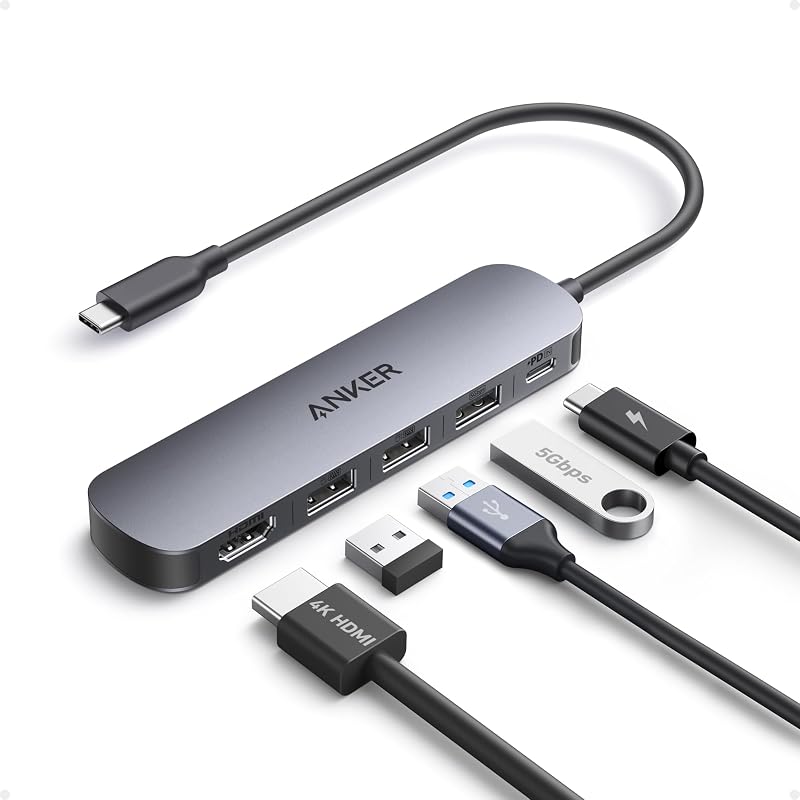
The Anker USB-C Hub is a compact 5-in-1 multiport adapter engineered for everyday desktop expansion. Measuring 4.8 inches long and weighing just 0.06 kilograms, its lightweight gray plastic housing adds an HDMI port capable of delivering 4K resolution at 30Hz in mirror and extend modes. This makes it a practical anker usb c hub hdmi option for linking a laptop to an external monitor or television. To utilize this display connection, your host laptop must support DisplayPort Alternate Mode over USB-C.
For power management, this anker 5-in-1 usb-c hub includes a dedicated Power Delivery input supporting up to 100W total input, reserving 10W for hub operations and delivering up to 90W pass-through charging to your computer. The listing explicitly states that this power port is only for connecting an external wall charger and cannot power external peripherals. To keep your laptop charged during heavy sessions, pairing this hub with a dedicated anker usb-c charger provides consistent desktop power.
Data connectivity includes three rectangular ports: one 5Gbps USB 3.0 port for fast thumb drive transfers and two 480Mbps USB 2.0 ports suited for mice and keyboards. It supports Windows 10 and 11, macOS 12 and newer, and ChromeOS 134 or higher. While ideal for standard desktop peripherals, users needing fast data transfers across multiple external hard drives simultaneously will find this model gives way to the faster USB configurations found on higher-tier Anker hubs.
Anker 332 USB-C Hub
- Color Black
- Weight 0.09 Pounds
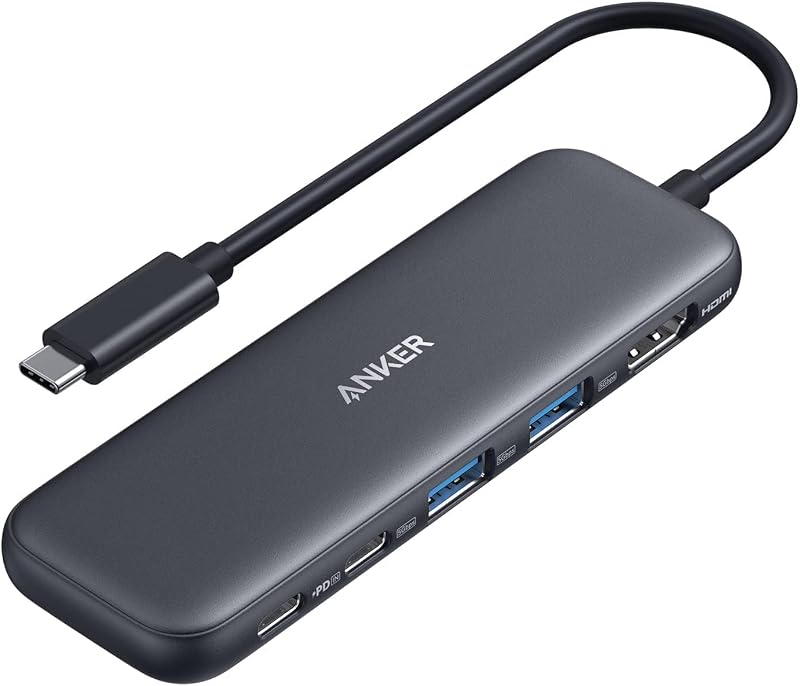
The Anker USB C Hub, listed in its included materials as the anker 332 usb-c hub, modernizes the portable 5-in-1 layout by upgrading data speeds across all peripheral connections. Built from black ABS plastic and weighing 1.44 ounces, it delivers 4K video output at 30Hz through HDMI while providing two 5Gbps USB-A ports and one dedicated 5Gbps USB-C data port. This setup allows you to transfer files quickly across modern external drives without bottlenecking transfer rates.
Power is handled via a 100W USB-C Power Delivery input providing up to 85W pass-through charging to your laptop. The listing specifies that the wall charger is not included and that the 100W PD-IN port supports charging only, with no support for data devices, headphones, or speakers. Furthermore, the 5Gbps USB-C data port handles file movement exclusively and cannot output video. For tablet users, the listing notes that achieving full power for an iPad requires a 45W wall charger.
System compatibility covers Windows 7, 10, and 11, macOS 12 and newer, and ChromeOS, but the listing explicitly highlights that this model is not compatible with Linux. With fast 5Gbps speeds across both Type-A and Type-C data ports, it is a clear step up for users handling modern portable storage. However, if your routine involves offloading photos directly from memory cards, this hub gives way to models with integrated card readers.
Anker 7-in-1 USB C Hub
- Color Gray
- Weight 0.22 Pounds
- Size USB C Hub (7-in-1)
For broader expansion without carrying multiple accessories, the 7-in-1 Anker USB C Hub delivers extensive connectivity inside a gray ABS casing. Weighing 3.52 ounces and measuring 8.27 inches long, this adapter expands a single laptop port into seven useful connections. It integrates a 4K HDMI port running at 30Hz alongside dedicated SD and MicroSD card slots, making it a capable anker multiport adapter for photographers and creators needing to offload camera footage quickly.
Alongside memory card slots, this anker 7-in-1 usb-c hub provides file transfers up to 5Gbps across its USB-A and USB-C data ports. It also supports USB-C Power Delivery pass-through charging up to 85W, allowing you to power your computer while actively utilizing all connected peripherals. Connecting a reliable anker usb charger ensures the hub receives steady power to drive all seven ports without interruption.
Compatibility extends across Windows 7, Windows 10, Mac OS X 10.6 Snow Leopard or newer, and mobile devices including tablets and smartphones. Because it bundles display, data, charging, and media slots into one unit, it is the most complete portable hub in this lineup. However, users who only need to plug in a single flash drive will find its multi-cable design bulkier than necessary compared to compact plug adapters.
Anker USB C Adapter
- Best for Minimalists connecting single legacy USB-A flash drives
- Color Gray

Our score: 8.6/10
Pros
- Slim enough for side-by-side use
- Durable scratch-resistant aluminum shell
- Two adapters included per pack
Cons
- No display or charging ports
- Expands only one port per unit

Best for: Photographers and creators needing memory card slots
Pros
- Built-in SD and MicroSD slots
- High-speed 5Gbps file transfers
- Pass-through charging up to 85W
Cons
- Listing omits specific memory card standards
- Heavier footprint than mini adapters
Best for: Workspaces transferring files across multiple modern drives
Pros
- All data ports reach 5Gbps
- Includes USB-C data connection
- Compact lightweight ABS build
Cons
- Not compatible with Linux systems
- USB-C ports cannot output video
When you only need to connect a traditional USB device without carrying cables or multi-port boxes, the Anker USB C Adapter provides a direct, pocket-sized solution. Sold in a pack of two, this miniature anker usb c to usb adapter converts any standard USB-C socket into a female USB 3.0 Type-A port. Each adapter measures 1.03 by 0.57 by 0.3 inches and features a scratch-resistant aluminum casing with a space gray matte finish.
Designed for effortless everyday connectivity, these adapters let you plug in older hard drives, flash drives, keyboards, mice, printers, and cameras. The slim profile ensures two adapters can plug side by side into adjacent USB-C ports, making it arguably the best anker dongle for macbook users seeking simple peripheral connections. The connectors are engineered for durability and rated for up to 10,000 insertion cycles.
These adapters operate on a nominal power rating of 1.2 watts without needing an external wall plug. If your workspace relies on standard anker usb a cables, keeping these adapters on hand offers great convenience. However, because they lack HDMI video outputs, card slots, and laptop charging ports, they give way to Anker’s multi-port hubs whenever you need an external monitor or all-in-one docking capabilities.
Chip values are fields copied from the Amazon product listing. Scores are out of 10, based on listed specifications and buyer feedback.
Matching a Model to Your Setup
- For home workstations with basic peripherals: The Anker USB-C Hub offers balanced utility with 90W pass-through charging, 4K HDMI video, and ports for your mouse, keyboard, and flash drive.
- For modern multi-drive file transfers: The Anker 332 USB-C Hub suits users moving data across multiple external drives thanks to its uniform 5Gbps USB-C and USB-A transfer speeds.
- For photographers and media creators: The Anker 7-in-1 USB C Hub combines an external 4K monitor connection and 85W charging with built-in SD and MicroSD slots for camera cards.
- For minimalist travel and quick flash drive access: The Anker USB C Adapter two-pack gives you tiny, cable-free aluminum adapters that fit easily into a pocket or bag.
- For dual side-by-side laptop ports: The Anker USB C Adapter is specifically designed with a narrow profile so you can use two adapters simultaneously in adjacent computer sockets.
Before You Buy
Before choosing an anker dongle usb-c model, keep in mind what the listings do not include. None of these multi-port hubs include a wall charger or an HDMI display cable in the box; they supply only the hub and documentation. Additionally, while the hubs support pass-through Power Delivery up to 85W or 90W, the hubs themselves consume between 10W and 15W to operate. If you use a lower-wattage laptop charger, your computer will receive less power than the charger’s maximum rating, which may lead to slower battery charging while under heavy workloads.
Display and system compatibility also require careful verification before purchase. All three multi-port hubs cap 4K external display output at a 30Hz refresh rate, and outputting video requires a computer port that supports DisplayPort Alternate Mode. On the operating system side, the listing specifies that the Anker 332 is not compatible with Linux, while the listing for the 7-in-1 hub does not specify exact speed classes for its integrated SD and MicroSD card slots.
FAQ
Can an Anker USB-C hub charge a laptop while running an external screen?
Yes, the multi-port hubs featured here support pass-through Power Delivery charging alongside their 4K HDMI display ports. Connecting an external USB-C charger to the hub powers the laptop while simultaneously routing video to an external monitor.
Why does my external monitor refresh at 30Hz instead of 60Hz?
The product listings for these hubs specify a maximum 4K resolution at 30Hz. This refresh rate is well suited for office work, video streaming, and web browsing, though it refreshes fewer times per second than 60Hz displays.
Can I plug USB-C headphones into the charging port on these hubs?
No, the listings explicitly state that the 100W USB-C Power Delivery port is strictly for connecting an external wall charger. It does not support audio devices, headphones, or data transfer accessories.
Will an Anker multi-port hub work with an iPad?
Yes, these hubs support compatible tablets with USB-C ports that support display and power standards. For the Anker 332, the listing specifically notes that using a 45W wall charger ensures full power delivery for an iPad.
What is the benefit of a USB 3.0 port over a USB 2.0 port?
A USB 3.0 port transfers data at up to 5Gbps, making it much faster for transferring large files to external drives. A USB 2.0 port operates at 480Mbps, which is ideal for basic input devices like mice and keyboards.


