
As Amazon Associates, we earn from qualifying purchases. This means we may receive a small commission at no extra cost to you if you click through and make a purchase.
Selecting a portable computer often feels overwhelming when specialized technical jargon and model numbers dominate product pages. If you are researching the lenovo thinkpad 2026 collection, you are likely deciding between lightweight portability and expansive screen real estate, baseline office capabilities and high-end multitasking capacity, and simple daily typing versus demanding data workflows. For first-time shoppers and gift-givers seeking clarity, understanding how memory, processors, and screen specifications translate into daily tasks makes identifying the right machine straightforward and rewarding.
The modern catalog from Lenovo organizes its business and productivity machines across distinct categories designed for specific work environments. The renowned T-Series represents the core professional standard, emphasizing balanced durability, advanced security, and lightweight 14-inch designs suited for frequent travel. The L-Series shifts toward larger 16-inch workspaces that incorporate full numeric keypads for spreadsheet-heavy tasks, while the E-Series delivers essential business reliability with versatile configurations. Beyond the ThinkPad family, Lenovo also provides accessible entry-level notebooks tailored for basic student coursework. Exploring this lenovo laptops comparison reveals exactly which tier aligns with your daily routine so you can make an informed choice without paying for unnecessary extras.
Lenovo Laptops Lineup at a Glance
| Model | Screen Size & Type | Processor | Memory & Storage |
|---|---|---|---|
| Lenovo 2026 ThinkPad T14s Gen 7 | 14-inch WUXGA Touch (500 nits) | Intel Core Ultra 7 365 vPro | 32GB RAM, 1TB SSD |
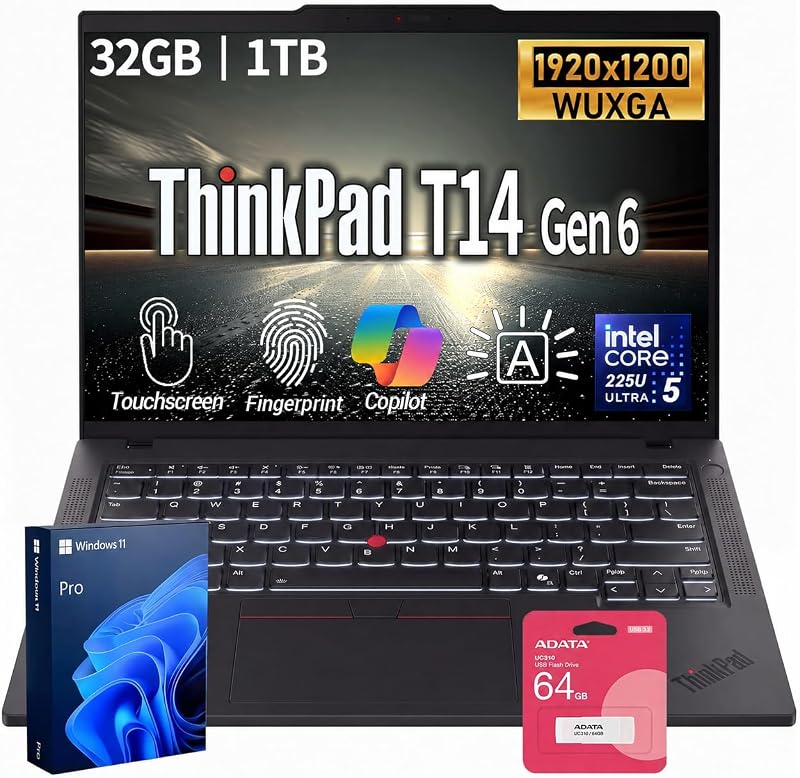
| Lenovo ThinkPad T14 FHD+ Touch Business | 14-inch WUXGA Touch (400 nits) | Intel Core Ultra 5 225U | Up to 64GB RAM, 1TB SSD |
| Lenovo ThinkPad L16 Premium Business Laptop | 16-inch WUXGA Non-Touch (400 nits) | Intel Core Ultra 7 255U | 64GB RAM, 2TB SSD |
| Lenovo ThinkPad E14 Gen 7 Laptop | 14-inch WUXGA Non-Touch (300 nits) | AMD Ryzen 7 250 | 32GB RAM, 1TB SSD (Dual 512GB) |
| Lenovo ThinkPad L16 Touchscreen Premium Business | 16-inch WUXGA Touch (400 nits) | Intel Core Ultra 5 225U | 16GB RAM, 256GB SSD |
| Lenovo Laptop Computer 2026 Edition | 14-inch HD Non-Touch | Intel Celeron N4500 | 8GB RAM, 128GB eMMC |
Figures as published on the product listings.
The Models in Detail
Lenovo 2026 ThinkPad T14s Gen 7
- Best for Mobile professionals needing top tier performance
- Total Usb Ports 4
- Number of Ports 6
- Processor Count 8
- Number of Items 1
- Number of Packs 1

Our score: 10.0/10
Pros
- 500-nit bright touchscreen
- Three Thunderbolt 4 ports
- Factory sealed retail packaging
Cons
- Soldered non-upgradable memory
- Lacks built-in Ethernet jack
The Lenovo 2026 ThinkPad T14s Gen 7 represents the premium slimline tier of the business family, finished in a distinctive Cosmic Blue chassis. It is powered by the Intel Core Ultra 7 365 vPro processor, featuring Low Power Efficient cores reaching up to 3.60 GHz and Performance cores reaching up to 4.80 GHz. Designed for demanding corporate workflows, this model integrates Intel vPro technology for remote hardware manageability and advanced system stability. It also includes Copilot+ integration to assist with automated workflows and real-time document drafting.
Visual performance is anchored by a 14-inch WUXGA 1920 by 1200 IPS touchscreen that delivers an impressive 500 nits of brightness, 100 percent sRGB color accuracy, and an anti-glare coating running at a 60Hz refresh rate. For fast file access and smooth operation, it features a generous lenovo laptop 32gb ram 1tb ssd layout utilizing soldered LPDDR5X memory clocked at 7467MT/s alongside a PCIe Gen4 TLC Opal drive. Connectivity is exceptionally modern, providing three Thunderbolt 4 ports supporting DisplayPort 2.1 and power delivery, one USB-A port with always-on charging, an HDMI 2.1 port capable of driving external 4K displays at 60Hz, and a 3.5mm audio combo jack.
This laptop is ideal for traveling executives, field consultants, and mobile professionals who require maximum screen brightness for working outdoors or in sunlit offices. Because its 32GB of memory is soldered directly to the motherboard, it cannot be upgraded later, meaning buyers who anticipate needing even larger memory capacities should consider expandable models instead. It ships in unopened retail packaging backed by a one-year Lenovo onsite warranty that can be extended upon registration.
Lenovo ThinkPad T14 FHD+ Touch Business
- Best for Office multitaskers wanting built in Ethernet
- Number of Items 1
- Total Usb Ports 4
- Number of Ports 7
- Number of Ethernet Ports 1
- Total Number of HDMI Ports 1
Our score: 9.4/10
Pros
- Integrated RJ-45 Ethernet port
- Upgradable DDR5 memory slots
- Dual Thunderbolt 4 connections
Cons
- Modest 400-nit panel brightness
- Integrated graphics only
The Lenovo ThinkPad T14 FHD+ Touch Business provides a balanced approach to workplace computing, prioritizing versatile hardware expandability alongside modern AI capabilities. Driven by the Intel Core Ultra 5 225U processor with 12 cores, 14 threads, and turbo speeds up to 4.8GHz, this machine handles extensive office multitasking effortlessly. It features a 14-inch WUXGA 1920 by 1200 IPS touchscreen display with a work-friendly 16:10 aspect ratio, 400 nits of brightness, and 3M DBEF5 technology designed to optimize panel efficiency.
Physical security and expandability stand out on this 3.2-pound ultra-portable machine. It incorporates a discrete TPM 2.0 security chip, Firmware Shield protection, a fingerprint reader integrated for biometric authentication, and a Kensington Nano Security slot. Unlike fully soldered ultra-slim variants, this system supports memory expansion up to 64GB of DDR5 RAM and storage upgrades up to a 2TB PCIe SSD, making it adaptable as your software demands grow. It also includes a backlit keyboard activated via the Fn and Space key combination.
This model suits everyday office workers and remote staff who frequently connect to traditional wired networks, thanks to its built-in Gigabit Ethernet RJ-45 jack. Alongside standard dual Thunderbolt 4 USB-C ports, dual USB-A connections, and an HDMI 2.1 video output, it eliminates the need for external connection adapters. Those who require extreme outdoor screen brightness may prefer the 500-nit panel of the T14s, but this model offers superior port convenience for standard desk setups.
Lenovo ThinkPad L16 Premium Business Laptop
- Best for Spreadsheet workers wanting a large touchscreen
- Number of Items 1
- Memory Slots Available 2
- Total Usb Ports 5
- Number of Ports 9
- Total Number of HDMI Ports 1
Pros
- Responsive 16-inch touchscreen
- Includes 5-in-1 Type-C hub
- Integrated full numeric keypad
Cons
- Modest 256GB SSD capacity
- Lower 45 percent NTSC color gamut

Our score: 10.0/10
Best for: Power users wanting maximum storage and screen
Pros
- Massive 64GB RAM and 2TB SSD
- Dedicated numeric keypad
- Included wireless mouse and flash drive
Cons
- Bulkier 16-inch footprint
- Non-touch display screen
The Lenovo ThinkPad L16 Premium Business Laptop is engineered for users who want an expansive workspace without sacrificing business-grade durability. Equipped with an Intel Core Ultra 7 255U processor reaching up to 5.2GHz across 12 cores and 14 threads, this clamshell laptop is configured with a massive 64GB of high-bandwidth DDR5 RAM and a 2TB PCIe NVMe M.2 solid-state drive. The 16-inch WUXGA 1920 by 1200 anti-glare IPS display offers 400 nits of brightness and a 45 percent NTSC color gamut at a 60Hz refresh rate.
Designed for heavy data processing, the keyboard includes a dedicated numeric keypad alongside a backlit layout and integrated fingerprint reader. Durability is a key highlight, as Lenovo tests the chassis against MIL-STD-810H standards across 12 criteria and 26 operational procedures. For added out-of-the-box convenience, this business bundle includes an A-DATA UC310 64GB USB flash drive and a Thunderobot ML101 wireless mouse featuring a 2.4G nano receiver and 1600 DPI precision. Ports include two USB-C Thunderbolt 4 connections with USB Power Delivery 3.1, three USB-A ports, HDMI 2.1, and an audio combo jack.
This laptop is best suited for financial analysts, accountants, and data-entry specialists who rely heavily on a physical numeric keypad and require immense memory capacity for running multiple virtual workspaces simultaneously. The listing notes that the original retail seal is opened solely to install the upgraded 64GB RAM and 2TB SSD, covered by a one-year warranty from Lenovo US. Those seeking a lightweight travel companion should look toward the smaller 14-inch models, as this 16-inch machine prioritizes desktop replacement comfort.
Lenovo ThinkPad E14 Gen 7 Laptop
- Best for Everyday professionals preferring AMD processing
- Processor Count 8
- Number of Items 1
- Number of Packs 1
- Number Of Cells 3
- Total Usb Ports 4

Our score: 9.2/10
Pros
- Sharp 5MP privacy webcam
- Dual 512GB solid state drives
- Radeon 780M graphics processor
Cons
- Modest 300-nit screen brightness
- Resealed packaging for upgrades
The Lenovo ThinkPad E14 Gen 7 Laptop provides an accessible entry point into the ThinkPad ecosystem, powered by AMD processing rather than Intel. Inside, an eight-core AMD Ryzen 7 250 processor reaches speeds up to 5.1GHz, paired with integrated AMD Radeon 780M graphics. Shoppers seeking a lenovo thinkpad ryzen 7 build will appreciate this configuration, which includes 32GB of DDR5 RAM and a unique storage architecture featuring dual 512GB PCIe NVMe SSDs to isolate system files from general data storage.
Visuals and communications are handled by a 14-inch WUXGA 1920 by 1200 anti-glare IPS panel rated at 300 nits, coupled with an upgraded 5MP webcam that features a physical privacy shutter. The chassis weighs 3.1 pounds and includes spill resistance on the backlit keyboard, a fingerprint reader, and an array of ports including a 40Gbps USB Type-C port, a 5Gbps USB Type-C port, two USB Type-A ports, an RJ-45 Ethernet connection, and an HDMI 2.1 output capable of supporting up to three external displays. Wireless duties are managed by Wi-Fi 6E and Bluetooth 5.3.
This laptop is tailored for college students, educators, and small business owners who participate in daily video conferences and desire robust typing protection. The listing indicates the computer was resealed to install the memory and dual solid-state drives, carrying a three-year warranty from Issaquah Highlands Tech on upgraded components alongside a one-year Lenovo warranty on remaining parts. While its 300-nit non-touch display is dimmer than the T-Series panels, it provides excellent daily value for general productivity.
Lenovo ThinkPad L16 Touchscreen Premium Business
- Total Usb Ports 5
- Number of Items 1
- Processor Count 12
- Hard Disk Description SSD
- Display Type LCD
The Lenovo ThinkPad L16 Touchscreen Premium Business combines a large 16-inch canvas with direct finger and stylus navigation. Powered by an Intel Core Ultra 5 225U processor with 12 cores, 14 threads, and speeds up to 4.8GHz, it is configured with 16GB of DDR DRAM and a 256GB solid-state drive. Buyers looking specifically for a lenovo thinkpad 16gb ram device with modern touch capabilities will find this layout well suited for navigating documents interactively.
The 16-inch anti-glare touchscreen operates at a crisp 1920 by 1200 resolution with 400 nits of brightness, 45 percent NTSC color coverage, and a 60Hz refresh rate. It also supports stylus input, providing flexibility for signing documents or annotating diagrams. The chassis measures 14.06 inches long by 9.98 inches wide by 0.77 inches thick and houses a backlit keyboard, a dedicated numeric keypad, a fingerprint reader, Wi-Fi 6E, and two Thunderbolt 4 ports. The package also includes a 5-in-1 Type-C hub to expand peripheral connections immediately.
This model is an effective choice for managers, customer-facing professionals, and administrative coordinators who prefer tapping directly on the display during presentations or form filling. It gives way to the higher-tier L16 configuration for users handling massive local media libraries, as the baseline 256GB SSD fills quickly under heavy storage demands. However, its balanced processor and interactive screen make it an intuitive business tool.
Lenovo Laptop Computer 2026 Edition
- Best for Budget conscious students doing everyday coursework
- Processor Count 2
- Number of Items 1
- Warranty Description 1
- Total Usb Ports 3
- Model Number 14
Pros
- Featherweight 2.89 pound chassis
- Includes 1-year Microsoft 365
- Built-in SD card reader
Cons
- Basic 1366×768 screen resolution
- Entry-level dual-core Celeron chip
The Lenovo Laptop Computer 2026 Edition serves as an entry-level alternative outside the enterprise ThinkPad family, focusing on basic computing simplicity. It is powered by an Intel Celeron N4500 dual-core processor reaching up to 2.8GHz, accompanied by Intel UHD Graphics, 8GB of DDR4 memory, and 128GB of eMMC storage. Running Windows 11, it arrives bundled with a one-year subscription to Microsoft 365, giving users immediate access to essential productivity tools like Word, Excel, and PowerPoint.
Weighing only 2.89 pounds with a slim 0.7-inch profile, this notebook features a 14-inch HD display with a 1366 by 768 resolution and an anti-glare finish. Multimedia is enhanced by dual speakers featuring Dolby Audio, while video calls utilize an HD 720p webcam equipped with a physical privacy shutter. Physical connectivity includes a USB-C 3.2 port, standard USB 3.2 and USB 2.0 ports, an HDMI 1.4b output, an audio jack, and a full-sized SD card reader for quick media transfers.
This notebook is built for middle school, high school, or introductory college students who need an affordable, lightweight device for web research, streaming lectures, and writing term papers. It gives way to the ThinkPad lineup when heavy multitasking, business-level encryption, or high-resolution photo editing is required, as the Celeron chip and 1366 by 768 screen are intended solely for fundamental everyday tasks.
Chip values are fields copied from the Amazon product listing. Scores are out of 10, based on listed specifications and buyer feedback.
Matching a Model to Your Setup
- Frequent business travelers who work outdoors or in bright transit terminals will appreciate the ultra-bright 500-nit anti-glare screen and thin profile of the Lenovo 2026 ThinkPad T14s Gen 7.
- Office professionals who need direct wired networking at their desk without carrying extra adapters should choose the Lenovo ThinkPad T14 FHD+ Touch Business with its integrated RJ-45 Ethernet port.
- Accountants, spreadsheet specialists, and financial power users will benefit most from the spacious screen, massive 64GB memory, and physical number pad on the Lenovo ThinkPad L16 Premium Business Laptop.
- Remote workers and students who spend long hours on video calls will enjoy the sharp 5MP privacy webcam and AMD multitasking speed of the Lenovo ThinkPad E14 Gen 7 Laptop.
- Classroom learners and casual home users needing basic document editing and web browsing will find the lightweight Lenovo Laptop Computer 2026 Edition an ideal fit.
Before You Buy
When reviewing these laptop listings, note that several practical hardware specifications are omitted from the product descriptions. While multiple models advertise all-day or long battery runtimes, the listings do not specify the exact battery capacity in watt-hours or provide standardized battery benchmark scores. Furthermore, several models mention integrated webcams without stating their exact sensor resolutions, leaving only the E14 Gen 7 clearly identified with a 5MP camera and the student notebook with a 720p sensor.
Additionally, pay attention to the packaging and accessory disclosures across different listings. The ThinkPad T14s arrives in unopened factory retail packaging, whereas the ThinkPad L16 models and the E14 Gen 7 specify that their boxes were professionally opened and resealed to install upgraded memory and storage components. If you require touch-screen stylus input, note that while the L16 Touch listing states it supports a stylus, it does not specify whether an active digital pen is included in the retail box or must be purchased separately.
FAQ
What is the difference between ThinkPad T-Series, L-Series, and E-Series laptops?
The ThinkPad T-Series serves as Lenovo’s flagship business line, focusing on lightweight construction, premium materials, enterprise vPro manageability, and bright displays. The L-Series provides enterprise durability with larger 16-inch screen formats and full numeric keypads, making them desktop-replacement workhorses. The E-Series represents an entry-level professional tier, offering core business durability and reliable connectivity for small offices and students at an accessible standard.
Why do some ThinkPad listings state that the box was resealed?
Certain specialized configurations feature memory or solid-state drive capacities that exceed base factory configurations. Certified professional distributors open the original manufacturer packaging solely to install high-grade RAM modules or larger storage drives before testing and resealing the unit. These listings provide distinct warranty terms, often splitting coverage between the original Lenovo warranty and distributor coverage for upgraded components.
Can these laptops connect to external desktop monitors?
Yes, all of the featured models include dedicated HDMI ports to connect directly to external monitors or television screens. Furthermore, the ThinkPad models equipped with Thunderbolt 4 or high-bandwidth USB-C ports can transmit DisplayPort video signals, allowing users to connect multiple high-resolution displays simultaneously through compatible cables or docking stations.
What does an Intel Core Ultra processor provide over older chips?
Intel Core Ultra processors feature an updated architecture that includes dedicated AI acceleration units known as NPUs, alongside efficient processing cores. This design helps offload everyday artificial intelligence tasks, such as background blur on video calls and Copilot document assistance, preserving system battery life while keeping standard applications running quickly and smoothly.
Is an eMMC storage drive the same as a solid-state drive?
While both eMMC and SSDs use flash memory without moving parts, solid-state drives found in ThinkPad models use PCIe NVMe interfaces that transfer data significantly faster. The eMMC storage found in the student laptop provides reliable, low-power storage suitable for basic web browsing and simple documents, whereas PCIe SSDs are required for rapid boot times and large business data transfers.


