
As Amazon Associates, we earn from qualifying purchases. This means we may receive a small commission at no extra cost to you if you click through and make a purchase.
Choosing a computer display can feel confusing when facing technical jargon and similar model numbers. An IPS (In-Plane Switching) screen keeps colors natural and uniform even when viewed from wide angles, making it a reliable option for home offices, family desks, and entertainment. The main decision involves balancing screen size, sharpness, refresh rate, and physical connections. By focusing on your everyday habits, you can easily find a display that suits your work style without paying for complex features you will not use.
LG organizes its IPS lineup into practical tiers based on specific tasks. Standard Full HD displays provide fluid scrolling for everyday computing on modest desks. Panoramic ultrawide models replace two physical screens with one seamless curved workspace for multi-window productivity. Creative users who need fine detail can step up to UltraFine 4K panels with laptop-charging connections, while the UltraGear series delivers fast motion for PC gaming. This lg ips monitor comparison breaks down each option to help you decide which lg monitor to buy for your desk.
LG IPS Monitors Lineup at a Glance
| Model | Screen Size & Resolution | Refresh Rate & Motion | Key Connectivity & Adjustments |
|---|---|---|---|
| LG 27U411A-B 27-inch Full HD | 27-inch Full HD (1920 x 1080) | 120Hz, 1ms MBR | HDMI, Tilt Stand (-5° to 20°) |
| LG 24U411A-B 24-inch Full HD | 23.8-inch Full HD (1920 x 1080) | 120Hz, 1ms MBR | HDMI, Tilt Stand (-5° to 20°) |
| LG 34U650A-B 34-inch UltraWide IPS WQHD | 34-inch Curved WQHD (3440 x 1440) | 100Hz, 5ms | USB-C (96W PD), HDMI, DisplayPort |
| LG 27UP850K-W 27-inch Ultrafine 4K UHD | 27-inch UHD 4K (3840 x 2160) | 60Hz, 5ms | USB-C (90W PD), DP, 2x HDMI, Tilt/Height/Pivot |
| LG 32UP83AK-W 32-inch Ultrafine 4K UHD | 31.5-inch UHD 4K (3840 x 2160) | 60Hz, 5ms | USB-C (60W PD), HDMI, DisplayPort, Tilt/Height/Pivot |
| LG 32G620B-B 32-inch Ultragear IPS QHD | 32-inch QHD (2560 x 1440) | 200Hz, 1ms GtG | G-SYNC Compatible, FreeSync Premium |
Figures as published on the product listings.
The Models in Detail
LG 27U411A-B 27-inch Full HD
- Best for Everyday home office and fluid casual gaming
- Color Black
- Size 27 inch
- Weight 9.3 Pounds
- Dimensions 8.7 x 24.1 x 18 inches

Our score: 9.2/10
Pros
- Fluid 120Hz refresh rate
- Rich 99% sRGB color coverage
- 1ms Motion Blur Reduction
Cons
- Tilt-only stand adjustment
- Listing does not specify speakers
The LG 27U411A-B 27-inch Full HD is a versatile home office display that balances a roomy viewable area with smooth motion. Featuring a 27-inch IPS panel, it delivers Full HD (1920 x 1080) resolution with 178-degree viewing angles and a 1500:1 contrast ratio. A key strength of this lg 27 inch ips monitor is its 120Hz refresh rate, doubling standard 60Hz panels for fluid document scrolling. Its matte finish reduces reflections, while 250 nits of brightness comfortably suits typical indoor lighting.
The lg 27u411a-b supports HDR10 and covers 99% of the sRGB color gamut for rich, consistent tones. For casual gameplay, it includes 1ms Motion Blur Reduction (MBR) and Dynamic Action Sync to keep fast action clear and responsive. The Switch app allows users to split the display into up to six layouts or launch video meetings via a quick hotkey.
With slim bezels and a tilt stand adjusting from -5° to 20°, this model is ideal for everyday home tasks. It yields to the 24-inch model on cramped desks or 4K screens for sharper text.
LG 24U411A-B 24-inch Full HD
- Best for Dorm rooms and compact workstation desks
- Color Black
- Size 24 inch
- Weight 7.1 Pounds
- Dimensions 8.7 x 21.2 x 16.4 Inches
Our score: 9.8/10
Pros
- Sharp pixel density at 24 inches
- Fluid 120Hz refresh rate
- Convenient Switch app multitasking
Cons
- Stand lacks height adjustment
- Listing does not specify speakers
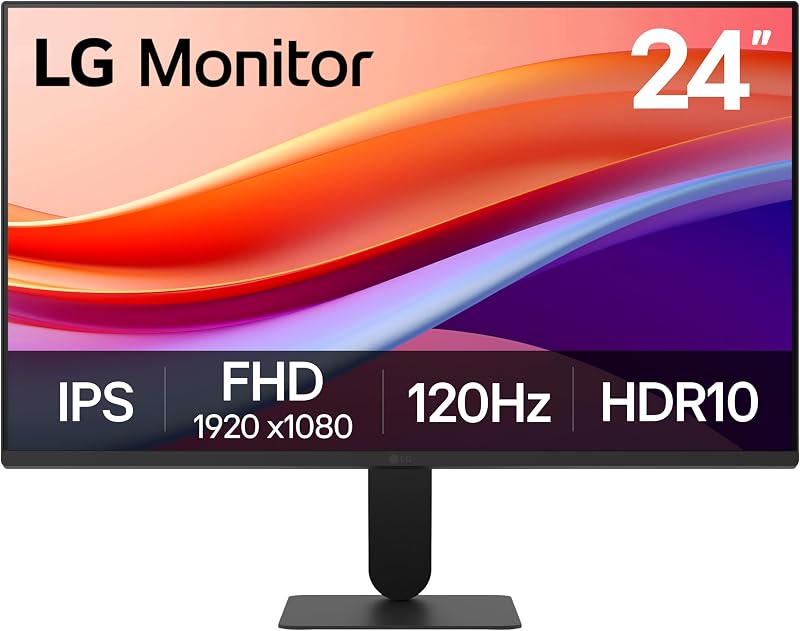
Designed for tighter desks, the LG 24U411A-B 24-inch Full HD brings modern visual performance to a compact 23.8-inch footprint. Because Full HD (1920 x 1080) resolution sits on a smaller surface, its 0.27mm pixel pitch delivers noticeably crisper text than larger 1080p panels. It features an IPS screen with 178-degree viewing angles, a 1500:1 contrast ratio, 250 nits brightness, and a glare-resistant matte coating.
The lg 24u411a-b includes a 120Hz refresh rate for fluid window navigation and reduced eye strain. Comfort is further supported by Reader Mode and Flicker Safe technology. The panel provides 99% sRGB color gamut coverage, HDR10 support, 1ms MBR, and Dynamic Action Sync for after-hours entertainment, while the Switch app simplifies screen splitting.
This monitor suits student dorms, small study areas, or dual-monitor office desks. Its three-side virtually borderless design keeps setups tidy with a -5° to 20° tilt stand. It yields to the 27-inch model for larger viewing or ultrawide screens for multi-window demands.
LG 34U650A-B 34-inch UltraWide IPS WQHD
- Best for Multi-window spreadsheet workers and laptop users
- Size 34
- Color Black
- Weight 22.3 pounds
- Dimensions 9.1 x 32.2 x 21.1 inches

Our score: 9.6/10
Pros
- Expansive 21:9 curved workspace
- Single-cable 96W USB-C charging
- Built-in DepthSound stereo speakers
Cons
- Wide desk footprint required
- Subtle 3800R curve
Users who want an expansive workspace without dual monitors will appreciate the LG 34U650A-B 34-inch UltraWide IPS WQHD. This 21:9 display provides 3440 x 1440 WQHD resolution, giving you generous horizontal space for side-by-side apps. A gentle 3800R curve aligns with your natural sightline to reduce neck strain. Exploring an lg ultrawide 34 inch curved setup demonstrates how single-panel panoramic screens eliminate distracting center bezels.
The lg 34u650a-b simplifies connectivity through a USB-C port that manages video, data, and up to 96W of laptop charging over one cord. DisplayPort and HDMI inputs are also present. Built-in DepthSound stereo speakers provide rich sound with enhanced bass for video calls, helping maintain a clean desk.
Performance specs include a 100Hz refresh rate, 5ms response time, 300 nits brightness, 99% sRGB color coverage, HDR10 support, and Reader Mode. This lg ultrawide ips monitor is ideal for spreadsheet specialists and multitasking professionals. It yields to 4K displays when high vertical pixel density is required for visual arts.
LG 27UP850K-W 27-inch Ultrafine 4K UHD
- Best for Graphic designers and high-resolution creative editors
- Color White
- Size 27-inch and USB-C
- Dimensions 9.4 x 24.2 x 22.4 inches

Our score: 8.2/10
Pros
- Sharp 4K UHD resolution
- DisplayHDR 400 with 400 nits
- Full tilt height pivot stand
Cons
- Standard 60Hz refresh rate
- Fixed 16:9 aspect ratio
Visual creators and detail-oriented workers will value the precision of the LG 27UP850K-W 27-inch Ultrafine 4K UHD. Packing 3840 x 2160 Ultra HD resolution into a 27-inch panel, it features a fine 0.15mm pixel pitch with over 8 million pixels. Exploring an lg 27 ultra hd ips 4k monitor reveals how 4K clarity renders razor-sharp text and intricate image details.
Color performance on the lg 27up850k-w includes VESA DisplayHDR 400 certification, 400 nits brightness, a 1200:1 contrast ratio, and up to 95% DCI-P3 color gamut expression. Built-in stereo speakers featuring Waves MaxxAudio provide rich sound for media editing. Gamers also benefit from Dynamic Action Sync and Black Stabilizer to brighten shadowed areas.
The white ergonomic stand offers comprehensive tilt, height, and pivot adjustments. The monitor functions as a hub with USB-C delivering up to 90W laptop charging, DisplayPort, two HDMI ports, two USB 3.0 ports, and a headphone jack. This lg 4k ips monitor is best for photo editors and laptop users needing dock convenience, though users wanting larger text may prefer the 32-inch 4K option.
LG 32UP83AK-W 32-inch Ultrafine 4K UHD
- Best for Spacious desktop multitasking and console entertainment
- Color White
- Size 32 Inch
- Dimensions 9.4 x 28.1 x 23.5 Inches
Pros
- Large 31.5-inch 4K canvas
- Single-cable 60W USB-C charging
- Versatile tilt height pivot stand
Cons
- Standard 60Hz refresh rate
- Lower USB-C charging wattage
Shoppers wanting 4K resolution on a larger canvas should look at the LG 32UP83AK-W 32-inch Ultrafine 4K UHD. Featuring a 31.5-inch IPS display with 3840 x 2160 resolution, it offers expansive screen space where menus and documents remain clear without excessive scaling. The matte panel provides 178-degree viewing angles, a 1000:1 contrast ratio, and 350 nits brightness.
The lg 32up83ak-w covers up to 95% of the DCI-P3 color spectrum with HDR10 enhancement for vibrant media playback. Built-in speakers handle meeting audio, while Reader Mode and Flicker Safe protect eye comfort. Console gamers can use Dynamic Action Sync and Black Stabilizer at 60Hz.
Connectivity includes USB-C with 4K display, data transfer, and 60W power delivery, alongside HDMI and DisplayPort. The white stand supports full tilt, height, and pivot customization. For shoppers seeking the best lg ips monitor for large-format 4K productivity and media streaming, this model is a strong pick. It steps aside for high-refresh panels when fast PC gaming is the priority.
LG 32G620B-B 32-inch Ultragear IPS QHD
- Best for Competitive PC gamers seeking high frame rates
- Color Black
- Weight 15.9 Pounds
- Dimensions 8.7 x 28.1 x 24 inches
Pros
- Blazing 200Hz refresh rate
- 1ms GtG response time
- G-SYNC Compatible and FreeSync Premium
Cons
- No USB-C connectivity included
- Listing does not specify built-in speakers
For responsive gaming, the LG 32G620B-B 32-inch Ultragear IPS QHD delivers fast motion across a large 32-inch screen. Its QHD (2560 x 1440) resolution provides crisp visuals without putting excessive load on your computer. An overview of an lg ultra gear 27 inch monitor explains how UltraGear balances speed and color, but this 32-inch model provides an even wider field of view.
The lg 32g620b-b stands out with a 200Hz refresh rate and a rapid 1ms (GtG) response time, minimizing blur and ghosting during intense gameplay. It supports NVIDIA G-SYNC Compatible and AMD FreeSync Premium technologies for tear-free frames. Game enhancements include Dynamic Action Sync, Black Stabilizer, and an on-screen Crosshair overlay.
The panel features 99% sRGB color gamut coverage and HDR10 support on a matte finish. This display is tailored for competitive gamers who demand fluid speed alongside wide IPS viewing angles. It yields to UltraFine models if you need USB-C charging or 4K resolution for creative workflows.
Chip values are fields copied from the Amazon product listing. Scores are out of 10, based on listed specifications and buyer feedback.
Matching a Model to Your Setup
- For compact desks and dorm rooms: The LG 24U411A-B 24-inch Full HD fits small spaces with sharp pixel density and smooth 120Hz scrolling.
- For standard home offices and family use: The LG 27U411A-B 27-inch Full HD offers a comfortable 27-inch screen with 120Hz fluid motion for daily tasks.
- For multi-app spreadsheets and clean setups: The LG 34U650A-B 34-inch UltraWide IPS WQHD delivers a curved 21:9 workspace, built-in speakers, and 96W USB-C charging.
- For creative editing and sharp detail: The LG 27UP850K-W 27-inch Ultrafine 4K UHD provides dense 4K clarity, DisplayHDR 400, 95% DCI-P3 color, and 90W power delivery.
- For spacious desktop productivity and streaming: The LG 32UP83AK-W 32-inch Ultrafine 4K UHD brings a generous 31.5-inch 4K view, built-in audio, and a fully adjustable stand.
- For fast-paced PC gaming: The LG 32G620B-B 32-inch Ultragear IPS QHD provides a blazing 200Hz refresh rate, 1ms response time, and G-SYNC compatibility.
Before You Buy
Before making a final choice, note what the manufacturer listings omit. The entry-level LG 24U411A-B and LG 27U411A-B feature tilt-only stands with no height or pivot adjustments, and their listings do not specify built-in speakers or bundled video cables beyond standard HDMI support. If you require audio or height flexibility, plan for external accessories.
Laptop users should also confirm USB-C power delivery limits. The LG 34U650A-B delivers 96W and the LG 27UP850K-W offers 90W, whereas the LG 32UP83AK-W provides 60W, which may charge demanding laptops more slowly. Additionally, the gaming-centric LG 32G620B-B lacks USB-C connectivity, and its listing does not specify internal speakers or full stand ergonomics.
FAQ
What makes an IPS monitor useful for daily desk work?
An IPS monitor maintains consistent colors and image clarity across wide 178-degree viewing angles. This prevents color shifting and contrast fade when viewing the screen from the side or sharing work with someone nearby.
Can USB-C power a laptop while transmitting display signals?
Yes. Monitors with full USB-C support transmit video, pass data, and supply laptop power over one cable. The LG 34U650A-B provides up to 96W, the LG 27UP850K-W offers up to 90W, and the LG 32UP83AK-W supplies up to 60W.
Is Full HD resolution clear on a 27-inch display?
Full HD on a 27-inch panel provides clear, readable text for everyday office tasks and web browsing. Users handling detailed photo editing or intricate design may prefer higher pixel density found on 4K models.
What is the benefit of a 120Hz or 200Hz refresh rate over 60Hz?
Higher refresh rates update the screen more times per second, making mouse movement, web scrolling, and fast-moving gaming action significantly smoother with reduced motion blur.
How does LG's Switch app help with multitasking?
The Switch app allows you to divide your screen into up to six tailored layout sections and assign hotkeys to launch video calls, streamlining window management during busy workdays.


