
As Amazon Associates, we earn from qualifying purchases. This means we may receive a small commission at no extra cost to you if you click through and make a purchase.
When shopping for a samsung ultra wide monitor, buyers face choices that extend far beyond standard screen dimensions. Ultrawide displays expand your horizontal field of view, replacing clumsy multi-screen setups with a single continuous workspace or an all-enveloping gaming viewport. Deciding which model to bring home involves balancing screen size, aspect ratio, panel technology, and curvature. First-time buyers and gift-givers often find themselves comparing compact 34-inch screens that fit comfortably on standard desks against monumental 49-inch and 57-inch super-ultrawide panels designed to simulate dual monitors without a center border. When browsing our samsung ultrawide curved monitor guide, shoppers often wonder how much desk depth and visual curvature they truly need for daily comfort.
Samsung organizes its ultrawide lineup into two primary families: the Odyssey series for gaming and the ViewFinity series for business productivity. The Odyssey lineup focuses on rapid refresh rates, low response times, and immersive curvature, ranging from the accessible Samsung Odyssey G5 to the massive Samsung Odyssey G9, the Samsung Odyssey OLED G9, and the flagship 57-inch Neo G9. In contrast, the ViewFinity family concentrates on workstation utility, offering models like the flat Samsung ViewFinity S50GC for clean graphic lines and the curved Samsung ViewFinity S65UC with integrated laptop docking and office tools. This samsung ultrawide monitor comparison walks through each model to help you decide which samsung ultrawide monitor to buy for your specific space, desktop setup, and daily activities.
Samsung Ultrawide Monitors Lineup at a Glance
| Model | Screen Size & Aspect Ratio | Refresh Rate & Panel | Key Focus |
|---|---|---|---|
| Samsung 34′ Odyssey G5 Ultra-Wide Gaming | 34 inches, 21:9 | 165Hz, VA (1000R Curved) | High-speed curved gaming |
| SAMSUNG 49-inch Odyssey G9 | 49 inches, 32:9 | 144Hz, VA LCD (1000R Curved) | Dual-QHD panoramic multitasking and gaming |
| SAMSUNG 34″ ViewFinity S50GC Series Ultra-WQHD | 34 inches, 21:9 | 100Hz, VA (Flat Matte) | Home office productivity and dual-source view |
| Samsung 34” ViewFinity S65UC | 34 inches, 21:9 | 100Hz, VA LCD (1000R Curved) | Laptop docking, KVM switch and built-in audio |
| Samsung 49″ Odyssey OLED G9 | 49 inches, 32:9 | 144Hz, QD-OLED (Curved) | True black contrast and rapid 0.03ms response |
| Samsung 57″ Odyssey Neo G9 | 57 inches, 32:9 | 240Hz, Mini LED VA (1000R Curved) | Dual 4K UHD resolution and extreme immersion |
Figures as published on the product listings.
The Models in Detail
Samsung 34′ Odyssey G5 Ultra-Wide Gaming
- Best for Entry curved gaming on standard desks
- Total Number of HDMI Ports 1
- Total Usb Ports 1
- Display Technology VA
- Color Gamut 72
- Display Type LCD

Our score: 8.6/10
Pros
- 165Hz refresh rate
- Immersive 1000R curve
- AMD FreeSync Premium
Cons
- 1ms MPRT response metric
- No built-in speakers
The Samsung 34′ Odyssey G5 Ultra-Wide Gaming monitor is built for players who want immersive curved gaming without stepping up to a massive desk-dominating footprint. It features a 34-inch screen with an ultrawide 21:9 aspect ratio and a QHD Wide 1440p resolution. What defines this display is its aggressive 1000R curvature, designed to match the human field of view by filling peripheral vision so players feel pulled into the center of virtual environments. The VA panel incorporates HDR10 support to deliver solid color accuracy across both dark and bright scenes.
In terms of motion clarity, the display provides a fast 165Hz refresh rate paired with a 1ms MPRT response time to eliminate motion blur during competitive action. It also incorporates AMD FreeSync Premium adaptive sync technology, which synchronizes the display to compatible graphics cards to reduce stutter, screen tearing, and input latency, supported by low framerate compensation. This makes it an ideal pick for dedicated PC gamers seeking high frame rates on a curved 1440p screen.
Where this display gives way to other models in the Samsung lineup is in workspace utility and connectivity. Because it targets gaming performance, it lacks the integrated USB-C docking, ethernet ports, and built-in speakers found on office-oriented alternatives like the ViewFinity series. The listing also specifies a 1ms MPRT metric rather than a gray-to-gray measurement, and does not mention advanced multitasking tools like an integrated KVM switch.
SAMSUNG 49-inch Odyssey G9
- Best for Dual-monitor replacement for gaming and multitasking
- Weight 34.39 Pounds
- Color Aluminum Silver
- Size 144Hz Refresh Rate
- Dimensions 16.56 x 45.18 x 22.38 inches
Our score: 9.4/10
Pros
- Expansive 32:9 panoramic view
- DisplayHDR 600 brightness
- Auto Source Switch plus
Cons
- Requires 45-inch desk width
- No USB-C laptop charging
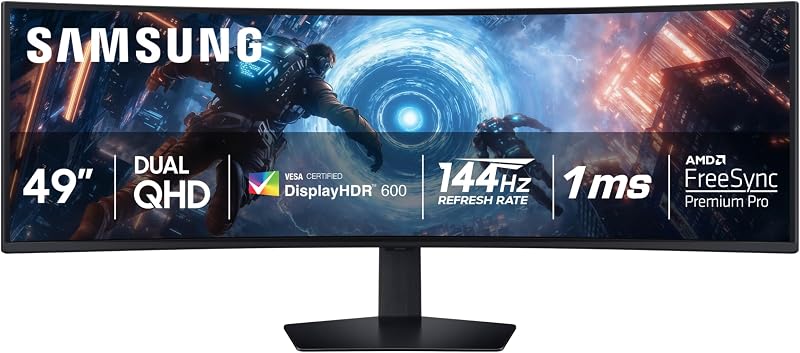
For shoppers seeking an expansive visual canvas, the SAMSUNG 49-inch Odyssey G9 delivers a panoramic 32:9 aspect ratio across a 49-inch curved LCD screen. This Dual QHD display provides the equivalent screen area of two standard 16:9 monitors placed side by side, completely eliminating the center bezel gap. Its tight 1000R curve wraps around the viewer’s field of view to keep every edge within comfortable sightlines, making it a powerful tool for flight simulators, racing titles, and intensive multi-window work.
The display panel utilizes VA technology with a matte finish, backed by VESA DisplayHDR 600 certification for deeper blacks, brighter highlights, and a 1,000,000:1 contrast ratio. Gamers benefit from a 144Hz refresh rate, a near-instant 1ms gray-to-gray response time, and AMD FreeSync Premium Pro with variable refresh rate support. For productivity, the monitor includes Picture-in-Picture and side-by-side split screen capabilities, as well as Auto Source Switch+ to detect and switch to newly powered devices immediately.
This model is best suited for power users and gamers who have the physical desk space to accommodate its 45.18-inch width and 16.56-inch depth. However, shoppers who prioritize pixel-perfect contrast and perfect black levels will find that this LCD model yields to the OLED version of the G9, while those seeking single-cable laptop docking will miss dedicated USB-C power delivery.
SAMSUNG 34″ ViewFinity S50GC Series Ultra-WQHD
- Best for Office multitasking on a flat display
- Color Black
- Size 34- in Flat
- Weight 10.8 Pounds
- Dimensions 8.7 x 32.1 x 18 inches

Our score: 8.6/10
Pros
- Flat screen for straight lines
- Ambient light sensor eye care
- Dual-source Picture-by-Picture
Cons
- Slower 5ms response time
- No integrated USB hub
The SAMSUNG 34″ ViewFinity S50GC Series Ultra-WQHD monitor is engineered specifically for productivity, home office duties, and content creation. Unlike the aggressive curves found on Odyssey gaming models, this 34-inch display features a flat screen surface with a matte finish, which many spreadsheet workers and graphic editors prefer for undistorted straight lines. If you want to explore more compact office options, our samsung 34 inch ultrawide monitor overview breaks down standard desk dimensions and workspace planning.
Multitasking is central to this monitor’s feature set. With a 21:9 aspect ratio and Ultra WQHD 1440p resolution, it offers generous horizontal space for running multiple software windows side by side. It provides two HDMI 2.2 inputs and one DisplayPort 1.2 connection, enabling Picture-by-Picture to display two separate computer sources simultaneously at native resolution, alongside Picture-in-Picture functionality. Visual comfort is enhanced by an ambient light sensor that automatically adjusts screen brightness, accompanied by Eye Saver Mode and Flicker Free technology.
While the display delivers a smooth 100Hz refresh rate and AMD Radeon FreeSync, its 5ms response time makes it less tailored for fast-paced competitive gaming than the Odyssey line. It also omits integrated speakers and USB-C connectivity, meaning users who want a single-cable laptop connection will need to look toward higher-tier ViewFinity models.
Samsung 34” ViewFinity S65UC
- Best for Single-cable laptop docking and workstation setups
- Color Black
- Size 34-inch
- Weight 11.46 Pounds
- Dimensions 9.49 x 31.75 x 22.08 inches

Our score: 8.4/10
Pros
- USB-C power and data cable
- Built-in KVM switch
- Integrated audio speakers
Cons
- 100Hz refresh rate cap
- Lower 0.72 color gamut
The Samsung 34” ViewFinity S65UC represents a dedicated workstation solution that brings together curved ergonomics and comprehensive desktop docking. Readers checking our samsung 34 monitor comparison will notice that this model stands out for its built-in docking features that declutter modern workspaces. It combines a 34-inch Ultra-WQHD panel with a 1000R curve, wrapping the 21:9 workspace naturally around the user to reduce eye strain during extended workdays.
Connectivity is the centerpiece of this model. It includes a USB-C port that handles both video display and device charging over a single cable, as well as an onboard LAN ethernet port to supply wired network access to slim laptops. A built-in KVM switch allows the user to control two separate computers using a single keyboard and mouse, seamlessly switching or utilizing split-screen, Picture-in-Picture, and Picture-by-Picture modes. It also includes built-in speakers, saving valuable desk space by eliminating the need for external desktop audio.
The screen offers a 100Hz refresh rate, AMD FreeSync, HDR10 with one billion colors, and intelligent eye care certified by TUV. This monitor is ideal for remote workers and professionals who dock a laptop daily. It gives way to the Odyssey G5 for pure high-refresh gaming, and to the 49-inch models for users who require the visual width of two full-size monitors side by side.
Samsung 49″ Odyssey OLED G9
- Best for Enthusiast gaming with true black contrast
- Weight 28.4 pounds
- Color Aluminum Silver
- Size 144Hz Refresh Rate
- Dimensions 11.19 x 47.04 x 20.84 Inches
Pros
- Infinite contrast QD-OLED
- Blistering 0.03ms response time
- Burn-in prevention algorithms
Cons
- Lower 250 cd brightness
- Risk of static image retention
The Samsung 49″ Odyssey OLED G9 elevates the super-ultrawide category by pairing a 49-inch Dual QHD curved panel with advanced QD-OLED display technology. With an expansive 32:9 aspect ratio and a crisp 110 pixels per inch density across a 5120 x 1440 resolution, this screen produces virtually infinite contrast with true, deep blacks and zero pixel backlight bleed. VESA DisplayHDR True Black 400 certification ensures vibrant color expression and nuanced shadow detail in atmospheric games.
Speed is a defining feature of this monitor. QD-OLED technology allows for an exceptionally fast 0.03ms gray-to-gray response time alongside a fluid 144Hz refresh rate. It supports both NVIDIA G-Sync compatibility and AMD FreeSync Premium Pro to eliminate tearing and input stutter. To protect the organic panel over long-term use, Samsung includes specialized safeguards such as a Thermal Modulation System to manage surface heat, automated logo and taskbar brightness dimming, and an automated screen saver that activates after ten minutes of inactivity.
This model is the premier choice for visual enthusiasts who demand the highest image depth and near-instantaneous pixel response. However, with a specified brightness of 250 cd/m2, it produces lower peak brightness than mini-LED models. Shoppers working with static spreadsheets for long hours may also prefer traditional LCD panels to eliminate any concern over static image retention.
Samsung 57″ Odyssey Neo G9
- Best for Extreme visual fidelity and flight simulators
- Size 57-inch
- Weight 41.9 pounds
- Color Black & White
- Dimensions 19.7 x 52.3 x 24 Inches
Pros
- Dual 4K UHD resolution
- 240Hz refresh with DP 2.1
- 2,392 Mini LED dimming zones
Cons
- Massive desk footprint
- Requires high-end GPU hardware
The Samsung 57″ Odyssey Neo G9 is a flagship super-ultrawide monitor that establishes an entirely new scale for desktop visual performance. Spanning 57 inches with a 32:9 aspect ratio, it is the world’s first Dual UHD monitor, offering the equivalent screen area and pixel resolution of two full 4K UHD monitors placed side by side. A deep 1000R curvature brings the outer edges of this massive screen into natural peripheral view, creating an unmatched cockpit-like field of view.
Behind the panel lies Quantum Matrix Technology powered by Quantum Mini LEDs, featuring 2,392 local dimming zones and 12-bit black levels. Combined with VESA DisplayHDR 1000 certification and a 1,000 nit peak brightness, this monitor produces intense highlights and dramatic contrast that rival premium televisions. Gaming capabilities are equally formidable, boasting a 240Hz refresh rate, 1ms gray-to-gray response time, AMD FreeSync Premium Pro, and next-generation DisplayPort 2.1 connectivity alongside HDMI 2.1 inputs.
The rear housing integrates CoreSync and Core Lighting+ to project game colors against the surrounding wall. This display is tailored exclusively for enthusiasts with high-end graphics hardware capable of driving Dual 4K resolution at high refresh rates. Its massive dimensions require a heavy-duty, deep desk, making it impractical for compact home offices or standard office workstations.
Chip values are fields copied from the Amazon product listing. Scores are out of 10, based on listed specifications and buyer feedback.
Matching a Model to Your Setup
- Standard home office desks with single-cable laptops: Choose the Samsung 34” ViewFinity S65UC for its integrated USB-C docking, ethernet port, KVM switch, and built-in speakers that eliminate external clutter.
- Budget-conscious gamers on standard desks: The Samsung 34′ Odyssey G5 Ultra-Wide Gaming provides a 165Hz refresh rate and 1000R curve without overwhelming typical desk space.
- Spreadsheet analysis and graphic editing on a flat screen: The SAMSUNG 34″ ViewFinity S50GC Series Ultra-WQHD offers wide 21:9 horizontal space with a flat panel that keeps lines and grid cells perfectly straight.
- Flight sim, racing enthusiasts, and dual-monitor replacers: The SAMSUNG 49-inch Odyssey G9 replaces two 16:9 displays seamlessly with its 32:9 aspect ratio and 1000R wrap-around curve.
- Dark-room visual enthusiasts and competitive gamers: The Samsung 49″ Odyssey OLED G9 delivers infinite contrast, true blacks, and a blistering 0.03ms response time for supreme clarity.
- Extreme multi-window power users with high-end graphics cards: The Samsung 57″ Odyssey Neo G9 delivers massive Dual 4K resolution and 240Hz speed for top-tier workstations.
Before You Buy
Before selecting one of the best samsung ultrawide monitors, carefully evaluate your physical desk space and mounting equipment. Super-ultrawide screens such as the 49-inch and 57-inch models require deep and sturdy desks to accommodate their wide stands, with the 49-inch model measuring over 45 inches across and 16 inches deep. While the listings highlight tilt and ergonomic adjustment for several models, they do not specify whether standard third-party monitor arms can support the substantial weight of these expansive displays without specialized heavy-duty brackets. Additionally, while curved screens enhance immersion, users who rely on precise drafting or CAD work may find that a curved surface introduces visual distortion compared to a flat panel.
Connectivity and accessory inclusions are another critical factor to check before finalizing your purchase. The product listings specify various video ports—such as DisplayPort 2.1, HDMI 2.1, DisplayPort 1.2, and USB-C—but they do not consistently specify which video cables are packaged in the box for every model. Furthermore, while the ViewFinity S65UC explicitly includes built-in speakers and a KVM switch, gaming-centric displays like the Odyssey G5, Odyssey G9, and Odyssey Neo G9 omit integrated audio hardware, requiring you to supply external desktop speakers or a gaming headset. Verifying your computer’s graphics card capabilities is equally important, as driving Dual QHD or Dual 4K resolutions at high refresh rates demands significant processing power.
FAQ
What is the difference between Samsung Odyssey and ViewFinity ultrawide monitors?
Samsung Odyssey monitors are designed specifically for gaming, featuring high refresh rates up to 240Hz, ultra-low response times down to 0.03ms, and aggressive curves like 1000R for immersive play. Samsung ViewFinity monitors prioritize office productivity, offering flat or curved screens with 100Hz refresh rates, eye-care ambient light sensors, and connectivity tools such as USB-C laptop docking, LAN ports, and integrated KVM switches.
What does 1000R curvature mean on a Samsung curved ultrawide monitor?
The 1000R rating indicates the curvature radius of the screen in millimeters. A 1000R curve forms an arc corresponding to a circle with a radius of 1,000 millimeters, or one meter. This specific curve closely matches the natural field of view of human eyes, allowing you to see the outer edges of a wide screen without constantly turning your neck.
Can a 49-inch Samsung ultrawide monitor replace two monitors?
Yes, a 49-inch Samsung ultrawide monitor with a 32:9 aspect ratio provides the exact screen surface of two standard 27-inch 16:9 monitors placed side by side. Using features like Picture-by-Picture, you can display two separate input sources on one continuous panel without any plastic bezels in the middle.
Do Samsung ultrawide monitors have built-in speakers?
Not all models include built-in audio. Among the displays covered here, the Samsung 34” ViewFinity S65UC includes integrated speakers. In contrast, gaming-focused models such as the Odyssey G5, Odyssey G9, Odyssey OLED G9, and Odyssey Neo G9 do not list built-in speakers and require external audio peripherals or headphones.
Which Samsung ultrawide monitor is best for working with laptops?
The Samsung 34” ViewFinity S65UC is particularly well-suited for laptop users because of its multi-functional USB-C port. This connection transmits display signals, transfers data, and charges the connected laptop through a single cable, while an integrated ethernet port provides stable wired internet directly to laptops lacking a dedicated LAN port.


