
As Amazon Associates, we earn from qualifying purchases. This means we may receive a small commission at no extra cost to you if you click through and make a purchase.
Shopping for a reliable laptop can feel overwhelming when technical jargon like processor generations, solid-state drive types, and memory capacities clutter product descriptions. If you are shopping for your own desk or searching for a practical gift, finding a dependable machine comes down to balancing responsive everyday performance, fast solid-state storage, and a display that suits daily routines. Choosing a dell i5 ssd laptop represents an ideal middle ground for households, remote workers, and students because an Intel Core i5 processor easily handles web research and office tasks, while a modern solid-state drive ensures rapid boot times without the sluggish mechanical delays of older storage technology.
Understanding the brand structure makes this dell laptop comparison straightforward for first-time shoppers. Dell organizes these mid-range laptops into two primary families: Latitude and Inspiron. The Latitude lineup consists of enterprise-grade business computers originally built for corporate durability, featuring rigid frames, advanced connectivity like Thunderbolt ports, and business-tier security. Many Latitude units offered today are certified refurbished or renewed, making them sturdy, functional workhorses. In contrast, Inspiron and numeric-series notebooks cater directly to families, home offices, and students, emphasizing everyday convenience with responsive touchscreens, lightweight builds, and built-in numeric keypads. Deciding which dell laptop to buy simply depends on whether you prefer enterprise-level connectivity or modern consumer convenience.
Dell Laptop Lineup at a Glance
| Model | Screen | Processor & RAM | Storage & Ports |
|---|---|---|---|
| Dell Latitude 5420 14″ Laptop Core | 14″ FHD (1920×1080) Non-Touch Anti-Glare | Intel Core i5-1145G7, 16GB RAM | 512GB PCIe SSD, 2x Thunderbolt 4, HDMI 2.0, RJ45 |
| Dell 15.6″ FHD Touchscreen Laptop | 15.6″ FHD (1920×1080) 120Hz IPS Touchscreen | Intel Core i5-1334U, 8GB RAM | 512GB PCIe SSD, USB-C, HDMI, SD Card Reader |
| Dell 15.6″ Laptop DC15250 | 15.6″ FHD (1920×1080) Anti-Glare | Intel Core i5-1334U, Unspecified RAM | 512GB SSD, Memory Card Slot, HDMI, Ergonomic Hinge |
| Dell Inspiron 15 FHD Touch Laptop | 15.6″ FHD (1920×1080) Touchscreen | Intel Core i5-1334U, 16GB RAM | 512GB SSD, Numeric Keypad, Windows 11 Pro |
| Dell Latitude 5430 Laptop | 14″ FHD (1920×1080) Non-Touch Anti-Glare | Intel Core i5-1235U, 16GB RAM | 512GB PCIe NVMe SSD, 2x Thunderbolt 4, HDMI, RJ45 |
| Dell Inspiron Touchscreen Laptop | 15.6″ FHD (1920×1080) IPS Touchscreen | Intel Core i5-1155G7, 16GB RAM | 1TB SSD, 2x USB 3.2, HDMI 1.4, SD Card Reader |
Figures as published on the product listings.
The Models in Detail
Dell Latitude 5420 14″ Laptop Core
- Best for Mobile professionals wanting compact business durability
- Color Black
- Weight 3.88 pounds
- Size i5 11th Gen | 16GB | 512GB
- Dimensions 12.65 x 0.82 x 8.35 Inches

Our score: 9.6/10
Pros
- Dual Thunderbolt 4 ports
- Generous 16GB system RAM
- Anti-glare 14-inch screen
Cons
- Renewed refurbished hardware
- No touchscreen support
The Dell Latitude 5420 14″ Laptop Core is an enterprise-oriented notebook offered as a Dell Certified Refurbished system under the Amazon Renewed program. At its core, an 11th Generation quad-core Intel Core i5-1145G7 processor works alongside 16GB of DDR4 memory and a fast 512GB PCIe solid-state drive. For shoppers wanting a dell i5 16gb ram ssd laptop that can handle intensive multitasking across dozens of browser tabs and complex office applications without slowing down, this machine provides immediate, snappy responsiveness. The non-touch 14-inch Full HD display features an anti-glare finish and wide viewing angles, making it comfortable to view under bright office fluorescents.
Physical connectivity is a primary strength of this compact business chassis. Dell equipped the machine with two Thunderbolt 4 ports featuring Power Delivery and DisplayPort capabilities, two USB 3.2 Gen 1 ports, an HDMI 2.0 output, a microSD card reader, and a native RJ45 gigabit Ethernet port. These extensive connections make linking desktop peripherals seamless. Anyone setting up a dedicated dual-screen home office workstation can explore how well corporate hardware integrates with multi-display hubs by reviewing dell docking stations for desk setups. The machine also includes a backlit keyboard, an integrated HD webcam, and a 63-watt-hour battery with Express Charge support.
This model is an ideal match for remote professionals, administrative workers, and students who need sturdy physical durability and hardwired networking. However, because it relies on an 11th Generation quad-core chip and a compact 14-inch non-touch display, shoppers looking for expansive touchscreen real estate or newer multi-core processors will prefer Dell’s 15-inch consumer models.
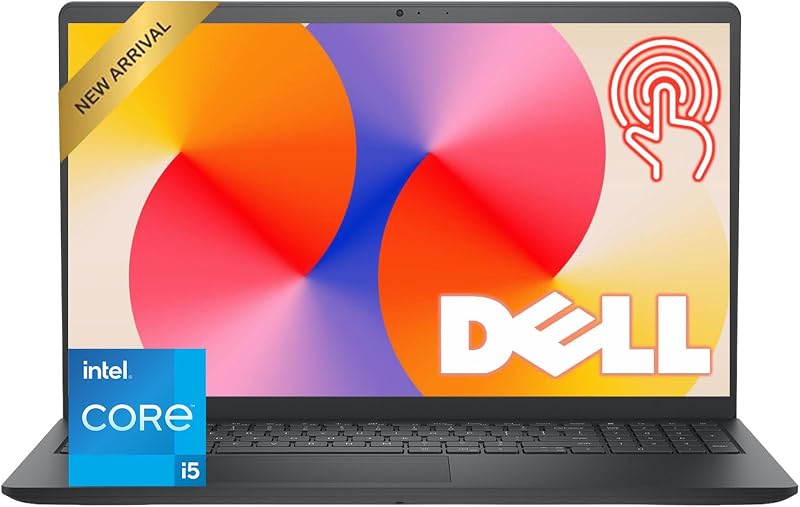
Dell 15.6″ FHD Touchscreen Laptop
- Best for Families needing responsive touchscreen media browsing
- Color Black
- Size 8GB RAM | 512GB PCIe SSD
- Dimensions 14.11 x 9.28 x 0.75 inches
Our score: 8.4/10
Pros
- Smooth 120Hz FHD touchscreen
- 10-core 13th Gen processor
- Clear 1080p webcam
Cons
- Modest 8GB memory ceiling
- Non-backlit keyboard
Designed for versatile home and family use, the Dell 15.6″ FHD Touchscreen Laptop introduces modern 13th Generation processing power. It features the 10-core Intel Core i5-1334U processor, which reaches speeds up to 4.60GHz by balancing high-power tasks and lightweight background duties across dedicated performance and efficiency cores. Supported by 8GB of DDR4 RAM and a 512GB PCIe solid-state drive, this notebook boots instantly and launches daily tools without hesitation. To see how solid-state storage enhances daily reliability compared to traditional spinning drives, readers can learn more about a dell laptop with solid state hard drive and its benefits for home users.
The centerpiece of this model is its 15.6-inch Full HD touchscreen, which features an upgraded 120Hz refresh rate. This higher refresh rate refreshes the picture twice as fast as standard displays, resulting in noticeably smoother web scrolling, fluid window movements, and reduced visual stutter. The IPS-level panel features an anti-glare coating and 250 nits of brightness. For virtual meetings and remote family chats, Dell integrated a crisp 1080p Full HD webcam alongside dual stereo speakers tuned with Dolby Audio. A spill-resistant keyboard with a built-in numeric keypad adds practical peace of mind for busy family dining tables and student workspaces.
Weighing 4.19 pounds with up to 9 hours of listed battery life, this dell 15.6 fhd touchscreen laptop is well suited for students, families, and remote learners who prefer hands-on touch control. It yields to larger-memory alternatives when managing heavy workloads, as power users may find the 8GB RAM capacity limiting compared to 16GB options in the lineup.
Dell 15.6″ Laptop DC15250
- Best for Students typing long papers and assignments
- Total Usb Ports 3
- Number of Ports 4
- Total Number of HDMI Ports 1
- Number of Items 1
- Number of Packs 1

Our score: 8.6/10
Pros
- Lightweight 3.6-pound chassis
- ComfortView blue light reduction
- Ergonomic lifted hinge
Cons
- RAM capacity not specified
- Non-touch display
Carrying a clean Platinum Silver finish and weighing just 3.6 pounds, the Dell 15.6″ Laptop DC15250 is built for comfort, lightweight mobility, and everyday typing. Running on the 13th Generation Intel Core i5-1334U processor paired with a 512GB solid-state drive and Windows 11 Home, it delivers prompt responsiveness for web browsing, digital paperwork, and video streaming. While the listing does not specify the exact installed RAM capacity, the modern 13th Gen processor architecture ensures efficient processing for essential daily applications.
Ergonomic refinement sets this model apart from other standard budget designs. Dell incorporated a lifted hinge mechanism that automatically tilts the keyboard to an ergonomic typing angle whenever the display lid is opened, easing strain on your wrists during long writing sessions. The keyboard includes a numeric keypad, a backlit layout, and a dedicated calculator hotkey for fast numerical calculations. To protect your vision during extended evening assignments, the 15.6-inch Full HD anti-glare display works with Dell ComfortView software to reduce blue light emissions. Furthermore, this laptop includes one year of Dell Onsite Service, providing professional technician visits to your home or office if a covered hardware problem cannot be solved remotely.
This notebook is an excellent match for college writers, bookkeepers, and beginners who prioritize comfortable typing, easy carrying weight, and strong service support. Shoppers who require direct hands-on screen navigation will want to look toward one of Dell’s touchscreen alternatives instead.
Dell Inspiron 15 FHD Touch Laptop
- Best for Productive home office workers needing multitasking headroom
- Weight 3.66 Pounds
- Color Carbon Black
- Size 16GB RAM+512GB SSD
- Dimensions 14.11 x 9.27 x 0.75 inches

Our score: 8.8/10
Pros
- Generous 16GB system memory
- 10-core processing power
- Windows 11 Pro included
Cons
- Conflicting listing text details
- Dimmer screen outdoors
The Dell Inspiron 15 FHD Touch Laptop pairs modern processing power with high memory capacity for demanding daily routines. Encased in a subtle Carbon Black shell, this model runs on the 10-core 13th Gen Intel Core i5-1334U processor alongside 16GB of RAM and a 512GB solid-state drive. While one bullet in the listing text contains an obvious typographical error mentioning 64GB RAM and an 8TB SSD, the official technical specifications and product title confirm 16GB of DDR4 memory and a 512GB SSD. This memory level allows effortless switching between web browsers, office tools, and multimedia playback without system lag.
Equipped with Windows 11 Pro, this laptop provides business-friendly tools including BitLocker encryption and enhanced management capabilities. The 15.6-inch Full HD touchscreen allows users to tap, pinch, and navigate on-screen items intuitively, complementing the integrated numeric keypad on the keyboard deck for data entry. The product listing highlights lifetime access to essential Microsoft Office applications alongside Copilot AI tools, giving buyers immediate software capabilities right out of the box for document drafting, presentations, and calculations.
This dell inspiron 15 touch laptop fits home office workers, self-employed professionals, and college students who need ample multitasking headroom alongside the convenience of a touchscreen. It gives way to the Latitude models for users who require rugged business drop resistance, dual Thunderbolt connections, or native wired Ethernet ports.
Dell Latitude 5430 Laptop
- Best for Office multitaskers needing advanced wired connectivity
- Color Black
- Weight 3.88 Pounds
- Dimensions 12.65 x 0.76 x 8.35 Inches
Pros
- 12th Gen 10-core processor
- Dual Thunderbolt 4 connections
- Built-in wired Ethernet port
Cons
- Renewed cosmetic condition
- Heavier for a 14-inch chassis
For buyers who prioritize enterprise durability combined with upgraded 10-core processing, the Dell Latitude 5430 Laptop is an attractive option. Available as an Amazon Renewed Grade A refurbished business unit, it houses a 12th Generation Intel Core i5-1235U processor featuring 10 cores, 12 threads, and a 12MB cache. Combined with 16GB of 3200MHz DDR4 RAM and a 512GB PCIe NVMe solid-state drive, this laptop handles intensive spreadsheet calculations, large databases, and professional office suites smoothly under Windows 11 Pro.
Constructed inside a compact black frame weighing 3.9 pounds, this machine is engineered for long-term workplace reliability. Its 14-inch Full HD anti-glare screen offers wide viewing angles and 250 nits of brightness. Although one line of the listing description mentions a touchscreen, the specific feature bullets and technical specifications confirm it has a non-touch anti-glare display. Port availability is outstanding, featuring two Thunderbolt 4 USB-C ports with Power Delivery and DisplayPort output, two USB 3.2 Gen 1 ports with PowerShare, an HDMI 2.0 port, an RJ45 Ethernet jack, a Smart Card reader, and a microSD 4.0 card slot.
This notebook is the best dell core i5 laptop choice for business travelers, technical workers, and students who frequently work docked at a desk and require hardwired networking. Shoppers considering renewed commercial computers can also compare how processor tiers match up by reading our overview of the dell refurbished laptop i7 for corporate hardware. The Latitude 5430 includes a 90-day renewed warranty, though users wanting a brand-new factory chassis or an integrated numeric keypad will prefer the 15.6-inch Inspiron models.
Dell Inspiron Touchscreen Laptop
- Best for Users storing massive photo and video libraries
- Color Intel 11th
- Size Intel i5-1155G7
- Dimensions 14.11 x 9.26 x 0.71 inches
Pros
- Expansive 1TB solid state drive
- Convenient touch display
- 16GB RAM for multitasking
Cons
- Older 11th Gen quad-core chip
- Wi-Fi 5 wireless module
The Dell Inspiron Touchscreen Laptop stands out by offering twice the internal storage capacity of the other models in this comparison. Featuring a massive 1TB solid-state drive, this Carbon Black laptop provides abundant room for extensive photo collections, high-definition video archives, and heavy project files without requiring an external drive. Powering the system is an Intel Quad-Core i5-1155G7 processor reaching boost clocks up to 4.50GHz, accompanied by 16GB of RAM and Windows 11 Pro for dependable everyday multitasking.
The 15.6-inch Full HD touch display utilizes an IPS panel with narrow bezels, anti-glare treatment, and 220 nits of brightness, allowing users to interact directly with web pages, digital documents, and creative projects. Connectivity covers essential daily needs with two USB 3.2 Type-A ports, a USB 2.0 port, an HDMI 1.4 output for external monitors, an SD card reader, and a headphone combo jack. A built-in numeric keypad makes entering numerical data simple, while an integrated 720p HD webcam handles routine video calls.
This computer is best suited for digital hobbyists, families, and everyday users who prioritize massive on-board storage and intuitive touch controls. However, because it runs on an 11th Generation quad-core processor and Wi-Fi 5 wireless rather than the 10-core 13th Gen chips and Wi-Fi 6 found on newer siblings, it yields to newer Inspiron models for buyers wanting the latest processing architecture.
Chip values are fields copied from the Amazon product listing. Scores are out of 10, based on listed specifications and buyer feedback.
Matching a Model to Your Setup
- For home office professionals who dock into dual desktop monitors and need hardwired internet: The Dell Latitude 5430 Laptop and the Dell Latitude 5420 14″ Laptop Core provide dual Thunderbolt 4 connections and native RJ45 gigabit Ethernet ports.
- For students typing research papers and carrying a laptop between classrooms: The Dell 15.6″ Laptop DC15250 offers a lightweight 3.6-pound frame, an ergonomic lifted typing hinge, and eye-friendly ComfortView software.
- For families wanting smooth entertainment, video calls, and interactive homework: The Dell 15.6″ FHD Touchscreen Laptop features an interactive 120Hz Full HD touch panel, a 1080p webcam, and a spill-resistant keyboard.
- For heavy multitaskers who keep dozens of applications and browser tabs open simultaneously: The Dell Inspiron 15 FHD Touch Laptop provides 16GB of RAM, a 10-core 13th Gen processor, and Windows 11 Pro.
- For digital hobbyists and photographers storing extensive media collections locally: The Dell Inspiron Touchscreen Laptop features an expansive 1TB solid-state drive, 16GB of RAM, and a 15.6-inch IPS touch display.
Before You Buy
Before making your final choice, it is helpful to note what these modern laptops do not include. None of the six models reviewed feature an internal optical CD or DVD drive, as modern laptop designs have phased out disc drives to achieve slimmer profiles and lighter chassis. If you have older software discs or physical DVD movies, you will need to purchase an external USB disc drive. Additionally, while certain models mention office software in their feature summaries, verify the exact license terms during unboxing, as standard consumer laptops often include trial subscriptions rather than perpetual software suites. It is also worth remembering that the Dell 15.6″ Laptop DC15250 does not specify its exact installed RAM capacity in the listing, so checking system settings upon delivery is a sensible practice.
Another important factor is the distinction between brand-new consumer models and renewed business units. The Dell Latitude 5420 and Latitude 5430 are sold through the Amazon Renewed program. Although these enterprise-grade laptops undergo comprehensive functionality testing, battery health inspections, and cosmetic cleaning, they may show minor signs of prior handling and may arrive in generic packaging with third-party or OEM-compatible power adapters. The Latitude 5430 is backed by a 90-day renewed warranty, whereas new units like the Dell 15.6″ Laptop DC15250 come with a 1-year onsite service warranty from Dell where a technician visits your home or office if remote troubleshooting fails. Checking warranty terms ensures you pick the right balance of price, condition, and long-term peace of mind.
FAQ
What does an Intel Core i5 processor do in a modern laptop?
An Intel Core i5 processor functions as the central brain of your computer, balancing responsive speed with energy efficiency. Across the 11th, 12th, and 13th Generation chips in these laptops, a Core i5 processor easily handles web surfing with dozens of tabs, office documents, streaming media, and everyday multitasking without causing system slowdowns or excessive heat.
Why is an SSD better than an older mechanical hard drive?
A solid-state drive (SSD) uses electronic flash memory instead of spinning magnetic platters to save files and software. This enables your laptop to boot into Windows in seconds, open large applications almost instantly, and transfer documents quietly without the vibration, noise, or mechanical fragility of older hard disk drives.
Is 8GB of RAM enough, or should I choose 16GB?
For standard household browsing, homework, streaming movies, and word processing, 8GB of RAM provides a smooth, reliable experience. However, if you plan to keep multiple demanding programs open at the same time, work with large data spreadsheets, or want extra headroom so your laptop stays fast for years, choosing a model with 16GB of RAM is a worthwhile investment.
What is the main difference between Dell Latitude and Dell Inspiron laptops?
Dell Latitude laptops are built for corporate enterprise use, focusing on durable frames, advanced connectivity like Thunderbolt and wired Ethernet ports, and Windows 11 Pro security tools. Dell Inspiron models are designed for everyday consumers, students, and families, emphasizing interactive touchscreens, sleek finishes, and integrated numeric keypads for typing convenience.
Can I connect an external monitor to these Dell laptops?
Yes, all six laptops include video outputs for external displays. The Inspiron and numeric models include standard full-size HDMI ports to easily connect to a desktop monitor or television. The Latitude 5420 and Latitude 5430 include both HDMI ports and dual Thunderbolt 4 USB-C connections, supporting multi-monitor desktop setups through a single docking cable.
Which model is the best dell core i5 laptop for beginners?
For first-time buyers who want an intuitive, easy-to-use computer, the Dell 15.6″ FHD Touchscreen Laptop is an excellent choice as a dell core i5 laptop for beginners. Its large 15.6-inch touch display feels as familiar to navigate as a tablet or smartphone, while its 1080p webcam and spill-resistant keyboard offer great convenience for family and study environments.


