
As Amazon Associates, we earn from qualifying purchases. This means we may receive a small commission at no extra cost to you if you click through and make a purchase.
Shopping for a dell laptop 14 inch touchscreen can feel overwhelming when faced with technical terminology, model codes, and subtle configuration differences. A 14-inch display serves as an ideal middle ground for modern portable computers: it is compact enough to slip into a backpack or messenger bag without strain, yet provides sufficient screen space to organize spreadsheets, web browsers, and word documents side by side. Integrating touch functionality changes how you interact with your applications, enabling quick scrolling through online articles, intuitive button tapping, digital document signing, and pinch-to-zoom controls just like on a smartphone. For first-time shoppers and gift-givers, the primary challenge is determining whether a traditional clamshell notebook built for rigid workplace durability or a convertible 2-in-1 machine that folds flat for entertainment best matches daily habits.
Dell arranges its mobile computing catalog primarily into two distinct families: the consumer-oriented Inspiron range and the commercial-grade Latitude collection. Inspiron systems, including the dell inspiron 14 2-in-1 models, emphasize lifestyle flexibility with 360-degree rotating hinges, taller screen aspect ratios, and media-friendly chassis designs. The Latitude line focuses on enterprise reliability, offering physical camera privacy shutters, hardwired office connectivity, and high-speed data ports. By reviewing this dell touchscreen laptop comparison, you can readily decide which dell laptop to buy without paying for features you do not need or overlooking options essential to your routine. If you are also evaluating different screen sizes across standard portable form factors, our comprehensive dell 14 laptop guide explores how display dimensions influence daily portability.
Dell 14-Inch Touchscreen Laptops Lineup at a Glance
| Model | Processor | Memory and Storage | Display and Form Factor |
|---|---|---|---|
| Dell Latitude 7420 | Intel Core i7-1165G7 | 16GB DDR4, 512GB SSD | 14″ FHD (1920×1080) Touch Clamshell |
| Dell Inspiron 14 7440 | Intel Core 5 120U | 16GB DDR5, 512GB SSD | 14″ WUXGA (1920×1200) Touch 2-in-1 |
| Dell Latitude 7430 | Intel Core i7-1265U | 16GB DDR4, 512GB SSD | 14″ FHD (1920×1080) Touch Clamshell |
| Dell Inspiron 14 2 in 1 | Intel Core 7 150U | 16GB DDR5, 512GB SSD | 14″ FHD+ (1920×1200) Touch 2-in-1 |
| Dell Latitude 5450 | Intel Core Ultra 5 135U | 16GB DDR5, 512GB SSD | 14″ FHD (1920×1080) Touch Clamshell |
| Dell Latitude 7440 | Intel Core i7-1365U | 32GB DDR4, 512GB SSD | 14″ QHD (2560×1600) Touch Clamshell |
Figures as published on the product listings.
The Models in Detail
Dell Latitude 7420 Touchscreen Laptop Computer
- Best for Office tasks on a budget
- Color Silver
- Size 16GB 512GB SSD
- Dimensions 13 x 8 x 1 inches

Our score: 9.0/10
Pros
- Intel Core i7 power
- Thunderbolt 4 connectivity
- Windows 11 Pro included
Cons
- Renewed condition
- Fixed clamshell hinge
The Dell Latitude 7420 Touchscreen Laptop Computer is a renewed business clamshell engineered for straightforward office productivity. Powered by an 11th Generation Intel Core i7-1165G7 processor featuring 4 cores, 8 threads, and boost speeds up to 4.7GHz, it handles daily work demands smoothly. System responsiveness is supported by 16GB of DDR4 RAM and a 512GB solid-state drive, which together offer swift boot sequences and comfortable multitasking across several open browser windows and documents. Integrated Intel Iris Xe Graphics drives the 14-inch Full HD display with a 1920×1080 resolution, delivering crisp visual output and responsive touch navigation.
Connectivity options on this dell latitude 7420 touchscreen configuration are extensive for a slim notebook. It features high-speed Thunderbolt 4 ports, a standard USB 3.1 port, an HDMI 2.0 output for connecting external monitors or televisions, and a micro SD card reader for convenient file transfers. A backlit keyboard facilitates comfortable typing in dim office spaces, and the operating system is Windows 11 Pro with multi-language support covering English, Spanish, and French. Because this model utilizes a traditional clamshell chassis, its hinge opens to a standard typing position rather than folding completely flat into a handheld tablet.
This laptop is well suited for home-office workers, accounting professionals, and students who value a sturdy corporate chassis and versatile port options over convertible tablet tricks. Users seeking a 360-degree rotating screen that transforms into an easel or tablet will find the Inspiron convertibles better matched to their entertainment needs.
Dell Inspiron 14 7440
- Best for Everyday multitaskers wanting peak speed
- Color Blue
- Weight 3.8 Pounds
- Dimensions 12.36 x 8.9 x 0.62 Inches

Our score: 9.0/10
Pros
- High-speed Core 7 chip
- DDR5 5200MHz memory
- Versatile 360-degree hinge
Cons
- Heavier 3.8-pound chassis
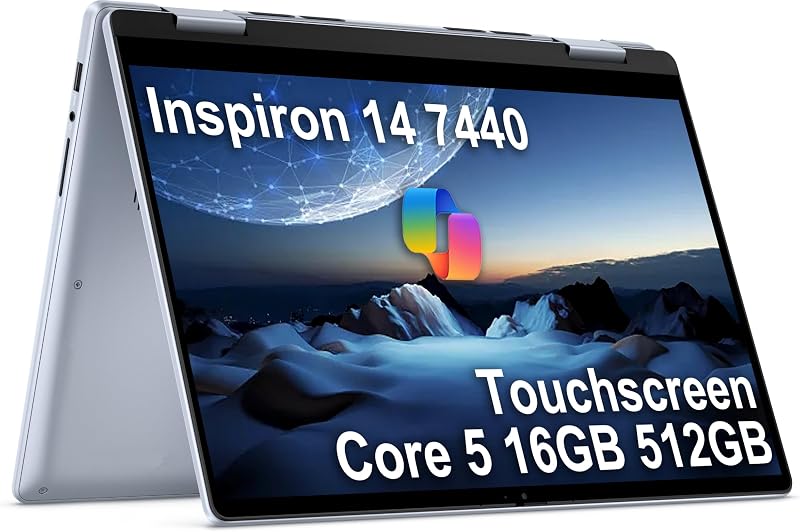
Our score: 9.6/10
Best for: Students wanting 2-in-1 flexibility
Pros
- 360-degree convertible hinge
- Tall 16:10 touch display
- Lightweight 2.9-pound build
Cons
- Resealed for upgrades
Designed for shoppers who want a machine that seamlessly bridges academic assignments and weekend relaxation, the Dell Inspiron 14 7440 introduces a flexible 360-degree hinge mechanism. This versatile build allows you to operate the device in standard laptop mode, rotate it into tent mode for reading recipes, position it as an upright stand for video watching, or fold it back into tablet mode for direct on-screen navigation. It runs on an Intel Core 5 120U processor with 10 cores, 12 threads, and clock speeds up to 5.00GHz, paired with fast 16GB DDR5 memory running at 4800MHz and a 512GB PCIe NVMe solid-state drive.
The touch panel on this dell inspiron 14 7440 features a 14-inch WUXGA resolution of 1920×1200. This 16:10 aspect ratio provides noticeable extra vertical height compared to traditional widescreen displays, allowing you to view more lines of text before needing to scroll down. The screen offers 250 nits of brightness, ComfortView technology to help reduce eye fatigue, and support for an active stylus pen. Weighing 2.9 pounds in an Ice Blue finish, the device includes two USB Type-C 3.2 Gen 2 ports, two USB 3.2 Gen 1 Type-A ports, an HDMI 1.4 port, an SD-card reader, an FHD webcam, and Intel Wi-Fi 6E. The listing notes battery life up to 10.2 hours and ExpressCharge capability that reaches up to 80% charge in 60 minutes.
This 2-in-1 is ideal for students, casual digital creators, and family households needing an adaptable computer for both desk work and casual couch browsing. Note that the listing states this brand-new unit was resealed by Issaquah Highlands Tech to perform the RAM and storage upgrade, backed by a three-year warranty on the upgraded components. Buyers requiring legacy hardwired network ports or enterprise security suites should look toward the Latitude family instead.
Dell Latitude 7430 14in FHD Touchscreen
- Best for Business professionals needing dual monitors
- Weight 3 Pounds
- Dimensions 13 x 7.8 x 0.7 inches

Our score: 8.2/10
Pros
- 12th Gen 10-core i7
- Dual 4K display support
- Anti-glare IPS display
Cons
- Renewed condition
- Standard 16:9 aspect ratio
The Dell Latitude 7430 14in FHD Touchscreen steps forward in business computing power by incorporating an Intel 12th Generation Core i7-1265U processor. This 10-core, 12-thread chip operates at speeds up to 4.8GHz, supplying dependable performance for running large spreadsheets, browser tabs with heavy web apps, and virtual conferencing sessions simultaneously. The renewed system is equipped with 16GB of DDR4 RAM and a 512GB solid-state drive, promoting rapid software loading and consistent data access under Windows 11 Pro.
Display clarity on this dell latitude 7430 touchscreen is handled by a 14-inch Full HD (1920×1080) anti-glare IPS panel that reduces distracting overhead reflections in brightly lit offices. For workspace expansion, it provides two Thunderbolt 4 USB-C ports with Power Delivery and DisplayPort, enabling clean connection to dual 4K external displays using a compatible dock or cable. It also supplies a USB Type-A 3.2 Gen 1 port with PowerShare sleep-charging capability, an HDMI port, a 3.5mm headphone jack, and a backlit keyboard. Built-in business security features include TPM 2.0 architecture and BitLocker encryption support.
This model is a reliable choice for remote employees and administrative professionals needing a dependable clamshell workstation that connects cleanly to multiple desktop monitors. However, if your daily responsibilities demand a higher-resolution 2.5K display or double the system memory for virtual machines, the Latitude 7440 is the logical next step up.
Dell Inspiron 14 2 in 1
- Color Ice Blue
- Size 16GB|512GB
- Weight 2.91 pounds
- Dimensions 12.36 x 8.9 x 0.74 inches
Providing elevated processing power within a convertible body, the Dell Inspiron 14 2 in 1 features an Intel Core 7 150U processor. Boasting 10 cores, 12 threads, and peak boost clock speeds reaching up to 5.4GHz, this machine provides snappy responsiveness for heavy study sessions, digital content editing, and everyday business tasks. It is paired with 16GB of high-speed DDR5 memory operating at 5200MHz and a 512GB PCIe NVMe solid-state drive, ensuring rapid application response times and fluid multitasking under Windows 11 Pro with AI-driven Copilot assistance.
The 360-degree convertible hinge allows this dell inspiron 14 2-in-1 to transition effortlessly between traditional typing, touch presentations, and flat tablet interactions. Its 14-inch Full HD+ (1920×1200) IPS touch display provides an expanded 16:10 workspace, wide viewing angles, and an anti-glare coating. Hardware connectivity includes Wi-Fi 6E, Bluetooth, an FHD webcam for video calls, multiple USB ports, and an HDMI output. Encased in an Ice Blue chassis measuring 0.62 inches thin with an overall weight of 3.8 pounds, it combines robust processing frequencies with an intuitive touchscreen layout for any dell 14 inch touchscreen laptop seeker.
This configuration suits ambitious students, creative freelancers, and home users who want maximum clock speed in a flexible 2-in-1 format. The listing discloses that the original packaging was opened solely to inspect, test, and install component upgrades. While slightly heavier than its Core 5 sibling, its higher processor headroom makes it an excellent fit for demanding productivity workloads.
Dell Latitude 5450 Laptop
- Best for Desk workers requiring wired Ethernet
- Color Gray
- Weight 3.3 pounds
- Size 16GB 512GB SSD
- Dimensions 12.68 x 8.63 x 0.76 inches
Pros
- Built-in RJ-45 Ethernet port
- Intel Core Ultra 5 chip
- Webcam privacy shutter
Cons
- Clamshell cannot fold back
The Dell Latitude 5450 Laptop brings updated architectural efficiency to corporate desks through its Intel Core Ultra 5 135U processor. Featuring 12 cores, this processor focuses on streamlined energy consumption and optimized system multitasking. Backing the processor are 16GB of DDR5 RAM and a 512GB PCIe NVMe M.2 SSD, making light work of background file syncs, data sorting, and intensive office applications. The listing states that this machine delivers up to 11 hours of battery life to support professionals working away from wall outlets.
Its 14-inch Full HD (1920×1080) IPS touchscreen incorporates an anti-glare finish and 72% NTSC color coverage for balanced visual clarity. A dedicated FHD HDR IR webcam includes a physical privacy shutter that lets you physically slide a cover over the lens when video calls end. The dell latitude 5450 touchscreen is distinctly equipped with an integrated RJ-45 Ethernet port for secure wired networking, alongside two Thunderbolt 4 ports, two USB 3.2 Gen 1 Type-A ports, HDMI 2.0, an audio combo jack, Wi-Fi 6E, Bluetooth 5.3, and a backlit keyboard.
Corporate IT personnel, traveling professionals, and home-office workers requiring hardwired internet stability will appreciate this laptop’s comprehensive port selection and clamshell stability. Note that this unit was resealed by Issaquah Highlands Tech to install upgraded memory and storage, supported by a three-year component warranty. For shoppers who prefer a permanent desktop workstation rather than a portable setup, an alternative like a dell all in one desktop computer 24 inch touchscreen provides an expansive stationary display.
Dell Latitude 7440 Touchscreen Laptop
- Best for Executives needing maximum memory and sharpness
- Weight 3 Pounds
- Dimensions 14 x 1 x 7 inches
Pros
- Generous 32GB RAM
- High-res QHD 2560×1600 screen
- Carbon fiber chassis
Cons
- Renewed condition
- Clamshell cannot fold back
Occupying the high end of enterprise performance, the renewed Dell Latitude 7440 Touchscreen Laptop pairs an upgraded display with substantial memory capacity. It runs on a 13th Generation Intel Core i7-1365U processor with 10 cores, 12 threads, 12MB cache, and clock speeds up to 5.20GHz. Setting it apart from other selections in this guide, it comes equipped with a massive 32GB of DDR4 RAM alongside a 512GB SSD, making it capable of handling large databases, dozens of active browser tabs, and multiple productivity applications without slowing down.
Visual performance on this dell latitude 7440 touchscreen is delivered via a 14-inch QHD display with a sharp 2560×1600 resolution. Operating with a 16:10 aspect ratio and 300 nits of brightness, the multi-touch screen renders detailed text and high-resolution media with outstanding definition. Built using a durable carbon fiber chassis, it includes an FHD IR camera with physical shutter, ExpressSign-In presence detection, intelligent privacy protection, and temporal noise reduction for clear microphone input. Expansion ports include two Thunderbolt 4 USB-C ports with Power Delivery and DisplayPort 1.4, two USB 3.2 Gen 1 Type-A ports (one with PowerShare), an HDMI 2.0 port, and an audio jack.
This premium notebook is tailored for managers, data analysts, and executive power users seeking the best dell touchscreen laptops with exceptional screen sharpness and double the memory of baseline systems. Because it uses a clamshell carbon fiber build, it does not rotate into tablet orientation. If you want to compare how high-end 14-inch mobility stacks up against larger screen sizes, reviewing a dell – 15.6 2k touchscreen laptop – intel core i7 1355u 2023 – 16gb memory – 1tb storage – carbon bl illustrates the trade-offs between display scale and portability.
Chip values are fields copied from the Amazon product listing. Scores are out of 10, based on listed specifications and buyer feedback.
Matching a Model to Your Setup
- For students and frequent media streamers: The Dell Inspiron 14 7440 offers a 360-degree convertible hinge, a lightweight 2.9-pound build, and up to 10.2 hours of battery life for smooth transitions between note-taking and movie watching.
- For creative multitasking and higher clock speeds: The Dell Inspiron 14 2 in 1 delivers high frequencies up to 5.4GHz via its Intel Core 7 processor alongside fast DDR5 5200MHz memory within a flexible convertible body.
- For budget-conscious office workers: The renewed Dell Latitude 7420 Touchscreen Laptop Computer provides a dependable business chassis, dual Thunderbolt 4 ports, and a reliable 11th Gen Core i7 chip for standard desk duties.
- For corporate desks requiring wired connections: The Dell Latitude 5450 Laptop includes an integrated RJ-45 Ethernet port, an energy-efficient Intel Core Ultra 5 processor, and a physical webcam privacy shutter.
- For data specialists and executive power users: The Dell Latitude 7440 Touchscreen Laptop features 32GB of RAM, an ultra-sharp 2560×1600 QHD display, and a carbon fiber chassis for demanding workloads.
- For home-office docking stations: The renewed Dell Latitude 7430 14in FHD Touchscreen supplies dual Thunderbolt 4 ports with dual 4K external display support backed by a 12th Gen Core i7 processor.
Before You Buy
Before making your final choice, remember that touchscreen capability does not necessarily guarantee an active stylus pen is bundled in the packaging. While listings for the Inspiron convertible models highlight stylus support for handwriting and sketch work, the included accessory lists do not specify that a pen comes inside the box. Shoppers intending to draw, annotate PDF documents, or take handwritten notes should anticipate checking stylus compatibility and obtaining a supported active pen separately. Furthermore, consider your external monitor connections; while models equipped with Thunderbolt 4 can transmit video over USB-C, connecting to older conference room projectors may require a dedicated HDMI cable or adapter.
It is equally important to understand the difference between renewed systems and vendor-upgraded units. The Latitude 7420, Latitude 7430, and Latitude 7440 listings represent renewed devices that have undergone professional inspection, testing, and cosmetic cleaning, with the listings noting they may ship in generic packaging with compatible accessories. Meanwhile, models such as the Inspiron 7440, Inspiron 14 2 in 1, and Latitude 5450 are described as brand-new units that were unsealed by third-party distributors solely to install expanded memory or solid-state storage. Reviewing seller disclosures clarifies whether component warranties are serviced through third-party vendors or the original manufacturer.
FAQ
What is the main difference between an Inspiron 2-in-1 and a Latitude touchscreen laptop?
The primary difference centers on hinge design and target environment. The Dell Inspiron 2-in-1 family features a 360-degree rotating hinge that transitions between laptop, tent, stand, and tablet modes, making it well suited for flexible school and home media use. The Dell Latitude series utilizes a traditional clamshell structure focused on workplace durability, featuring physical webcam privacy shutters, optional wired Ethernet ports, and Windows 11 Pro security tools.
Can I use my fingers directly on these touchscreen displays?
Yes, all six Dell laptops featured in this guide are equipped with capacitive touch displays that respond directly to finger taps, swipes, and multi-finger gestures. You can tap buttons, flick down web pages, and pinch to zoom without needing a mouse or external trackpad.
Why do some models feature a 16:10 aspect ratio instead of 16:9?
A 16:10 aspect ratio, found on models like the Inspiron 7440 (1920×1200) and Latitude 7440 (2560×1600), delivers extra vertical screen height compared to standard 16:9 widescreen panels (1920×1080). This additional vertical space allows you to view more lines of text, spreadsheet rows, or source code before needing to scroll down.
Do all of these Dell laptops include Windows 11 Pro?
Yes, according to the specifications provided in each product listing, all six models arrive with Windows 11 Pro pre-installed. This edition includes business-focused capabilities such as BitLocker drive encryption, client virtualization support, and AI-powered Windows Copilot assistance.
What is the practical difference between DDR4 and DDR5 memory?
DDR5 represents the newer memory generation that operates at higher data transfer frequencies, such as 4800MHz or 5200MHz, compared to typical DDR4 memory speeds. While 16GB of DDR4 memory remains fully capable for everyday web browsing and office documents, DDR5 memory provides greater data bandwidth for multitasking and newer processor architectures.


