
As Amazon Associates, we earn from qualifying purchases. This means we may receive a small commission at no extra cost to you if you click through and make a purchase.
Finding the ideal desktop display often comes down to balancing visual clarity, available workspace, and how cleanly your computer connects to your peripherals. If you are shopping for a dell ultrasharp monitor for your home office or creative studio, you are looking at displays engineered specifically for accurate color reproduction, ergonomic adjustability, and long-session comfort. First-time buyers and gift-givers can easily feel overwhelmed by technical specifications like pixel pitch, refresh rate, and single-cable docking. Understanding how these features translate into daily tasks makes it simple to choose a display that elevates your workflow without paying for hardware you will never use.
Across the product family, Dell organizes its UltraSharp lineup by screen size, display resolution, and integrated docking features. The range spans from compact 24-inch full high definition units tailored for standard administrative duties to standard 27-inch workhorses with quad high definition or ultra high definition, and up to sweeping 40-inch curved screens designed to replace multiple monitors. Many modern models feature 120Hz refresh rates for fluid motion, built-in ambient light sensors that adjust automatically to room conditions, and high-wattage Thunderbolt or USB-C hubs that charge laptops directly over video cables. This dell ultrasharp monitor comparison outlines the practical differences across six key displays so you can decide which dell ultrasharp to buy. You can also explore our broader overview of dell computer ultrasharp screens to see how these panel innovations fit into broader desktop configurations.
Dell Monitors Lineup at a Glance
| Model | Screen Size | Resolution | Refresh Rate | Key Connectivity |
|---|---|---|---|---|
| Dell UltraSharp U2725QE | 27 inches | 4K UHD (3840 x 2160) | 120Hz | Thunderbolt 4 with up to 140W power |
| Dell U2424H UltraSharp | 23.8 inches | FHD (1920 x 1080) | 120Hz | USB-C with up to 15W power and DisplayPort |
| Dell UltraSharp 27 Monitor | 27 inches | 27-inch class | 120Hz | Thunderbolt 4 hub connectivity |
| Dell UltraSharp U4025QW | 39.7 inches | 5K2K WUHD | Listing does not specify | USB Type-C connectivity |
| Dell UltraSharp 27 Thunderbolt Hub Monitor | 27 inches | QHD | 120Hz | Thunderbolt 4 with up to 90W power and KVM |
| Dell UltraSharp U2724DE | 27 inches | WQHD | 120Hz | Extensive hub connectivity with IPS Black |
Figures as published on the product listings.
The Models in Detail
Dell UltraSharp U2725QE 27-Inch 4K UHD
- Best for Color-critical visual professionals and video editors
- Color UHD-120Hz
- Size 27.0 inches

Our score: 8.6/10
Pros
- Sharp 4K UHD resolution
- 140W Thunderbolt 4 charging
- High 3000 to 1 contrast
- Smooth 120Hz refresh rate
Cons
- High power delivery requires compatible laptop
The Dell UltraSharp U2725QE 27-Inch 4K UHD stands as a top-tier dell 4k ultrasharp monitor designed for demanding creative projects and streamlined desktop setups. Its 27-inch IPS Black panel delivers a crisp 3840 x 2160 resolution paired with an expansive 3000 to 1 contrast ratio and VESA DisplayHDR 600 certification. Creative professionals benefit from 99 percent DCI-P3 color coverage factory-calibrated to a Delta E of less than 1.5, ensuring precise, true-to-life tones right out of the box. A peak brightness of 450 cd/m² ensures clear visibility in brightly lit rooms, while ComfortView Plus hardware minimizes harmful blue light emissions without distorting on-screen colors.
Connectivity is a standout feature of the Dell UltraSharp U2725QE, centering around a versatile Thunderbolt 4 single-cable hub. This port carries ultra-high-definition video, data, and up to 140W of laptop charging power simultaneously, while also supporting daisy-chain setups for up to two additional 4K displays. The rear panel includes an RJ45 Ethernet port, HDMI 2.1, USB-C, and USB-A connections, alongside a fully ergonomic stand offering height, tilt, swivel, and pivot adjustments. A 120Hz refresh rate and 5ms response time maintain fluid visuals and eliminate motion blur during fast-paced multitasking.
This display suits visual artists, photographers, video editors, and laptop users who require uncompromising color accuracy and high power delivery over a single connection. Users who do not need 4K resolution or 140W charging capacity can opt for one of Dell’s 1440p hub alternatives without sacrificing ergonomic flexibility.
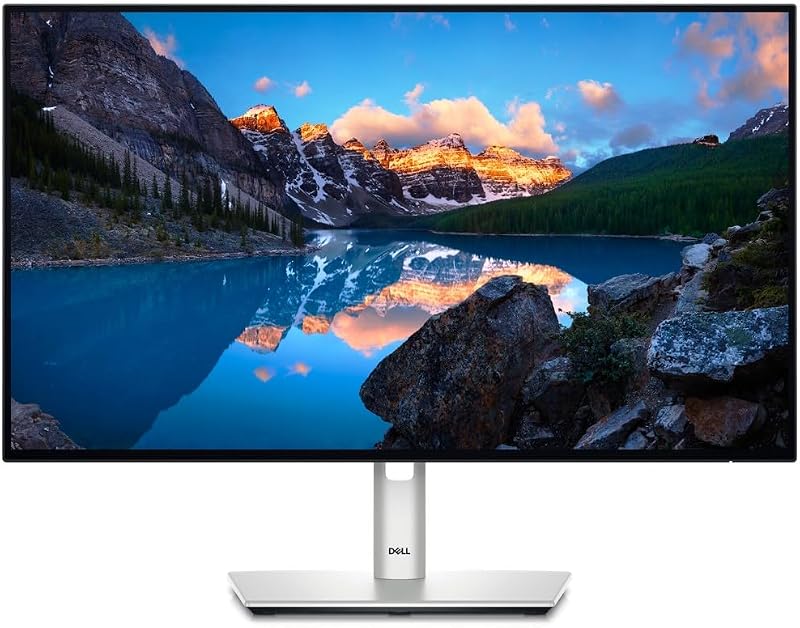
Dell U2424H UltraSharp 24 Inch FHD
- Best for Compact everyday home office desks
- Color Silver
Our score: 8.6/10
Pros
- Smooth 120Hz refresh rate
- Built-in ambient light sensor
- Full ergonomic stand adjustments
Cons
- Basic 1080p resolution
- USB-C power capped at 15W
When desktop space is limited, the Dell U2424H UltraSharp 24 Inch FHD delivers premium visual engineering in a space-saving 23.8-inch form factor. Operating at 1920 x 1080 resolution, this monitor upgrades everyday office tasks with a fluid 120Hz refresh rate and a 5ms response time. That higher refresh rate reduces visual flicker and makes scrolling through documents significantly smoother than on standard 60Hz panels. Dell incorporates an Ambient Light Sensor that intelligently detects surrounding room lighting to optimize brightness and color temperature automatically throughout the day.
Accessibility is prioritized through convenient edge ports, including a quick-access USB-A port and a USB-C port that provides up to 15W of power for charging mobile devices or powering desk accessories. The rear connection array features two DisplayPort inputs, an HDMI port, two USB-C ports, and three USB-A ports. The display covers 98 percent of the DCI-P3 color spectrum with a 1000 to 1 contrast ratio and 250 nits of brightness. Dell’s signature InfinityEdge border delivers a virtually borderless visual experience, making this screen an exceptional choice for dual-monitor arms.
The Dell U2424H UltraSharp is well suited for students, home office workers, and administrative professionals seeking smooth motion and eye comfort in a compact footprint. However, because its USB-C port outputs up to 15W rather than high laptop-charging wattage, users who need full single-cable laptop power delivery should consider Dell’s higher-tier hub models.
Dell UltraSharp 27 Monitor
- Best for Dual-computer workers and Mac users
- Processor Count 1
- Total Number of HDMI Ports 1
- Total Usb Ports 5
- Total USB 3.0 Ports 5
- Series Number 27
Pros
- Built-in KVM switch
- 90W Thunderbolt 4 hub
- Factory-calibrated Display P3 color
Cons
- QHD resolution rather than 4K

Our score: 9.0/10
Best for: General office multitaskers wanting fluid motion
Pros
- Deep 2000 to 1 contrast
- Smooth 120Hz visual experience
- Integrated ambient light sensor
Cons
- Listing omits integrated KVM details
The Dell UltraSharp 27 Monitor, identified in technical documentation as model U2724D, balances broad desktop space with high visual comfort. Its 27-inch matte LED display runs at 120Hz, delivering fluid motion and less flicker than standard 60Hz displays. A deep 2000 to 1 contrast ratio ensures text, spreadsheets, and darker visual elements appear sharp and legible.
Physical adjustment is comprehensive, allowing users to tilt, swivel, pivot 90 degrees into portrait orientation, and adjust height to fit individual posture requirements. Color-focused users can dynamically create, store, and manage custom ICC profiles directly on their computer via the software dashboard. The listing also highlights FreeSync technology for tear-free image reproduction, and the description notes extensive connectivity backed by Thunderbolt 4 hub capability. For those evaluating ultra-wide or high-density alternatives, our dell 5k monitor guide explores how scaling behaves across wider desktop footprints.
This 27-inch model serves general multitaskers, finance professionals, and home office workers who want a larger screen area, strong contrast, and high eye comfort ratings. If your workstation requires managing two separate computers simultaneously with one keyboard and mouse, stepping up to a model with built-in KVM switching will be a more practical path.
Dell UltraSharp U4025QW 40″ Class 5K2K
- Best for Multitaskers needing massive curved workspace
- Weight 41.93 pounds
- Size 16.5" x 37.3" x 4.3"
- Dimensions 4.3 x 37.3 x 16.5 inches
- Color Information Not Available

Our score: 8.8/10
Pros
- Expansive 5K2K WUHD resolution
- Bright 600 Nit panel
- Curved 21 to 9 aspect ratio
Cons
- Large desk footprint required
- Listing omits stand adjustment ranges
For power users who find traditional dual-screen setups cumbersome, the Dell UltraSharp U4025QW 40″ Class 5K2K offers a massive, uninterrupted curved display. Featuring a 39.7-inch viewable screen with an ultrawide 21 to 9 aspect ratio, this monitor provides extensive horizontal workspace. Its 5K2K WUHD resolution renders fine text, intricate design files, and broad data sets with crisp precision, allowing professionals to view sprawling timelines and multiple application windows side by side without a dividing bezel.
The gentle curve brings the outer edges of the display into natural peripheral vision, creating an immersive viewing environment across the entire 39.7-inch surface. The matte screen maintains excellent clarity even in brightly lit offices thanks to a strong 600 Nit brightness rating that cuts through harsh overhead glare. A 5ms response time ensures sports, fast action video, and dynamic presentations render without blurring. Integrated USB Type-C connectivity enables high-speed data transfer and efficient productivity communication between your workstation and connected equipment.
The Dell UltraSharp U4025QW is tailored for video editors, financial analysts, software developers, and executive desks requiring maximum horizontal screen real estate. Those with smaller office desks may find its nearly 40-inch width overwhelming, making standard 27-inch displays a more manageable choice for modest furniture.
Dell UltraSharp 27 Thunderbolt Hub Monitor
- Color Silver
- Size U2726DER
- Weight 16.25 pounds
- Dimensions 7.57 x 24.1 x 15.18 Inches
The Dell UltraSharp 27 Thunderbolt Hub Monitor, model U2726DER, functions as an all-in-one productivity dock for hybrid workers and creators. Presenting a sharp QHD canvas on a 27-inch IPS display, it pairs a 120Hz refresh rate with a 2000 to 1 contrast ratio for deep blacks and smooth navigation. For creators and digital designers, 98 percent Display P3 coverage and factory-calibrated color accuracy provide true-to-life visuals straight from the box, streamlining photo and video production workflows.
As a specialized dell ultrasharp usb c monitor, it streamlines your desktop by routing video, data, and up to 90W of laptop charging over a single Thunderbolt 4 cable. Developers and multitaskers who alternate between a corporate laptop and a personal computer can switch between two machines using a single keyboard and mouse via the built-in KVM switch. The chassis features a modern light ash finish, a virtually borderless frame, and tested macOS compatibility supported by the Dell Display and Peripheral Manager software application.
This monitor is the ideal match for professionals managing two computers, Mac laptop owners seeking a single-cable docking solution, and digital designers who value factory-calibrated Display P3 color. If your primary goal is working in native 4K resolution rather than 1440p, the U2725QE represents the more direct choice in the 27-inch class.
Dell UltraSharp U2724DE 27-Inch Class WQHD
- Best for Contrast-focused editors and productivity workers
- Processor Count 1
- Total Number of HDMI Ports 1
- Total Usb Ports 6
- Total Thunderbolt Ports 2
- Total USB 3.0 Ports 1
Pros
- IPS Black 2000 to 1 contrast
- Fluid 120Hz refresh rate
Cons
- Limited to 1440p resolution
The Dell UltraSharp U2724DE 27-Inch Class WQHD rounds out the lineup by combining a 2560 x 1440 WQHD workspace with advanced IPS Black panel technology. This display achieves a 2000 to 1 contrast ratio, generating significantly darker shadow tones and richer contrast than traditional IPS screens.
An onboard Ambient Light Sensor actively detects changes in ambient room illumination, automatically fine-tuning brightness and color temperature for optimal viewing comfort. The screen offers full ergonomic adjustability, including tilt, swivel, pivot, and height changes, alongside an InfinityEdge border that reduces visual distractions. Users can manage custom ICC profiles directly on their computer via software controls. If your desktop requires an even larger physical display size, our guide to the dell 32 inch monitor category explores additional dimensions for expansive home office setups.
The Dell UltraSharp U2724DE suits content managers, data workers, and business professionals who want rich contrast, eye-care features, and extensive hub connectivity without paying a premium for 4K pixel density. Users who do not need the comprehensive docking options of the DE model can consider the standard U2724D for comparable panel performance.
Chip values are fields copied from the Amazon product listing. Scores are out of 10, based on listed specifications and buyer feedback.
Matching a Model to Your Setup
- For color-critical creative pros and 4K video workflows: Choose the Dell UltraSharp U2725QE 27-Inch 4K UHD for factory-calibrated 99 percent DCI-P3 color, high 3000 to 1 contrast, and 140W Thunderbolt 4 power delivery.
- For dual-computer operators and software engineers: Select the Dell UltraSharp 27 Thunderbolt Hub Monitor (U2726DER) to leverage its integrated KVM switch, 90W single-cable laptop charging, and macOS compatibility.
- For massive timeline editing and multi-window productivity: Pick the Dell UltraSharp U4025QW 40″ Class 5K2K to replace dual-monitor setups with an expansive 39.7-inch curved screen and 600 Nit brightness.
- For rich contrast and certified eye comfort in office tasks: Opt for the Dell UltraSharp U2724DE 27-Inch Class WQHD to benefit from IPS Black 2000 to 1 contrast, 120Hz motion, and ambient light sensing.
- For compact desks and secondary screen placement: Go with the Dell U2424H UltraSharp 24 Inch FHD to maximize smaller desk space while retaining 120Hz scrolling and full ergonomic stand adjustments.
- For dependable single-machine workstation ergonomics: Choose the Dell UltraSharp 27 Monitor (U2724D) for a balanced 27-inch workspace with dynamic ICC profile management and 2000 to 1 contrast.
Before You Buy
Before purchasing a Dell UltraSharp monitor, verify the exact power output and cable specifications on the listing against your computer hardware. While high-tier models like the U2725QE supply up to 140W and the U2726DER supplies up to 90W over Thunderbolt 4, more compact choices such as the U2424H output only up to 15W through USB-C, which charges accessories but cannot power a laptop. Furthermore, listings do not consistently specify which video cables are included inside retail boxes. Check your computer ports and confirm whether you need to purchase an extra HDMI, DisplayPort, or Thunderbolt cable separately.
Desk dimensions and graphics card capabilities also require advance planning. Most 24-inch and 27-inch models in this family feature full ergonomic stands with height, tilt, swivel, and pivot adjustments, but the listing for the 39.7-inch U4025QW does not detail stand adjustment ranges or VESA mounting plate dimensions. Additionally, driving ultra-high resolutions like 4K UHD or 5K2K at high refresh rates requires an up-to-date computer graphics chip. Verifying that your machine supports these display outputs will ensure your new UltraSharp monitor runs at full capability right away.
FAQ
What makes a 120Hz refresh rate beneficial on Dell UltraSharp monitors?
A 120Hz refresh rate refreshes the on-screen image 120 times every second, which is double the speed of traditional 60Hz office displays. This faster refresh rate creates smoother mouse cursor motion, reduces blurring when scrolling through documents or webpages, and reduces visual fatigue during long working hours.
How does IPS Black technology improve visual quality?
Standard IPS panels generally feature a contrast ratio of 1000 to 1, which can make deep black tones appear slightly gray in dim lighting. IPS Black technology raises contrast to 2000 to 1 or higher, providing noticeably deeper blacks, greater shadow definition, and enhanced color depth while preserving wide 178-degree viewing angles.
Can every Dell UltraSharp monitor charge a laptop through one cable?
No, charging capability varies significantly across the lineup based on individual port specifications. The U2725QE provides up to 140W and the U2726DER provides up to 90W over Thunderbolt 4, easily handling laptop power demands. In contrast, the compact U2424H provides up to 15W over USB-C, which is designed for smaller accessories rather than laptop charging.
What does the integrated Ambient Light Sensor do?
The integrated Ambient Light Sensor detects changing light levels in your workspace and automatically adjusts the display brightness and color temperature. It increases screen luminance during bright daytime hours and lowers intensity as room lighting dims, helping reduce eye strain without requiring manual menu adjustments.
What is an integrated KVM switch on an UltraSharp monitor?
A KVM switch allows you to connect two different computers to one monitor and control both machines using a single keyboard and mouse. In this lineup, the Dell UltraSharp 27 Thunderbolt Hub Monitor (U2726DER) explicitly includes built-in KVM functionality, whereas standard models like the U2424H and U2724D do not feature this capability in their listings.


