As Amazon Associates, we earn from qualifying purchases. This means we may receive a small commission at no extra cost to you if you click through and make a purchase.
Setting up a productive home office or multi-screen workstation often starts with a single frustrating problem: modern laptops are slim and portable, but they rarely feature enough built-in ports to connect two external displays, a wired network cord, a keyboard, a mouse, and memory cards simultaneously. Plugging and unplugging a tangled mess of individual dongles every time you take your computer away from your desk quickly becomes exhausting. Choosing a dedicated docking station dual monitor novoo hub solves this dilemma by routing your monitors, data cables, internet, and power pass-through into a single unified desktop station that connects to your laptop via one USB-C cord.
Understanding the NOVOO catalog is straightforward once you look at how the manufacturer organizes its multiport hubs around port density, maximum data transfer bandwidth, and specific video port types. In this novoo docking station comparison, each model features a sturdy aluminum chassis and supports dual or triple external displays, but they cater to distinctly different desk setups. The range spans from a 12-in-1 model equipped with legacy analog video connections for older office screens, up to a 14-in-1 workstation hub built for triple 4K monitors, and reaches an advanced 15-in-1 hub offering 10Gbps data ports for heavy file transfers. Figuring out which novoo docking station to buy simply comes down to identifying the specific display cables you own and how many high-speed accessories you plug in each day.
NOVOO Docking Stations Lineup at a Glance
| Model | Video Output Ports | Maximum Data Speed | Key Connectivity Highlight |
|---|---|---|---|
| NOVOO 15 in 1 Laptop Docking | Dual HDMI (4K@60Hz) + DisplayPort (8K) | 10Gbps (USB-C & USB-A) | 15 total ports with top-tier 10Gbps data throughput |
| NOVOO 14 in 1 Docking Station | Dual HDMI (4K@60Hz) + DisplayPort (8K@30Hz / 4K@120Hz) | 5Gbps (USB-C & USB 3.0) | Ultra-light 1.76-ounce shell with triple 4K display support |
| NOVOO USB C Docking Station Dual | Dual HDMI (4K@30Hz) + VGA (1080P) | 5Gbps (USB 3.0 & USB-C) | Legacy VGA video port for older office monitors |
Figures as published on the product listings.
The Models in Detail
NOVOO 15 in 1 Laptop Docking
- Best for Creative professionals transferring large media files
- Color Black
- Weight 0.16 Pounds
- Size 15 in 1 Dock
- Dimensions 2.3 x 2.3 x 6.3 Inches

Our score: 8.6/10
Pros
- 10Gbps high-speed USB ports
- 8K DisplayPort and dual 4K HDMI
- Gigabit Ethernet and card readers
Cons
- Requires 100W charger for best stability
- No extended multi-screen desktop on macOS
The NOVOO 15 in 1 Laptop Docking station stands as the most comprehensive and high-bandwidth unit in the company lineup, housing 15 individual connection ports inside a sleek black aluminum enclosure. It provides dual HDMI outputs running at up to 4K resolution at a smooth 60Hz refresh rate, alongside an 8K-capable DisplayPort output for ultra-high-definition monitors. For data-intensive peripherals, this hub steps up to 10Gbps transfer rates through dedicated USB-A and USB-C ports, while also supplying two 5Gbps USB-A ports, two standard 480Mbps USB-A ports for basic input accessories, a Gigabit RJ45 Ethernet jack delivering 1000Mbps wired internet, an SD and TF 3.0 memory card reader, and a 3.5mm audio jack. Weighing just 2.56 ounces, it consolidates an entire desktop ecosystem into a compact, portable form factor.
When deployed on a desk, this device functions as an expansive novoo triple display hub for compatible Windows computers, letting you extend independent browser windows, design tools, and communication apps across three separate screens. The manufacturer listing notes that macOS computers are restricted by system limitations to mirror mode or single-screen extension (A-AAA or A-BBB layouts) because Apple systems do not support Multi-Stream Transport (MST) over standard USB-C connections. To ensure smooth operation when powering multiple high-resolution displays and transferring files from external solid-state drives, the listing specifically advises connecting a 100W or greater original laptop charger to the USB-C Power Delivery input port.
This flagship hub is the best novoo usb c dock for creative professionals, video editors, and technical multitaskers who demand high-speed 10Gbps file transfers alongside dual or triple modern digital displays. If you only plan to connect basic wireless mouse dongles or older 1080p screens, the high-speed overhead on this model may exceed your basic needs, making the 14-in-1 or 12-in-1 alternatives more practical. However, for users who work with large media libraries on modern laptops like MacBook Pro, Dell XPS, HP Spectre, Lenovo ThinkPad, or Microsoft Surface, its top-tier port density provides exceptional future-proofing. Those exploring high-performance multi-screen setups might also compare its flexibility against a dedicated dell docking station dual monitor setup to evaluate port layouts.
NOVOO 14 in 1 Docking Station
- Best for Everyday office workers running triple monitors
- Size 14 in 1
- Weight 0.11 Pounds
- Color Silver Gray HUB

Our score: 8.4/10
Pros
- Supports triple 4K displays at 30Hz
- Ultra-lightweight 1.76-ounce aluminum build
- Three dedicated USB 2.0 peripheral ports
Cons
- Wall charger and power cord not included
- Data ports capped at 5Gbps
Designed with a clean silver-gray aluminum finish, the NOVOO 14 in 1 Docking Station balances extensive multi-screen capability with an exceptionally lightweight body weighing only 1.76 ounces and measuring 2 inches long by 0.6 inches wide by 5 inches high. Its port selection includes two 4K HDMI ports capable of 4K@60Hz video transmission, an advanced DisplayPort supporting single-screen output up to 8K@30Hz or 4K@120Hz, a Gigabit Ethernet port for lag-free 1000Mbps networking, a 100W USB-C Power Delivery pass-through charging port, and a combined 3.5mm microphone and audio jack. It also integrates a built-in SD and Micro SD card reader alongside six dedicated USB peripheral ports: two USB-A 3.0 ports at 5Gbps, one USB-C data port at 5Gbps, and three USB 2.0 ports tailored specifically for keyboards, mice, and printers.
As a versatile novoo dual monitor adapter, this 14-in-1 model excels at multi-monitor office productivity under Windows by supporting Multi-Stream Transport (A-BCD mode). In this setup, office workers can spread separate documents, spreadsheets, and web research across triple 4K monitors running at 30Hz without visual stutter. For Apple users, the listing clarifies that macOS mirrors external displays due to system software constraints. Power handling is robust, passing up to 100W of charging power through to the connected laptop while simultaneously running all connected accessories, though the listing explicitly notes that a wall charger is not included in the box and suggests plugging in a 65W or greater power supply for reliable daily operation.
This 14-in-1 model is the ideal choice for everyday business professionals, finance analysts, and remote workers who want triple-screen flexibility and generous accessory connectivity without paying for 10Gbps transfer ports they will never utilize. It concedes the fastest data speeds to the 15-in-1 model, capping file transfers at 5Gbps, but compensates with three dedicated USB 2.0 ports that keep wireless mouse transmitters responsive and free of radio interference. Backed by two years of product maintenance and 24/7 customer support, it represents a rock-solid desktop upgrade for anyone transitioning from a single small laptop screen to an organized multi-display workstation. It also offers a great travel-friendly companion if you regularly split work between home and an office desk outfitted with an hp laptop docking station dual monitor configuration.
NOVOO USB C Docking Station Dual
- Best for Users connecting older VGA monitors or projectors
- Color Grey
- Size 12-in-1
Our score: 9.4/10
Pros
- Dedicated 1080P analog VGA output
- Dual 4K HDMI video ports
- Broad legacy operating system compatibility
Cons
- HDMI limited to 4K at 30Hz
- Heavier 158-gram aluminum casing
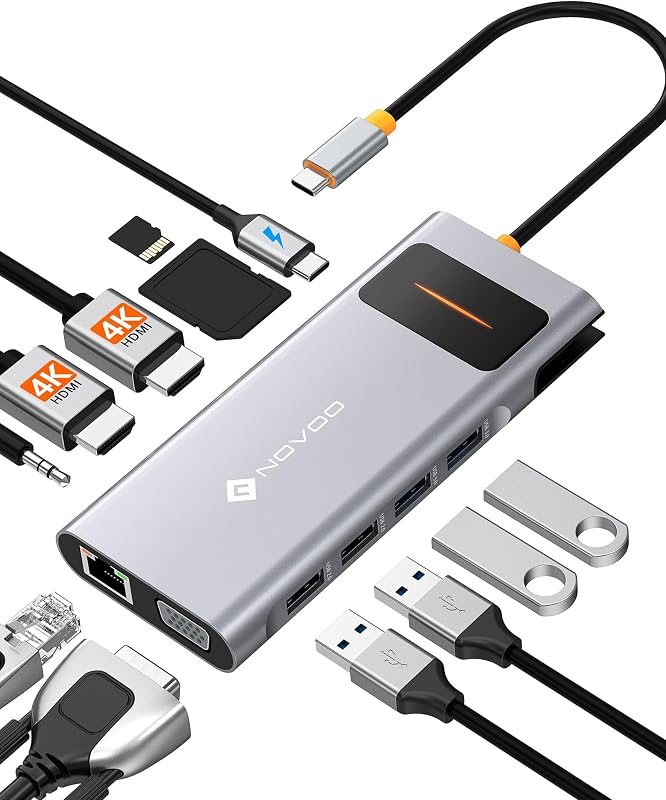
The NOVOO USB C Docking Station Dual provides a distinctive 12-in-1 connection array that directly addresses desks that still utilize mixed-generation computer hardware. Encased in a durable gray aluminum body measuring 5.5 inches long, 2.5 inches wide, and 1 inch high with a weight of 158 grams, this dock features two HDMI ports delivering 4K resolution at 30Hz, alongside a legacy analog VGA port capable of 1080P output. Beyond video, the dock includes two USB 3.0 ports with 5Gbps transfer speeds, one USB-C 5Gbps data port, two USB 2.0 ports, a 100W USB-C Power Delivery charging port, a Gigabit Ethernet RJ45 jack compatible with 10/100/1000BASE-T local area networks, an SD and TF flash memory card reader, and a 3.5mm headphone and microphone jack.
This novoo 15 in 1 laptop docking sibling offers impressive display versatility by bridging modern HDMI screens with legacy office hardware, allowing Windows users to configure dual-monitor and triple-monitor viewing layouts across two HDMI panels and one VGA screen. The listing highlights an essential technical requirement for buyers: your host laptop must feature a built-in, fully functional USB-C port that carries both video signals (DisplayPort Alt Mode) and charging capabilities. Operating system support is remarkably broad, spanning Windows 10, 8, 7, Vista, and XP, along with Mac OS X 10.6 or later, and Linux 2.6.14 or later, ensuring seamless operation across older corporate operating systems as well as modern consumer hardware.
This 12-in-1 dock is tailor-made for educators, conference room organizers, and budget-conscious desk setups where an existing computer monitor or meeting room projector relies on an older 15-pin VGA cable. It gives way to the 14-in-1 and 15-in-1 models if you need cutting-edge DisplayPort connections, 60Hz refresh rates at 4K, or 8K single-display outputs. However, if your workstation revolves around standard office tasks, 1080p monitors, and reliable wired internet, this hub eliminates the need to purchase separate digital video adapters. Buyers who frequently compare versatile third-party docking options like a wavlink docking station will find that this NOVOO hub delivers an exceptionally convenient bridge between legacy analog gear and modern USB-C laptops.
Chip values are fields copied from the Amazon product listing. Scores are out of 10, based on listed specifications and buyer feedback.
Matching a Model to Your Setup
- Creative professionals and videographers moving large media files between fast external solid-state drives and triple modern screens should select the NOVOO 15 in 1 Laptop Docking.
- Everyday remote workers and analysts who want triple 4K screen extension under Windows alongside dedicated ports for wireless peripherals should choose the NOVOO 14 in 1 Docking Station.
- Classrooms, conference rooms, and home offices that rely on older VGA monitors or conference room projectors alongside HDMI screens will be best served by the NOVOO USB C Docking Station Dual.
- Frequent travelers who prioritize an ultra-lightweight 1.76-ounce aluminum build that slips easily into a laptop sleeve should opt for the NOVOO 14 in 1 Docking Station.
- Power users seeking the absolute highest data transfer speeds of 10Gbps on both USB-A and USB-C connections will find the right fit in the NOVOO 15 in 1 Laptop Docking.
Before You Buy
Before purchasing any NOVOO docking station, it is critical to know what accessories are not included in the retail packaging. None of these three NOVOO docks include an AC wall power supply brick or an external wall outlet power cord. Instead, each dock features a USB-C Power Delivery pass-through port rated up to 100W that requires you to plug in your laptop’s original USB-C charger or a separately purchased high-wattage power adapter (the 14-in-1 model recommends at least 65W, while the 15-in-1 model recommends 100W or higher for stable multi-screen performance). Additionally, video cables such as HDMI, DisplayPort, and VGA cords are not supplied with the docks and must be provided from your existing monitor setup.
Hardware compatibility on your host computer is another critical detail that the product listings emphasize. For any of these docks to transmit external video and charge your laptop over a single cord, your computer’s USB-C port must be a fully functional port supporting DisplayPort Alternate Mode (DP Alt Mode) and USB Power Delivery; standard data-only USB-C ports cannot output video. Furthermore, Apple MacBook users must be aware that macOS does not support Multi-Stream Transport (MST) over standard USB-C docks. While Windows computers can extend different windows across two or three external monitors independently, Mac computers will only mirror your primary screen or mirror the same extended desktop across all external displays simultaneously.
FAQ
Can NOVOO docking stations extend independent screens on Apple Mac laptops?
No, the product listings specifically point out that macOS does not support Multi-Stream Transport (MST) across standard USB-C docking hubs. When connected to a MacBook Pro or MacBook Air, external monitors will operate in mirror mode or single-screen extension mode (A-AAA or A-BBB layouts), meaning all external displays will show identical content rather than independent desktops.
Do NOVOO docking stations come with a power supply in the box?
No, the listings state that a wall charger and power cord are not included in the package. Each dock features a USB-C Power Delivery port capable of passing up to 100W through to your computer, and you must connect your laptop’s original USB-C power brick or a standalone high-wattage wall adapter to keep the laptop charged and peripherals running smoothly.
What type of USB-C port does my laptop need to use these docks?
Your laptop must have a fully functional USB-C port or a Thunderbolt 3 or 4 port that supports DisplayPort Alternate Mode (DP Alt Mode) for video output and USB Power Delivery for charging. If your laptop only features a basic USB-C data transfer port, the dock will power USB accessories and read flash drives, but your external monitors will not display a picture.
What is the difference between the 5Gbps and 10Gbps USB ports on these docks?
A 5Gbps port, found on standard USB 3.0 connections, transfers data at roughly 500 megabytes per second, which is plenty fast for external hard drives, flash sticks, and general office backups. A 10Gbps port, featured on the NOVOO 15 in 1 model, doubles that transfer ceiling to approximately 1000 megabytes per second, significantly speeding up file transfers when working with high-speed solid-state drives and 4K video footage.
Why does the NOVOO 12-in-1 dock include a VGA port alongside HDMI?
The NOVOO USB C Docking Station Dual includes a legacy 15-pin VGA port to provide backward compatibility for older desktop monitors, classroom displays, and office projectors that do not have modern HDMI or DisplayPort inputs. It allows users to connect up to 1080p analog video gear without needing to purchase separate specialized video conversion dongles.