
As Amazon Associates, we earn from qualifying purchases. This means we may receive a small commission at no extra cost to you if you click through and make a purchase.
Shopping for a compact desktop computer often feels overwhelming because miniature machines pack diverse processors, storage formats, and port configurations into enclosures that look almost identical from across a desk. When deciding on a small desktop, first-time buyers and gift-givers must evaluate processor core counts, system memory, internal storage capacity, and video display options against their daily workload. Whether you are searching for a kamui mini pc for web browsing or looking to build a multi-monitor productivity station, selecting the right machine comes down to balancing daily application needs with physical expansion capability.
KAMRUI organizes its compact personal computer range into distinct tiers, separating entry-level home office units from high-efficiency octa-core workhorses and entertainment desktops. In this detailed kamrui mini pc comparison, we examine how the brand arranges its hardware options across the Pinova series, the AK1PLUS workspace chassis, and the performance-focused E3B platform. Understanding these distinctions helps clarify which kamrui mini pc to buy so you can invest in the exact processing performance and display connectivity your daily routine demands.
KAMRUI Mini PCs Lineup at a Glance

Our score: 8.6/10
Best for: Demanding productivity and fast networking setups
Pros
- AMD Ryzen 7 7735HS 8-core CPU
- Fast 2.5GbE Ethernet and WiFi 6
- Dual-channel LPDDR5 5500MT/s memory
Cons
- Listing does not specify preloaded OS name
| Model | Processor | Memory and Storage | Display Outputs | Primary Connectivity |
|---|---|---|---|---|
| KAMRUI Pinova P2 Mini PC | AMD Ryzen 7330U (4C/8T, up to 4.3GHz) | 16GB LPDDR4X, 256GB M.2 SSD | Triple 4K (HDMI 2.0, DP 1.4b, Type-C) | Gigabit LAN, Dual-Band WiFi, Bluetooth |
| KAMRUI AK1PLUS Mini PC Computer | Intel N5030 (4C/4T, up to 3.1GHz) | 12GB LPDDR4, 256GB M.2 SSD | Dual 4K (2x HDMI 2.0) | Gigabit Ethernet, WiFi, Bluetooth 5.0 |
| KAMRUI Mini PC Ryzen 7 7735HS | AMD Ryzen 7 7735HS (8C/16T, up to 4.75GHz) | 16GB LPDDR5, 512GB M.2 SSD | Triple 4K (HDMI 2.0, DP 1.4, Type-C) | 2.5GbE LAN, WiFi 6, Bluetooth |
| KAMRUI E3B AMD Ryzen 7 7730U | AMD Ryzen 7 7730U (8C/16T, up to 4.5GHz) | 16GB LPDDR4X, 1TB M.2 SSD | Triple 4K (HDMI, DP, Type-C) | RJ45 LAN, WiFi 6, Bluetooth 5.2 |
| KAMRUI Pinova P1 Mini PC | AMD Ryzen R2544 (4C/8T, up to 3.7GHz) | 16GB RAM, 256GB M.2 SSD | Triple 4K (HDMI, DP, Type-C) | Gigabit LAN, Dual-Band WiFi 5, Bluetooth 4.2 |
| KAMRUI Gaming Mini PC | AMD Ryzen 7 7730U (8C/16T, up to 4.5GHz) | 16GB LPDDR4X, 512GB M.2 SSD | Triple 4K (HDMI 2.0, DP 1.4, Type-C) | WiFi 6 (2400 Mbps), Bluetooth 5.2 |
Figures as published on the product listings.
The Models in Detail
KAMRUI Pinova P2 Mini PC
- Best for Everyday multitaskers needing triple monitor connectivity
- Color Silver
- Size 16GB+256GB/AMD Ryzen 7330U

Our score: 8.4/10
Pros
- AMD Ryzen 7330U 4-core processor
- Triple 4K display connectivity
- 16GB RAM for smooth multitasking
Cons
- Modest 256GB SSD storage
The KAMRUI Pinova P2 Mini PC utilizes an AMD Ryzen 7330U processor built on Zen 3 architecture with 4 cores and 8 threads reaching boost speeds up to 4.3GHz. For beginners, processor cores represent separate processing units inside the chip, while threads allow each core to manage two computational tasks at once. Backed by 8MB of L3 cache and a 28-watt power envelope, this silver desktop delivers dependable responsiveness for everyday office productivity, administrative workflows, and media playback.
Visual output is handled by integrated AMD Radeon Graphics featuring 6 compute units on the Vega architecture. The chassis provides three separate display channels: one HDMI 2.0 port, one DisplayPort 1.4b connection, and a multi-functional USB 3.2 Gen2 Type-C port supporting DisplayPort Alternate Mode at 10Gbps data speeds. This configuration allows simultaneous 4K@60Hz output to three screens, making it easy to hook up desktop monitors or connect to a living room setup like a tlc tv 4k for family entertainment. Internally, the unit houses 16GB of power-efficient LPDDR4X memory and a 256GB M.2 SSD, alongside dual-band Wi-Fi and Bluetooth.
This desktop suits remote professionals, telecommuters, and students who need a responsive multi-monitor workstation without a bulky tower. Its compact 5.04 x 5.04 x 1.63-inch case includes a VESA mounting bracket to attach directly behind a monitor. However, users requiring vast storage reserves for local video libraries or demanding graphics editing will find better headroom moving up to the brand’s octa-core machines like the E3B or 7735HS models.
KAMRUI AK1PLUS Mini PC Computer
- Best for Everyday web browsing and student homework
- Processor Count 1
- Total Usb Ports 4
- Total Number of HDMI Ports 1
- Total Thunderbolt Ports 2
- Graphics Card Ram 16

Our score: 8.6/10
Pros
- Dual 4K display capability
- Expandable 2.5-inch drive bay
- Quiet air-cooled thermal design
Cons
- Intel N5030 entry-level processing speed
The KAMRUI AK1PLUS Mini PC Computer centers around an Intel N5030 quad-core processor running 4 cores and 4 threads at clock speeds up to 3.1GHz. This platform focuses on energy conservation and low thermal output, making it an accessible option for fundamental tasks such as browsing the web, streaming educational lectures, organizing family calendars, and handling spreadsheet documents. The system comes pre-installed with Windows 10 Pro and is kept cool by an internal air cooling fan designed for quiet desktop operation.
Memory and storage flexibility stand out on this model. It includes 12GB of LPDDR4 memory and a fast 256GB M.2 2280 solid state drive. When you need extra room for files, the chassis supports expansion with an M.2 SATA or NVMe drive up to 2TB, plus a dedicated internal bay for a 2.5-inch SATA hard drive or solid state drive up to 2TB, enabling up to 4TB of combined storage. Visual tasks are driven by Intel UHD Graphics outputting through dual HDMI 2.0 ports for dual 4K@60Hz monitor setups. The exterior features four USB 3.2 ports, Gigabit Ethernet, an audio jack, and dual-band Wi-Fi.
This machine is built for first-time buyers, schoolchildren, reception desks, and home offices that stick to standard office software and web portals. Because it uses an entry-level Intel N5030 chip and relies on dual HDMI ports without a DisplayPort or USB-C video output, users seeking triple-display setups or fast media rendering will want to look toward the Pinova P2 or Ryzen 7 alternatives.
KAMRUI Mini PC Ryzen 7 7735HS
- Total Usb Ports 7
- Total Number of HDMI Ports 1
- Processor Count 1
- Operating System OS
- Model Number H1
The KAMRUI Mini PC Ryzen 7 7735HS steps into enthusiast territory with the AMD Ryzen 7 7735HS processor. Featuring 8 cores and 16 threads with boost frequencies reaching 4.75GHz, this Enhanced Edition chip delivers substantial processing bandwidth for complex spreadsheets, heavy application multitasking, and digital media processing. Heat management relies on an airflow-optimized cooling design with an upgraded aluminum heatsink that increases cooling efficiency by 30 percent while maintaining low operational noise beneath an illuminated modern blue indicator light.
High-speed data transfer is prioritized throughout the hardware layout. The system incorporates 16GB of dual-channel LPDDR5 memory running at 5500MT/s alongside a 512GB M.2 SSD. Internal expansion allows upgrading storage up to 4TB across two M.2 2280 slots supporting PCIe 3.0×4 throughput. Integrated AMD Radeon Graphics with 12 cores running up to 2200MHz power triple 4K@60Hz display configurations through one HDMI 2.0, one DisplayPort 1.4, and one USB 3.2 Gen2 Type-C port that supports 10Gbps data, DisplayPort 1.4 output, and Power Delivery. Network traffic is accelerated by a 2.5GbE RJ45 Ethernet port paired with modern WiFi 6 wireless technology.
Demanding professionals, multi-tasking office managers, and creators who move massive files across local networks will appreciate the raw horsepower and 2.5-gigabit connectivity on this desktop. While it handles heavy daily workloads with ease, individuals who merely need a simple typing and browsing machine will find its high-tier processor more capable than basic everyday clerical tasks require.
KAMRUI E3B AMD Ryzen 7 7730U
- Best for Users requiring large internal storage capacity
- Color Black
- Size 16GB+1TB/AMD Ryzen 7 7730U
Our score: 8.8/10
Pros
- Spacious 1TB M.2 solid state drive
- AMD Ryzen 7 7730U 8-core processor
- WiFi 6 and Bluetooth 5.2 connectivity
Cons
- Listing notes eSATA interface ambiguity
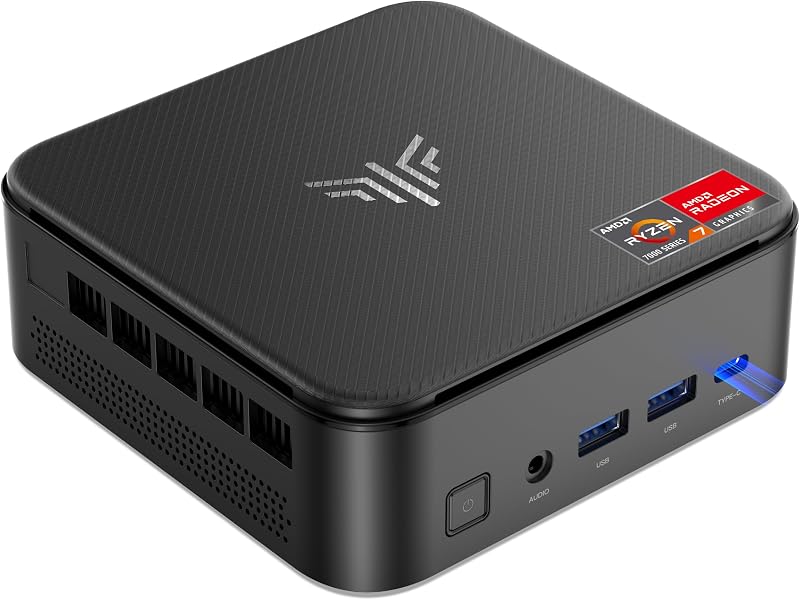
The KAMRUI E3B AMD Ryzen 7 7730U offers an exceptional balance of processing speed and built-in capacity by pairing an AMD Ryzen 7 7730U processor with an extensive 1TB M.2 2280 solid state drive. Based on Zen 3+ architecture, the CPU features 8 cores and 16 threads operating at a 2.0GHz base clock with turbo boost potential up to 4.50GHz. Users can switch operational profiles in the BIOS between an energy-saving quiet mode and a full performance mode, all within an efficient 28-watt power envelope.
Out-of-the-box storage space is the defining highlight here. With 1TB of solid state storage included, owners can archive large photo libraries, extensive document databases, and application installations without immediate external drives. The board houses two M.2 2280 slots supporting up to 4TB of total storage, with one slot handling both SATA and PCIe NVMe drives. Graphics processing comes from an 8-core AMD Radeon GPU clocked at 2000MHz, supporting triple displays via HDMI, DisplayPort, and Type-C. Wireless links include triple-band WiFi 6 and Bluetooth 5.2, making it simple to pair modern wireless peripherals or a high-resolution display like a samsung mini led tv 55 inch screen for home media streaming.
This desktop is well-matched for home office power users, self-employed creators, and network utility builders looking for a server-ready PC for firewall or routing software. It gives way to the 7735HS model for shoppers who specifically require newer LPDDR5 memory speeds and a 2.5GbE wired network port, but its default 1TB storage drive makes it an outstanding standalone option.
KAMRUI Pinova P1 Mini PC
- Best for Compact home office desks and remote work
- Color Black
- Size 16GB+256GB/Ryzen R2544
- Dimensions 3.94 x 3.94 x 1.18 inches
Pros
- Ultra-compact space-saving chassis
- Preloaded Windows 11 Pro system
- Triple screen display output
Cons
- 256GB storage capacity fills up fast
The KAMRUI Pinova P1 Mini PC focuses on maximum space economy while retaining solid multi-threaded capability. At its heart is the AMD Ryzen R2544 processor, providing 4 cores, 8 threads, 4MB of cache, and boost clocks up to 3.7GHz at a 28W TDP. The listing highlights preloaded Windows 11 Pro operating software, giving business buyers immediate access to professional security features, remote management options, and TPM 2.0 support right out of the box.
Despite measuring a remarkably compact 3.94 x 3.94 x 1.18 inches (with secondary listing text noting 5.06 x 5.06 x 2.01 inches), this micro desktop provides robust physical connectivity. It houses 16GB of system RAM, a 256GB M.2 SSD, four USB 3.2 ports, an RJ45 Gigabit Ethernet jack, and an audio in/out port. Visual output supports triple-screen 4K@60Hz layouts through dedicated HDMI, DisplayPort, and Type-C connections driven by integrated 1400MHz graphics. A soft blue chassis light activates during operation, and the included VESA mount allows clean installation on the back of any standard computer monitor.
The Pinova P1 serves as an ideal kamrui mini pc for home office environments where desk space is scarce, such as shared study areas, reception desks, and compact cubicles. Users planning to run intensive 3D games or edit multi-track 4K video footage will encounter performance limits on this 4-core platform and should look toward KAMRUI’s 8-core Ryzen 7 offerings instead.
KAMRUI Gaming Mini PC
- Best for Casual gamers and general multimedia streamers
- Processor Count 1
- Total Usb Ports 6
- Total Number of HDMI Ports 1
- Operating System OS
- Processor Socket no
Pros
- AMD Ryzen 7 7730U 8-core CPU
- AMD Radeon 8-core graphics
- Fast WiFi 6 and Bluetooth 5.2
Cons
- Heavier unit weight at 1.25 kilograms
The KAMRUI Gaming Mini PC leverages the 8-core, 16-thread AMD Ryzen 7 7730U processor built on TSMC’s 7nm FinFET process. The CPU reaches boost frequencies up to 4.5GHz and carries 16MB of L3 cache to smooth out computational bottlenecks during multitasking. Operating with a default TDP of 15 watts and scaling up to 28 watts under demand, this system balances thermal control with punchy performance inside a sturdy 1.25-kilogram desktop chassis.
Internal hardware features 16GB of LPDDR4X memory clocked at 3200MHz and a 512GB M.2 2280 PCIe x4 solid state drive, providing responsive boot times and ample space for general application suites. Visual duties are handled by an 8-core AMD Radeon graphics engine running at 2000MHz. It supports three 4K@60Hz monitors through a combination of HDMI 2.0, DisplayPort 1.4, and USB Type-C video ports. For rapid data exchange, the computer includes WiFi 6 wireless connectivity capable of speeds up to 2400 Mbps alongside Bluetooth 5.2 and multiple USB 3.2 Gen 2 ports.
This desktop is engineered for casual gamers playing entry-level titles, home media enthusiasts, and everyday office workers who want octa-core multitasking muscle without purchasing a traditional tower. Shoppers seeking a hyper-compact footprint or ultra-fast LPDDR5 memory will find the Pinova P1 or 7735HS models better tailored to those specific hardware preferences.
Chip values are fields copied from the Amazon product listing. Scores are out of 10, based on listed specifications and buyer feedback.
Matching a Model to Your Setup
- Dedicated home office desk with dual monitors and standard office files: choose the KAMRUI AK1PLUS Mini PC Computer for its dual HDMI outputs, quiet air cooling, and flexible 2.5-inch drive bay.
- Compact remote workspace requiring triple-screen productivity: select the KAMRUI Pinova P2 Mini PC for its 4-core, 8-thread Zen 3 efficiency and versatile DisplayPort, HDMI, and USB-C display outputs.
- High-throughput workstation with multi-gigabit networking: opt for the KAMRUI Mini PC Ryzen 7 7735HS to take advantage of its 8-core processing power, LPDDR5 memory, and fast 2.5GbE LAN port.
- Extensive local storage for document archives and offline media: choose the KAMRUI E3B AMD Ryzen 7 7730U for its massive 1TB factory-installed SSD and dual M.2 expansion slots.
- Ultra-minimalist desk or monitor-back mounting with business management: pick the KAMRUI Pinova P1 Mini PC for its small form factor, VESA bracket, and pre-installed Windows 11 Pro system.
- General household entertainment and casual gaming: go with the KAMRUI Gaming Mini PC to enjoy 8-core processing, 512GB of internal storage, and smooth WiFi 6 wireless streaming.
Before You Buy
Before purchasing a compact desktop, keep in mind what is not included in the packaging. None of these KAMRUI mini computers come with a computer monitor, keyboard, mouse, or video cables beyond basic power adapters and mounting brackets. You will need to provide your own external display and input devices to complete your workstation. Furthermore, while models like the AK1PLUS explicitly list Windows 10 Pro and the Pinova P1 specifies Windows 11 Pro, other listings vaguely define the preloaded operating system simply as “OS,” meaning first-time buyers should verify operating system setup requirements during initial startup.
Shoppers should also pay attention to physical specifications and port arrangements that may seem confusing in technical tables. For example, certain specification blocks list optical disc storage such as BD-R or cite eSATA interfaces, yet these compact computers do not house internal disc drives or external legacy eSATA ports; any physical CD or Blu-ray reading requires a separate external USB drive. Review your display input ports carefully to confirm whether you need standard HDMI cables, DisplayPort cords, or USB-C video cables to connect your screens properly.
FAQ
Can these mini desktop computers connect to multiple screens simultaneously?
Yes, all six models support multi-monitor setups. The AK1PLUS supports dual 4K monitors through its two HDMI ports, while the Pinova P1, Pinova P2, E3B, 7735HS, and Gaming Mini PC models feature triple 4K display support by combining HDMI, DisplayPort, and USB Type-C video outputs.
What is the difference between quad-core and eight-core processors for beginners?
Processor cores function like individual workers inside your computer. A quad-core chip (4 cores) easily handles web browsing, word processing, video calls, and running a few applications together. An eight-core chip (8 cores) doubles those internal resources, allowing the computer to manage intense multitasking, background data compiling, photo editing, and light gaming without slowdowns.
Can I upgrade the internal storage on these compact computers?
Most models provide internal storage expansion options. For instance, the AK1PLUS includes an open bay for a 2.5-inch SATA hard drive or SSD, while the E3B and 7735HS feature dual M.2 2280 slots supporting total storage capacities up to 4TB. Checking internal drive slots allows you to expand capacity as your digital library expands.
Do these computers support wireless networking out of the box?
Yes, every model in this lineup includes built-in wireless networking and Bluetooth connectivity. Models like the Pinova P1, Pinova P2, and AK1PLUS utilize dual-band Wi-Fi for everyday web access, while performance models like the 7735HS, E3B, and Gaming Mini PC incorporate modern WiFi 6 for faster data transfer and reduced latency.
How does mounting a mini PC behind a monitor work?
Several models, including the Pinova P1, Pinova P2, and 7735HS, include a standard VESA mounting bracket in the box. This metal bracket screws into the threaded mounting holes on the back of compatible computer monitors, allowing you to slide the mini PC securely behind the screen to keep your desk entirely clutter-free.


