As Amazon Associates, we earn from qualifying purchases. This means we may receive a small commission at no extra cost to you if you click through and make a purchase.
Stepping into aviation or space simulation can feel overwhelming when you look at the specialized hardware options on the market. Modern flight simulation software gives you the opportunity to sit in the pilot seat of everything from commercial airliners and vintage bush planes to advanced military fighter jets and sci-fi spacecraft. However, flying an aircraft using a standard computer keyboard or standard game controller feels clunky and imprecise. Choosing the right physical gear means deciding between a comprehensive Hands-On Throttle And Stick system, known in aviation gaming as a HOTAS, and modular cockpit expansion panels. A HOTAS pairs a precision flight stick in your dominant hand with a progressive engine throttle in your non-dominant hand, giving you physical control over flight surfaces, speed, and thrusters. In contrast, an instrument switch panel focuses on authentic cockpit procedures like turning magnetos, igniting aircraft engines, flipping landing lights, and pulling a physical lever to drop landing gear. Understanding how these hardware categories fulfill different roles is the first step in assembling an immersive flight desk.
Logitech organizes its flight simulation hardware into clear tiers tailored to specific simulation genres and desk arrangements. In their dedicated flight hardware catalog, you will find dual-unit controllers that focus on complete physical aircraft operation alongside modular add-on hardware designed to replicate real-world civil aviation cockpits. At one end of the lineup, Logitech produces fully featured dual-handed control systems with advanced sensors, physical spring adjustments, and specialized mini analog sticks designed to accommodate modern space simulators and complex twin-engine military combat aircraft. Alongside these combat-focused flight sticks, the brand maintains classic civil aviation gear originally developed under the Saitek engineering lineage, including adjustable progressive throttles with integrated displays and standalone switch modules that can be stacked on your desktop or mounted directly to flight yokes. By separating complete flight sticks from specialized cockpit switchboards, this range lets pilots start with an all-in-one dual-handed flight controller or systematically build a multi-panel physical cockpit over time.
Logitech Flight Simulator Controllers Lineup at a Glance
| Model | Hardware Category | Key Hardware Features | Connectivity and Requirements |
|---|---|---|---|
| Logitech G X56 H.O.T.A.S Throttle | Dual-unit joystick and twin throttle | 16-bit hall-effect sensors, mini analog sticks, 4-spring tension system, RGB backlighting | 2x USB 2.0 ports, Windows 11, 10, 8.1, 7 |
| Logitech G Pro Flight Switch Panel | Modular cockpit switch panel | Rotary engine start dial, landing gear lever with LED lights, modular mounting brackets | 1x USB port, Windows 10, 8.1, 8, 7 |
| Logitech G Saitek X52 Pro Flight | Dual-unit joystick and progressive throttle | Non-contact magnetic sensors, progressive throttle detents, interactive LCD screen, 5-position handle adjustment | 2x USB 2.0 ports, Windows 10, 8.1, 7 |
Figures as published on the product listings.
The Models in Detail
Logitech G X56 H.O.T.A.S Throttle
- Best for Space simulation and advanced combat pilots
- Color Black
- Weight 6.922 pounds
Our score: 9.8/10
Pros
- 16-bit hall-effect non-contact sensors
- Twin throttles with friction adjuster
- Mini analog sticks for 6DoF translation
- Customizable RGB backlighting
Cons
- Requires two USB ports
- Large desktop footprint
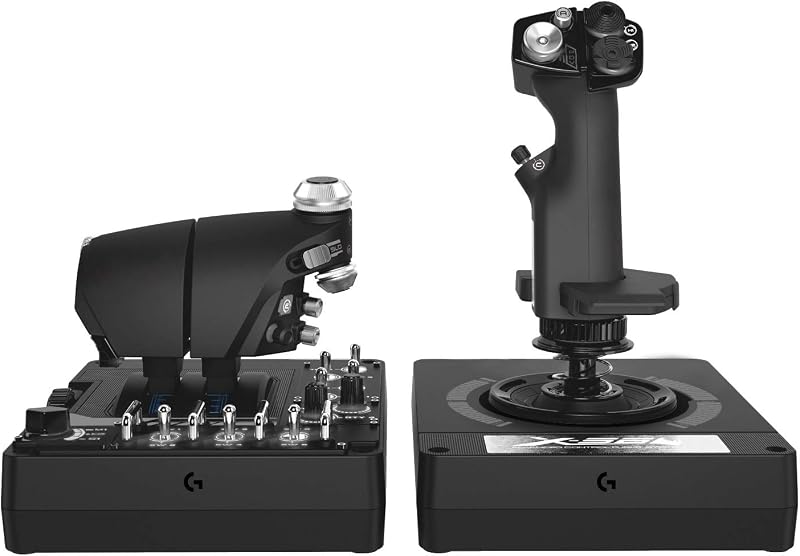
The Logitech G X56 H.O.T.A.S Throttle serves as the brand’s premier dual-handed flight control system, engineered specifically to handle both terrestrial flight simulation and complex six-degrees-of-freedom space simulation. Finished in a matte black and gray exterior, this heavy 6.9-pound setup divides flight commands across two distinct desktop units: an ergonomic flight stick and a separate dual-throttle base. The flight stick incorporates non-contact hall-effect sensors on its 16-bit aileron and elevator axes, ensuring that physical movements translate into smooth, jitter-free digital inputs inside your simulator. To tailor physical resistance to your personal preference, the flight stick includes an advanced four-spring system that allows you to swap out central springs to achieve anything from loose, agile steering to firm, resistant centering. Alongside traditional flight switches, both the stick and throttle feature dedicated mini analog thumbsticks that deliver true six-degrees-of-freedom maneuvering, enabling you to manage vertical, horizontal, and lateral thruster translation or control gimballed spacecraft weaponry independently.
On the propulsion side, the twin throttle unit allows you to control two engines independently, or lock the two levers together via a mechanical throttle lock when operating single-engine aircraft. A physical friction adjustment dial lets you modify the resistance required to slide the throttles forward and backward. Connectivity is handled through a pair of USB 2.0 cables that measure two meters in length, plugging directly into your Windows computer. The unit features 24 primary physical buttons, while Logitech’s programming software expands that hardware into over 189 programmable commands across multiple active mode profiles. The system also integrates customizable RGB backlighting, allowing you to match the internal glow of the throttle and stick to the lighting scheme of your existing desktop workstation. For pilots who like to switch their desk layout between daily productivity with a bluetooth mouse for laptop logitech workflow and weekend space piloting, the solid desktop footprint of the X56 provides plenty of stability without requiring permanent mounting screws.
This controller is built primarily for flight enthusiasts, combat pilots, and modern space flight simulation enthusiasts who demand total physical control over multi-axis movement, thrusters, and weaponry. Because the button shapes and switch angles are deliberately contoured with distinct tactile profiles, it is widely used by pilots flying inside virtual reality headsets who must operate all flight controls purely by touch. The model delivers immense versatility for combat and space operations, but it gives way to the lighter, single-throttle X52 Pro for casual aviators who prefer a more streamlined layout with integrated flight instrumentation readouts, or to the modular Pro Flight Switch Panel for pilots focused strictly on general aviation cockpit checklists.
Logitech G Pro Flight Switch Panel
- Best for Cockpit builders expanding switch controls
- Color White

Our score: 8.0/10
Pros
- Landing gear lever with LED status
- Modular interlocking bracket design
- Rotary engine magneto starter dial
Cons
- No flight steering stick included
- Civilian simulation software focus
The Logitech G Pro Flight Switch Panel is a specialized instrument module created to eliminate keyboard reliance and mouse-clicking during critical flight operations. Weighing just 14.78 ounces and measuring 11.1 inches wide by 3.27 inches deep and 2.48 inches high, this horizontal switchboard is built to replicate the lower instrument console of civilian training aircraft. The hardware features 14 individual mechanical switches, a multi-position rotary engine magneto starter dial, and a prominent landing gear lever flanked by integrated green and red light-emitting diodes. These LEDs provide real-time status feedback directly from simulation software like Microsoft Flight Simulator X, showing when landing gear is transitioning, locked down, or fully stowed. Connecting directly to your PC via a single USB cable, the panel works natively with leading aviation software suites including Flight Simulator X, Prepar3D, and X-Plane 10 across Windows operating systems.
A central engineering strength of this switch module is its modular, interlocking architecture. The panel comes equipped with dedicated mounting brackets that allow it to be attached directly on top of a standard flight yoke, secured flat to the surface of your desk, or bolted together with other instrument displays. Aviators can arrange their cockpit layout in whatever physical configuration best mirrors their virtual airplane, placing this switch bank above radio panels or directly to the side of a yoke. Building a customized cockpit setup shares many similarities with assembling a specialized racing simulator with a logitech steering wheel ps4 setup, where establishing consistent physical muscle memory across switches and pedals enhances realism. The rotary starter dial lets you cycle through left, right, and both magnetos before clicking to the engine start position, making engine run-up procedures feel identical to actual pre-flight checklists.
This switch panel is an ideal expansion purchase for flight sim hobbyists who already own a primary steering flight stick or yoke and want to make their cockpit startup and landing procedures more tactile. It gives you immediate access to pitot heat, master avionics, cowl flaps, fuel pumps, and navigational beacon switches without hunting for keyboard shortcuts on your screen. However, it does not function as an independent flight controller. It contains no joystick, rudder control, or throttle levers, meaning it must be paired with dedicated primary steering hardware like a flight stick or full throttle quadrant to fly an airplane.
Logitech G Saitek X52 Pro Flight
- Best for Beginners seeking adjustable ergonomic flight sticks
- Color Black
- Weight 5.1 pounds
- Dimensions 14.57 x 9.84 x 9.06 inches
Our score: 9.4/10
Pros
- Five-position handle adjustment system
- Progressive throttle with detents
- Illuminated multi-function LCD screen
- Precision centering spring mechanism
Cons
- Single throttle instead of twin
- Requires two USB ports
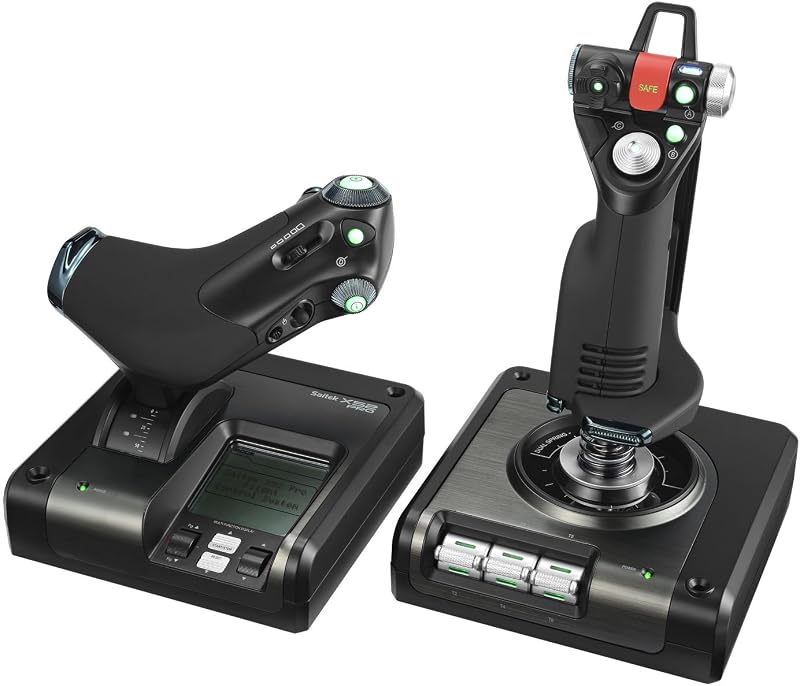
The Logitech G Saitek X52 Pro Flight represents one of the most established and balanced hands-on throttle and stick designs in desktop flight simulation. Built with a sturdy 5.1-pound total weight and a sleek black and silver aesthetic, this two-piece controller splits your flying duties between a precision centering joystick and a feature-packed progressive throttle unit. The flight stick utilizes non-contact magnetic technology along the X and Y axes, paired with a constant-tension spring mechanism that consistently pulls the stick back to absolute center when released. A standout ergonomic feature of the X52 Pro joystick is its five-position adjustable handle mechanism, which lets pilots raise or lower the contoured hand rest to fit small, medium, or large hand sizes comfortably during extended flying sessions.
The companion progressive throttle unit includes built-in mechanical detents at both the idle and afterburner positions. These tactile detents provide a noticeable physical bump when moving the throttle, letting you instantly feel when your aircraft has dropped to flight idle for landing or pushed past normal military power into afterburner without glancing at on-screen engine dials. Furthermore, the throttle features an integrated, illuminated multi-function liquid crystal display that can display radio frequencies, active controller profiles, and simulated cockpit data. The entire system houses 16 primary physical buttons alongside illuminated toggle switches, rotary dials, and a secondary mouse-pointer nub on the throttle. Configuration is managed through Logitech’s Smart Technology software on Windows PCs, requiring two available USB 2.0 ports to power the two distinct hardware bases.
For beginner and intermediate sim pilots, the X52 Pro stands out as an exceptional entry point into serious desktop aviation. It provides an intuitive, highly adjustable physical interface that feels completely natural for general aviation flying, commercial jet airliners, and military flight simulators. The single progressive throttle and built-in LCD screen provide immediate feedback without overwhelming the user with complicated calibration steps. While it lacks the twin-engine split throttle and secondary mini analog thumbsticks found on the X56, it serves as a remarkably approachable, ergonomic flight controller that balances durability and ease of use.
Chip values are fields copied from the Amazon product listing. Scores are out of 10, based on listed specifications and buyer feedback.
Matching a Model to Your Setup
- Space simulation and combat flight enthusiasts: Select the Logitech G X56 H.O.T.A.S Throttle, which delivers twin-engine throttle splits, customizable spring tension, and dedicated mini analog thumbsticks for complete six-degrees-of-freedom spacecraft translation.
- Civilian aviation cockpit builders: Choose the Logitech G Pro Flight Switch Panel, which provides physical magneto ignition dials, light switches, and a mechanical landing gear lever with active LED indicator lights.
- Beginners wanting an ergonomic dual-unit setup: Opt for the Logitech G Saitek X52 Pro Flight, featuring a five-position adjustable hand grip, progressive throttle detents at idle and afterburner, and an integrated multi-function LCD screen.
- Virtual reality pilots flying without looking at the desk: Select the Logitech G X56 H.O.T.A.S Throttle, designed with distinct button textures, varied toggle orientations, and natural ergonomic finger placement for easy touch navigation in VR headsets.
- Pilots expanding an existing flight yoke setup: Choose the Logitech G Pro Flight Switch Panel, which includes modular mounting brackets that bolt directly to the top or sides of compatible flight consoles and desk surfaces.
- Sim pilots seeking balanced military and commercial flying: Opt for the Logitech G Saitek X52 Pro Flight, offering smooth magnetic non-contact sensors and illuminated mode indicators that adapt effortlessly across diverse flight software titles.
Before You Buy
Before purchasing flight simulation gear, carefully assess your available desk space, USB port availability, and mounting surface requirements. Both the X56 and X52 Pro dual-unit systems are substantial pieces of hardware, weighing 6.9 pounds and 5.1 pounds respectively, and each system requires two dedicated USB 2.0 ports on your computer because the joystick and throttle communicate via separate cables. The listings do not specify power source adapter requirements, operating over standard USB computer bus power instead. Furthermore, while the X56 lists a generous two-meter cable length, the listings do not specify the exact cable lengths for the X52 Pro or the Pro Flight Switch Panel, nor do they include dedicated table edge clamps for securing the heavy flight sticks to thin desks. Checking that your workstation has adequate surface depth and available ports before unboxing ensures a frictionless setup process.
Operating system compatibility and software requirements also demand attention. All three products explicitly specify compatibility with Windows operating systems, but the listings do not claim native compatibility with macOS or gaming consoles like the Xbox Series X or PlayStation 5, despite the X56 listing mentioning compatibility with Sony PlayStation VR headsets. Similarly, when arranging your room layout, keep peripheral wiring organized; just as setting up an immersive audio station with high-performance logitech pc speakers requires planning around desk real estate and cable management, a multi-component flight simulation setup functions best when your throttle, stick, and switch panels are securely positioned and wired without straining USB ports.
FAQ
What is the difference between a HOTAS system and a switch panel?
A HOTAS system, which stands for Hands-On Throttle And Stick, is an active primary flight control system consisting of a steering joystick and an engine throttle lever that work together to control pitch, roll, yaw, and propulsion. A switch panel is an auxiliary instrument console equipped with mechanical toggles, ignition dials, and landing gear levers that handle secondary cockpit operations like electrical systems, lights, and engine startup procedures.
Which Logitech flight simulator gear is best for beginners?
For newcomers to flight simulation, the Logitech G Saitek X52 Pro Flight provides the smoothest balance of comfort and functionality. Its five-position adjustable hand rest accommodates different hand sizes, its constant-tension centering spring provides predictable stick feedback, and its progressive throttle features tactile detents that make managing engine power simple and intuitive without extensive configuration.
Can I use the Logitech Pro Flight Switch Panel alongside a HOTAS controller?
Yes, the Logitech G Pro Flight Switch Panel connects to your PC via its own independent USB cable and operates as an auxiliary input device. You can place the switch panel alongside either the X56 or the X52 Pro flight controllers, allowing you to use your HOTAS for flight steering and propulsion while using the physical switch panel for engine ignition and landing gear operation.
Do these Logitech flight controllers work with modern flight simulators out of the box?
These controllers connect through standard USB interfaces and are compatible with leading simulation software titles on Windows PCs, including Microsoft Flight Simulator X, Prepar3D, and X-Plane 10. While basic flight axes and common buttons work via standard Windows USB input protocols, downloading Logitech’s dedicated configuration software allows you to program macro commands and customize backlighting.
Do these flight controllers require an external power brick?
The product listings do not list an external power brick or separate wall power adapter for these models. They draw their operating power directly from your computer’s USB ports. Because controllers like the X56 and X52 Pro utilize lighting, sensors, and dual USB cables, plugging them directly into motherboard USB ports or a powered USB hub ensures stable operation.