
As Amazon Associates, we earn from qualifying purchases. This means we may receive a small commission at no extra cost to you if you click through and make a purchase.
Shopping for computer storage can feel daunting when you encounter terms like solid-state memory, internal platters, read speeds, and operating system formats. When evaluating a 1tb wd drive, first-time buyers and gift shoppers typically choose between three main categories: a traditional portable hard drive, an internal replacement drive, or a fast solid-state drive. Each device handles storage differently, from everyday document backups to demanding console gaming. Knowing how these drives differ ensures you select the right model without accidentally buying an internal component when you wanted a simple USB cable connection.
A clear western digital hard drive comparison shows how the brand organizes its consumer hardware. Western Digital divides its drives into lines designed for specific tasks: the Elements series offers basic external capacity, the WD Blue line provides internal hardware for computer upgrades, and the WD_BLACK line delivers extreme performance for gaming. Deciding which western digital hard drive to buy comes down to matching drive type to your setup. This guide breaks down four 1TB options so you can pick the right storage gift or personal upgrade.
Western Digital Hard Drives Lineup at a Glance
| Model | Drive Type | Interface | Primary Purpose |
|---|---|---|---|
| WD 1TB Elements Portable External Hard | External HDD | USB 3.0 / USB 2.0 | Basic portable backups and desktop storage |
| Western Digital 1TB WD Blue Mobile | Internal HDD | SATA 6 Gb/s | Laptop upgrades and PC system repair |
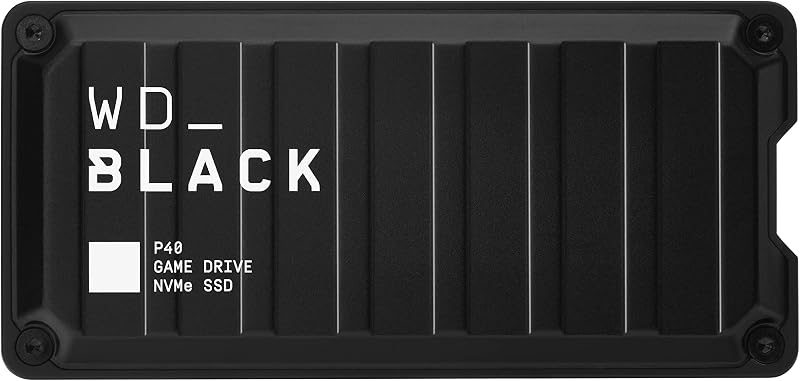
| Western Digital 1TB P40 Game Drive | External SSD | USB 3.2 Gen 2×2 | High-speed console and PC gaming |
| Western Digital 1TB My Passport SSD | External SSD | USB 3.2 Gen-2 / USB-C | Encrypted backups and fast file transfers |
Figures as published on the product listings.
The Models in Detail
WD 1TB Elements Portable External Hard
- Best for Everyday file archiving on a budget
- Size 1TB
- Color Black
- Weight 0.29 pounds

4.0 average rating left by Amazon buyers
Pros
- Universal USB 3.0 and 2.0 connectivity
- Preformatted for easy Windows setup
- Compact portable form factor
Cons
- Mechanical 100 MB/s read speed
- Requires reformatting for Mac
The WD 1TB Elements Portable External Hard is an entry-level external storage device built for simple, plug-and-play use. Often chosen as a reliable wd elements portable external hard drive for everyday archiving, this mechanical hard drive provides 1TB of capacity to free up space on full desktop computers or store photos, videos, music, and work files. According to the listing, it connects via USB 3.0 while maintaining backwards compatibility with USB 2.0 ports. Specifications list a read speed of 100 megabytes per second and a data transfer rate of 1 gigabit per second for moving routine personal files.
This drive arrives preformatted for Windows systems, including Windows 8, 7, Vista, and XP, though the listing states it can be easily reformatted for Mac. The casing encloses a 2.5-inch hard drive mechanism (with the listing also noting a 3.5-inch form factor in its specifications table), running directly on power supplied by the USB cord without requiring a separate wall plug. For shoppers exploring wd 1tb external hard drive options, it is compatible with desktops, laptops, and gaming consoles seeking cold storage.
This model suits budget-conscious families, students, and home office users who need dependable, straightforward backup storage. It handles music libraries, photo albums, and tax archives reliably. However, this mechanical drive gives way to solid-state alternatives when users want fast game loading speeds, drop-resistant metal housings, or built-in password encryption.
Western Digital 1TB WD Blue Mobile
- Best for Professionals needing secure high-speed mobile storage
- Size 1TB
- Color Gray
- Formats Digital
- Dimensions 5 x 4 x 1.25 inches

4.7 average rating left by Amazon buyers
Pros
- Fast 1050 MB/s NVMe read speeds
- Password-enabled 256-bit AES hardware encryption
- Drop resistant up to 6.5 feet
Cons
- No RGB lighting features
- More advanced than basic storage needs
4.9 average rating left by Amazon buyers
Best for: Console and PC gamers needing speed
Pros
- Blazing read speeds up to 2000 MB/s
- Customizable RGB lighting strips
- Durable two-meter drop resistance
Cons
- RGB dashboard software is Windows only
- Archived PS5 games cannot play directly

4.9 average rating left by Amazon buyers
Best for: Laptop repairs and internal desktop upgrades
Pros
- Includes Acronis True Image cloning software
- WD F.I.T. Lab certified compatibility
- Large 128 MB cache buffer
Cons
- Requires internal computer installation
- Modest 5400 RPM rotational speed
The Western Digital 1TB WD Blue Mobile is a 2.5-inch internal hard drive designed for everyday computing. As a bare internal component, this drive mounts inside a computer chassis using a Serial ATA (SATA 6 Gb/s) interface. The drive spins at 5400 RPM and includes a 128 MB cache buffer to assist with regular computing tasks. Understanding the difference in western digital external vs internal storage is vital here, as this drive connects directly to a computer motherboard rather than an external USB port.
Western Digital designed the western digital wd blue mobile for notebooks, desktops, All-in-One PCs, external enclosures, and compatible game consoles. A key listing feature is the free Acronis True Image WD Edition cloning software, which assists users in copying their existing operating system and data from an old drive. The drive is WD F.I.T. Lab certified to work across various PC configurations, and the listing notes data recovery service among its additional features.
This model is best for DIY builders, hobbyists, or computer owners needing to replace a faulty laptop hard drive or add internal secondary storage for photos and games. However, this internal drive gives way to portable external models for any gift buyer seeking an out-of-the-box storage drive that requires no screwdrivers or hardware installation.
Western Digital 1TB P40 Game Drive
- Size 1TB
- Color Black
- Weight 0.17 pounds
- Dimensions 4.21 x 2 x 0.51 inches
The Western Digital 1TB P40 Game Drive is a high-speed external solid-state drive from Western Digital’s WD_BLACK performance brand. Built for serious players, the wd black p40 game drive ssd reaches read speeds up to 2,000 megabytes per second and media speeds of 1,950 MB/s through a USB 3.2 Gen 2×2 interface. These speeds reduce load times compared to traditional hard drives, allowing console and PC gamers to run large game libraries smoothly.
The P40 features customizable RGB lighting that users can configure on Windows computers using the downloadable WD_BLACK Dashboard application. Built for durability, the shock-resistant housing can survive drops up to two meters. The listing notes compatibility with PlayStation 5 (play and store PS4 games, or archive PS5 games), PlayStation 4 Pro and PS4, Xbox One, and Xbox Series X|S (play and store Xbox One games, or archive Series X|S games), as well as PC and Mac computers.
This drive is best for console and PC gamers who want faster load times, rugged construction, and personalized RGB lighting. It makes an excellent gift for gaming enthusiasts needing extra console capacity. However, this gaming drive gives way to the My Passport SSD for business users who prefer subtle, professional styling with integrated password security.
Western Digital 1TB My Passport SSD
- Size 1TB
- Color Blue
- Formats Digital
- Weight 0.2 pounds
The Western Digital 1TB My Passport SSD is an ultra-fast portable drive designed for productivity, file security, and media workflows. Known among shoppers as the wd my passport ssd 1tb, this drive utilizes NVMe technology to deliver read speeds up to 1,050 megabytes per second and write speeds up to 1,000 megabytes per second. It connects using USB 3.2 Gen-2 and USB-C, with USB-A compatibility for older computers. For shoppers seeking the best western digital 1tb drive for work, this model provides high performance in a compact gray metal chassis.
Security and physical resilience are central to this model. The drive features password-enabled 256-bit AES hardware encryption to protect sensitive documents from unauthorized access. Its metal casing resists shock and vibration, offering drop resistance up to 6.5 feet (1.98 meters). Ready out of the box for Mac and PC, the drive is suited for fast backups and video editing. Those looking at alternative options like a sandisk 1tb portable ssd will appreciate the My Passport SSD’s balance of speed and rugged protection.
This drive is best for business travelers, photographers, and students who need fast, secure, and durable storage for critical files. It easily handles transferring large video files on the go. However, this high-performance SSD gives way to the simpler WD Elements drive for home users who only need basic desktop backups without NVMe speeds or encryption.
Chip values are fields copied from the Amazon product listing. Star figures are the average rating left by Amazon buyers, not a score given here.
Matching a Model to Your Setup
- Everyday home archiving on a budget: The WD 1TB Elements Portable External Hard provides straightforward USB plug-and-play storage for family photos, music, and personal records without the cost of high-speed SSD parts.
- Repairing an older laptop or upgrading desktop capacity: The Western Digital 1TB WD Blue Mobile is the correct choice when you need an internal 2.5-inch SATA hard drive to replace a failed drive or expand PC storage.
- Expanding modern PlayStation or Xbox game storage: The Western Digital 1TB P40 Game Drive offers 2,000 MB/s read speeds, drop resistance, and RGB lighting for console and gaming PC setups.
- Protecting confidential files during travel: The Western Digital 1TB My Passport SSD provides 256-bit AES hardware encryption, drop resistance up to 6.5 feet, and rapid 1,050 MB/s NVMe transfer speeds for Mac and PC users.
- First-time gift buyers wanting simple setup: The WD 1TB Elements Portable External Hard serves as great wd portable storage for beginners because it connects easily through USB ports without tools or technical software configuration.
Before You Buy
Before choosing a 1TB Western Digital drive, checking what the product listings do not include helps avoid unexpected setup hurdles. For example, the listing for the Western Digital 1TB WD Blue Mobile internal drive does not include SATA connection cables, mounting screws, or power adapters in the box. Because internal drives are sold as bare components, buyers must ensure their computer case has an open 2.5-inch bay and the required cables, or purchase an external drive enclosure separately.
External drives also have operational details worth noting. While the WD 1TB Elements Portable External Hard mentions compatibility with Windows and notes easy reformatting for Mac, the listing does not specify if cross-platform software is included. Additionally, while the Western Digital 1TB P40 Game Drive supports PlayStation 5 and Xbox Series X|S consoles, the listing makes clear that next-generation games can only be archived on the drive, requiring players to copy titles back to internal console storage before playing.
FAQ
What is the difference between an internal and an external Western Digital drive?
An external drive, like the WD Elements or My Passport SSD, comes in a protective casing and connects to your computer using a USB cable. An internal drive, like the WD Blue Mobile, is a bare component designed to be installed inside a computer chassis and connected directly to the motherboard using SATA cables.
Can I use the WD Elements portable hard drive on a Mac computer?
Yes. Although the listing states that the WD Elements drive arrives formatted for Windows operating systems like Windows 8 and 7, it explicitly confirms that the drive can be easily reformatted for Mac systems using standard operating system tools like macOS Disk Utility.
Why is the WD P40 Game Drive faster than the WD Elements portable drive?
The WD P40 Game Drive is an external solid-state drive that uses flash memory and a USB 3.2 Gen 2×2 interface, achieving read speeds up to 2,000 MB/s. The WD Elements is a mechanical hard drive with spinning platters and a USB 3.0 interface, listed with a 100 megabytes per second read speed.
Can I play PlayStation 5 games directly from the WD P40 Game Drive?
According to the product listing, you can play and store PlayStation 4 games directly from the drive. However, PlayStation 5 games can only be archived on the drive, meaning they must be copied back to the console’s internal storage before you can play them.
What makes the WD My Passport SSD suitable for travel and sensitive files?
The WD My Passport SSD features a shock-resistant metal body offering drop protection up to 6.5 feet (1.98 meters). For security, it includes password-enabled 256-bit AES hardware encryption to protect personal and business files if the drive is lost or misplaced.


