As Amazon Associates, we earn from qualifying purchases. This means we may receive a small commission at no extra cost to you if you click through and make a purchase.
Finding the right wd 1tb external hard drive can feel confusing when facing multiple product lines from the same manufacturer. First-time buyers and gift-givers often struggle to distinguish between simple drag-and-drop storage units and feature-rich drives that include automated backup utilities and hardware-level encryption. Portable external drives serve as essential physical safeguards for irreplaceable family photographs, personal video clips, work spreadsheets, and system recovery points. When deciding which wd external hard drive to buy, your primary consideration should center on whether you need seamless plug-and-play simplicity for fast manual transfers or sophisticated background security measures that protect your personal files against accidental loss and unauthorized access.
Western Digital organizes its portable storage lineup into two primary families: the streamlined Elements series and the security-focused My Passport family. The Elements range prioritizes unhindered plug-and-play utility, stripping away pre-loaded software to deliver straightforward storage expansion across computers and gaming consoles right out of the box. In contrast, the My Passport family incorporates hardware encryption, password protection, and specialized management software designed to defend sensitive personal records against ransomware threats. Capacity across these lineups ranges from standard single-terabyte units up to expanded two-terabyte editions, giving you the freedom to choose the right balance of volume and security for your daily workflow.
WD External Hard Drives Lineup at a Glance
| Model Name | Storage Capacity | Hardware Security | Primary Interface |
|---|---|---|---|
| WD 1TB My Passport | 1 TB | Hardware Encryption & Password Protection | USB 3.0 / USB 2.0 |
| WD 1TB Elements Portable External Hard | 1 TB | None Listed | USB 3.0 / USB 2.0 |
| WD 1TB My Passport Ultra | 1 TB | 256-bit AES Hardware Encryption | USB-C / USB 3.1 |
| WD 2TB Elements Portable External Hard | 2 TB | None Listed | USB 3.2 Gen 1 / USB 3.0 |
| WD 2TB My Passport | 2 TB | Hardware Encryption & Password Protection | USB 3.1 / USB 3.0 |
Figures as published on the product listings.
The Models in Detail
WD 1TB My Passport
- Best for Modern USB-C laptop users needing security
- Size 1TB
- Color Silver
- Formats Digital
- Weight 0.29 pounds
- Dimensions 4.33 x 3.21 x 0.5 inches

Our score: 9.2/10
Pros
- Refined metal enclosure
- Native USB-C connectivity
- 256-bit AES encryption
Cons
- Formatted specifically for Windows

Our score: 8.6/10
Best for: Everyday secure document and photo backups
Pros
- Hardware encryption
- Ransomware defense software
- Three-year warranty
Cons
- Software setup required
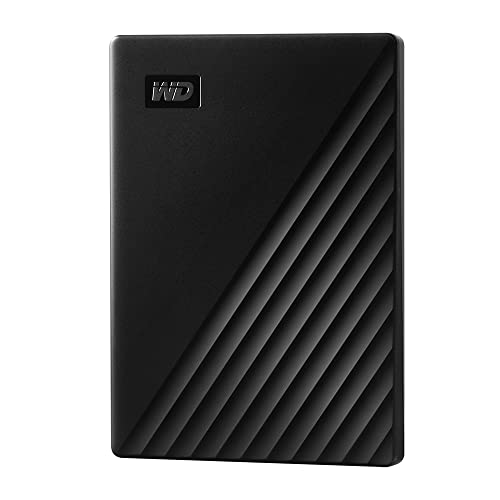
The WD 1TB My Passport is built for everyday users who value peace of mind when backing up crucial files on the go. Featuring a slim and durable 2.5-inch enclosure, this portable drive provides integrated password protection backed by hardware encryption to secure confidential records. According to the manufacturer listing, it includes Acronis True Image for Western Digital software, giving you defense against modern ransomware threats alongside automated scheduling tools. Connectivity is handled through a standard USB 3.0 interface with backwards compatibility for USB 2.0 ports across desktops, laptops, and tablets. If you need a trustworthy 1tb wd drive to safeguard family photographs and personal tax records, this unit provides multi-layered protection straight out of the box.
This model is ideal for home office workers, college students, and family archivists who want scheduled background backups. The listing indicates a read speed of 500 megabytes per second, a 1TB cache memory size, and a 3-year manufacturer limited warranty for lasting reliability. While the bundled software safeguards files against emerging cyber threats, setting up master passwords and background schedules requires extra initial effort. Shoppers looking for pure drag-and-drop simplicity without password prompts will prefer the streamlined Elements series instead.
WD 1TB Elements Portable External Hard
- Best for Simple plug-and-play Windows file storage
- Size 1TB
- Color Black
- Weight 0.29 pounds

Our score: 8.0/10
Pros
- Plug-and-play simplicity
- Universal USB 3.0 compatibility
- Pocket-sized form factor
Cons
- No hardware encryption
The WD 1TB Elements Portable External Hard focuses entirely on simple, dependable storage without software overhead. Designed for users who prefer instant drag-and-drop convenience, this drive comes formatted for Windows systems including Windows 8, 7, Vista, and XP, while offering easy reformatting for Mac computers. Western Digital equips this model with universal USB 3.0 and USB 2.0 connectivity, allowing swift file transfers between legacy hardware and modern workstations. With a listed read speed of 100 megabytes per second and a data transfer rate of 1 gigabit per second, this wd elements portable 1tb option provides reliable media storage on demand.
This portable hard drive suits students, casual users, and gift-givers seeking immediate capacity expansion. The lightweight 2.5-inch casing fits into any pocket, serving as a dependable wd portable hard drive 1tb for music, videos, and everyday study documents. The listing confirms broad compatibility across desktop computers, laptops, and gaming consoles for personal file backups. However, because the Elements line excludes hardware encryption and backup management utilities, users transporting proprietary work data should consider the more secure My Passport lineup.
WD 1TB My Passport Ultra
- Size 1TB
- Color Black
- Weight 0.26 pounds
- Dimensions 4.22 x 2.95 x 0.44 inches
The WD 1TB My Passport Ultra combines high-level security with an innovative modern exterior featuring a refined metal cover. Built to complement thin modern laptops, this drive offers native USB-C and USB 3.1 connectivity, enabling data transfer rates up to 5 gigabits per second. Western Digital includes robust 256-bit AES hardware encryption, enabling secure password locking directly at the controller level. The listing confirms bundled WD Backup software along with tools for importing social media and cloud files, helping users streamline file synchronization across online platforms.
Creative freelancers, business travelers, and executive laptop users will appreciate the sleek aesthetic and modern connection ports of the wd my passport ultra 1tb. The drive arrives pre-formatted for Windows PCs and carries a 3-year manufacturer limited warranty. While the metal housing provides refined styling, connecting it to legacy USB-A ports or gaming consoles may require separate adapters not highlighted in the listing. For modern computer users seeking premium materials and ironclad security, this drive stands out as an exceptional match.
WD 2TB Elements Portable External Hard
- Best for High-capacity basic media storage on consoles
- Size 2TB
- Color Black
- Formats Digital
- Weight 0.29 pounds
- Dimensions 4.35 x 3.23 x 0.59 inches
Pros
- Spacious 2TB storage
- SuperSpeed 5Gbps USB interface
- Broad gaming console support
Cons
- No password locking
The WD 2TB Elements Portable External Hard doubles the available storage space while maintaining a compact, portable form factor. Engineered for high-capacity expandability, this drive features SuperSpeed USB 3.2 Gen 1 connectivity capable of 5 gigabit per second transfer rates for fast media transfers. The drive operates at 5400 RPM with a listed read speed of 1 gigabyte per second, allowing rapid access to vast media archives and game installations. Plug-and-play ready for Windows, it connects smoothly to both PCs and Macs without complex formatting or supplementary power bricks.
Gamers and digital media collectors needing abundant room for high-definition video collections or console game libraries will appreciate this high-capacity unit. In any wd external hard drive comparison, this 2TB model delivers excellent storage volume without background software using system resources. The listing notes broad compatibility across desktops, laptops, and gaming consoles. However, because it lacks password locking and ransomware protection, it is best suited for non-sensitive entertainment libraries rather than confidential commercial records.
WD 2TB My Passport
- Best for Power users wanting secure 2TB backups
- Size 2TB
- Color Black
- Dimensions 4.22 x 2.95 x 0.44 Inches
Pros
- Generous 2TB capacity
- Hardware encryption included
- Defense against ransomware
Cons
- Software installation needed
The WD 2TB My Passport unites expanded capacity with advanced digital defense inside a slim, durable black enclosure. Designed for users who refuse to compromise between high volume and security, it includes hardware encryption and password protection to safeguard private records against theft. Western Digital bundles device management software equipped with defense against ransomware threats, helping safeguard your photo archives and work portfolios. Universal USB 3.1 and USB 3.0 compatibility ensures fast, effortless connections to desktop rigs, laptops, and tablets.
This 2TB drive caters directly to small business operators, creative professionals, and family archivists managing years of irreplaceable memories. In the debate of wd elements vs my passport, this model stands out as the ultimate complete solution, offering massive storage space alongside dedicated hardware protection and a 3-year limited warranty. It represents the best wd external hard drive choice for power users who require substantial mobile capacity without leaving sensitive data exposed during travel.
Chip values are fields copied from the Amazon product listing. Scores are out of 10, based on listed specifications and buyer feedback.
Matching a Model to Your Setup
- For students needing hassle-free document storage: Choose the WD 1TB Elements Portable External Hard for instant Windows plug-and-play simplicity without dealing with password prompts.
- For remote workers archiving sensitive records: Select the WD 1TB My Passport to protect identity files and tax forms using hardware encryption and ransomware defense software.
- For modern USB-C laptop and ultrabook owners: Pick the WD 1TB My Passport Ultra for native USB-C compatibility, a stylish metal finish, and 256-bit AES encryption.
- For console gamers expanding their game libraries: Opt for the WD 2TB Elements Portable External Hard to secure double the storage space and 5Gbps SuperSpeed USB performance.
- For business travelers managing large confidential archives: Deploy the WD 2TB My Passport to combine 2TB of spacious storage with hardware locking and ransomware protection.
Before You Buy
While product listings detail technical metrics like transfer rates and encryption standards, they frequently omit day-to-day physical accessories. The listings for both the Elements and My Passport lines do not specify whether carrying pouches, protective bumpers, or drop-resistant sleeves are included in the retail box. If you plan to carry your drive inside a commuter bag alongside heavy hardware, purchasing a padded travel case is advisable to protect the internal mechanical drive from sudden shock. Shoppers interested in how portable drives compare across the broader market can also read our review of the seagate 1tb portable hard drive lineup.
In addition, operating system preparation deserves attention before you begin transferring files. Although the listings note that drives come formatted for Windows and can be easily reformatted for Mac, they do not specify the exact step-by-step formatting tools or dual-platform file system configurations required for seamless cross-platform sharing. Taking time to verify your computer ports and determining whether you require cross-platform formats like exFAT ensures an effortless setup from the moment you plug your drive in.
FAQ
What is the difference between WD Elements and WD My Passport drives?
WD Elements drives prioritize simple plug-and-play operation without pre-loaded software or security settings, making them fast and straightforward for media storage. WD My Passport drives include built-in hardware encryption, password protection, and specialized management software with ransomware defense to safeguard sensitive files.
Can I use these WD external hard drives on Mac computers?
Yes, all listed WD drives can work with Mac computers. While models like the WD 1TB Elements arrive formatted for Windows, the listing confirms they can be easily reformatted for macOS using the native disk management utilities on your Mac.
Do these WD portable hard drives require an external power cable?
No, every portable WD drive featured in this guide is bus-powered through its USB cable. They draw all needed power directly from your laptop, desktop, or console, eliminating the need for bulky external power adapters.
What does hardware encryption do on a WD drive?
Hardware encryption locks your data at the controller level using a user-created password. On models like the WD 1TB My Passport Ultra, 256-bit AES encryption ensures that your files remain inaccessible to unauthorized users even if the drive is lost or stolen.
Can I plug a USB 3.0 WD drive into an older USB 2.0 port?
Yes, WD USB 3.0 and USB 3.1 drives are backwards compatible with legacy USB 2.0 ports. You can connect them directly to older computers, though file transfer speeds will be capped at standard USB 2.0 rates.


