
As Amazon Associates, we earn from qualifying purchases. This means we may receive a small commission at no extra cost to you if you click through and make a purchase.
Finding the right connectivity adapter can feel overwhelming if you are unfamiliar with computer hardware, especially when compact laptops only include one or two built-in ports. When shopping for an acer usb c hub, gift-givers and first-time buyers often struggle to decipher technical terms like refresh rates, pass-through charging limits, and bus transfer speeds. Choosing a compact option like the popular acer 5 in 1 usb c hub gives modern notebook users immediate access to standard television or monitor plugs, external storage drives, and traditional desktop peripherals without creating a messy tangle of individual adapters.
An organized acer usb c hub comparison reveals that Acer designs its multi-port accessories around distinct computing needs rather than adopting a one-size-fits-all build. Some models prioritize smooth video output for external monitors, while others emphasize photography card readers, high-speed solid-state drive transfers, or legacy desktop expansions. Understanding how these features differ will help you determine which acer usb c hub to buy based on the specific computer, monitor, and daily accessories present in your home or office workstation.
Acer USB-C Hubs Lineup at a Glance
| Model | Total Ports | Video Connectivity | Max Data Transfer Rate | Power Delivery |
|---|---|---|---|---|
| Acer USB C Hub (5-in-1) | 5 | 4K at 60Hz (HDMI) | 5Gbps | 100W PD (90W to Host) |
| Acer USB C Hub (7-in-1) | 7 | 4K at 30Hz (HDMI) | 5Gbps | 100W PD |
| Acer 6-in-1 USB C Hub 10Gbps | 6 | 4K at 60Hz (HDMI) | 10Gbps | 100W PD (90W to Host) |
| Acer USB Hub 4 Ports | 4 | None | 5Gbps | 5V Input Only (Peripherals) |
| Acer 10Gbps USB C Hub | 4 | 4K at 60Hz (USB-C) | 10Gbps | 100W PD (90W to Host) |
Figures as published on the product listings.
The Models in Detail
Acer USB C Hub
- Best for Photographers and travelers needing memory card slots
- Color Space grey
- Dimensions 5.12 x 1.38 x 0.39 inches

Our score: 8.0/10
Pros
- Built-in SD and MicroSD card slots
- Compact 68-gram aluminum enclosure
- 100W Power Delivery pass-through
Cons
- HDMI output limited to 4K at 30Hz
- USB-C port does not support video

Our score: 8.4/10
Best for: Remote workers needing smooth 4K external video
Pros
- Smooth 4K at 60Hz HDMI output
- Pass-through charging up to 90W output
- Dedicated interference-free USB 2.0 port
Cons
- Lacks integrated SD card slots
The 5-in-1 Acer USB C Hub provides a balanced port layout designed to transform a single laptop connection into an organized workstation. Its hardware interface includes a dedicated HDMI 2.0 port capable of delivering 4K video at a 60Hz refresh rate, alongside a 100W Power Delivery input port that supplies up to 90W of stable pass-through charging directly to your computer. For external accessories, it features one 5Gbps USB-C data port, one 5Gbps USB-A 3.0 port, and a dedicated USB-A 2.0 port that prevents wireless signal interference when connecting an acer wireless mouse for laptop or keyboard receiver. Encased in a durable aluminum shell, it dissipates heat effectively while remaining lightweight and compact for travel.
This acer multiport hub for laptop users is an excellent match for remote workers, students, and general office users who want a simple external monitor connection alongside reliable charging. The 4K at 60Hz video capability ensures cursor navigation, document scrolling, and video streaming remain fluid on compatible modern displays. However, if your daily workflow involves pulling photos directly from camera memory cards, this model gives way to the seven-port version that incorporates integrated SD card slots.
Acer USB C Hub
- Color Space grey
- Dimensions 5.12 x 1.38 x 0.39 inches
For users who need broader multimedia connectivity, the seven-port Acer USB C Hub expands a single computer connection into seven functional interfaces within a space grey aluminum enclosure weighing only 68 grams. The port array includes an HDMI port that mirrors or extends displays at 4K resolution at 30Hz or Full HD 1080p, two USB-A 3.1 ports running at 5Gbps, one USB-C 5Gbps data channel, and a 100W Power Delivery charging input. The listing explicitly states that this USB-C port is dedicated strictly to data transfer and does not support video or audio transmission. The primary advantage of this hub is the inclusion of dedicated MicroSD and SD card slots, making file imports straightforward without needing an extra standalone card reader.
This acer usb-c multiport adapter suits photography hobbyists, casual content creators, and office users who frequently move images from digital cameras or mobile devices to a laptop. Its slim 5.1-inch by 1.4-inch footprint makes it effortless to pack into a laptop sleeve or travel bag. Nevertheless, users who prioritize fluid 60Hz monitor performance for detailed spreadsheets, gaming, or video playback should note that its HDMI output caps at 30Hz, meaning it yields to Acer’s 6-in-1 or 5-in-1 hubs when smooth display motion is paramount.
Acer 6-in-1 USB C Hub 10Gbps
- Best for Designers transferring files to high-speed external drives
- Color Grey
Our score: 9.8/10
Pros
- Fast 10Gbps USB-C and USB-A ports
- Sharp 4K at 60Hz display support
- Durable integrated 5.9-inch cable
Cons
- No built-in SD card readers
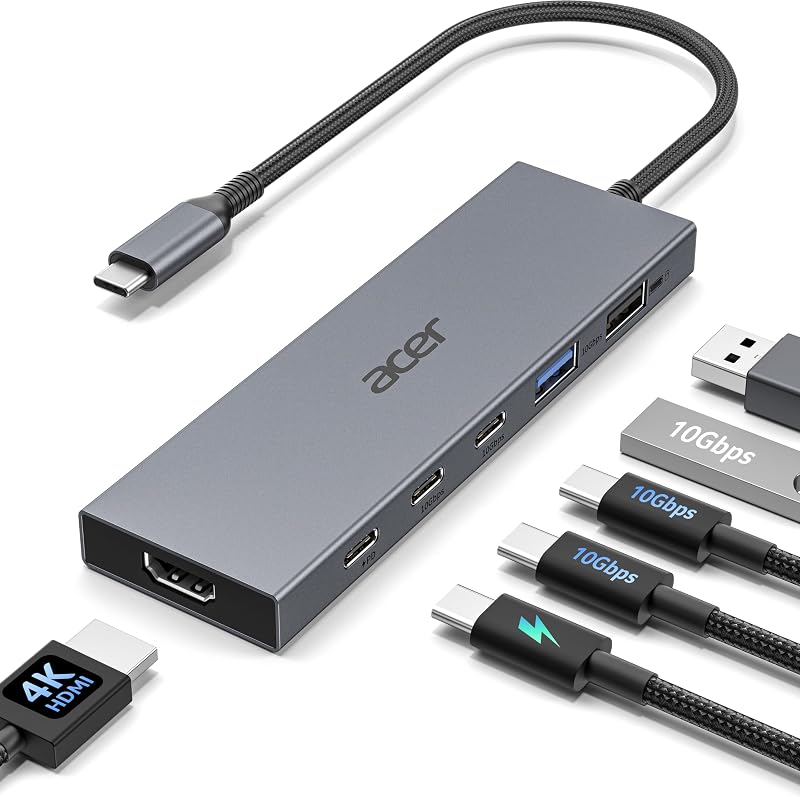
Stepping up to enhanced data bandwidth, the Acer 6-in-1 USB C Hub 10Gbps doubles standard transfer rates by offering 10Gbps speeds across multiple modern ports. The layout integrates two 10Gbps USB-C 3.2 data ports, one 10Gbps USB-A 3.2 port, an additional USB-A 2.0 port operating at 480Mbps for basic input peripherals, and a 100W Power Delivery port that supplies up to 90W of continuous laptop power. Display connectivity is handled through an HDMI port supporting 4K resolution at 60Hz, provided the connected computer supports HDMI 2.0 standards or higher. The hub features a sleek grey casing and includes an integrated 5.9-inch (15 cm) connection cable built for neat desktop placement.
This configuration makes a strong case as the best acer usb c hub for designers, video editors, and professionals who regularly transfer large media libraries to fast external solid-state drives. The combination of 10Gbps transfer channels and 60Hz 4K video eliminates common workflow bottlenecks on modern laptops. However, users who require physical memory card readers will miss the dedicated slots found on the 7-in-1 unit, and those using pure USB-C monitors cannot route display signals through this hub’s data-only Type-C ports.
Acer USB Hub 4 Ports
- Best for Gamers and desktop users expanding USB-A ports
- Size 2ft
- Color Black
- Weight 0.1 Pounds
- Dimensions 4.13 x 1.18 x 0.35 inches

Our score: 8.4/10
Pros
- Four 5Gbps USB 3.0 Type-A ports
- Long 2-foot connection cable
- Auxiliary 5V power input for hard drives
Cons
- No video display output
- Cannot charge host laptop batteries
Constructed with a standard USB-A host connector rather than a native Type-C upstream plug, the Acer USB Hub 4 Ports provides an accessible solution for expanding standard peripheral ports on traditional computers. Made from durable black Acrylonitrile Butadiene Styrene (ABS) plastic and weighing only 1.6 ounces, it converts a single rectangular USB socket into four USB 3.0 Type-A data ports operating at 5Gbps. It incorporates a GL3510 controller chip for thermal stability, an LED power indicator, and a generous 2-foot cable that easily reaches around desktop towers and gaming desks. While the hub features an auxiliary USB-C port labeled IN 5V, the listing explicitly notes that this port cannot transfer files or charge computers; it functions solely to deliver supplemental power to the four USB-A ports when running high-draw external mechanical hard drives.
This four-port splitter is ideal for gamers connecting accessories to a PS4 or Xbox, desktop PC owners, and students using standard laptops who simply need additional sockets for flash drives, wired mice, and printers. It bypasses complex display setups and driver installations completely. However, because it lacks video ports and cannot provide battery charging to your computer, users seeking an all-in-one docking station with external monitor outputs should select one of Acer’s dedicated USB-C models instead.
Acer 10Gbps USB C Hub
- Best for Users with modern USB-C monitors and SSDs
- Total Usb Ports 4
- Number of Ports 4
- Number of Items 1
- Total USB Ports 4
- Brand Acer
Pros
- Native 4K at 60Hz USB-C video output
- Dual 10Gbps USB-C high-speed data lanes
- Sturdy aluminum heat-resistant build
Cons
- No traditional USB-A ports
- Requires host support for DisplayPort Alt Mode
Adopting an all-modern port architecture, the Acer 10Gbps USB C Hub is a specialized 4-in-1 docking accessory designed for cutting-edge computing environments. Built with a durable, heat-resistant aluminum casing, it provides a dedicated USB-C display port supporting 4K video at 60Hz, two high-speed USB-C data ports capable of 10Gbps transfer speeds, and a 100W Power Delivery input that provides 90W of pass-through power to the host machine. The manufacturer listing notes that video transmission requires a host laptop with DisplayPort Alternate Mode, USB4, or Thunderbolt 3/4 support, and the PD port is strictly wired for battery charging rather than data routing. Unlike traditional hubs, this model completely omits legacy USB-A ports in favor of a streamlined Type-C interface.
This compact adapter is tailored specifically for minimalist desk setups using modern USB-C monitors, portable displays, and high-speed external Type-C drives. If your workstation connects an external display using an acer usb c to hdmi cable or a native USB-C monitor cord, this adapter keeps desktop cabling clean while preserving fast 10Gbps drive access. Conversely, if you still rely on standard rectangular flash drives, wired mice, or traditional television cables, this unit will require additional adapters, making the 6-in-1 or 5-in-1 Acer models far more practical for everyday use.
Chip values are fields copied from the Amazon product listing. Scores are out of 10, based on listed specifications and buyer feedback.
Matching a Model to Your Setup
- Everyday Home Office with One 4K Monitor: Choose the Acer USB C Hub (5-in-1) for its smooth 4K at 60Hz HDMI video, reliable 90W pass-through charging, and dedicated interference-free peripheral port.
- Travel and Photography Workflows: Select the Acer USB C Hub (7-in-1) to take advantage of integrated SD and MicroSD card slots alongside dual standard USB ports for thumb drives.
- High-Speed File Backups and Creative Editing: Pick the Acer 6-in-1 USB C Hub 10Gbps when transferring large video projects to external solid-state drives while maintaining a 60Hz display feed.
- Desktop Towers and Console Peripherals: Opt for the Acer USB Hub 4 Ports to turn a single standard USB socket into four 5Gbps ports with a long 2-foot reach and auxiliary power support.
- Modern All-USB-C Workstations: Deploy the Acer 10Gbps USB C Hub if your desk relies exclusively on Type-C computer monitors and high-speed USB-C external storage drives.
Before You Buy
Before purchasing any hub, check your computer’s port specifications carefully. The product listings specify that video output over HDMI or USB-C requires your computer to feature a full-featured USB-C port supporting DisplayPort Alternate Mode, Thunderbolt 3/4, or USB4. If your laptop only carries basic data-only USB-C sockets, monitor signals cannot pass through the hub. Additionally, while the hubs support up to 100W Power Delivery input to deliver 90W of host charging, the product listings do not include a wall charging brick or a high-wattage charging cable in the box, meaning you must provide your own compatible charger.
It is also worth noting what these product listings do not specify regarding advanced display arrangements. None of the listings advertise multi-stream transport (MST) capabilities for driving dual extended external monitors independently from a single hub, as each model features only one dedicated video display path. Furthermore, aside from the 6-in-1 model with its stated 5.9-inch cable and the 4-port model with its 2-foot cord, the listings do not specify the exact cable lengths for the remaining hubs, so planning your desk layout around a short host connection is advisable.
FAQ
Can an Acer USB-C hub charge my laptop while other ports are in use?
Yes, models equipped with 100W Power Delivery pass-through support host battery charging. The hub reserves approximately 10W of incoming power to operate its internal controller chips and connected peripherals, delivering up to 90W of stable charging to your computer when plugged into a 100W wall adapter and compatible cable.
Why does an external monitor remain blank when connected to the hub?
Video output requires your computer’s USB-C port to support DisplayPort Alternate Mode, USB4, or Thunderbolt technology. If your laptop only supports basic data synchronization across its USB-C connection, the display ports on the hub will not receive a video signal to transmit to your screen.
What is the difference between 4K at 30Hz and 4K at 60Hz on these hubs?
Refresh rate dictates how many times per second your display updates its picture. A 4K at 60Hz output refreshes sixty times per second, creating fluid mouse movement, smooth window scrolling, and natural video playback. In comparison, 4K at 30Hz refreshes only thirty times per second, which can appear visibly choppy during standard navigation.
Does the Acer USB Hub 4 Ports require external power to work?
No, the four-port USB 3.0 hub works straight out of the box as a bus-powered splitter for mice, keyboards, and standard flash drives. The dedicated 5V USB-C port is strictly optional and only needs a power connection when you connect high-draw external mechanical hard drives that require extra electrical stability.
Can I plug an external monitor into the USB-C data ports on these hubs?
No, the USB-C data ports found on the 5-in-1, 7-in-1, and 6-in-1 models are wired exclusively for file transfers and peripheral accessories, meaning they do not output video or audio signals. The only model in this comparison capable of driving a display over USB-C is the Acer 10Gbps USB C Hub, which incorporates a designated 4K at 60Hz USB-C video output port.


