
As Amazon Associates, we earn from qualifying purchases. This means we may receive a small commission at no extra cost to you if you click through and make a purchase.
Shopping for a reliable pointing device can feel surprisingly tricky when different models share similar exterior finishes. When searching for an acer wireless mouse for laptop workstations, the choice usually comes down to physical ergonomics, wireless connectivity methods, and daily power requirements. First-time buyers often encounter unfamiliar jargon such as DPI sensitivity, radio-frequency dongles, and multi-device channels. Deciding between a standard desktop clicker, an upright ergonomic design, and an ultra-thin travel mouse determines how comfortable your wrist remains after hours of typing and browsing.
Acer organizes its wireless range around clear user priorities rather than confusing technical tiers. The brand divides its offerings into standard full-profile office cordless usb mice with standalone receivers, specialized multi-device mice with Bluetooth pairing, and lightweight portable options crafted for laptop bags. Understanding this lineup allows you to match your hand size and preferred grip to the right hardware without paying for features you will never touch. If you are exploring broader desk ergonomics, take a look at our acer ergonomic mouse overview to see how specialized grips support neutral arm postures.
Acer Wireless Mice Lineup at a Glance
| Model | Connectivity | Hand Size and Grip | Power Source | Tracking Sensitivity |
|---|---|---|---|---|
| Acer Wireless Mouse for Laptop | 2.4GHz USB-A Receiver | Medium to Large (Right Hand) | 2 AAA Batteries (Not Included) | 800 / 1200 / 1600 DPI |
| Acer Ergonomic Mouse Wireless Rechargeable | Bluetooth (2 Channels) and 2.4GHz USB | Medium to Large (Right Hand Handshake) | Built-in 500mAh Rechargeable | 800 to 4800 DPI (6 Levels) |
| Acer Bluetooth Wireless Mouse for Laptop | Bluetooth (2 Channels) and 2.4GHz USB | Small to Medium (Ambidextrous) | 1 AA Battery (Not Included) | 800 / 1200 / 1600 DPI |
| Acer Computer Mouse Wireless (45g) | 2.4GHz USB-A Receiver | Universal (Ambidextrous Compact) | 1 AA Battery (Included) | 1600 DPI Optical |
| Acer Computer Mouse Wireless (56g) | 2.4GHz USB-A Receiver | Small to Medium (Right Hand Flat) | 2 AAA Batteries (Not Included) | 800 / 1200 / 1600 DPI |
Figures as published on the product listings.
The Models in Detail
Acer Wireless Mouse for Laptop
- Best for Everyday office workers with medium to large hands
- Button Quantity 6
- Hardware Platform PC
- Embellishment Feature LED
- Item Weight 85 g
- Brand Acer

Our score: 8.6/10
Pros
- Sculpted medium to large right-hand grip
- Visual indicator light for DPI and battery
- Three adjustable DPI tracking speeds
- Ten-million-click durability rating
Cons
- Side navigation buttons unsupported on Mac
- Requires two AAA batteries not included
The Acer Wireless Mouse for Laptop is a dedicated 2.4GHz computer mouse 3 adjustable dpi tool built specifically for medium to large hands. Operating over a steady 32-foot wireless range, it relies on a plug-and-play USB-A receiver that requires no driver installations. The sculpted shell supports the palm in a traditional right-handed posture, keeping wrist muscles relaxed during regular office routines. It weighs approximately 3 ounces (86 grams), giving it enough heft for controlled movements across desk pads without feeling cumbersome during fast navigation.
Sensitivity management is straightforward thanks to three preset tracking levels: 800, 1200, and 1600 DPI. Acer includes an integrated indicator light directly on the housing that flashes once for 800 DPI, twice for 1200 DPI, and three times for 1600 DPI, eliminating guesswork when adjusting tracking speed. This same indicator alerts you when the remaining battery drops below 10 percent by flashing red continuously. Two dedicated side buttons provide instant forward and backward navigation through web browsers and file directories, though users should note that the listing confirms these side buttons do not function on macOS systems.
Power comes from two AAA batteries, which are not included in the box, while the USB-A receiver stores neatly inside the battery door for safe keeping. To conserve power, an automatic standby timer puts the optical sensor to sleep after 10 minutes of inactivity, waking up smoothly after two or three physical clicks. The primary buttons and scroll wheel carry a durability rating of 10 million clicks. Remember to peel off the protective plastic film from the bottom gliding feet before using this mouse on your desk surface.
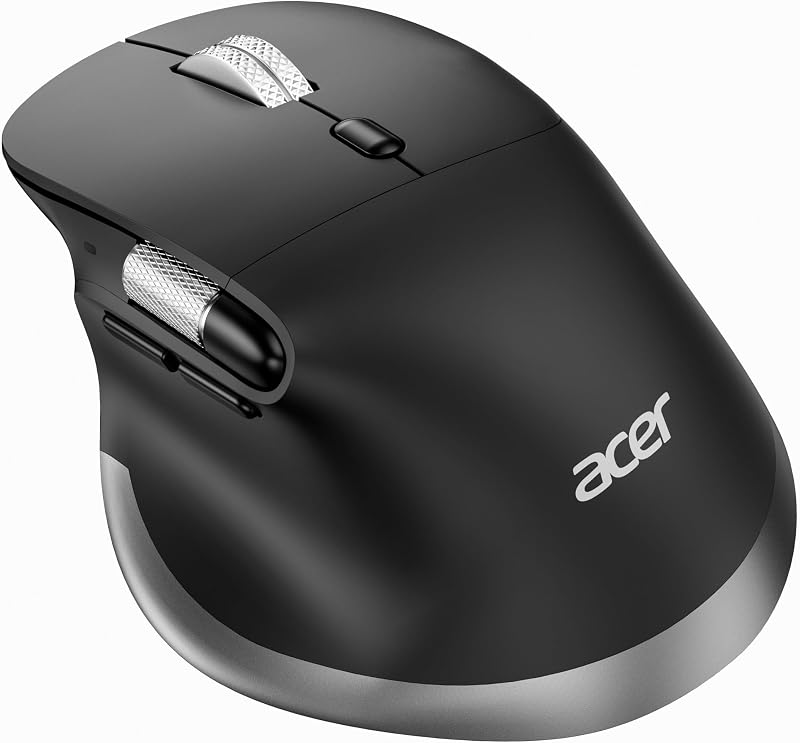
Acer Ergonomic Mouse Wireless Rechargeable
- Best for Spreadsheet editors needing neutral wrist posture
- Button Quantity 8
- Brand Acer
- Manufacturer acer
- Hand Orientation Right
- Color Black
Our score: 8.6/10
Pros
- Upright handshake ergonomic posture design
- Smooth horizontal thumb scroll wheel
- Built-in rechargeable USB-C battery
- Seamless switching across three devices
Cons
- Thumb scroll wheel is not programmable
- Heaviest model in lineup at 108 grams
Users suffering from wrist soreness during extended computer sessions will find relief in the Acer Ergonomic Mouse Wireless Rechargeable. This model adopts an upright handshake angle that places medium to large hands in a neutral posture, easing continuous tension across the forearm and carpal tunnel area. Weighing 108 grams, it provides a stable, planted feel on the desk. The manufacturer listing notes that users unfamiliar with vertical ergonomics should expect a transitional adjustment period of one to two weeks before the grip feels completely natural.
Connectivity is a key highlight, as this dual-mode unit links with up to three computers simultaneously through two Bluetooth channels and one 2.4GHz wireless receiver. A single press of the mode switch button toggles between your paired devices instantly. Navigation is handled through eight buttons, including forward and backward thumb switches and a secondary horizontal thumb wheel. This thumb wheel glides left and right across wide financial spreadsheets, coding layouts, and video editing timelines whenever page content exceeds screen width, though the listing confirms this secondary wheel is not programmable.
Tracking precision spans six levels ranging from 800 up to 4800 DPI, allowing you to tailor pointer acceleration across high-resolution displays. Unlike battery-swapping alternatives, this mouse houses an integrated 500mAh rechargeable cell that charges directly through a front-facing USB-C port. The wireless USB dongle slots directly into an integrated storage slot underneath the base, where a protective plastic film must also be removed before beginning work.
Acer Bluetooth Wireless Mouse for Laptop
- Best for Students studying in quiet libraries and classrooms
- Button Quantity 4
- Brand Acer
- Manufacturer acer
- Color Black
- Style Name Modern

Our score: 8.4/10
Pros
- Silent-click switches prevent noise distractions
- Dual Bluetooth and 2.4GHz wireless pairing
- Easy-access magnetic top battery cover
- Ambidextrous shape for left and right hands
Cons
- Requires single AA battery not included
- Lacks auxiliary forward and back buttons
The Acer Bluetooth Wireless Mouse for Laptop caters directly to shoppers with small to medium hands who prioritize portability and whisper-quiet operation. Crafted with a symmetrical, low-profile body, it accommodates both right-handed and left-handed grip styles equally well. At a featherweight 2 ounces (63 grams), it slides effortlessly into computer sleeves, briefcases, or jacket pockets, serving as an agile travel companion for remote workers and busy students moving between lecture halls.
Equipped with dual-mode connectivity, the mouse toggles across three separate hardware setups via two Bluetooth connections and a single 2.4GHz wireless USB receiver. It maintains a stable operating distance up to 33 feet, though Bluetooth and 2.4GHz modes cannot be engaged at the exact same moment. Silent-click switch mechanisms beneath the primary buttons eliminate sharp clicking noises, making this model ideal for open offices, quiet university study lounges, and late-night research sessions at home.
Sensitivity can be switched between 800, 1200, and 1600 DPI to suit varying display sizes. Physical maintenance is remarkably simple thanks to a top-mounted magnetic cover that lifts away effortlessly to reveal the battery bay and receiver slot. It requires a single AA battery (not included in the package) and enters an automatic sleep mode after 10 inactive minutes, waking with two or three firm clicks. A protective plastic film on the base must be removed prior to initial gliding.
Acer Computer Mouse Wireless
- Best for Travelers packing into ultra-slim laptop sleeves
- Button Quantity 3
- Brand Acer
- Manufacturer Acer
- Color Black
- Model Number AMR100
Pros
- Flat 56-gram pocket-friendly profile
- Three quick-switch DPI sensitivity settings
- Extended 32.8-foot wireless range
- Long three to six month battery lifespan
Cons
- Requires two AAA batteries not included
- Asymmetrical shape favors right-handed grip

Our score: 9.2/10
Best for: Commuters seeking the lightest possible travel weight
Pros
- Featherweight 45-gram travel-friendly body
- Single AA battery included in the package
- Balanced ambidextrous shape for any hand
- Audible clicky tactile switch feedback
Cons
- Fixed 1600 DPI with no adjustment button
- Wireless range limited to 20 feet
If minimizing travel weight is your top priority, the 45-gram version of the Acer Computer Mouse Wireless delivers unmatched lightness. Measuring 4.02 by 2.36 by 1.26 inches, this pocket-sized pointer is designed to alleviate wrist fatigue by offering almost zero dragging resistance. It features an ambidextrous curved profile that suits both left- and right-handed users, making it a dependable spare to keep inside your travel bag alongside a modern Windows laptop bundle such as the hp 2025 touchscreen laptop (i3, 2tb ssd, 64gb ram, windows 11 pro, office lifetime + 4-in-1 usb-a ad package.
This streamlined unit focuses on simplicity, utilizing a dedicated 2.4GHz radio frequency connection through an included USB-A nano receiver with an effective range of up to 20 feet. Setup is completely plug and play across Windows, macOS, ChromeOS, and Linux operating systems without third-party configuration utilities. The optical tracking sensor operates at a fixed 1600 DPI resolution, providing balanced tracking speed suitable for day-to-day web navigation, basic document creation, and digital shopping.
Unlike its silent-clicking sibling, this mouse embraces traditional mechanical tactile feedback with crisp, audible clicks that create an engaging rhythm while typing and scrolling. Its three-button layout includes standard left and right triggers paired with a central textured scroll wheel. Convenience is elevated right out of the box because Acer includes the single required AA battery inside the retail packaging, allowing you to plug in the receiver and begin working immediately.
Acer Computer Mouse Wireless
- Button Quantity 3
- Brand Acer
- Manufacturer Acer
- Color Black
- Model Number AMR100
The slim 56-gram edition of the Acer Computer Mouse Wireless merges an ultra-flat form factor with modern sensitivity controls. Designed specifically as an acer travel mouse with usb receiver convenience, its flat profile slips into the thinnest laptop pouches without bulging. Despite its slender height, the top shell features subtle right-handed contouring that helps your fingers and palm settle naturally into place for extended typing and browsing sessions.
Wireless communication is handled by a standard 2.4GHz USB receiver operating across an expansive 32.8-foot radius. Tracking adaptability is built directly into the housing through four functional buttons, including a dedicated DPI switch positioned directly behind the scroll wheel. Users can toggle between 800, 1200, and 1600 DPI settings with a quick click, making it easy to shift from precise image crops to broad multi-monitor cursor sweeps.
Energy efficiency is an engineering priority on this model, yielding an estimated operating lifespan of three to six months depending on daily computing routines. The optical sensor drops into low-power standby after 10 idle minutes and revives with an ordinary click. It runs on two AAA batteries, which are not supplied in the box, and houses the compact USB adapter inside the rear battery door so it never gets lost during transit.
Chip values are fields copied from the Amazon product listing. Scores are out of 10, based on listed specifications and buyer feedback.
Matching a Model to Your Setup
- For multi-device productivity across tablets and laptops: The Acer Ergonomic Mouse Wireless Rechargeable lets you pair two Bluetooth machines alongside a 2.4GHz desktop and switch between them with a single button.
- For shared campus libraries, quiet dorms, and open workspaces: Choose the Acer Bluetooth Wireless Mouse for Laptop to take advantage of its noiseless switch design and ambidextrous symmetry.
- For full-time desktop office desks and medium-to-large hands: The Acer Wireless Mouse for Laptop provides a sculpted, supportive right-hand palm rest with visible DPI flashing lights and forward/backward web buttons.
- For ultralight commuters seeking the absolute lightest load: The 45g Acer Computer Mouse Wireless cuts carrying weight down to almost nothing and includes a pre-packaged AA battery.
- For travel bags requiring an ultra-flat profile with adjustable tracking: The 56g Acer Computer Mouse Wireless slips flat into slim sleeves while retaining three quick-switch DPI sensitivity stages.
Before You Buy
Before selecting an Acer peripheral, pay close attention to the power supply and connection ports on your current computer. Three models in this comparison require independent alkaline cells (either AA or AAA sizes) that are not packaged in the retail box, meaning you must purchase them separately before starting work. Furthermore, all five models rely on traditional USB-A receivers for their 2.4GHz wireless mode. If your modern ultrabook or tablet features only USB-C ports, you will need a separate USB-A to USB-C hub or adapter, as none is included in these mouse packages.
Software customization is another important factor to understand before buying. None of these listings mention companion macro software or custom button-remapping suites. Features like the horizontal thumb wheel on the ergonomic model and the browser forward/backward buttons on standard models operate strictly as factory-configured hardware commands. In addition, the manufacturer explicitly notes that thumb side navigation buttons do not function on Apple macOS computers, and non-rechargeable models do not publish standardized milliamp ratings or water-resistance certifications.
FAQ
How does 2.4GHz wireless differ from Bluetooth connectivity on an Acer mouse?
A 2.4GHz wireless connection uses a dedicated USB-A dongle that plugs into your computer to create an instant, lag-free link without any pairing screens or driver downloads. Bluetooth connects directly to the internal wireless card inside your laptop or tablet, freeing up your physical USB ports and allowing multi-device mice to switch between several computers seamlessly.
What does DPI mean and why does it matter on an office mouse?
DPI stands for dots per inch, which measures how far the cursor travels across your screen relative to the physical movement of your hand. A lower setting like 800 DPI offers steady, fine-grained control for detail work, while higher settings like 1600 or 4800 DPI glide the cursor swiftly across large, high-resolution computer monitors with minimal wrist movement.
Where is the USB receiver stored when opening a new Acer wireless mouse?
Acer stores the miniature USB-A wireless receiver inside the mouse body to prevent it from getting misplaced during shipping. On battery-operated units, the receiver sits inside a molded slot next to the AA or AAA battery bay beneath the cover. On the rechargeable ergonomic model, the storage slot is located on the underside of the mouse base.
Why do my mouse buttons not work properly on an Apple Mac?
While primary left-clicking, right-clicking, and basic wheel scrolling work normally on macOS via standard USB and Bluetooth protocols, supplemental forward and backward thumb buttons rely on Windows navigation commands. Acer specifically notes in product listings that auxiliary side buttons do not operate natively on macOS systems.
How do sleep mode and click-to-wake work to preserve battery life?
To prevent continuous power drain when you step away from your desk, Acer wireless mice automatically enter an energy-saving sleep standby mode after 10 inactive minutes. Unlike mice that wake up whenever desk vibrations move the sensor, these models conserve extra power by requiring two or three deliberate physical clicks to reactivate tracking.


