
As Amazon Associates, we earn from qualifying purchases. This means we may receive a small commission at no extra cost to you if you click through and make a purchase.
Expanding your computer’s connectivity should not require decoding confusing technical jargon, yet choosing an amazon basics usb hub often presents an unexpected puzzle for first-time buyers. Modern laptops are thinner and lighter than ever, but that portability usually comes at the cost of traditional ports. When an ultraportable machine includes only one or two small receptacles, connecting everyday essentials like a mouse, external storage drive, wired internet cable, or desktop display becomes an immediate hurdle. Finding the ideal adapter comes down to auditing your daily workspace: noting how many devices you plug in simultaneously, identifying their connector shapes, and determining whether your tasks demand rapid file transfer speeds, monitor mirroring, or laptop battery charging.
Understanding how the manufacturer arranges its hardware makes navigating the catalog straightforward. In an amazon basics usb hub comparison, the products divide cleanly into distinct functional roles rather than a single upgrade path. The catalog ranges from multi-port desktop hubs with dedicated wall power for managing clusters of legacy accessories, to compact travel adapters integrating wired gigabit networking, up to advanced USB-C hubs capable of 10Gbps data and video passthrough. Rather than searching for a universal best amazon basics usb hub, your focus should be deciding which amazon basics usb hub to buy based on the ports your machine currently offers and the exact peripherals your routine requires.
Amazon Basics USB Hub Lineup at a Glance

Our score: 8.4/10
Best for: Desktops with numerous legacy peripherals
Pros
- 10 total expansion ports
- Dedicated AC power adapter included
- Broad legacy operating system support
Cons
- Does not support charging
- Eight ports limited to USB 2.0
Our score: 8.4/10
Best for: High-speed modern laptop file transfers
Pros
- 10Gbps high data transfer
- Compact 0.07 kg lightweight design
- Thunderbolt 3 host compatibility
Cons
- Does not charge host laptop
- Data transfer only on downstream ports
| Model | Port Count | Maximum Speed | Power & Connection |
|---|---|---|---|
| Amazon Basics USB 3.2 3.1 Gen | 5 Ports (3 USB-A, 1 USB-C downstream, 1 USB-C upstream) | 10Gbps | Host-powered (USB-C), data only |
| Amazon Basics USB 3.0 10-Port Hub | 10 Ports (2 USB 3.0, 8 USB 2.0) | 5Gbps (USB 3.0) / 480Mbps (USB 2.0) | AC adapter included, data only |
| Amazon Basics 4-Port USB 3.0 Hub | 4 Ports (3 USB 3.0, 1 RJ45 Gigabit Ethernet) | 5Gbps (USB) / 1000Mbps (Ethernet) | Host-powered (USB-A), data & network |
| Amazon Basics 6-in-1 USB-C 3.2 | 6 Ports (2 USB-A, 1 USB-C, 1 HDMI, 1 Ethernet, 1 PD) | 10Gbps (USB) / 1000Mbps (Ethernet) | 100W PD input (up to 85W output) |
Figures as published on the product listings.
The Models in Detail
Amazon Basics USB 3.2 3.1 Gen
- Size 1
- Color Silver, Black
- Dimensions 10 x 1.25 x 0.44 inches
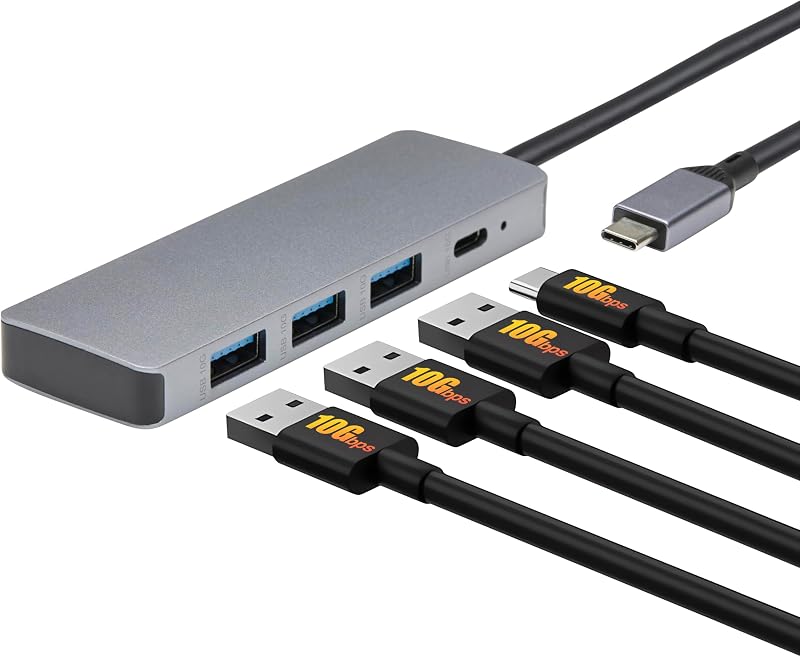
The Amazon Basics USB 3.2 3.1 Gen is engineered for users who prioritize rapid data movement across modern and traditional peripherals without carrying excess bulk. Weighing just 0.07 kg in a slim silver and black casing, this 5-port hub connects via an integrated upstream USB-C plug. The port array includes three USB-A ports and one downstream USB-C port, each delivering data transfer speeds up to 10Gbps. This high-bandwidth throughput allows users to transfer massive media files and system backups significantly faster than standard USB 3.0 gear. Integrated LED indicators communicate connection status, while plug-and-play engineering ensures hot-swappable use without extra drivers on Windows 10 and Mac computers.
This adapter is aimed at mobile professionals who rely on external solid-state drives and portable thumb drives. However, the listing notes that the downstream USB ports support data transfer only and will not charge a host laptop. Because the hub relies on bus power drawn from your computer, you must verify your laptop USB-C power supply and peripheral loading current, especially with high-draw devices like spinning hard drives. If your desk demands external display output or laptop charging, this model yields to the 6-in-1 adapter. For a streamlined desk on an amazon basics folding table, it provides a dependable high-speed data bridge.
Amazon Basics USB 3.0 10-Port Hub
- Color Black
- Size 10 Port
- Weight 0.64 Pounds
- Dimensions 8.66 x 1.3 x 0.63 inches
For extensive desktop environments with numerous connected accessories, the Amazon Basics USB 3.0 10-Port Hub delivers centralized expandability. Housed in a slim black chassis designed to conserve desk space, this external hub splits one connection into ten distinct ports: two blue SuperSpeed USB 3.0 ports offering up to 5Gbps transfer speeds, and eight white USB 2.0 ports operating at 480Mbps high-speed or 12Mbps full-speed modes. The listing highlights support for 10/100/1000Mbps transmission bandwidth. It provides broad compatibility across legacy platforms including Windows Vista, XP, Me, 2000, 7, 8, and Mac OS X v10.8, making it an exceptional tool for older computing setups and specialized hardware benches.
A primary technical advantage of this unit is its included AC wall adapter. By drawing electrical current directly from an outlet, it powers multiple accessories simultaneously without causing the signal dropouts common in passive splitters. Nonetheless, the listing explicitly states that this unit functions only for data transfer and does not support device charging. It also lacks video outputs, so shoppers planning to drive a monitor like an amazon basics gaming monitor must look to dedicated display adapters. For desktop users juggling mice, keyboards, game controllers, and flash drives, this 10-port hub cleanly eliminates peripheral clutter.
Amazon Basics 4-Port USB 3.0 Hub
- Best for Travelers needing wired internet connectivity
- Color Black
- Size 4-Port
- Dimensions 7.36 x 3.15 x 0.59 Inches

Our score: 8.0/10
Pros
- Gigabit RJ45 Ethernet port
- 5Gbps SuperSpeed USB ports
- 1-year limited warranty included
Cons
- Plastic enclosure build
- 900mA maximum output per port
The Amazon Basics 4-Port USB 3.0 Hub provides an essential bridge for laptops that lack traditional USB ports and hardwired network connectivity. Encased in a black plastic shell measuring 7.36 by 3.15 by 0.59 inches and weighing just 0.04 kg, this compact travel adapter features three USB 3.0 ports and one RJ45 Gigabit Ethernet port. The USB-A ports support data transmission up to 5Gbps with backward compatibility for USB 2.0, providing up to 900mA per port. The Ethernet jack delivers 10/100/1000 Mbps bandwidth, giving users a stable, low-latency wired internet connection that circumvents congested wireless signals. Amazon Basics backs the unit with a 1-year limited warranty.
This hybrid adapter is tailored for travelers, students, and remote workers who need reliable wired internet in hotel rooms or offices. Supported platforms include Windows 10, 8, 7, Vista, XP, 2000, Me, and Mac OS X v10.8, though the listing notes it does not support laptop operating systems prior to Windows 7 or Mac OS 10.6. As the documentation explains, actual network speed may vary based on cabling, router hardware, and computer ethernet cards. Because it connects via USB-A and does not support display passthrough or laptop charging, it steps aside for the 6-in-1 dock in modern USB-C setups.
Amazon Basics 6-in-1 USB-C 3.2
- Best for All-in-one laptop docking and charging
- Color Light Grey
- Size 11.94 x 4.6 x 1.5cm
- Dimensions 4.7 x 1.81 x 0.59 inches

Our score: 9.6/10
Pros
- 100W Power Delivery passthrough input
- 4K HDMI display output
- 10Gbps USB-C and USB-A ports
Cons
- No SD card reader included
- Wall charger and cable not included
The Amazon Basics 6-in-1 USB-C 3.2 serves as a comprehensive docking hub for current-generation laptops. Built with a light grey casing measuring 4.70 by 1.81 by 0.59 inches and weighing 0.08 kg, this multiport adapter connects via an integrated 15cm USB-C cable. It features six interfaces: one 4K HDMI port, one Gigabit Ethernet port, two USB-A 10Gbps ports, one downstream USB-C 10Gbps port, and one USB-C 100W Power Delivery input. Supporting Windows 10 and Mac platforms, this plug-and-play adapter is hot-swappable and compatible with Thunderbolt 3 host ports. The 10Gbps data ports provide rapid file transfers for external drives and modern accessories.
The standout feature is its 100W Power Delivery input, which routes up to 85W of passthrough electricity to charge your laptop while you work. The listing specifies that this PD port supports power delivery only (no data transfer) and notes that an external wall charger and power cable are not included. Under full load, the hub may reach a surface temperature near 122°F (50°C), which is typical for compact adapters handling high-wattage power and video. It does not include an SD card reader. When linking your laptop to an amazon basics 24 inch gaming monitor, this dock simplifies your routine by consolidating display, data, and power into one cable.
Chip values are fields copied from the Amazon product listing. Scores are out of 10, based on listed specifications and buyer feedback.
Matching a Model to Your Setup
- Single-Cable Laptop Workstations: Choose the Amazon Basics 6-in-1 USB-C 3.2 if your laptop relies on USB-C and you need 4K HDMI video output, gigabit internet, and up to 85W of passthrough charging alongside fast 10Gbps data ports.
- High-Speed Solid-State Storage: Select the Amazon Basics USB 3.2 3.1 Gen if you frequently transfer massive files between portable SSDs and your USB-C or Thunderbolt 3 laptop, utilizing 10Gbps throughput across three USB-A ports and one USB-C port.
- Peripheral-Heavy Desktops: Pick the Amazon Basics USB 3.0 10-Port Hub if your desk holds numerous input devices, flash drives, and printers, utilizing the included AC wall adapter to keep all ten connections powered stably.
- Wired Office and Hotel Networking: Opt for the Amazon Basics 4-Port USB 3.0 Hub if you travel with a standard USB-A laptop and require a reliable RJ45 Gigabit Ethernet jack for stable video calls alongside three 5Gbps USB expansion ports.
- Vintage PC Maintenance and Retro Testing: Rely on the Amazon Basics USB 3.0 10-Port Hub when maintaining machines running legacy operating systems like Windows XP, Windows 2000, or Windows Vista, ensuring dependable peripheral detection.
Before You Buy
Before making a final choice, verify what accessories are omitted from the retail packaging so you can prepare your workspace properly. None of the bus-powered hubs include external power bricks, and even the Amazon Basics 6-in-1 model requires you to supply your own high-wattage USB-C wall charger and cable to utilize its 100W Power Delivery input. Additionally, none of the four hubs featured in this lineup include an integrated SD or microSD card reader, which means photographers must bring a separate card reader. If you manage amazon basics smart accessories at home, remember that these hubs serve primarily as data transfer tools rather than dedicated battery charging stations.
Prospective buyers should also review technical details that the product listings do not specify. For instance, while the 6-in-1 adapter provides 4K HDMI output, the documentation does not state the maximum refresh rate at 4K resolution. Similarly, the manufacturer listings do not name the internal controller chipsets powering the data splitters, nor do they detail exact downstream power distribution when multiple unpowered accessories are connected to host-powered units simultaneously. Verifying your computer’s native port wattage and the power requirements of your external drives will help ensure your amazon basics multiport adapter operates smoothly.
FAQ
Can an amazon basics usb hub charge my laptop while transferring files?
Only the Amazon Basics 6-in-1 USB-C 3.2 can charge your host computer, routing up to 85W of passthrough electricity through its 100W Power Delivery input when connected to an external wall charger. The other three models—the USB 3.2 3.1 Gen dock, the 10-port hub, and the 4-port hub—are designed exclusively for data transfer and will not supply battery charging power to your laptop.
What is the difference between USB 3.2 Gen 2 and USB 3.0 speeds on an amazon basics hub usb?
The primary distinction is data transfer bandwidth. USB 3.0 hubs, like the 4-port and 10-port models, transfer data at maximum speeds up to 5Gbps, which is well-suited for general flash drives and desktop accessories. USB 3.2 Gen 2 models, such as the USB 3.2 3.1 Gen hub and the 6-in-1 dock, deliver up to 10Gbps, transferring high-volume multimedia files in roughly half the time.
Do Amazon Basics USB hubs require manual driver installation?
No, all four models discussed in this guide feature plug-and-play architecture that operates without manual software installation. When connected to compatible operating systems like Windows 10 or Mac OS, the computer recognizes the data ports, network adapters, and video outputs automatically.
Why does an amazon basics multiport adapter get warm during everyday use?
Compact multiport adapters manage substantial electrical and data traffic within a small enclosure, especially when routing 4K video, gigabit network packets, and high-wattage power passthrough. The listing notes that the 6-in-1 adapter can reach a surface temperature near 122°F (50°C) under full load, which represents standard heat dissipation through its casing.
Which amazon basics usb hub to buy for connecting an external display?
If you need to connect an external monitor, the Amazon Basics 6-in-1 USB-C 3.2 is the sole option in this lineup that includes a video display interface, providing a 4K HDMI port. The other three hubs offer data ports and networking jacks only, meaning they cannot transmit video signals directly to a screen.


