As Amazon Associates, we earn from qualifying purchases. This means we may receive a small commission at no extra cost to you if you click through and make a purchase.
Shopping for a desktop display can quickly feel intimidating when you encounter complex gaming jargon like refresh rates, millisecond response times, and panel curvature ratings. If you are currently searching for an aoc 27 inch monitor 240hz curved display, you are likely looking for that sweet spot where fast-moving games feel remarkably fluid and the physical screen gently curves to match your natural field of vision. A high refresh rate means your monitor draws new images hundreds of times every second, turning chaotic game action into smooth, easy-to-track motion. Screen curvature, measured with numbers like 1500R, gently bends the outer edges toward your eyes, helping to reduce neck movement and pull you directly into the virtual world.
AOC organizes its gaming monitor lineup around specific player priorities, balancing distinct screen technologies, physical shapes, and speed capabilities across several tiers. Within this selection, you will encounter high-contrast curved displays built on vertical alignment panels, an elite tournament-grade display featuring self-luminous organic light-emitting diodes, and responsive in-plane switching panels designed for pristine viewing angles. Understanding this aoc curved monitor comparison allows gift-givers and first-time shoppers to see how physical curves, pixel counts, and panel types work together, making it straightforward to decide which aoc monitor to buy for your particular space and graphical needs.
AOC Curved Gaming Monitors Lineup at a Glance
| Model | Screen Size and Shape | Panel Type and Resolution | Refresh Rate and Response | Stand Adjustability |
|---|---|---|---|---|
| AOC C27G4ZH | 27 Inch, 1500R Curved | VA LCD, Full HD (1920×1080) | 280Hz, 0.3ms | Height, Tilt, Swivel, VESA |
| AOC Agon Pro AG276QZD2 | 26.5 / 27 Inch, Flat | QD-OLED, QHD (2560×1440) | 240Hz (up to 280Hz), 0.03ms GTG | Height, Tilt, Swivel, Rear Lighting |
| AOC Q27G41ZE | 27 Inch, Flat | IPS LCD, QHD (2560×1440) | 240Hz, 0.3ms MPRT | Tilt Adjustment (-3° to +21°) |
| AOC C24G42E | 24 Inch, 1500R Curved | VA LCD, Full HD (1920×1080) | 180Hz, 1ms MPRT / 0.5ms | Tilt, 3-Sided Frameless |
Figures as published on the product listings.
The Models in Detail
AOC 27 Inch Curved Gaming Monitor (C27G4ZH)
- Best for Immersive high-speed competitive gaming on curved desks
- Color Black
- Size 27" 280Hz FHD
- Dimensions 9.43 x 24.07 x 20.33 Inches

4.7 average rating left by Amazon buyers
Pros
- Blazing 280Hz refresh rate
- Deep 3000 to 1 contrast ratio
- Full ergonomic height and swivel stand
- Immersive 1500R visual curve
Cons
- 1080p resolution on 27 inches
- Glossy screen finish reflects direct glare
The AOC 27 Inch Curved Gaming Monitor, listed under model number aoc c27g4zh, is built specifically for players who prioritize wraparound immersion and intense visual speed. Featuring a generous 27-inch screen with an engaging 1500R curvature, this display physically curves around your field of view to create an encompassing presentation. The panel operates at a blazing 280Hz refresh rate combined with a rapid 0.3ms response time, which keeps lightning-fast movements crisp and eliminates distracting motion blur. It uses a Vertical Alignment panel that achieves a deep 3000:1 contrast ratio, ensuring that nighttime environments and dark movie scenes retain rich, inky shadow details rather than washing out into gray.
Beyond its motion clarity, this aoc 240hz curved gaming display is loaded with everyday comfort and setup features. The listing highlights an ergonomic stand with comprehensive height adjustment, tilt, and swivel options, as well as VESA compatibility for users who want to mount the screen onto an articulated monitor arm. AOC incorporates Flicker-Free technology and Adaptive Sync to prevent screen tearing during intense gameplay sessions, while the AOC G-menu software allows users to customize visual profiles effortlessly. It also includes HDR readiness and operates at a glossy screen finish with 300 nits of brightness, making colors pop cleanly in standard home lighting.
This model is ideal for competitive action gamers and casual players who want a large, highly adjustable curved screen without placing extreme demands on their computer graphics card, since Full HD 1080p is easy for most gaming systems to run smoothly. However, if your daily routine demands hyper-sharp text rendering for office productivity or maximum pixel sharpness for expansive strategy titles, this 1080p display gives way to the higher-resolution Quad HD options discussed next.
AOC Agon Pro 27 Inch Gaming (AG276QZD2)
- Best for Enthusiasts wanting peak color and instantaneous response
- Color Black
- Weight 14.7 Pounds
- Size 27" 240Hz AGON PRO
- Dimensions 9.01 x 23.99 x 20.73 inches
4.9 average rating left by Amazon buyers
Pros
- Stunning self-luminous OLED panel
- Near-instant 0.03ms response time
- Crisp 1440p resolution
- Vibrant rear ambient lighting
Cons
- Flat panel lacks curved immersion
- Listing does not specify cable lengths
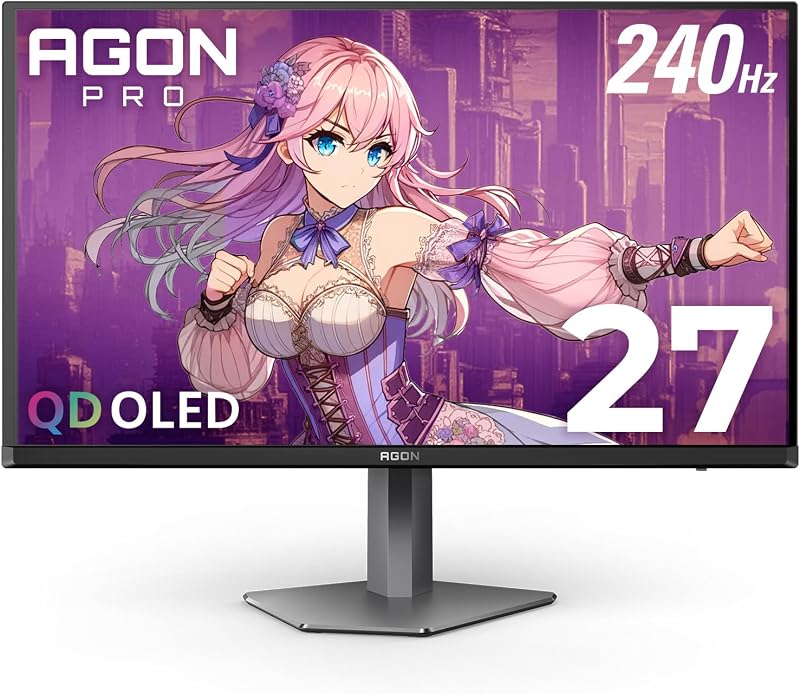
Sitting at the pinnacle of visual technology, the AOC Agon Pro 27 Inch Gaming monitor, known as the aoc agon pro ag276qzd2, is a tournament-tier 26.5-inch class display. Unlike traditional backlit panels, this model uses a self-luminous Quantum Dot OLED display where every individual pixel creates its own light. This architecture produces genuine, absolute blacks and yields an extraordinary contrast ratio of 1,500,000:1. Operating at a crisp 2K Quad HD resolution of 2560×1440, it blends sharp visual clarity with hyper-responsive performance, offering a 240Hz refresh rate that reaches up to 280Hz alongside an astonishingly fast 0.03ms gray-to-gray response time.
Visual fidelity on this monitor is exceptional, featuring HDR10 support and an expansive color gamut that covers 101 percent of DCI-P3 and 136.7 percent of the sRGB color spectrum. Dedicated hardware synchronization includes G-Sync compatibility to ensure completely tear-free graphical delivery. The exterior design incorporates customizable ambient lighting on the back of the chassis that casts colorful glows across your wall, synchronizing with other AOC peripherals. Console gamers are also supported, with the listing highlighting ultra-low latency and frame rates up to 120Hz for compatible consoles, alongside six quick-switch game modes and Shadow Control settings.
This premium display is crafted for esports enthusiasts, competitive shooters, and visual purists who want the absolute fastest pixel reaction times and breathtaking color accuracy on a flat tournament layout. It gives way to the C27G4ZH for shoppers who specifically desire a physical wraparound curvature or who prefer a more traditional, straightforward desktop form factor.
AOC 27″ Gaming Monitor QHD 260Hz (Q27G41ZE)
- Best for Sharp competitive play requiring wide viewing angles
- Total Number of HDMI Ports 2
- Display Type LED
- Brand AOC
- Manufacturer AOC
- Aspect Ratio 16:9
4.6 average rating left by Amazon buyers
Pros
- Crisp QHD 1440p resolution
- Fluid 240Hz refresh rate
- Versatile triple display input ports
- Frameless 3-sided modern chassis
Cons
- Stand only supports tilt adjustments
- Modest 1000 to 1 contrast ratio
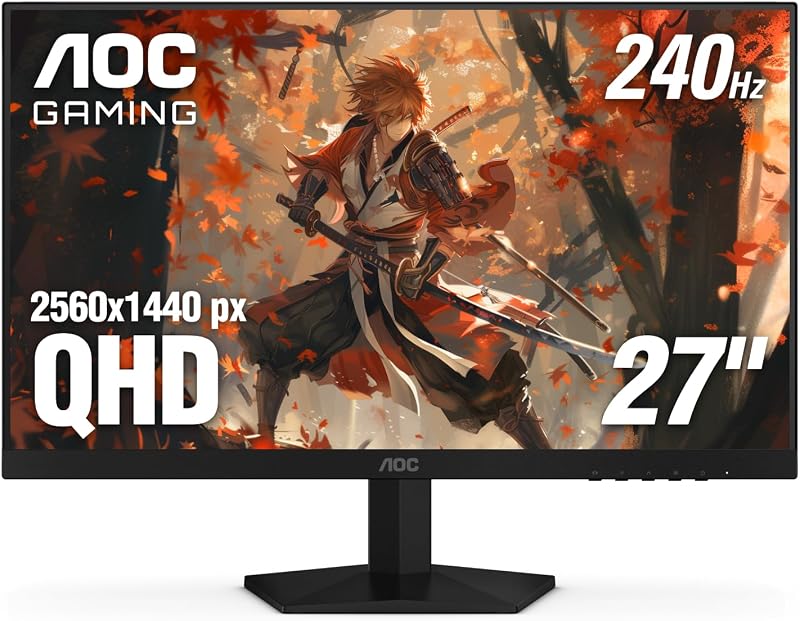
The AOC 27″ Gaming Monitor QHD 260Hz, designated as the aoc q27g41ze, delivers high resolution and exceptional speed on a flat In-Plane Switching panel. Offering a detailed 2560×1440 Quad HD resolution across a 27-inch frame, this screen produces significantly crisper text and finer visual textures than standard 1080p displays. It features a native 240Hz refresh rate over DisplayPort alongside an ultra-responsive 0.3ms MPRT response time, keeping frantic visual action remarkably sharp. The IPS technology provides wide viewing angles, ensuring that visual tones and colors stay uniform even when viewed from the side.
This aoc 27 inch gaming monitor features a sleek, three-sided frameless design highlighted with modern black and red styling. Connectivity is well-rounded, featuring one DisplayPort 1.4 connection, two HDMI 2.0 ports, and an audio-out port for external speakers or headphones. While the stand is limited to a tilt range of -3° to +21°, the display includes Adaptive-Sync for smooth frame pacing, AOC Shadow Control to reveal targets hiding in dark corners, and a user-friendly graphical on-screen display menu. If you are comparing versatile 27-inch IPS form factors across brands, reading our lg ultra gear 27 inch monitor overview can give you additional perspective on how flat IPS gaming panels behave.
The Q27G41ZE is the optimal pick for gamers who desire the sharp pixel density of 1440p resolution paired with the natural color reproduction of IPS glass for both high-level gaming and daytime desk work. It hands over the crown to the C27G4ZH if you prefer deep 3000:1 contrast and an immersive curve, or to the Agon Pro if you demand OLED contrast.
AOC 24 Inch Curved Gaming Monitor (C24G42E)
- Best for Compact setups seeking smooth curved action
- Color Black
- Size 24" 180Hz FHD
- Dimensions 8.96 x 21.1 x 19.81 inches

4.1 average rating left by Amazon buyers
Pros
- Smooth 180Hz refresh rate
- Gentle 1500R curved profile
- Rich 2000 to 1 contrast ratio
- Compact space-saving desktop footprint
Cons
- Lower refresh than 240Hz models
- Listing does not specify height adjust
For shoppers with tighter desk space or multi-screen ambitions, the AOC 24 Inch Curved Gaming Monitor, cataloged as the aoc c24g42e, delivers impressive visual immersion in a space-conscious size. This 24-inch display features a 1500R curvature that gently wraps the picture around your sightlines, creating a personal gaming cockpit. Built with a Full HD 1920×1080 VA panel, it produces an impressive 2000:1 contrast ratio that brings out clear distinctions between bright highlights and dark shadows in atmospheric titles.
Fluid motion is central to this compact display, which achieves a 180Hz refresh rate through its DisplayPort 1.4 connection and a rapid response time measured down to 0.5ms (with a 1ms MPRT rating). Visual tear reduction is handled by AMD FreeSync Premium, ensuring stutter-free rendering during rapid frame transitions. It also boasts broad color coverage reaching 119.9 percent of sRGB and 89.8 percent of DCI-P3, framed by a three-sided borderless casing that aligns neatly in side-by-side monitor arrangements. Shoppers looking into compact curved displays can also look at our viewedge 24 inch gaming monitor walkthrough to see how smaller screen footprints operate on standard student desks.
This model is particularly suited for dorms, modest bedroom setups, and high-frame-rate esports players who prefer keeping the entire screen surface within their central vision without moving their eyes. It stands as the best aoc curved screen for tight workspaces, stepping aside for the larger 27-inch models whenever you have the desk depth to support a larger visual canvas.
Chip values are fields copied from the Amazon product listing. Star figures are the average rating left by Amazon buyers, not a score given here.
Matching a Model to Your Setup
- High-Speed Curved Immersion: Choose the AOC 27 Inch Curved Gaming Monitor (C27G4ZH) if you have ample desk space and want a fast 280Hz refresh rate combined with an immersive 1500R curve and an adjustable ergonomic stand.
- Elite Visual Fidelity and Esports Precision: Select the AOC Agon Pro 27 Inch Gaming (AG276QZD2) if you desire true blacks, a 0.03ms response time, rear ambient lighting, and razor-sharp 1440p visuals on a flat OLED panel.
- Balanced 1440p Sharpness and Wide Viewing Angles: Pick the AOC 27″ Gaming Monitor QHD 260Hz (Q27G41ZE) if you want high resolution for productivity and gaming alongside the color consistency of an IPS panel.
- Space-Saving Desks and Multi-Screen Layouts: Opt for the AOC 24 Inch Curved Gaming Monitor (C24G42E) if your desk has limited depth or you want a 1500R curved display that keeps every detail within your direct peripheral view.
- Modern Gaming Consoles: Both the AOC Agon Pro and the AOC C24G42E explicitly list support for 120Hz console output, making them seamless companions for modern television-style console setups.
Before You Buy
Before making a final choice, it is helpful to note what the retail listings do not specify. Video connection cords can vary between packages; while DisplayPort is required to unlock the highest refresh rates on several of these displays (such as 180Hz on the 24-inch model or 240Hz on the QHD IPS model), the listings do not consistently confirm the exact lengths or versions of the included cables in every retail box. Buyers should verify their computer or console output ports in advance and be prepared to pick up a dedicated DisplayPort 1.4 or high-speed HDMI cable if their setup requires extended length.
Additionally, sound hardware and mounting hardware specifics are left out of several product descriptions. While audio-out headphone jacks are highlighted on models like the Q27G41ZE, the listings do not specify integrated internal speakers or speaker wattages, meaning you should plan on using desktop speakers or a gaming headset for sound. If you are debating whether a 24-inch or 27-inch display fits your room layout, exploring our aoc 32 inch curved monitor breakdown will help you understand how viewing distances change when scaling up in screen size.
FAQ
What does the 1500R curvature number mean on an AOC monitor?
The number followed by the letter R indicates the radius of the circle the monitor curve would form, measured in millimeters. A 1500R curve means that if you placed enough of these monitors together to complete a full ring, the radius from the center to the screens would be 1,500 millimeters. A lower number indicates a tighter, more noticeable bend, which helps wrap the display around your natural peripheral vision.
Do I need a DisplayPort connection to get the fastest refresh rates?
Yes, in most cases. The product listings note that peak speeds—such as the 180Hz rate on the C24G42E and the 240Hz speed on the Q27G41ZE—are achieved specifically via DisplayPort 1.4 connections. While HDMI ports are included for consoles and secondary PCs, they may cap frame rates at slightly lower levels depending on the HDMI standard supported by your graphics card.
What is the difference between VA, IPS, and OLED panels in this guide?
VA panels, found on the C27G4ZH and C24G42E, use liquid crystals aligned vertically to block backlight effectively, resulting in high contrast ratios of 2000:1 to 3000:1 for deep dark scenes. IPS panels, like the one in the Q27G41ZE, prioritize wide viewing angles and natural color accuracy. OLED panels, featured on the Agon Pro, use self-illuminating pixels without any backlight, delivering virtually infinite contrast and near-instant pixel response times.
Are these AOC monitors suitable for console gaming?
Yes, several models in this lineup specifically cater to console players. The listings for both the AOC Agon Pro AG276QZD2 and the AOC C24G42E explicitly highlight support for up to 120Hz refresh rates and ultra-low latency with modern gaming consoles, providing fluid motion when connected over HDMI.
Can I mount these AOC monitors on an aftermarket monitor arm?
The AOC C27G4ZH explicitly confirms VESA compatibility in its listing specifications, allowing you to attach it to standard monitor arms and wall brackets. For the other models, the listings highlight included desktop stands with tilt or multi-directional adjustments, but do not detail specific rear mounting hole dimensions, so using the factory-provided desk base is the safest initial plan.