
As Amazon Associates, we earn from qualifying purchases. This means we may receive a small commission at no extra cost to you if you click through and make a purchase.
Setting up an efficient workspace or choosing a practical gift for a hybrid worker often leads to a tangle of power bricks, display cables, and dongles. A quality docking station eliminates desktop clutter by routing video, high-speed data, wired internet, and system power through a single cord. When browsing a belkin docking station, shoppers generally decide between high-throughput Thunderbolt docks built for demanding workflows and flexible USB-C hubs engineered for broad platform support. Understanding how display bandwidth, charging capabilities, and physical ports interact makes it simple to choose a dock that meets everyday productivity needs without unnecessary confusion.
Belkin organizes its docking hardware around physical desk footprint, connection generation, and display architecture. The lineup spans lightweight bus-powered travel units, dedicated multi-port Thunderbolt 3 hubs, sleek Thunderbolt 4 core hubs, and expansive 14-port desktop stations. While native Thunderbolt models rely on host hardware channels to drive crisp 4K or 8K screens at 40Gbps speeds, Belkin also offers DisplayLink-powered stations that allow multi-monitor expansion on computers that normally permit only one external display. Comparing power delivery wattage and port configurations will clarify which belkin docking station to buy for your daily setup.
Belkin Docking Stations Lineup at a Glance
| Model | Total Ports | Power Delivery | Display Support |
|---|---|---|---|
| Belkin Thunderbolt 3 Docking Station | 12 | 85W | Dual 4K |
| Belkin Thunderbolt 3 Dock Mini HD | 4 | Bus-Powered | Dual 4K at 60Hz |
| Belkin Connect Thunderbolt 4 Docking Station | 5 | 96W | Single 8K or Dual 4K |
| Belkin Thunderbolt 4 Docking Station Triple | 14 | 96W | Triple 4K (Windows) / Dual 4K (Mac) |
| Belkin Thunderbolt 4 Docking Station | 12 | 90W | Single 8K or Dual 4K |
| Belkin DisplayLink Dual Display Docking Station | 14 | 100W | Dual 4K at 60Hz |
Figures as published on the product listings.
The Models in Detail
Belkin Thunderbolt 3 Docking Station
- Best for Mobile workers needing dual HDMI monitors
- Color BLACK
- Weight 0.39 pounds
- Size Thunderbolt 3 Mini
- Dimensions 3.1 x 5.1 x 0.8 Inches

4.1 average rating left by Amazon buyers
Pros
- Compact and lightweight build
- Tethered Thunderbolt cable
- Dual 4K HDMI ports at 60Hz
- Built-in gigabit Ethernet
Cons
- No laptop passthrough charging
- Limited to four expansion ports

4.3 average rating left by Amazon buyers
Best for: Legacy Thunderbolt 3 laptop users
Pros
- 12 peripheral and display ports
- 85W upstream laptop charging
- Dual 4K display capability
- Included 0.8-meter cable
Cons
- Uses older Thunderbolt 3 standard
- Bulky external power brick
The Belkin Thunderbolt 3 Docking Station, also referenced in listing documentation as the Thunderbolt 3 Dock Pro, serves as an expansive desktop anchor for home and corporate offices. Encased in a space gray aluminum housing, this unit delivers up to 85W of upstream charging to power a connected Mac or Windows laptop over a single connection. Belkin bundles a standalone 170W power brick along with an included 0.8-meter (2.6-foot) Thunderbolt 3 cable. Its 12-port layout provides immediate access to peripheral connections, including DisplayPort, gigabit Ethernet, an SD card reader, front-facing audio, four total USB ports, and dedicated Thunderbolt channels.
This dock supports dual 4K monitors to build a versatile multi-window workspace, backed by data transfer speeds reaching up to 40Gbps for fast local backups. It is ideal for users with Thunderbolt 3 or compatible USB-C laptops who rely on legacy ports like standard DisplayPort and physical SD media slots. While it remains a proven workhorse for established workstations, users wanting downstream daisy chaining for multiple modern USB-C accessories will find more flexibility in Belkin’s newer Thunderbolt 4 family.
Belkin Thunderbolt 3 Dock Mini HD
The Belkin Thunderbolt 3 Dock Mini HD focuses on portability and rapid deployment for mobile professionals, students, and traveling presenters. Instead of requiring a heavy external AC power brick, this compact black hub draws power directly from the host laptop through an integrated 6.8-inch (174mm) tethered Thunderbolt 3 cable. Weighing just 6.24 ounces and measuring barely over five inches across, it slides smoothly into a travel sleeve or briefcase, making it well-suited for temporary hot-desks, conference rooms, or shared workspaces.
Despite its minimal footprint, the dock delivers full 40Gbps Thunderbolt speeds and incorporates two HDMI ports that drive dual 4K monitors at a smooth 60Hz refresh rate. Additional connections include two USB-A 3.0 ports for connecting flash drives or a wireless mouse receiver, alongside a gigabit Ethernet port for stable wired networking. Listing specifications cite compatibility with macOS Sierra or higher and Windows 8 or higher. Because this bus-powered design provides no passthrough laptop charging, it yields to Belkin’s mains-powered desktop models for users seeking an all-in-one charging station for their primary desk.
Belkin Connect Thunderbolt 4 Docking Station
- Best for Users building clean Thunderbolt 4 daisy chains
- Color Gray
- Weight 1.98 Pounds
- Dimensions 5.3 x 2.9 x 0.7 inches

4.9 average rating left by Amazon buyers
Pros
- Four Thunderbolt 4 USB-C ports
- 96W laptop power delivery
- Supports single 8K or dual 4K
- Compact 5-in-1 desk footprint
Cons
- Only one legacy USB-A port
- No built-in Ethernet port
The Belkin Connect Thunderbolt 4 Docking Station delivers a streamlined 5-in-1 core hub experience engineered for modern USB-C and Thunderbolt computers. Built with a low-profile gray enclosure weighing two pounds, this hub features four Thunderbolt 4 ports (one upstream host port and three downstream device ports) along with a single high-speed USB-A port. It includes an external 150W power supply and a detachable Thunderbolt 4 cable. The hub provides up to 96W of Power Delivery to run demanding host laptops at full capacity while supplying up to 15W of downstream charging to connected accessories.
This hub is tailored for users building clean, high-performance setups centered around external solid-state drives and modern displays. Transfer rates hit 40Gbps, which the listing notes is eight times faster than standard USB 3.0, and users can daisy-chain up to six compatible devices. Display capabilities support either a single 8K screen at 30Hz or dual 4K monitors at 60Hz. It includes certified overcurrent protection and requires Windows 11 on PC setups. For users who prioritize modern USB-C connectivity over traditional legacy jacks, this model stands out as the best belkin thunderbolt dock for minimalist desks.
Belkin Thunderbolt 4 Docking Station Triple
- Best for Workstations balancing dual HDMI screens and accessories
- Color Gray
Pros
- Dual HDMI 2.0 ports built in
- 90W laptop charging plus front fast charge
- High-resolution 8K single display support
- 12 ports for broad peripheral connectivity
Cons
- Requires large desktop space
- Older HDMI 2.0 specification
4.6 average rating left by Amazon buyers
Best for: Windows power users needing three 4K displays
Pros
- Up to triple 4K display output
- Fast 2.5Gb wired Ethernet
- 14 connectivity ports
- 96W power delivery
Cons
- Mac extended displays limited to two
- Only one dedicated HDMI port
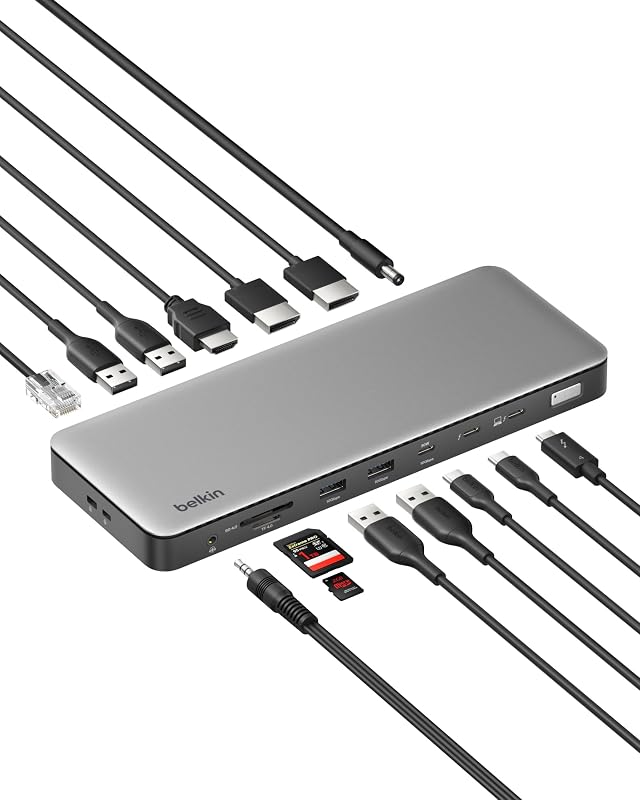
The Belkin Thunderbolt 4 Docking Station Triple is a heavy-duty 14-in-1 hub designed for complex multi-screen environments and dense peripheral connectivity. Built in a gray casing and shipped in 100 percent plastic-free packaging, this station supplies 96W of laptop Power Delivery over a single cord. Its extensive port selection features one dedicated HDMI 4K port, Thunderbolt 4 connectivity, five total USB ports across USB-A 3.1 and USB-C, front-facing SD and microSD card slots, an audio jack, and an upgraded 2.5Gb Ethernet port that provides wired networking two and a half times faster than standard gigabit speeds.
Display flexibility represents the defining feature of this belkin thunderbolt 4 docking station triple configuration. According to listing specifications, compatible Windows PCs can output up to three extended 4K displays at 60Hz for deep multitasking across spreadsheets, code editors, and media tools. On Mac systems, macOS supports up to two extended displays through this dock. Physical security is supported by an integrated Kensington Lock slot alongside Belkin’s 6-point safety system covering over-voltage, overload, and over-temperature protection. While ideal for multi-monitor workstations, users who only need two standard displays may find better value in simpler dual-display alternatives.
Belkin Thunderbolt 4 Docking Station
- Color Space Gray
- Weight 0.93 Pounds
- Size 1" x 7.9" x 3.2"
- Dimensions 9.75 x 5.12 x 0.79 inches
The Belkin Thunderbolt 4 Docking Station provides a balanced 12-port hub created to act as the primary desktop center for Mac and Windows environments. This gray workstation supplies up to 90W of upstream charging to your host laptop through an included 0.8-meter Thunderbolt 4 cable. It also features a front-facing USB-C Power Delivery 3.0 port, allowing you to fast-charge a smartphone or tablet directly from the dock. The rear and front arrays include two Thunderbolt 4 ports, two HDMI 2.0 ports, a USB-C 3.1 Gen 2 port, two USB-A 3.1 ports, gigabit Ethernet, an SD card reader, and an audio connection.
Screen support on this versatile belkin thunderbolt docking station covers a single 8K display or dual 4K monitors, with listing notes citing support for up to three extended displays on compatible systems. Its 40Gbps bandwidth moves large video projects and photo libraries without bottlenecks. Shoppers researching alternatives across our site, such as a dell thunderbolt 4 dock, will appreciate Belkin’s straightforward integration of dual HDMI ports, which avoids the need for DisplayPort adapter dongles. It gives way to DisplayLink models primarily when connecting dual extended monitors to base Apple silicon laptops.
Belkin DisplayLink Dual Display Docking Station
- Best for Dual-monitor MacBook or mixed-fleet office setups
- Color Black
Pros
- DisplayLink software enables dual Mac screens
- 100W laptop power delivery
- 14 ports with legacy adapter
- Recycled housing construction
Cons
- Capped at 10Gbps data speed
- Requires DisplayLink driver installation
The Belkin DisplayLink Dual Display Docking Station solves standard display limitations by utilizing DisplayLink graphics technology rather than relying entirely on native GPU channels. This 14-in-1 desktop hub allows laptops—including base Apple M1, M2, and M3 MacBooks that natively support only one external screen—to extend across two 4K displays at 60Hz using either HDMI or DisplayPort connections. It functions as an effective belkin usb c docking station dual monitor hub for shared office desks and mixed computing fleets.
Charging performance is the highest in Belkin’s lineup, delivering up to 100W of Power Delivery to the connected laptop. The dock provides seven total USB ports, a 1Gb Ethernet jack, and data transfer speeds up to 10Gbps via USB 3.2 Gen 2. Belkin includes a USB-C to USB-A adapter to accommodate older legacy laptops, and the black chassis features VESA mounting options alongside a Kensington Lock slot. The housing is built using at least 75 percent recycled materials and comes with a 3-year warranty. Shoppers comparing universal USB hubs in our dell usb c dock guide will find Belkin’s cross-platform flexibility impressive, though users requiring 40Gbps data transfer speeds should stick to native Thunderbolt 4 hubs.
Chip values are fields copied from the Amazon product listing. Star figures are the average rating left by Amazon buyers, not a score given here.
Matching a Model to Your Setup
- Choose the Belkin Thunderbolt 4 Docking Station Triple if you work on a Windows computer and require three independent 4K monitors alongside high-speed 2.5Gb Ethernet for heavy file transfers.
- Select the Belkin DisplayLink Dual Display Docking Station if you own a standard MacBook with an M1, M2, or M3 chip and need to run two extended 4K external displays simultaneously for work.
- Opt for the Belkin Connect Thunderbolt 4 Docking Station if you prefer a minimalist desk aesthetic and want three downstream Thunderbolt 4 ports to daisy-chain modern high-speed storage drives.
- Pick the Belkin Thunderbolt 4 Docking Station if you want a reliable 12-port desktop hub with dual HDMI ports, 90W laptop charging, and a dedicated fast-charging front port for your phone.
- Use the Belkin Thunderbolt 3 Docking Station if you have an existing Thunderbolt 3 laptop and want a comprehensive 12-port workstation with full-size SD card access and 85W power.
- Carry the Belkin Thunderbolt 3 Dock Mini HD in your gear bag if you travel frequently and need a portable, bus-powered hub to connect dual HDMI displays in hotel rooms or client offices.
Before You Buy
Before purchasing a docking station, check your computer’s physical ports and internal display capabilities to avoid connectivity surprises. While all Thunderbolt 4 docks utilize the oval USB-C connector shape, not every USB-C port on a laptop supports Thunderbolt data rates or video transmission. Furthermore, the product listings do not include monitor cables like standard HDMI or DisplayPort cords, so you will need to provide your own to connect external screens. If you plan to connect older USB-A flash drives or specialized input accessories, verify the exact port count, as compact hubs like the 5-in-1 model prioritize USB-C over older rectangular connectors.
Operating system compatibility and software drivers also play a crucial role in performance. While standard Thunderbolt docks require no background software for basic display output, the DisplayLink dual display dock requires installing DisplayLink Manager software on your host machine to enable dual extended screens on macOS. Additionally, the listings specify that triple extended display configurations on the 14-in-1 Thunderbolt 4 model require a compatible Windows PC, whereas Mac operating systems are limited to two extended displays. Reviewing your laptop manufacturer’s external display specifications beforehand ensures seamless setup right out of the box.
FAQ
Can a Belkin Thunderbolt 4 dock work with an older Thunderbolt 3 laptop?
Yes, Thunderbolt 4 technology is backward compatible with Thunderbolt 3 host computers. When plugged into a Thunderbolt 3 port, the dock will operate at standard Thunderbolt 3 performance levels, allowing you to access connected peripherals, external monitors, and upstream laptop charging seamlessly.
What is the difference between native Thunderbolt docks and DisplayLink docks?
Native Thunderbolt docks transmit video signals directly from your laptop’s built-in graphics hardware across high-speed 40Gbps channels without requiring additional software. In contrast, DisplayLink docks compress video data via dedicated software drivers and process it through USB data channels. This enables dual external displays on computers with hardware display limits, such as base Apple M-series MacBooks, though it caps data transfer speeds at 10Gbps.
Do Belkin docking stations include a host connection cable in the box?
Most desktop Belkin Thunderbolt docking stations come with a dedicated host cable included in the packaging, typically measuring 0.8 meters (approximately 2.6 feet) in length. Portable options like the Mini HD include an integrated tethered cable. However, monitor connection cables such as HDMI or DisplayPort cords are not supplied and must be purchased separately.
How much charging wattage does my laptop need from a dock?
Most standard productivity laptops, such as ultrabooks and 13-inch to 14-inch notebooks, charge efficiently with 60W to 85W of power delivery. Larger mobile workstations and 16-inch laptops benefit from 90W to 100W to maintain battery levels during intense rendering or gaming sessions. Belkin’s desktop docking stations supply between 85W and 100W, making them well-suited for most modern machines.
Can I use a Belkin Thunderbolt dock to charge my smartphone?
Yes, several Belkin models support downstream accessory charging. Specifically, the Belkin Thunderbolt 4 Docking Station features a dedicated front-facing USB-C Power Delivery 3.0 port designed to fast-charge smartphones and tablets, while the 5-in-1 Connect hub provides up to 15W of downstream power across its secondary Thunderbolt ports.


