
As Amazon Associates, we earn from qualifying purchases. This means we may receive a small commission at no extra cost to you if you click through and make a purchase.
Connecting a modern laptop, tablet, or mobile phone to an external display should be simple, but differing port types often complicate the process. Modern computers increasingly rely on compact USB-C ports to handle both battery charging and display output. When your television, office monitor, or conference room projector relies on standard HDMI connections, an adapter is necessary to bridge that connection. The right adapter prevents blurry text, keeps your battery from running out during a meeting, and eliminates visual lag during streaming. First-time buyers and gift-givers often need to choose between a basic converter cable that only carries a display signal and multi-port options that can charge host machines or connect accessories at the same time. Deciding between these choices comes down to how many open ports your device has, the physical space on your desk, and whether your monitor setup demands high refresh rates for smooth visuals.
Belkin organizes its video connectivity range across several functional tiers, moving from lightweight single-cable dongles up to desktop docking hubs. In this lineup, you will find dedicated video converters designed purely for screen mirroring, charge-and-display combination dongles, and comprehensive multiport hubs equipped with standard USB ports. When performing a belkin usb hub comparison, shoppers quickly discover that each hardware tier targets a specific desk environment and workflow. Deciding which belkin usb adapter to buy depends heavily on your hardware priorities, such as whether you need 60Hz refresh rates for fluid motion, pass-through power delivery to prevent battery drain, or extra USB-A connections for standard peripherals. Understanding these differences ensures that you choose the exact belkin usb-c to hdmi adapter that matches your external monitor and host device requirements.
Belkin USB-C to HDMI Adapters Lineup at a Glance

4.0 average rating left by Amazon buyers
Best for: Minimalist Chromebook and MacBook streaming setups
Pros
- Chromebook certified compatibility
- Smooth 4K video at 60Hz
- Advanced shielding against Wi-Fi interference
- HDCP 2.2 protected content playback
Cons
- No power pass-through charging
- Single video port only
| Model | Video Resolution and Refresh Rate | Power Delivery Pass-Through | Port Selection | Enclosure and Weight |
|---|---|---|---|---|
| Belkin USB C to HDMI Adapter | 4K (3840×2160) at 60Hz | Up to 60W USB Power Delivery | 1 HDMI, 1 USB-C Power Port | Black finish, 0.05 kg |
| Belkin USB-C to HDMI Adapter | 4K at 60Hz | None (Bus-powered, 0.03W draw) | 1 HDMI Port | Black finish, 1.12 ounces |
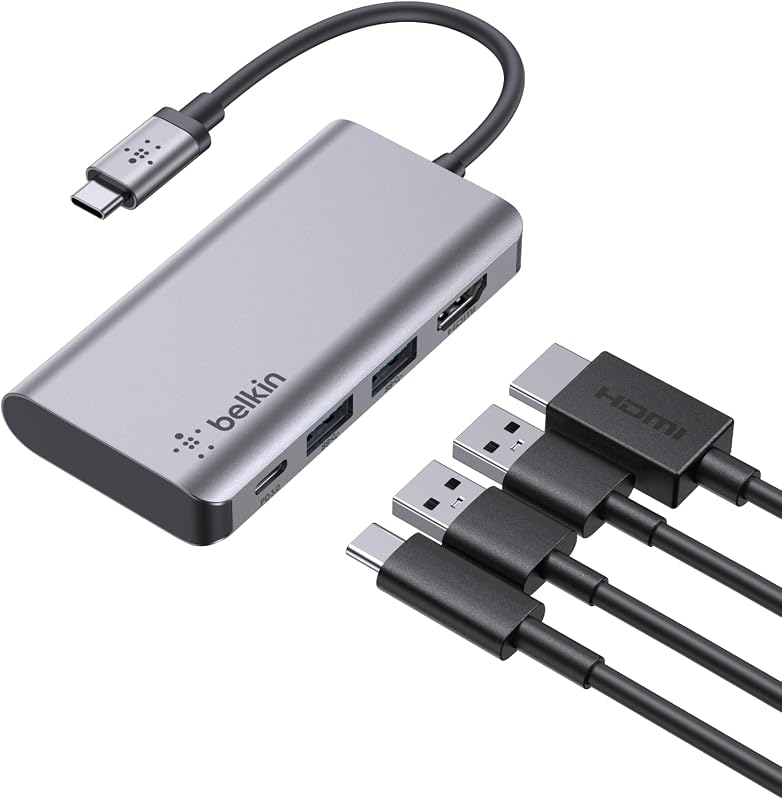
| Belkin USB C Hub | 4K at 30Hz | Up to 100W (minus 15W for dock) | 1 HDMI 1.4, 2 USB-A 3.0, 1 USB-C PD | Composite with aluminum finish, 3.36 ounces |
| Belkin USB-C Hub 5-Port 4K HDMI | 4K (HDMI 2.0) at 60Hz | Up to 100W Power Delivery | 1 HDMI 2.0, 4 Multiport USB Connections | 75% PCR Plastic housing, 0.12 kg |
Figures as published on the product listings.
The Models in Detail
Belkin USB C to HDMI Adapter
- Best for Everyday desktop multitasking with older accessories
- Color Black
- Weight 0.209 pounds
4.0 average rating left by Amazon buyers
Pros
- Pass-through power up to 100W
- Dual USB-A 3.0 ports for accessories
- Fast 5 Gbps data transfer speeds
Cons
- HDMI output capped at 30Hz
- Dock consumes 15W of input power

4.3 average rating left by Amazon buyers
Best for: Presenters needing simultaneous charging and display
Pros
- Pass-through charging up to 60W
- Crisp 4K video at 60Hz
- Universal plug and play
Cons
- No additional USB-A accessory ports
- Host port must support DP Alt Mode
The Belkin USB C to HDMI Adapter solves a common challenge for ultra-thin laptop owners: losing your only charging port to plug in an external monitor. This dual-purpose adapter features an integrated USB-C connector on one end that plugs directly into your computer, while the compact adapter body houses an HDMI video port alongside a dedicated USB-C power input port. The HDMI interface supports ultra-high-definition video resolutions up to 4K by 2K (3840×2160) running at a 60Hz refresh rate. By routing up to 60W of pass-through USB Power Delivery through the second port, your host device receives continuous power while outputting full visual fidelity. The listing notes plug-and-play operation for Mac and Windows laptops, including the MacBook Pro, Surface Pro, and iPad Pro, operating without extra software installations.
This specific belkin usb c to hdmi adapter is best suited for mobile professionals, educators, and students who frequently carry their devices to lecture halls, conference rooms, or trade show booths. If your notebook or tablet features only a single USB-C port, a traditional video-only dongle would leave your device running on battery power until the presentation ends. This model eliminates battery anxiety while delivering high-definition video clarity. However, it gives way to larger multi-port hubs when your daily routine requires connecting traditional accessories such as thumb drives, external mice, or wired keyboards. When comparing options like the apple av adapter usb-c to hdmi, users who want focused utility without carrying a bulky desktop dock will appreciate this balance of video sharpness and charging capability.
From a design standpoint, this adapter is lightweight and compact, weighing 0.05 kg with dimensions measuring 1.1 x 4 x 5.1 inches. The black exterior maintains an understated look on any desk surface. The manufacturer listing notes that the host device’s USB-C port must support DisplayPort Alternate Mode (DP Alt Mode) to transmit video through this cable. For users seeking an efficient way to output 4K at 60Hz while retaining their laptop’s battery life via a single wall charger, this 2-port adapter provides an elegant, clutter-free solution.
Belkin USB-C to HDMI Adapter
- Color Black
- Weight 0.209 pounds
The Belkin USB-C to HDMI Adapter provides a direct, single-cable pathway between any video-capable USB-C port and an HDMI display. Built purely for video transmission, this streamlined dongle features a single HDMI port and draws a nominal 0.03 watts directly from your connected machine. It features official “Works With Chromebook” certification, meaning it meets Google compatibility standards for smooth operation across Chromebook models. Beyond standard laptops, the listing specifies compatibility with televisions, monitors, iPads, and iPhones that support video output over USB-C. It delivers clear 4K visual output at 60Hz, ensuring steady cursor tracking, crisp presentation slides, and fluid media playback without stutter.
One of the standout technical attributes detailed in the listing is its advanced internal shielding designed to minimize electromagnetic interference (EMI). High-speed digital signals can sometimes disrupt nearby wireless radios, but this engineered shielding maintains a stable wired display link while helping protect your laptop’s Wi-Fi connection from signal degradation. Additionally, this belkin 4k hdmi adapter supports HDCP 2.2 content protection protocols. This compliance allows users to stream digital rights-managed media from popular platforms such as Netflix and iTunes directly to high-definition screens without facing blacked-out screens or playback errors.
This minimalist model suits commuters, home theater streamers, and office workers whose computers already feature multiple USB-C ports or separate charging inputs. Measuring 5.74 x 1.3 x 0.48 inches and weighing just 1.12 ounces, it slips effortlessly into a pocket or laptop sleeve. It yields to charge-enabled adapters or hubs when your device has only one available port and must receive battery power while connected to the screen. For pure video conversion with robust wireless protection, it remains a dedicated hardware choice.
Belkin USB C Hub
- Color Black
- Size 5 Ports
The Belkin USB C Hub steps up from simple dongles to offer a full 4-in-1 desktop expansion station. Designed for users who need to connect a wider array of workstation peripherals through a single cable, this unit incorporates an HDMI 1.4 port, two USB-A 3.0 BC1.2 ports, and a dedicated USB-C Power Delivery port. The device facilitates data transfer speeds up to 5 Gbps, allowing users to move large files, photos, and documents between thumb drives and their computer quickly. Built to handle heavier power requirements, it supports pass-through charging up to 100W. The listing notes that the hub reserves 15W to power its internal circuitry and connected ports, delivering the remaining wattage directly to keep host laptops such as the MacBook Pro, MacBook Air, and Chromebook energized.
The HDMI port on this belkin usb c hub outputs video resolutions up to 4K, capped at a 30Hz refresh rate. For general productivity tasks, spreadsheets, word processing, and slide presentations, 30Hz provides clear visual rendering on modern 4K monitors. However, users who require ultra-fluid mouse tracking, fast-paced video editing, or high frame-rate streaming will find that 30Hz is less fluid than 60Hz models. This model yields to higher-tier hubs when smooth 60Hz motion is mandatory. If you are comparing multi-port docks and evaluating the acer usb c hub against Belkin alternatives, this 4-in-1 model serves as an effective desktop nexus for users balancing external accessories with basic display needs.
Weighing 3.36 ounces with dimensions of 5.19 x 3.98 x 0.97 inches, the unit features a composite enclosure with an aluminum finish that complements modern metallic notebooks. The two USB-A BC1.2 ports provide reliable connections and power for smartphones, tablets, external hard drives, keyboards, and mice. For remote workers, students, and home office setups seeking to clean up cable clutter while expanding a single USB-C port into a productive workstation, this multiport adapter delivers practical versatility.
Belkin USB-C Hub 5-Port 4K HDMI
- Best for Creative professionals wanting fast ports and fluid 4K
- Color Black
- Size 5 Ports

4.3 average rating left by Amazon buyers
Pros
- Fluid 4K at 60Hz HDMI 2.0 output
- 100W Power Delivery pass-through
- Built-in 6-point safety defense system
- Housing made with 75% recycled materials
Cons
- Plastic exterior casing
- Heavier footprint than simple adapters
The Belkin USB-C Hub 5-Port 4K HDMI represents the most capable connectivity solution in this collection, bridging the gap between peripheral expansion and visual performance. This multiport hub features five dedicated connection points, including an HDMI 2.0 port that delivers full 4K visual resolution at a 60Hz refresh rate. Alongside the display interface, it provides fast data transmission up to 5 Gbps across its USB ports, allowing users to connect external storage drives, cameras, and input devices simultaneously. The dedicated USB-C port handles fast data transfers and 100W Power Delivery pass-through at the same time, ensuring power-hungry laptops like the M4 MacBook Pro, iPad Pro, and Windows machines stay charged during intense workloads.
Safety and environmental design are emphasized in this model’s specifications. The unit incorporates Belkin’s 6-point safety system, an internal hardware defense suite offering over-voltage, overload, overcurrent, over-temperature, and short-circuit protection, all built with fire-resistant materials. The listing highlights sustainable manufacturing, with the outer housing built from 75% Post-Consumer Recycled (PCR) plastics, supported by a 2-year manufacturer coverage period. This belkin multiport adapter brings peace of mind to users who leave high-wattage power supplies connected to their devices throughout long workdays.
This flagship belkin usb-c hub 5-port 4k hdmi is tailored specifically for content creators, photographers, video editors, and power users who need both high refresh rates and multi-device connectivity. While the 4-in-1 hub restricts 4K video to 30Hz, this 5-port model sustains full 60Hz output alongside multiple USB data channels. Weighing 0.12 kg in a compact form factor, it is compatible with Chrome OS, Windows, and macOS. It represents the top choice in this comparison for anyone seeking an all-in-one docking companion that handles high-resolution monitors and high-speed data peripherals.
Chip values are fields copied from the Amazon product listing. Star figures are the average rating left by Amazon buyers, not a score given here.
Matching a Model to Your Setup
- Presentations and classroom lectures with a single-port laptop: The Belkin USB C to HDMI Adapter gives you reliable 4K 60Hz video on projectors while channeling up to 60W of power so your battery does not run low mid-speech.
- Dedicated streaming and media viewing on a multi-port Chromebook or MacBook: The Belkin USB-C to HDMI Adapter provides a direct, single-cable link with Chromebook certification, HDCP 2.2 support for protected video, and advanced shielding to protect your Wi-Fi signal.
- Everyday home office setups using legacy desktop accessories: The Belkin USB C Hub lets you connect two standard USB-A devices like keyboards and mice, delivers up to 100W pass-through charging, and links to an external display at 4K 30Hz.
- High-demand creative workstations and video editing suites: The Belkin USB-C Hub 5-Port 4K HDMI provides fluid 4K 60Hz video via HDMI 2.0, 100W Power Delivery, 5 Gbps data speeds, and a 6-point electrical safety system for heavy computing tasks.
- Minimalist travel kits for hotel room televisions: The Belkin USB-C to HDMI Adapter weighs barely over an ounce, fits into small pockets, and connects your tablet, iPhone, or laptop to displays without requiring extra wall power.
Before You Buy
Before purchasing any hdmi to usb c adapter belkin offers, you should verify the specific capabilities of your computer’s USB-C port. USB-C refers to the physical shape of the connector, but not all USB-C ports carry video signals. For any of these adapters to transmit video to your display, your host computer or tablet must support DisplayPort Alternate Mode (commonly known as DP Alt Mode) or Thunderbolt technology over its USB-C connection. The product listings do not include external HDMI cables or dedicated wall charging adapters in the box; you must supply your own HDMI display cable and USB-C power brick to take full advantage of pass-through charging and video output. When shopping for cables, pairing your adapter with a high-bandwidth display cord like an acer usb c to hdmi cable will ensure steady signal delivery to your monitor.
It is also essential to understand how power pass-through operates when planning your workstation power budget. The product listings specify that multi-port docks reserve a portion of incoming power to operate their internal circuitry and peripheral ports. For instance, the 4-in-1 hub reserves 15W from incoming power, meaning a 100W charger supplies 85W of net power to your laptop. Furthermore, the listings do not specify custom driver software requirements because these hardware devices operate via native operating system display protocols on Windows, macOS, and Chrome OS. Reviewing your host device’s manual for DP Alt Mode support and verifying your monitor’s supported refresh rates will guarantee a smooth setup experience from day one.
FAQ
Does a Belkin USB-C to HDMI adapter require drivers to work?
No driver downloads or software installations are required. All four Belkin adapters in this guide are engineered as plug-and-play accessories that interface directly with native display drivers built into macOS, Windows, and Chrome OS. As long as your computer or mobile device supports video output via DisplayPort Alternate Mode over USB-C, the external monitor will detect the video feed automatically as soon as the adapter and HDMI cable are connected.
What is the practical difference between 4K at 30Hz and 4K at 60Hz?
The refresh rate, measured in Hertz (Hz), represents how many times per second the display updates the image on your screen. At 4K running at 30Hz, the display refreshes 30 times per second, which is suitable for reading documents, browsing web pages, and presenting slides, but may cause the mouse cursor and active windows to appear slightly choppy when moving quickly. At 4K running at 60Hz, the screen refreshes 60 times per second, resulting in noticeably smoother mouse movement, fluid video playback, and reduced eye strain during extended work sessions.
Can I charge my laptop through every Belkin adapter in this guide?
No, not every model supports pass-through charging. The basic Belkin USB-C to HDMI Adapter is a bus-powered, video-only dongle that does not feature any power input ports. To charge your device while transmitting video, you must choose the Belkin USB C to HDMI Adapter (supporting up to 60W Power Delivery), the Belkin USB C Hub (supporting up to 100W with 15W reserved for the dock), or the Belkin USB-C Hub 5-Port 4K HDMI (supporting up to 100W Power Delivery).
Why is my external monitor blank after plugging in the adapter?
A blank screen usually occurs when the host device’s USB-C port does not support DisplayPort Alternate Mode (DP Alt Mode), which is the standard required to transmit visual data through USB-C. If your host device only supports data transfer or basic battery charging over that specific port, the monitor will not receive a signal. Additionally, ensure that your display is set to the correct HDMI input channel and verify that your HDMI cable is securely seated at both ends.
Will these Belkin adapters play protected video from Netflix or iTunes?
Yes, these adapters support High-bandwidth Digital Content Protection (HDCP). Specifically, the Belkin USB-C to HDMI Adapter explicitly lists support for HDCP 2.2, which ensures secure communication between your computer and the external display. This prevents digital handshake failures and black screens when streaming copyrighted movies and shows from streaming platforms like iTunes, Netflix, and other protected services.


