
As Amazon Associates, we earn from qualifying purchases. This means we may receive a small commission at no extra cost to you if you click through and make a purchase.
Choosing the right anker multiport adapter comes down to solving a very modern computing dilemma: modern laptops are remarkably slim and portable, but they frequently eliminate traditional ports in favor of one or two USB-C connections. For everyday users and gift-givers shopping for students, remote professionals, or family members, navigating the variety of adapters can feel daunting. A multiport adapter bridges this connectivity divide, linking a notebook to essential external monitors, thumb drives, memory cards, and power cords through a single plug. Deciding on the right model requires weighing physical port variety against personal performance priorities like fluid video refresh rates or stable wired internet access.
Anker organizes its hub lineup around clear, practical workspace scenarios, segmenting models by overall port count, enclosure materials, and dedicated functionality. In this anker multiport adapter comparison, options range from minimalist five-port travel hubs to feature-rich seven-port designs equipped with dual memory card slots or specialized display controllers. Some models focus on high-definition 4K video at a rapid 60Hz refresh rate for visual clarity, while others prioritize reliable office networking via integrated Ethernet jacks. Recognizing how these port configurations differ makes it easy to decide which anker multiport adapter to buy for your particular desk setup.
Anker Multiport Adapters Lineup at a Glance
| Model | Port Selection | Display and Video | Power Delivery |
|---|---|---|---|
| Anker USB C Hub (B0DXJQT19B) | 7 Ports: 2 USB-A 3.0, 1 USB-C Data, HDMI, SD, TF, USB-C PD | Up to 4K at 60Hz | Up to 85W pass-through (100W input) |
| Anker USB-C Hub with Ethernet (B08C9HZ5YT) | 6 Ports: Ethernet, HDMI, 1 USB-C Data, 2 USB Data, USB-C PD | Up to 4K at 30Hz | Supports 65W wall charger pass-through |
| Anker USB-C Hub (B0DKT8BB4M) | 5 Ports: 1 USB-A 3.0, 2 USB-A 2.0, HDMI, USB-C PD | Up to 4K at 30Hz | Up to 90W pass-through (100W input) |
| Anker USB C Hub (B07ZVKTP53) | 7 Ports: USB-A Data, USB-C Data, SD, microSD, HDMI, USB-C PD | Up to 4K at 30Hz | Up to 85W pass-through |
Figures as published on the product listings.
The Models in Detail
Anker USB C Hub
- Best for Travelers managing multi-device media files
- Color Gray
- Weight 0.22 Pounds
- Size USB C Hub (7-in-1)

Our score: 8.2/10
Pros
- Dual SD and microSD card slots
- High-speed 5Gbps USB-A and USB-C ports
- Pass-through charging up to 85W
Cons
- HDMI output capped at 4K at 30Hz
- Omits a wired Ethernet port

Our score: 9.0/10
Best for: Professionals demanding smooth 4K 60Hz video output
Pros
- Fluid 4K at 60Hz HDMI video
- Dual SD and TF memory card slots
- Fast 5Gbps USB-C and USB-A ports
- Compact durable metal housing
Cons
- No built-in Ethernet jack
- USB-C port does not transmit video
The Anker USB C Hub is a compact 7-in-1 connectivity solution tailored for users who value fluid, high-resolution external displays alongside rapid data access. Built with a sleek gray metal enclosure measuring 5.17 inches long, 1.46 inches wide, and 0.47 inches thick, this lightweight 67-gram hub slips comfortably into any laptop bag or briefcase. Its defining feature is an advanced HDMI port capable of delivering 4K video at a 60Hz refresh rate, providing significantly smoother on-screen movement for presentations, video playback, and general multitasking compared to standard 30Hz outputs. Connecting an external monitor using a quality apple hdmi cable allows compatible laptops to take full advantage of this fluid video capability.
Beyond high-grade display output, this anker usb c hub 7 in 1 provides two USB-A 3.0 ports and a dedicated USB-C data port, each operating at transfer rates up to 5Gbps to speed up external file management. It also features dual memory card slots supporting SD and TF cards, allowing digital camera users to offload photography without extra readers. Laptop charging is managed by a USB-C Power Delivery input port supporting up to 100W, which safely routes up to 85W of pass-through power straight to your computer. The listing notes that the USB-C port handles data transfer only, leaving all video transmission exclusively to the HDMI port.
This model stands out as the best anker multiport adapter for visual creatives, content editors, and professionals who prioritize smooth screen performance. Functioning reliably across Windows machines and Mac systems running OS 10.12 Sierra or later, it serves as an excellent anker multiport adapter for macbook users wanting improved refresh rates. However, if your daily workload demands an integrated Ethernet jack for hardwired office networks, this unit gives way to Anker models equipped with dedicated network hardware.
Anker USB-C Hub with Ethernet
- Best for Minimalist desks needing essential peripheral ports
- Total Usb Ports 3
- Number of Ports 5
- Number of Packs 1
- Number of Items 1
- Warranty Description 18
Our score: 9.2/10
Pros
- High 90W pass-through charging capacity
- Lightweight 0.06 kg compact profile
- Three USB-A ports for desk accessories
Cons
- Two USB-A ports limited to 480Mbps
- No Ethernet port or card readers

Our score: 9.2/10
Best for: Users needing reliable hardwired office network connections
Pros
- Dedicated wired Ethernet port
- Sturdy aluminum enclosure
- Supports 65W pass-through charging
- Wide legacy operating system support
Cons
- HDMI output limited to 4K at 30Hz
- Lacks integrated memory card slots
Engineered specifically for workspaces where wireless stability is unpredictable or corporate policy requires a physical cable, the Anker USB-C Hub with Ethernet provides dependable 6-in-1 utility. Encased in a gray aluminum exterior, the hub weighs 0.08 kg and measures 5.2 inches long by 0.9 inches wide and 0.72 inches high, presenting a slender desktop footprint. Its primary technical asset is an integrated Ethernet port, which delivers an instant, reliable wired internet connection without needing secondary dongles or software configuration.
Alongside hardwired networking, this anker usb-c hub with ethernet includes an HDMI port that supports display resolutions up to 4K at 30Hz, meeting standard needs for office productivity, web research, and conference calls. Peripheral support is handled by one USB-C data port and two USB data ports offering speeds up to 5 gigabytes per second according to the listing specifications. The adapter features a Power Delivery input port designed to receive a 65W wall charger, providing steady pass-through power to your notebook or tablet while you work. Exploring additional compact travel connectivity is easy by reviewing the best anker usb c dongle alternatives available for mobile setups.
This hub is ideally suited for remote workers, business travelers, and students who frequently encounter congested hotel or dorm Wi-Fi networks and need uninterrupted online connectivity. Compatibility is broad, supporting Windows operating systems from XP through Windows 10, Mac OS X 10.6 Snow Leopard or newer, and Linux. However, users who require integrated SD card slots for camera media or who demand a faster 60Hz video refresh rate will prefer Anker’s 7-in-1 media-centric designs.
Anker USB-C Hub
- Color Gray
- Weight 0.22 Pounds
- Size USB C Hub (7-in-1)
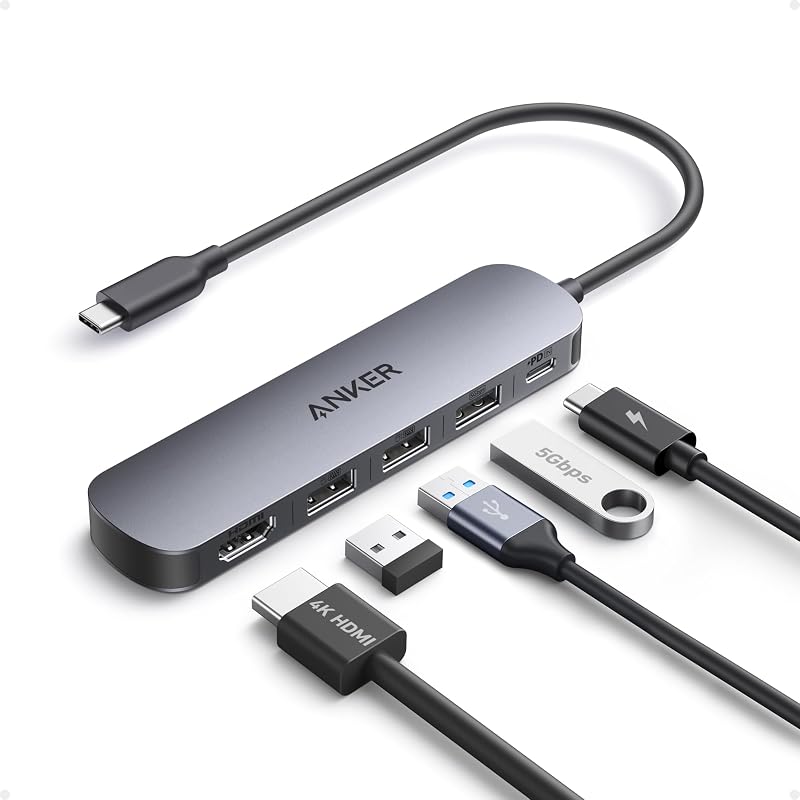
The 5-in-1 Anker USB-C Hub offers an accessible, clutter-free design tailored for everyday home and classroom computing. Constructed from lightweight gray plastic, it weighs just 0.06 kg and measures 4.8 inches long by 1.2 inches wide and 0.46 inches high, making it the most featherweight unit in the lineup. This adapter concentrates on baseline essentials, converting a single USB-C port into an HDMI output, one USB-A 3.0 port, two USB-A 2.0 ports, and a dedicated Power Delivery input port without any unnecessary physical bulk.
Power handling is an impressive attribute of this anker 5 in 1 usb c hub. When connected to an external 100W wall charger, the hub reserves 10W to power its internal hardware and channels up to 90W of high-efficiency pass-through charging directly to your laptop. The manufacturer listing notes that the wall charger is not included in the package and that this Power Delivery input port is dedicated strictly to laptop charging rather than peripheral power. Data connectivity divides tasks sensibly: the 5Gbps USB-A 3.0 port accommodates high-speed external hard drives, while the two 480Mbps USB-A 2.0 ports provide stable links for wireless mice and keyboards. The HDMI interface supports 4K visuals at 30Hz in both mirror and extended display modes on Windows 10 and 11, macOS 12 or newer, and ChromeOS.
This 5-in-1 hub suits minimalists, students using school-issued laptops, and gift-givers seeking an uncomplicated desk accessory for basic monitor and mouse connectivity. It eliminates confusing extras while maximizing pass-through charging efficiency. However, because it omits both memory card readers and an Ethernet port, individuals managing digital photography or demanding hardwired internet will need to step up to one of Anker’s larger 6-in-1 or 7-in-1 multiport models.
Anker USB C Hub
- Color Gray
- Weight 0.22 Pounds
- Size USB C Hub (7-in-1)
Providing extensive media expansion, the 7-in-1 Anker USB C Hub serves as a versatile workstation companion for mobile professionals, students, and tablet users. Constructed from durable acrylonitrile butadiene styrene (ABS) plastic in gray, this unit weighs 3.52 ounces and measures 8.27 inches long, 2.13 inches wide, and 0.59 inches thick. It expands one USB-C connection into a complete peripheral hub featuring dual memory card access, multiple USB data channels, an HDMI display port, and high-speed pass-through power delivery.
For individuals transferring media between devices, this anker usb c multiport adapter includes both standard SD and microSD card slots, streamlining photo and video ingestion from action cameras, drones, and digital cameras. The USB-A and USB-C data ports deliver transfer rates up to 5Gbps (listed at 5120 megabytes per second), ensuring large archives and media folders move rapidly. The HDMI port supports media projection at resolutions up to 4K at 30Hz, while the Power Delivery port supports up to 85W of pass-through charging to keep your machine powered under heavy computing loads. Keeping the host device fully charged during demanding data transfers is easy when pairing the hub with a dedicated anker multiport charger.
This model is an exceptional fit for multi-device owners who switch between laptops, tablets, and smartphones running Windows 10 or macOS. Its wide compatibility accommodates legacy systems extending back to Windows 7 and Mac OS X 10.6 Snow Leopard. While it delivers excellent all-around utility for media storage and external accessories, users needing fluid 60Hz display refresh rates or a direct wired Ethernet connection will find better alignment with Anker’s more specialized alternatives.
Chip values are fields copied from the Amazon product listing. Scores are out of 10, based on listed specifications and buyer feedback.
Matching a Model to Your Setup
- High-Refresh Visual Desktops: If you connect your notebook to a modern 4K monitor and require fluid on-screen motion alongside photo card ingestion, the Anker USB C Hub (model B0DXJQT19B) provides the necessary 4K at 60Hz HDMI output and dual SD card slots.
- Interference-Free Office Networks: For home offices, dormitories, or enterprise workspaces plagued by spotty wireless signals, the Anker USB-C Hub with Ethernet (model B08C9HZ5YT) provides a dependable, hardwired gigabit internet jack.
- Streamlined Peripheral Stations: When your workstation setup only requires connecting a keyboard, mouse, basic display, and high-wattage charging cable, the compact Anker USB-C Hub (model B0DKT8BB4M) delivers 90W pass-through power without excess bulk.
- Multi-Device Media Management: If your workflow involves transferring camera footage across smartphones, tablets, and laptops, the 7-in-1 Anker USB C Hub (model B07ZVKTP53) provides comprehensive SD and microSD card connectivity with 5Gbps file speeds.
- MacBook Travel Workstations: Travelers wanting a durable metal anker multiport adapter for macbook use that balances 85W charging with high-speed 5Gbps USB-A and USB-C data ports will appreciate the compact footprint of the Anker USB C Hub (model B0DXJQT19B).
Before You Buy
Before selecting an anker multiport adapter, it is crucial to confirm the technical capabilities of your laptop’s USB-C port, as physical shape alone does not indicate supported features. The product listings emphasize that video output through the HDMI port requires your laptop to support DisplayPort Alternate Mode (DP Alt Mode) over USB-C, or feature USB4 or Thunderbolt 3, 4, or 5 interfaces. If your laptop’s USB-C port is limited to basic data transfer, connected USB accessories like flash drives will work normally, but the adapter cannot project video to an external monitor.
Shoppers should also be aware of items not included in the standard packaging. The manufacturer listings do not include external wall chargers or HDMI cables in the box; packages contain only the hub itself, an 18-month warranty document, and a welcome guide. Additionally, pass-through charging adapters consume a small amount of electricity—such as the 10W reserved by the 5-in-1 model—to power their own internal chips and connected peripherals. To charge your laptop at its standard speed, ensure your external USB-C power brick supplies enough total wattage to cover both the hub’s operational reserve and your notebook’s requirements.
FAQ
Can an Anker multiport adapter charge my laptop without an external charger?
No, an Anker multiport adapter does not contain an internal battery and cannot store electrical energy on its own. To charge your computer through the adapter, you must connect a compatible USB-C wall charger to the hub’s Power Delivery input port. The hub then routes the electrical current through its integrated cable into your laptop’s battery circuit.
What is the difference between 4K at 30Hz and 4K at 60Hz?
The Hertz (Hz) rating indicates how many times per second your external monitor refreshes the image on the screen. A 4K at 30Hz connection updates 30 times each second, which is perfectly functional for word processing, spreadsheets, and casual browsing, but fast mouse scrolling can appear slightly jumpy. A 4K at 60Hz connection refreshes 60 times per second, delivering noticeably smoother cursor movements and fluid video playback that helps reduce eye strain during long working sessions.
Can I plug a monitor into the USB-C data port on the hub?
No, the USB-C data ports on these hubs are designed strictly for transferring data with external hard drives, flash drives, or mobile accessories at speeds up to 5Gbps. The manufacturer listings explicitly state that video projection is supported exclusively through the dedicated HDMI port, meaning USB-C monitors or display cables cannot transmit video through the USB-C data port.
Do these Anker adapters require special software drivers to operate?
These Anker hubs are plug-and-play devices that operate immediately upon connection to supported operating systems, including Windows, macOS, and ChromeOS, without requiring manual driver installations. However, your computer must meet the minimum operating system requirements stated in the listing, such as macOS 10.12 Sierra or Windows 10, to guarantee full hardware functionality.
Why does my laptop show a slow charging warning when connected through the hub?
Pass-through multiport adapters reserve a small slice of electrical power—generally between 10W and 15W—to operate their internal circuit boards and connected USB accessories. If you connect a low-wattage power adapter to the hub, the remaining wattage reaching your laptop may dip below the manufacturer’s recommended charging threshold, prompting the computer to display a slow-charging alert. Using a higher-wattage external wall charger easily remedies this issue.


