As Amazon Associates, we earn from qualifying purchases. This means we may receive a small commission at no extra cost to you if you click through and make a purchase.
Selecting an asus 27 4k monitor involves balancing panel technology, refresh rate, and daily productivity features. While each screen shares a sharp 3840 by 2160 Ultra HD resolution, their internal hardware serves distinct workflows. Content creators require strict color calibration and broad gamut coverage for accurate media production. Competitive gamers prioritize high refresh rates and rapid response times to eliminate blur. Meanwhile, home office users often benefit most from ergonomic stands, eye comfort filters, and integrated audio. Understanding these technical differences helps you decide which asus 27 4k to buy. Exploring the broader range of asus 4k monitors highlights how panel engineering influences everyday performance across tasks.
The ASUS catalog organizes its 27-inch Ultra HD displays into distinct lines. The ProArt series caters to creative production with factory-calibrated profiles, Calman verification, and versatile USB-C power delivery. The TUF Gaming and Republic of Gamers lines target enthusiasts with refresh rates up to 240 hertz, specialized anti-flicker solutions, and self-lit QD-OLED panels. Rounding out the range is the VY series, built for home productivity with antibacterial surfaces and eye care features. In this asus 27 4k comparison, we examine each model in plain terms so first-time buyers can make an informed choice.
ASUS 27-Inch 4K Monitors Lineup at a Glance
| Model | Display Panel Type | Refresh Rate | Primary Standout Feature |
|---|---|---|---|
| ASUS ProArt PA279CRV | IPS LCD | 60Hz | 96W USB-C Power Delivery and Calman Verification |
| ASUS VY27UQ | IPS LCD | 60Hz | Antibacterial Bezel Coating and Built-in Speakers |
| ASUS ROG PG27UCDM | QD-OLED | 240Hz | DisplayPort 2.1a UHBR20 with Full 80Gbps Bandwidth |
| ASUS TUF Gaming VG27UQ1A | Fast IPS LCD | 160Hz | Simultaneous ELMB Sync and Console 4K 120Hz Support |
| ASUS ROG XG27UCDMG | QD-OLED | 240Hz | Custom Heatsink Thermal System and True Black 400 |
| ASUS ProArt Display PA279CDV | QD-OLED | 120Hz | Built-in Auto KVM Switch and Delta E under 1.5 |
Figures as published on the product listings.
The Models in Detail
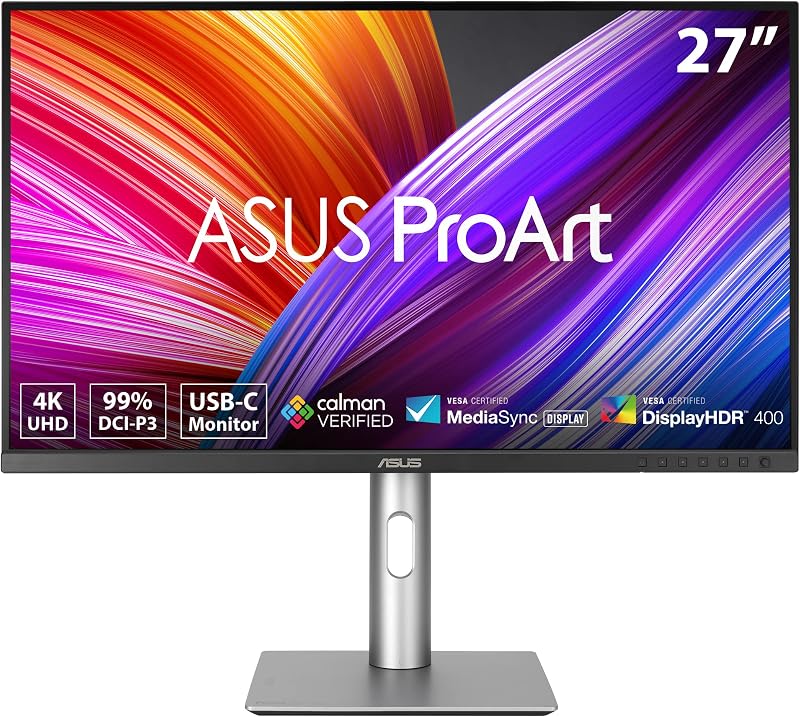
ASUS ProArt PA279CRV 27 Inch 4K
- Best for Color grading and graphic design workstations
- Color BLACK
- Size 27 Inch
- Weight 18.25 pounds
- Dimensions 24.1 x 8.46 x 16.07 inches
4.6 average rating left by Amazon buyers
Pros
- Calman Verified Delta E under 2
- 96W USB-C power delivery
- DisplayPort daisy-chain capability
Cons
- Standard 60Hz refresh rate
The ASUS ProArt PA279CRV 27 Inch 4K is engineered for photographers, video editors, and designers who demand reliable color accuracy. Its IPS panel yields wide 178-degree viewing angles to ensure uniform visuals across the display. Factory pre-calibration guarantees a Delta E measurement under 2, indicating that color variances are practically invisible to the human eye. Calman Verified certification further guarantees color precision alongside 99 percent coverage of both the DCI-P3 and Adobe RGB spectrums.
Connectivity is optimized for laptop workflows through a multi-functional USB-C port that carries video, data, and 96 watts of power delivery over a single cable, keeping workspaces free of clutter. The display also supports DisplayPort daisy-chaining, letting users run multiple monitors from one computer port. The included stand supports tilt, swivel, pivot, and height adjustments, while integrated Eye Care technology reduces blue light and eliminates screen flicker.
ASUS includes a 5-year warranty package—comprising three standard years plus two years upon registration—and a complimentary three-month Adobe Creative Cloud subscription. For visual artists seeking the best asus 27 4k monitor for editing, the ASUS ProArt PA279CRV provides an accurate workspace. However, its 60 hertz refresh rate means gamers will prefer the faster refresh rates of the brand’s gaming displays.
ASUS VY27UQ 27 Inch 4K UHD
- Best for Everyday home office and distance learning
- Color BLACK
- Size 27 Inch
- Weight 11.2 pounds
- Dimensions 21 x 38 x 49 inches

4.9 average rating left by Amazon buyers
Pros
- Antibacterial bezel and hotkey coating
- Built-in stereo speakers
- Eye Care Plus color augmentation
Cons
- Standard 60Hz refresh rate
The ASUS VY27UQ 27 Inch 4K UHD pairs sharp Ultra HD resolution with unique physical and visual wellness features for home offices and shared spaces. Its 27-inch IPS panel produces wide 178-degree viewing angles and covers 99 percent of the color gamut for clean media streaming and office tasks. A distinctive physical feature is an antibacterial treatment applied directly across the front bezels and hotkeys, which inhibits bacterial and fungal growth on frequently touched surfaces.
Visual comfort is supported by the ASUS Eye Care Plus suite. Along with TÜV Rheinland certified flicker-free backlighting and blue light reduction, the screen includes a Color Augmentation mode to assist users with color-vision deficiencies. A built-in Rest Reminder prompts regular breaks, and the downloadable ASUS DisplayWidget utility allows you to modify display parameters directly with your mouse.
The display features DisplayPort and HDMI inputs, integrated stereo speakers for immediate audio output, and Adaptive Sync support to prevent screen tearing during playback. Running at 60 hertz, it delivers dependable daily utility. It concedes ground in color grading and gaming speeds, where users requiring Delta E certification or high refresh rates will prefer ProArt or TUF Gaming models.
ASUS ROG PG27UCDM 27 Inch 4K
- Best for Elite esports and high-bandwidth gaming
- Color BLACK
- Weight 16.8 pounds
- Dimensions 8.6 x 24 x 21.6 Inches

4.3 average rating left by Amazon buyers
Pros
- Blistering 240Hz QD-OLED panel
- Full 80Gbps DisplayPort 2.1a bandwidth
- Neo Proximity burn-in prevention sensor
Cons
- Requires periodic OLED care maintenance
The ASUS ROG PG27UCDM 27 Inch 4K combines fourth-generation QD-OLED technology with an ultra-fast 240 hertz refresh rate. Spanning 26.5 inches diagonally, this screen eliminates conventional backlights, using self-illuminating pixels to achieve a 1,500,000 to 1 contrast ratio with pure blacks. A 0.03 millisecond response time provides instantaneous pixel transitions, minimizing motion blur in competitive games. Shoppers exploring high-speed screens can consult our asus monitor 27 inch 240hz overview for deeper technical perspective.
A major highlight is the inclusion of DisplayPort 2.1a UHBR20, providing an 80 gigabits per second bandwidth pipeline that drives uncompressed 4K visuals at 240 hertz. The monitor also features HDMI 2.1, a 90-watt USB-C port, and an integrated tripod socket. To protect against burn-in, the ROG OLED Care Pro suite features a Neo Proximity Sensor that turns the screen black when you step away.
OLED Anti-Flicker 2.0 technology reduces panel flicker by 20 percent during frame rate shifts. The display covers 99 percent of the DCI-P3 color space with true 10-bit color and Delta E under 2 accuracy, supported by a 3-year warranty that includes burn-in coverage. For office users working on static documents all day, an IPS model like the ProArt avoids OLED maintenance routines.
ASUS TUF Gaming VG27UQ1A 27 Inch
- Best for Versatile PC and console gaming setups
- Color BLACK
- Weight 10.6 Pounds
- Dimensions 8.4 x 24.2 x 17.9 inches

4.8 average rating left by Amazon buyers
Pros
- Fluid 160Hz Fast IPS panel
- HDMI 2.1 uncompressed console 120Hz support
- Simultaneous ELMB Sync and G-SYNC
Cons
- Standard 1000 to 1 contrast ratio
The ASUS TUF Gaming VG27UQ1A 27 Inch provides sharp 4K visuals and high speeds without the maintenance routines of an OLED screen. Built with a Fast IPS panel, it delivers a smooth 160 hertz refresh rate and a 1 millisecond response time. ASUS Extreme Low Motion Blur Sync (ELMB Sync) allows backlight strobing and variable refresh rates to operate together, eliminating tearing and motion blur simultaneously. Readers considering other resolutions can review our analysis of the asus tuf gaming 27 1440p monitor to compare panel classes.
Console compatibility is a key asset. Thanks to HDMI 2.1, modern game consoles can output native 4K visuals at 120 hertz without chroma subsampling. PC gamers benefit from Display Stream Compression, official NVIDIA G-SYNC Compatible status, and AMD FreeSync Premium. Variable Overdrive technology dynamically adjusts pixel voltage as frame rates fluctuate to keep rapid motion sharp.
The package includes a DisplayPort cable, an L-shaped screwdriver, a power cord, and a 3-month Adobe Creative Cloud membership. The display covers 95 percent of the DCI-P3 color gamut for vibrant scenes. While its 1,000 to 1 contrast ratio cannot match the absolute black levels of QD-OLED panels, its Fast IPS build provides worry-free durability for everyday use.
ASUS ROG XG27UCDMG 27 Inch 4K
- Best for Enthusiast gaming with true black contrast
- Color BLACK
- Weight 16.4 pounds
- Dimensions 6.6 x 24.1 x 20.1 inches
Pros
- Fast 240Hz refresh rate
- DisplayHDR True Black 400 certification
- Custom heatsink thermal management
Cons
- Lacks DisplayPort 2.1a connection
The ASUS ROG XG27UCDMG 27 Inch 4K is built around a 26.5-inch fourth-generation QD-OLED panel offering a 240 hertz refresh rate and a 0.03 millisecond response time. Certified for VESA DisplayHDR 400 True Black, its self-illuminating pixels produce a 1,500,000 to 1 contrast ratio. This delivers pure black tones alongside vibrant specular highlights without backlight halo artifacts.
To ensure thermal efficiency and panel longevity, ASUS equipped this model with a custom internal heatsink that dissipates heat without noisy cooling fans. The display also features the ROG OLED Care Pro system with a Neo Proximity Sensor, which switches the screen to black when you leave the desk to prevent burn-in. ASUS covers the display with a 3-year warranty that includes burn-in protection.
The panel delivers 99 percent DCI-P3 color gamut coverage, true 10-bit color depth, and factory-calibrated Delta E under 2 accuracy. OLED Anti-Flicker 2.0 stabilizes luminance levels by 20 percent against fluctuating frame rates to reduce eye fatigue. It gives way to the PG27UCDM mainly regarding DisplayPort 2.1a connectivity, focusing instead on high-end QD-OLED performance and dedicated passive heatsink cooling.
ASUS ProArt Display 27″ 4K OLED
- Best for Dual-computer creative studio desks
- Size 27 Inch
- Color Black/Silver
- Weight 12.35 pounds
- Dimensions 7.4 x 24.1 x 16.1 inches
Pros
- Built-in Auto KVM switch
- Calman Verified Delta E under 1.5
- Mac M Model-P3 color optimization
Cons
- Modest 240 nit standard brightness
The ASUS ProArt Display 27″ 4K OLED (model PA279CDV) merges the contrast of QD-OLED technology with color grading standards. Using a 26.5-inch panel, it pairs 4K clarity with a 120 hertz refresh rate and a 0.1 millisecond response time. This configuration lets animators, video editors, and game creators review high-frame-rate content on their primary color-grading display. It reaches 1,000 nits peak brightness, meeting VESA DisplayHDR True Black 400 standards.
Color precision is exceptional, arriving Calman Verified and pre-calibrated to a Delta E variance below 1.5. The 10-bit panel spans 100 percent of sRGB, 99 percent of DCI-P3, and wide BT. 2020 spaces. MacBook users can utilize an integrated M Model-P3 color mode tuned to match Apple display chromaticity. A built-in Auto KVM switch lets you control two connected computers using one mouse and keyboard, automatically switching peripherals between sources.
Connectivity features a 96-watt USB-C Power Delivery port, HDMI, DisplayPort with daisy-chaining, and an integrated USB hub. An anti-scratch surface film provides up to 2.5 times better protection than earlier OLED screens. The fully ergonomic stand supports tilt, swivel, pivot, and height adjustments. For creators requiring master-level color accuracy alongside true black contrast, this model represents the pinnacle of the ProArt series.
Chip values are fields copied from the Amazon product listing. Star figures are the average rating left by Amazon buyers, not a score given here.
Matching a Model to Your Setup
- For professional photo retouching and graphic design: Choose the ASUS ProArt PA279CRV, which offers factory-calibrated Delta E under 2 accuracy, 99 percent Adobe RGB coverage, and 96-watt USB-C laptop charging.
- For shared family workstations and distance learning: Select the ASUS VY27UQ, featuring antibacterial bezel coating, integrated speakers, and specialized Eye Care Plus color augmentation modes.
- For esports enthusiasts chasing maximum frame rates: Pick the ASUS ROG PG27UCDM, boasting an ultra-fast 240 hertz QD-OLED display, 0.03 millisecond response speed, and DisplayPort 2.1a bandwidth.
- For dedicated console and PC hybrid gaming: Go with the ASUS TUF Gaming VG27UQ1A, providing Fast IPS reliability, 160 hertz PC refresh rates, and 4K 120 hertz HDMI 2.1 console capability.
- For dark-room cinematic gaming with custom cooling: Opt for the ASUS ROG XG27UCDMG, which combines DisplayHDR True Black 400, a custom heatsink thermal system, and 240 hertz QD-OLED contrast.
- For video editors working between two computers: Invest in the ASUS ProArt Display PA279CDV, equipped with a 120 hertz QD-OLED panel, built-in Auto KVM, and Delta E under 1.5 calibration.
Before You Buy
When choosing a 27-inch 4K screen, remember that Ultra HD resolution (3840 by 2160 pixels) demands significant graphical power from your computer. Standard desktop work and video streaming run easily on modern machines, but rendering 3D games at 120, 160, or 240 hertz requires a capable graphics card and high-speed video cables. While listings highlight advanced standards like HDMI 2.1 and DisplayPort 2.1a, they do not specify whether every necessary video cable is bundled in the box for every model, though the TUF Gaming listing explicitly includes a DisplayPort cable and screwdriver.
Additionally, integrated audio and mounting dimensions vary across the lineup. The ASUS VY27UQ includes built-in stereo speakers, but several gaming and ProArt displays omit integrated speakers to prioritize thermal management and specialized heatsinks. If you intend to use an aftermarket monitor arm, note that the listings do not detail the exact unboxed net weight for each display. Checking your desk footprint, audio setup, and computer output ports in advance ensures a smooth setup upon delivery.
FAQ
What does Calman Verified mean on ASUS ProArt monitors?
Calman Verified is an independent quality assurance standard from Portrait Displays. On ASUS ProArt monitors, it indicates that the screen was evaluated and calibrated at the factory to meet strict color accuracy criteria, achieving a Delta E under 2 or 1.5 so colors match professional production standards out of the box.
How does the Neo Proximity Sensor protect QD-OLED screens from burn-in?
The Neo Proximity Sensor is a hardware detector built into select ROG monitors. It detects when you step away from the desk and automatically turns the screen black after a short interval, preventing static images from remaining on display and reducing the risk of permanent burn-in.
Can I use the ASUS TUF Gaming VG27UQ1A with PlayStation 5 or Xbox Series X?
Yes, the ASUS TUF Gaming VG27UQ1A supports current-generation gaming consoles. Its HDMI 2.1 ports transmit uncompressed 4K video at 120 hertz without chroma subsampling, ensuring clear text and smooth motion during console gameplay.
What is an Auto KVM switch and how does it work on the ProArt PA279CDV?
An Auto KVM switch lets you control two computers using one keyboard and mouse connected to the monitor. When switching video inputs between your two machines, the display automatically redirects peripheral controls to the active system, keeping your workspace organized.
Is a 60Hz refresh rate adequate for daily office tasks and creative work?
Yes, a 60 hertz refresh rate is well suited for photo editing, graphic design, document work, and video playback, as standard film and online media run at 24 to 60 frames per second. Higher refresh rates primarily benefit fast-paced gaming and rapid motion previews.