
As Amazon Associates, we earn from qualifying purchases. This means we may receive a small commission at no extra cost to you if you click through and make a purchase.
Shopping for a high-performance computer display can feel overwhelming when technical specifications like refresh rate, pixel response time, and panel architectures dominate every product listing. A 240Hz display refreshes its visual screen 240 times every single second, creating an exceptionally fluid presentation that standard 60Hz and 120Hz monitors cannot replicate. If you are buying a gift or setting up your first serious gaming desk, choosing a dedicated lg 240hz monitor ensures that fast-moving games look clear, responsive, and free of distracting motion judder. In this guide, we break down how panel technologies, screen resolutions, and physical designs differ across the UltraGear family so first-time shoppers can make an informed choice with complete confidence.
LG organizes its high-speed gaming displays under the UltraGear banner, segmenting the range into three primary display technologies: fast In-Plane Switching (IPS), curved Vertical Alignment (VA), and self-illuminating Organic Light-Emitting Diode (OLED). The lineup is further arranged by resolution, spanning standard 1080p Full HD, sharper 1440p Quad HD, and expansive ultrawide formats. While every screen in this collection shares the same blisteringly fast 240Hz refresh speed, each model targets a specific type of user based on screen clarity, color reproduction, physical desk space, and connected computer hardware. Understanding these clear differences makes finding which lg monitor to buy straightforward and stress-free.
LG 240Hz Gaming Monitors Lineup at a Glance
The table below organizes each model in the lineup by display resolution, panel type, and pixel response time so you can compare key specifications side by side.
| Model | Screen Size and Resolution | Panel Technology | Response Time |
|---|---|---|---|
| LG 27G440A-B | 27-inch Full HD (1920 x 1080) | IPS | 1ms GtG |
| LG 27GR83Q-B | 27-inch QHD (2560 x 1440) | IPS | 1ms GtG |
| LG 27GX704A-B | 27-inch QHD (2560 x 1440) | Glossy OLED | 0.03ms GtG |
| LG 34G630A-B | 34-inch WQHD (3440 x 1440) | Curved VA | 1ms GtG |
| LG 27GS93QE | 27-inch QHD (2560 x 1440) | Matte OLED | 0.03ms GtG |
| LG 27GP750-B | 27-inch Full HD (1920 x 1080) | IPS | 1ms GtG |
Figures as published on the product listings.
The Models in Detail
LG 27G440A-B 27-Inch Ultragear Full HD
- Best for Budget competitive players needing fast refresh rates
- Color Black
- Weight 14.33 Pounds
- Dimensions 8.7 x 24.1 x 21.3 inches

Our score: 9.2/10
Pros
- Fast 240Hz refresh rate
- Fully adjustable ergonomic stand
- NVIDIA G-SYNC and FreeSync support
Cons
- Lower 1080p resolution on 27 inches
The LG 27G440A-B 27-Inch Ultragear Full HD is engineered specifically for competitive multiplayer gaming where maximizing frame rates takes priority over dense resolutions. Featuring a 1920 x 1080 resolution on a 27-inch screen, it pairs a 240Hz refresh rate with a 1ms Gray-to-Gray response time to eliminate motion blur. The IPS panel delivers vivid color reproduction with 99% sRGB color coverage and HDR10 enhancement, maintaining consistent visual quality across wide 178-degree viewing angles. Gamers benefit from built-in competitive features including Dynamic Action Sync for low input latency, Black Stabilizer to reveal hidden objects in dark scenes, and an on-screen crosshair overlay for precise aiming.
Physical flexibility and modern video connections are strong focal points for the LG 27G440A-B. The included ergonomic stand allows users to adjust tilt, height, swivel, and pivot, facilitating a comfortable viewing posture or a vertical orientation. Display connectivity includes DisplayPort alongside modern HDMI 2.1 inputs, allowing proper communication with contemporary gaming systems. Both NVIDIA G-SYNC Compatible and AMD FreeSync Premium protocols are integrated to synchronize the display with your graphics processor, eliminating screen tearing and visual stutter during fast-paced firefights.
This display suits competitive esports players, beginners, and gift recipients whose gaming PCs feature entry-level or mid-tier hardware that runs smoothest at 1080p resolution. Because driving 240 frames per second at Full HD requires less graphics horsepower, this model provides high-speed fluidity without requiring expensive PC upgrades. However, users who require ultra-crisp typography for detailed text work or office spreadsheets will find sharper image density in the brand’s 1440p offerings.
LG 27GR83Q-B 27-inch Ultragear QHD
- Best for Mainstream gamers wanting sharp 1440p visuals
- Color Black
- Weight 13.7 Pounds
- Size 240Hz-HDMI/DP
- Dimensions 10 x 24.2 x 22.7 Inches

Our score: 8.0/10
Pros
- Sharp QHD 1440p resolution
- DCI-P3 95% wide color coverage
- DisplayHDR 400 dynamic contrast
Cons
- Standard 1000:1 IPS contrast ratio
Stepping up significantly in clarity, the LG 27GR83Q-B 27-inch Ultragear QHD upgrades the native resolution to 2560 x 1440 across the same 27-inch screen size. This increase yields a tight 0.23 mm pixel pitch, producing noticeably sharper textures, crisper environmental edges, and cleaner desktop text. The IPS display achieves a 240Hz refresh rate and a rapid 1ms response rate, backed by VESA DisplayHDR 400 certification and up to 95% DCI-P3 color gamut coverage. Much like leading alternatives such as an asus monitor 27 inch 240hz display, this unit bridges the gap between esports-grade speed and detailed visual immersion.
According to its technical specifications, both the DisplayPort 1.4 and dual HDMI 2.1 connections support the full 240Hz refresh rate at 1440p, ensuring full compatibility with gaming desktops and modern consoles. Screen tearing is mitigated via validated NVIDIA G-SYNC Compatibility and AMD FreeSync Premium. Audio is handled by a 4-pole headphone output supporting DTS Headphone:X spatial sound, which provides simulated 3D directional audio directly through a standard gaming headset. The display is supported by a 3-side virtually borderless bezel and an ergonomic stand that offers tilt, height, and pivot customization.
The LG 27GR83Q-B is an outstanding choice for mainstream gamers who split their playtime between competitive online shooters and rich, visual story campaigns. It represents the balanced middle ground in an lg 240hz gaming monitor comparison, delivering high sharpness without moving into specialized display panels. Players who demand true infinite contrast ratios or pure inky blacks will want to look toward the OLED alternatives instead.
LG 27GX704A-B 27-inch Ultragear QHD
- Best for Enthusiasts seeking peak contrast and glossy finish
- Color Black
- Size 27 inches
- Weight 15.9 Pounds
- Dimensions 8.7 x 23.8 x 21 inches

Our score: 8.2/10
Pros
- Instantaneous 0.03ms response time
- Vibrant glossy OLED panel
- Deep 1,500,000:1 contrast ratio
Cons
- Lower standard SDR brightness
The LG 27GX704A-B 27-inch Ultragear QHD introduces self-lit OLED technology paired with a distinctive glossy screen finish. Unlike traditional LCD panels that use an LED backlight, each OLED pixel illuminates independently and can turn completely off. This produces an astonishing 1,500,000:1 contrast ratio, infinite black levels, and certified VESA DisplayHDR True Black 400 performance. With a crisp 2560 x 1440 resolution, up to 98.5% DCI-P3 color coverage, and peak brightness reaching up to 1300 nits in highlights, dark corridors remain genuinely black while lightning and explosions punch through with extraordinary vibrance.
Motion clarity is practically instant on this screen, featuring a 0.03ms pixel response time alongside its 240Hz refresh rate, earning VESA ClearMR 13000 certification for blur-free action. Connectivity is built for high-end setups with two HDMI 2.1 ports, DisplayPort 1.4, and an integrated USB 3.2 hub featuring one upstream and two downstream ports. Eye care is supported through three distinct UL certifications covering anti-glare, flicker-free operation, and low blue light emission, allowing extended sessions without unnecessary visual fatigue.
This monitor is built for visual purists and dedicated enthusiasts who prioritize contrast depth, vibrant highlights, and lightning-fast pixel response. For those gaming in light-controlled or darker rooms, it stands out as the best lg 240hz monitor for cinematic immersion. On the other hand, gamers setting up in bright rooms with direct sunlight or uncurtained windows behind their chair may prefer a matte screen coating to prevent reflections.
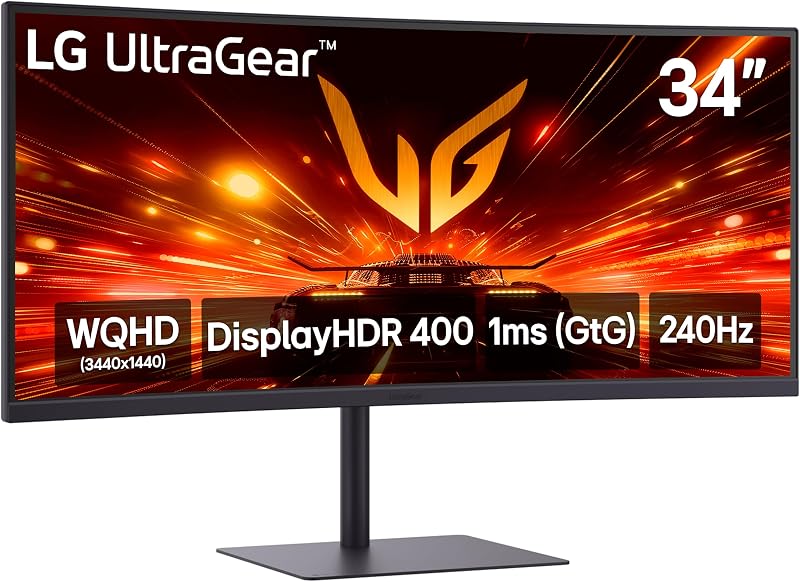
LG 34G630A-B 34-Inch Ultragear WQHD
- Best for Immersive ultrawide gaming and multitasking
- Total Number of HDMI Ports 2
- Total Usb Ports 3
- Total USB 3.0 Ports 2
- Display Technology VA
- Color Gamut 99
Our score: 8.8/10
Pros
- Expansive 34-inch curved ultrawide screen
- Convenient USB Type-C connectivity
- Integrated built-in desktop speakers
Cons
- Wider desk footprint required
Expanding the visual field horizontally, the LG 34G630A-B 34-Inch Ultragear WQHD delivers a 21:9 curved ultrawide experience. Boasting a 3440 x 1440 resolution across a curved 34-inch canvas, it adds roughly thirty percent more screen real estate than a traditional widescreen monitor. The curved VA panel operates at a 240Hz refresh rate with a 1ms response time, wrapping peripheral game scenes around your field of view while offering ample room to keep chat apps, game wikis, or project folders open side by side without alt-tabbing.
Color presentation is supported by VESA DisplayHDR 400, HDR10 decoding, and up to 95% DCI-P3 color spectrum coverage, ensuring deep shadow detail and punchy highlights. Connectivity is exceptionally versatile, offering HDMI, DisplayPort, and a USB Type-C port that carries display signals, data transfer, and 15W Power Delivery to power connected laptops. Shoppers exploring ultrawide options often weigh this against displays like an alienware 34 240hz qd-oled gaming monitor, but the LG model delivers a focused balance of high 240Hz speed and streamlined workstation features including integrated desktop speakers.
The LG 34G630A-B is an exceptional match for flight simulator enthusiasts, sim-racing drivers, and work-from-home professionals who require substantial multitasking space alongside fluid 240Hz gaming speeds. It completely removes the need for a secondary desktop monitor. However, because ultrawide monitors have an expansive physical width, shoppers with compact computer desks should measure their work surface before purchasing.
LG 27GS93QE 27-inch Ultragear OLED Gaming
- Best for High-end players gaming in bright rooms
- Color Green/Red
- Size 27 inches
- Weight 14.8 Pounds
- Dimensions 10.2 x 23.8 x 22.6 Inches
Pros
- Near-instant 0.03ms response time
- Matte anti-glare screen coating
- Included two-year panel warranty
Cons
- Requires conscious burn-in prevention habits
The LG 27GS93QE 27-inch Ultragear OLED Gaming display combines self-lit OLED image quality with a specialized matte, anti-glare screen coating. This low-reflection treatment scatters ambient light, allowing gamers to enjoy OLED contrast in rooms with overhead lighting or daytime windows without fighting distracting mirror-like reflections. Operating at a native 2560 x 1440 QHD resolution, the screen pairs its 240Hz refresh rate with a near-instantaneous 0.03ms response time, delivering pristine frame transitions and certified VESA DisplayHDR True Black 400 contrast.
Color rendering covers up to 98.5% of the wide DCI-P3 spectrum, producing lifelike tones in cinematic landscapes. It features validated NVIDIA G-SYNC Compatibility alongside AMD FreeSync Premium Pro, securing tear-free gaming regardless of which major graphics card brand powers your rig. LG packages this monitor with an ergonomic tilt, height, and pivot adjustable stand and includes a reassuring two-year limited warranty that covers internal components, labor, and the OLED display panel itself.
This display is ideal for gamers who desire the infinite contrast and 0.03ms responsiveness of OLED technology but operate their battlestation in a bright or moderately lit environment. While shoppers often compare it to curved alternatives like the samsung odyssey 240hz family, this flat-panel screen provides dependable geometric accuracy for everyday desktop computing. Gamers who play strictly in dark rooms and prefer a glossy display surface should look back toward the 27GX704A-B model.
LG 27GP750-B 27” Ultragear FHD
- Best for First-time buyers seeking straightforward esports speed
- Color Black
- Weight 13.2 pounds
- Dimensions 11.5 x 24.2 x 22.7 inches
Pros
- Fluid 240Hz refresh rate
- Solid IPS color accuracy
- Versatile tilt, height, and pivot stand
Cons
- 1080p pixel density on 27 inches
Delivering focused speed in a traditional form factor, the LG 27GP750-B 27” Ultragear FHD is a dedicated 1080p competitive esports monitor. Built around an IPS panel with a 1920 x 1080 resolution, it offers an ultra-fast 240Hz refresh rate and a 1ms response time to maintain clarity during fast camera sweeps. With 99% sRGB color gamut coverage and HDR10 support, it maintains realistic color fidelity while preserving broad 178-degree horizontal and vertical viewing angles.
To keep latency low, the monitor incorporates Dynamic Action Sync to minimize processing lag, ensuring that mouse inputs translate directly to immediate on-screen movement. Official NVIDIA G-SYNC compatibility and AMD FreeSync Premium prevent broken frames and visual tearing. The physical chassis features a 3-side borderless aesthetic paired with a sturdy ergonomic stand that supports quick press-and-click assembly along with height, tilt, and vertical pivot adjustments.
The LG 27GP750-B suits first-time buyers, younger gamers, and esports competitors playing fast titles like Fortnite or Overwatch who want pure 240Hz speed without stressing their graphics card. It serves as an uncomplicated entry point into high-speed gaming. However, buyers with premium graphics hardware who wish to experience higher visual detail in narrative games should consider stepping up to a 1440p monitor.
Chip values are fields copied from the Amazon product listing. Scores are out of 10, based on listed specifications and buyer feedback.
Matching a Model to Your Setup
- For competitive esports players on budget or mid-range computers: The LG 27G440A-B 27-Inch Ultragear Full HD and the LG 27GP750-B 27” Ultragear FHD deliver pure 240Hz speed at 1080p, maximizing performance without demanding high-end PC hardware.
- For mainstream gamers seeking the best balance of speed and clarity: The LG 27GR83Q-B 27-inch Ultragear QHD provides sharp 1440p visual clarity, vibrant IPS color, and 240Hz fluid motion for both competitive and story-driven games.
- For movie fans and evening gamers in dark rooms: The LG 27GX704A-B 27-inch Ultragear QHD combines true black levels, 0.03ms pixel response times, and a glossy panel finish that maximizes contrast depth.
- For daytime gamers in brightly lit living spaces: The LG 27GS93QE 27-inch Ultragear OLED Gaming monitor pairs deep OLED contrast and rapid response times with a matte anti-glare screen coating that eliminates room reflections.
- For simulator pilots, racing drivers, and home multitaskers: The LG 34G630A-B 34-Inch Ultragear WQHD offers an immersive 21:9 curved ultrawide perspective, integrated desktop speakers, and single-cable USB Type-C laptop connectivity.
Before You Buy
Before selecting an lg ultragear 240hz screen, it is essential to verify that your computer hardware supports high refresh rate video output. Achieving a continuous 240 frames per second at 1080p, 1440p, or ultrawide 1440p requires a modern graphics card capable of driving DisplayPort 1.4 or HDMI 2.1 bandwidth. Connecting a 240Hz monitor through an older video port or legacy cable will limit the display to standard 60Hz or 120Hz operation. The retail listings do not specify whether both DisplayPort and HDMI cables come packaged inside every retail box, so buyers should check their computer’s available video outputs and consider picking up a certified high-speed cable if needed.
Physical desk space and panel maintenance are equally important factors to plan for. Full-motion ergonomic stands with height, tilt, and swivel capabilities require considerable desk depth, with some models extending over ten inches from front to back. Furthermore, while the OLED listings offer unmatched 0.03ms response times and infinite contrast, OLED technology requires responsible everyday habits to prevent image retention from persistent desktop icons or taskbars over long hours. While the LG 27GS93QE explicitly includes a two-year warranty that covers the OLED panel itself, specific panel warranty terms on other models are not fully detailed in the listing data, making your daily usage pattern an important consideration before ordering.
FAQ
What is the difference between 1080p and 1440p on a 240Hz monitor?
A 1080p display has 1920 by 1080 pixels, while a 1440p screen offers 2560 by 1440 pixels. Across a 27-inch monitor, 1440p provides sharper text, more refined object outlines, and richer detail. However, driving a game at 240 frames per second in 1440p requires a significantly more powerful graphics card than running the same title at 1080p.
Do I need a special cable to reach 240Hz?
Yes. To run at 240Hz, you must use a compatible DisplayPort 1.4 or HDMI 2.1 cable connected to a graphics card that supports those output standards. Standard older HDMI cables often limit monitor refresh rates to 60Hz, 120Hz, or 144Hz.
What makes an OLED monitor different from an IPS monitor?
An IPS display uses a continuous LED backlight that shines through liquid crystals, achieving high overall brightness with standard contrast ratios around 1000:1. An OLED display features self-illuminating pixels that turn off individually, providing true infinite contrast, pitch-black dark scenes, and near-instant 0.03ms pixel response times.
Can gaming consoles like PlayStation 5 or Xbox Series X run at 240Hz on these monitors?
Current gaming consoles support a maximum video output of 120Hz at 1080p or 1440p resolutions. While an LG 240Hz display will handle 120Hz console output cleanly over HDMI 2.1, reaching the full 240Hz capability requires a dedicated gaming PC.
What do NVIDIA G-SYNC Compatible and AMD FreeSync do?
NVIDIA G-SYNC Compatible and AMD FreeSync are variable refresh rate protocols that match the monitor’s refresh speed directly to the frame rate produced by your computer’s graphics card. This synchronization prevents screen tearing and visual stutter during gameplay without increasing input lag.


