
As Amazon Associates, we earn from qualifying purchases. This means we may receive a small commission at no extra cost to you if you click through and make a purchase.
Shopping for a gaming display can feel confusing when technical specifications like refresh rates, panel types, and curvature measurements dominate the descriptions. If you are shopping for a gift or selecting your first dedicated screen, finding the right display comes down to balancing visual beauty against raw speed. Alienware manufactures premium monitors with distinctive styling, but their catalog features different display technologies engineered for specific setups. Choosing between an expansive alienware curved gaming monitor that wraps around your field of vision and a lightning-fast esports screen requires understanding how these features translate to everyday play.
When conducting an alienware gaming monitor comparison, you will notice the brand organizes its range around two distinct display technologies and two main form factors. One branch features Quantum Dot OLED panels that use self-illuminating pixels to produce infinite contrast and rich color fidelity. The other branch utilizes LED-backlit VA panels that provide strong brightness, reliable performance, and rapid motion without organic materials. Deciding which alienware gaming monitor to buy depends on whether your priority is panoramic immersion, color-critical creative work, or competitive tournament speed.
Alienware Gaming Monitors Lineup at a Glance
| Model | Display Size and Panel Type | Refresh Rate and Response Time | Key Standout Feature |
|---|---|---|---|
| Alienware AW3425DW | 34.2-inch QD-OLED (21:9) | 240Hz, 0.03ms | 1800R curve, DisplayHDR TrueBlack 400 |
| Alienware AW3423DWF | 34-inch QD-OLED (21:9) | 165Hz, 0.1ms | Creator Mode, 3-year burn-in warranty |
| Alienware AW3426DWM | 34-inch VA LED (21:9) | 240Hz, 1ms | 400 nits brightness, fast 240Hz refresh |
| Alienware AW3425DWM | 34-inch LED (21:9) | 180Hz, 1ms | 1500R deep curve, console mode support |
| Alienware AW2725DF | 26.7-inch QD-OLED (16:10) | 360Hz, 0.03ms | 360Hz refresh rate, fully adjustable stand |
Figures as published on the product listings.
The Models in Detail
Alienware 34 240Hz QD-OLED Curved Gaming
- Best for High-end gamers wanting premium ultrawide speed
- Color Black
- Weight 20.04 pounds
- Size 34.2" QD-OLED
- Dimensions 31.71 x 9.13 x 21.84 inches

4.1 average rating left by Amazon buyers
Pros
- Fluid 240Hz refresh rate
- Near-instant 0.03ms pixel response
- Vibrant 99.3% DCI-P3 color gamut
- VESA DisplayHDR TrueBlack 400 certification
Cons
- Moderate 250 nit standard brightness
- Listing does not specify ports
The Alienware 34 240Hz QD-OLED Curved Gaming monitor, identified in listings as the alienware aw3425dw, represents the premium tier of Alienware’s ultrawide catalog. This alienware 34 240hz qd-oled gaming monitor pairs a 34.2-inch curved surface with an infinite contrast ratio of 1,500,000:1. In simple terms, QD-OLED technology allows each individual pixel to turn entirely off, creating true, deep black tones instead of the charcoal tint seen on standard screens. It reaches 1000 nits peak HDR brightness and carries VESA DisplayHDR TrueBlack 400 certification, creating brilliant highlights during dark cinematic sequences.
For gameplay speed, this alienware 34 inch curved monitor operates at a high 240Hz refresh rate with an ultra-fast 0.03ms response time. Refresh rate indicates how many frames appear on screen each second, while response time measures how quickly pixels switch colors. These figures ensure that moving images remain clear and free of ghosting trails. The monitor includes NVIDIA G-SYNC Compatible, AMD FreeSync Premium Pro, and VESA AdaptiveSync certifications, which synchronize the display with your computer graphics card to prevent stuttering and screen tearing.
The panel features a gentle 1800R curve that matches the natural field of vision, alongside wide 99.3% DCI-P3 color coverage and factory calibration under Delta E<2. This display is suited for gamers who own high-end computers capable of delivering high frame rates at 3440 x 1440 resolution. It gives way to the AW3423DWF if you require specialized color space controls for content creation, or to Alienware’s VA models if you prefer standard LED backlights.
Alienware AW3423DWF Curved QD-OLED Gaming Monitor
- Best for Content creators and visual artists
- Color Black
- Size 34.0" OLED
- Weight 20.5 Pounds
- Dimensions 32.1 x 12 x 20.7 inches
4.7 average rating left by Amazon buyers
Pros
- Dedicated sRGB Creator Mode
- Three-year warranty covering burn-in
- Peak 1000 nit HDR brightness
- Legend 2.0 design with AlienFX
Cons
- Lower 165Hz refresh ceiling
- Requires substantial desk depth
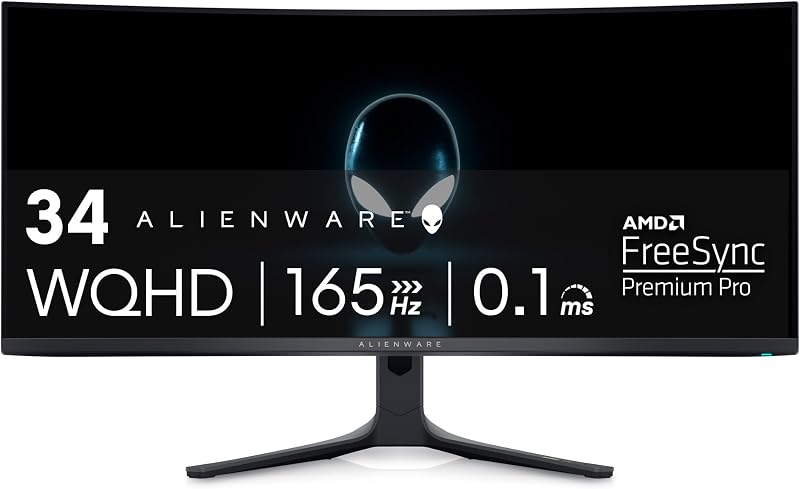
The Alienware AW3423DWF Curved QD-OLED Gaming Monitor, recognized by model code alienware aw3423dwf, is a proven ultrawide display tailored for immersive gaming and digital creation. This alienware qd-oled monitor features a 34-inch screen with an 1800R curve and an ultrawide 21:9 aspect ratio. Utilizing Quantum Dot OLED technology, it achieves true black levels, a 1,000,000:1 contrast ratio, and 1000 nits peak brightness under VESA DisplayHDR TrueBlack 400 testing. Factory calibration ensures accurate colors across 99.3% of the cinema-grade DCI-P3 spectrum.
Motion handling is rated at a 165Hz refresh rate paired with a rapid 0.1ms response time, supported by AMD FreeSync Premium Pro and VESA AdaptiveSync Display standards. The chassis incorporates Alienware’s Legend 2.0 design, featuring customizable AlienFX RGB lighting, 360-degree ventilation for heat dissipation, organized cable routing, and a 5-axis joystick for menu navigation. It also includes TUV-certified ComfortView Plus hardware to reduce blue light emissions during long desk sessions.
A major highlight on this listing is Creator Mode, an on-screen feature allowing users to switch between the native DCI-P3 color gamut and standard sRGB color spaces. The listing also includes a 3-year premium warranty covering OLED burn-in. This model is ideal for creative professionals and gamers who want rich visuals with warranty protection. It concedes top motion speed to the 240Hz AW3425DW, but serves as a versatile dual-purpose production and gaming hub.
Alienware 34 Gaming Monitor AW3426DWM
- Best for Gamers preferring bright non-OLED screens
- Weight 20.59 pounds
- Color Interstellar Indigo
- Dimensions 9.13 x 31.71 x 21.84 Inches

4.0 average rating left by Amazon buyers
Pros
- Fast 240Hz refresh rate
- Bright 400 nit screen
- Solid 1ms response time
Cons
- Narrower 95% color gamut
- Minimal listing technical specifications
The Alienware 34 Gaming Monitor AW3426DWM offers high refresh rate ultrawide gaming on a traditional LED-backlit foundation. Listed as the alienware aw3426dwm, this 34-inch display utilizes a WQHD resolution VA (Vertical Alignment) panel. VA technology aligns liquid crystal molecules to provide high native contrast and uniform illumination across wide 178-degree viewing angles. It delivers a solid brightness rating of 400 nits, which helps maintain visibility in brightly lit rooms where ambient window glare is present.
Fast motion is a key focus of this display, matching high-end monitors with a 240Hz refresh rate. Paired with a 1ms response time, the AW3426DWM renders rapid camera sweeps smoothly during competitive multiplayer matches. Its 21:9 aspect ratio provides extra peripheral horizontal space across its matte finish screen. Color performance is rated at 95% of standard broad gamuts, providing vibrant, clear imagery without over-saturation.
This monitor is designed for shoppers who want the fast 240Hz refresh rate of flagship models without the organic components of OLED displays. It is an excellent choice for users who display static desktop windows for extended periods. However, because it relies on standard LED backlighting, it cannot match the infinite contrast and true black levels found on the QD-OLED models in the lineup.
Alienware 34 Curved Gaming Monitor
- Best for Console and PC players seeking deep curvature
- Color Black
- Weight 20.97 Pounds
- Dimensions 31.71 x 9.13 x 21.84 inches

4.9 average rating left by Amazon buyers
Pros
- Immersive 1500R curved wrap
- Dedicated console mode integration
- Hardware-based low blue light solution
- Deep 3000 to 1 contrast ratio
Cons
- Capped at 180Hz refresh rate
- Color gamut limited to 95%
The Alienware 34 Curved Gaming Monitor, cataloged as the alienware aw3425dwm, combines ultrawide gaming real estate with console-friendly features. This 34-inch monitor features a sharp WQHD resolution across a 21:9 aspect ratio. Unlike the gentler 1800R curvature of its OLED siblings, this display features a tighter 1500R curve. The smaller radius creates a deeper physical bend, bringing the edges of the display closer to your eyes for heightened peripheral immersion in simulation and adventure games.
The screen runs at a fluid 180Hz refresh rate with a 1ms gray-to-gray response time, backed by AMD FreeSync Premium and VESA Adaptive Sync Technology. Its LED display achieves a 3,000:1 contrast ratio, 400 nits of brightness, and VESA DisplayHDR 400 certification. Color reproduction covers 95% of the DCI-P3 gamut. For extended gaming comfort, it includes a hardware-based low blue light solution that reduces eye strain while preserving natural on-screen color balance.
This monitor includes a dedicated console mode, which assists with signal compatibility when connected to modern gaming consoles. It is an appealing option for multi-platform players who share one monitor between a desktop PC and a console. It gives way to the AW3425DW and AW3426DWM if you need maximum 240Hz speed, but its deep 1500R curve and balanced feature set make it a dependable all-round display.
Alienware AW2725DF OLED Gaming Monitor
- Best for Competitive esports tournament players
- Color Black
- Size 27.0 OLED
- Weight 13.89 pounds
- Dimensions 9.59 x 23.98 x 15.99 Inches
Pros
- Blistering 360Hz refresh rate
- Ultra-fast 0.03ms response time
- Full pivot tilt swivel height adjustment
- Self-emissive infinite contrast ratio
Cons
- Compact 27-inch screen size
- Standard 16:10 non-ultrawide view
The Alienware AW2725DF OLED Gaming Monitor shifts focus from panoramic ultrawide curves to pure competitive tournament performance. Known in technical specifications as the alienware aw2725df, this monitor features a 26.7-inch (listed as 27-inch) QD-OLED panel with QHD resolution (2560 x 1440). By focusing on a standard screen width, it allows players to view the entire playing field without excessive eye movement. It boasts an ultra-high 360Hz refresh rate combined with a 0.03ms gray-to-gray response time.
Operating at 360Hz delivers remarkable motion clarity for fast-paced shooters and esports titles. Shoppers exploring speed benchmarks in an alienware 360hz monitor guide will appreciate how self-emissive QD-OLED pixels eliminate visual motion blur. The screen features VESA DisplayHDR True Black 400 certification, an infinite 1.5 million:1 contrast ratio, 1000 nits peak brightness, and 99.3% DCI-P3 color coverage with Delta E<2 accuracy.
Ergonomics are another major strength. The monitor stand features a compact hexagonal base that preserves desk space, alongside full height, tilt, swivel, and 90-degree pivot adjustability. Connectivity listings highlight HDMI, DisplayPort, and USB 3.2 Gen 1 ports. This model suits dedicated competitive gamers prioritizing frame rates and reaction times over the wide panoramic fields offered by Alienware’s 34-inch screens.
Chip values are fields copied from the Amazon product listing. Star figures are the average rating left by Amazon buyers, not a score given here.
Matching a Model to Your Setup
- High-Performance PC Enthusiasts: Choose the Alienware 34 240Hz QD-OLED Curved Gaming if you have a powerful graphics card capable of driving 240Hz at 3440 x 1440 and want the highest tier of QD-OLED contrast and speed.
- Content Creators and Hybrid Workers: Select the Alienware AW3423DWF Curved QD-OLED Gaming Monitor for its dedicated sRGB Creator Mode, 165Hz fluidity, and peace of mind from a 3-year burn-in warranty.
- Bright Offices and Marathon PC Gamers: Pick the Alienware 34 Gaming Monitor AW3426DWM if your room has abundant natural light and you want 240Hz ultrawide speed on a non-OLED VA panel.
- Console and Desktop Multi-Platform Players: Go with the Alienware 34 Curved Gaming Monitor to take advantage of its dedicated console mode, pronounced 1500R panoramic curve, and hardware low blue light filtering.
- Esports and Tournament Competitors: Opt for the Alienware AW2725DF OLED Gaming Monitor if you prioritize a blistering 360Hz refresh rate, 0.03ms response time, and full stand pivot adjustment over an ultrawide form factor.
Before You Buy
Before purchasing an Alienware gaming monitor, examine your physical desk dimensions and connection ports. Ultrawide 34-inch displays require considerable desk surface area. For example, the AW3423DWF listing specifies a depth of 32.1 inches with its stand attached, which requires a deep desk so the screen does not sit uncomfortably close. Additionally, several product listings do not specify the exact lengths of included display cables or the specific revision numbers of all video ports. Checking your computer graphics card outputs before delivery ensures you have the correct cables ready on setup day.
It is also helpful to review what the product listings leave out regarding warranty coverage and audio hardware. While the AW3423DWF listing explicitly outlines a 3-year warranty that covers OLED burn-in, the listings for the AW3425DW and AW2725DF do not specify their detailed warranty terms directly on the product pages. Furthermore, the listings do not mention integrated speakers, as these monitors are designed to pair with external computer speakers or gaming headsets. Planning for audio and checking warranty policies directly with the manufacturer ensures an easy setup without unexpected surprises.
FAQ
What is the difference between QD-OLED and VA gaming monitors?
QD-OLED uses self-illuminating pixels combined with quantum dot color layers. Because each pixel switches on and off independently, QD-OLED displays produce true blacks, infinite contrast, and instant response times down to 0.03ms. VA (Vertical Alignment) monitors rely on liquid crystal panels placed in front of an LED backlight. While VA panels provide strong brightness and high native contrast around 3,000:1 without burn-in risks, they cannot achieve the perfect black levels or microsecond response times of QD-OLED.
What do the 1800R and 1500R curve ratings mean?
The number before the letter R indicates the curve radius in millimeters. An 1800R monitor has a radius of 1800mm, representing a gentle curve that matches the eye’s natural viewing arc across an ultrawide screen. A 1500R monitor has a tighter 1500mm radius, creating a more pronounced bend. Tighter curves bring the outer edges of a 34-inch display closer into your peripheral vision, increasing visual immersion during games.
Why does refresh rate matter for a first-time monitor buyer?
Refresh rate, measured in Hertz (Hz), tells you how many times the monitor updates its picture every second. Standard office displays run at 60Hz. The Alienware displays featured here range from 165Hz up to 360Hz. A higher refresh rate makes on-screen movement significantly smoother, reduces input delay between mouse inputs and screen reactions, and keeps fast action clear and easy to follow.
Can you connect game consoles to an ultrawide Alienware monitor?
Yes, game consoles can connect to Alienware monitors using standard HDMI cables. Because home consoles output a standard 16:9 widescreen video signal rather than a 21:9 ultrawide ratio, the monitor will display black bars on the left and right sides to prevent image distortion. Models like the Alienware 34 Curved Gaming Monitor (AW3425DWM) include a dedicated console mode to optimize resolution and color handling for connected consoles.
Does the Alienware AW2725DF monitor rotate into portrait mode?
Yes, the Alienware AW2725DF OLED Gaming Monitor comes with a fully ergonomic stand that supports height adjustment, swivel, tilt, and 90-degree pivot rotation. The pivot feature allows you to turn the screen into a vertical orientation, which is helpful for reading chat feeds, coding, reviewing tall documents, or using it as a secondary streaming monitor.


