As Amazon Associates, we earn from qualifying purchases. This means we may receive a small commission at no extra cost to you if you click through and make a purchase.
Setting up a comfortable home office or upgrading a work desk often begins with a frustrating tangle of adapters, bulky power bricks, and multiple display cables. A modern Philips USB-C monitor resolves this desktop clutter by serving as both a high-definition screen and a central desktop hub. For first-time buyers and gift-givers exploring this category, the choice primarily centers around display shape, screen real estate, and physical flexibility. Shoppers generally weigh the ultra-sharp clarity of a traditional flat 16:9 display against the sweeping field of view offered by an ultrawide curved workspace, deciding whether raw pixel density or horizontal side-by-side multitasking best serves their everyday workflow.
Looking closely at the manufacturer’s lineup, the range is organized into distinct functional tiers that cater to specific computing habits. Philips centers its high-productivity displays around built-in USB-C docking architecture that carries video, peripheral data, and up to 90 watts of charging power over a single reversible cord. Within this family, the hardware splits between expansive 32-inch 4K panels engineered for high-precision text clarity and 34-inch curved panoramic screens outfitted with high refresh rates and integrated multi-computer switching controls. Understanding the exact mechanical and visual distinctions across these options makes it easy to find the ideal display for your setup.
Philips USB-C Monitors Lineup at a Glance
| Model | Display Size and Shape | Resolution and Refresh Rate | Standout Hardware Features |
|---|---|---|---|
| PHILIPS 32B1U3900 (Matte 75Hz) | 32-inch Flat (16:9) | 4K UHD (3840 x 2160) at 75Hz | Matte finish, TUV Eye Comfort, 4-port USB-A hub, built-in speakers |
| PHILIPS 34B2U3600C | 34-inch Curved (1500R) | WQHD (3440 x 1440) at 120Hz | Smart KVM switch, MultiView PbP/PiP, 4-year warranty, RJ-45 LAN |
| PHILIPS 32B1U3900 (Glossy 60Hz) | 32-inch Flat (16:9) | 4K UHD (3840 x 2160) at 60Hz | SmartErgoBase with portrait pivot, 350 cd/m² brightness, 4-year warranty |
Figures as published on the product listings.
The Models in Detail
PHILIPS 32B1U3900 32-inch 4K UHD LED
- Best for Everyday office productivity and sharp detail
- Color Black
- Dimensions 28.1 x 11 x 24.8 inches
4.8 average rating left by Amazon buyers
Pros
- Crisp 4K UHD resolution
- 90W laptop power delivery
- Matte anti-glare finish
- Built-in stereo speakers
Cons
- Standard 75Hz refresh rate
- Fixed landscape stand orientation
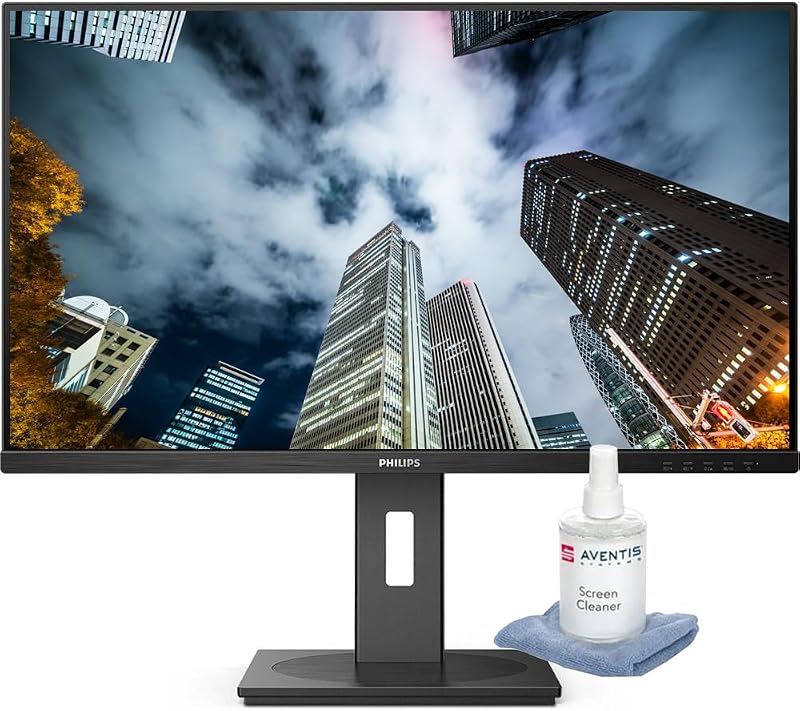
The PHILIPS 32B1U3900 32-inch 4K UHD LED is an all-in-one desktop hub designed to deliver immaculate visual detail alongside extensive peripheral connectivity. Built around a 31.5-inch vertical alignment panel, this screen provides an UltraClear 4K UHD resolution of 3840 by 2160 pixels in a standard 16:9 aspect ratio. The listing highlights a 75Hz refresh rate paired with a 4-millisecond response time, providing fluid cursor movement and responsive window management during demanding workdays. Its multi-domain vertical alignment architecture generates a deep static contrast ratio that renders rich dark tones and vivid imagery, supported by a broad palette displaying 1.074 billion colors. For readers sensitive to screen glare, this specific listing is fitted with a matte screen finish and incorporates TUV Rheinland certified flicker-free, low-blue light filtering, and an EasyRead mode that mimics paper to minimize eye fatigue during extended reading sessions.
Docking capabilities are central to this model’s design, transforming the monitor into a complete workstation hub through a single reversible USB-C cable. Plugging a compatible notebook into this port transmits ultra-high-definition video, routes USB data, and delivers up to 90 watts of charging power straight to the laptop battery. This single connection eliminates the need to unpack a dedicated laptop charger or rely on an external benfei 9in1 usb c mst laptop docking station just to link basic desktop tools. The back panel features a four-port USB-A 3.2 Gen 1 hub operating at speeds up to 5 gigabits per second, an RJ-45 Ethernet jack for secure wired local networks, dual HDMI 2.0 ports, a DisplayPort 1.4 connection, and integrated stereo speakers. The listing also notes the inclusion of a cleaning kit to keep the display surface pristine.
This model is an outstanding match for finance professionals, data analysts, writers, and office workers who spend hours inspecting dense spreadsheets, fine typography, and high-resolution documents. The combination of 4K pixel sharpness and non-reflective matte glass ensures that small numbers and complex charts remain crisp under direct overhead lighting. However, users who require a wider horizontal workspace to place three full application windows side by side without bezel interruptions will find that this 16:9 unit gives way to the curved ultrawide format found on the brand’s larger panoramic displays.
PHILIPS 34B2U3600C 34″ Curved WQHD Monitor
- Best for Multitaskers operating two computers side by side
- Size 34"
- Color Black
- Dimensions 11.3 x 31.77 x 23.7 Inches
4.8 average rating left by Amazon buyers
Pros
- Smooth 120Hz refresh rate
- Smart KVM switch control
- Immersive 1500R curved panel
- 4-year advance replacement warranty
Cons
- Lower vertical resolution than 4K
- Substantial desk footprint required
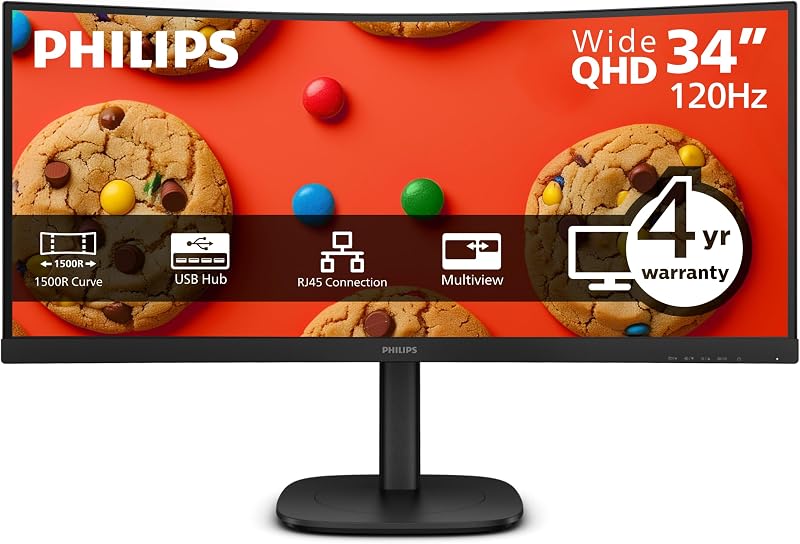
The PHILIPS 34B2U3600C 34″ Curved WQHD Monitor shifts the focus toward expansive panoramic multitasking and seamless dual-device control. This display utilizes a 34-inch curved VA panel engineered with a 1500R curvature, gently matching the natural contour of human vision to ensure that every corner of the display sits at a consistent viewing distance. It features an ultrawide WQHD resolution of 3440 by 1440 pixels, a 3500:1 static contrast ratio, 300 candelas per square meter of brightness, and 1.07 billion 10-bit colors with a 104 color gamut rating. A standout specification is its responsive 120Hz refresh rate over USB-C and DisplayPort connections, which steps down to 100Hz over HDMI 2.0, providing buttery-smooth window scrolling and fluid motion that noticeably reduces eye strain compared to standard desktop panels.
Where this model truly shines is in its advanced multi-system management features. The integrated Smart KVM switch enables users to control two separate computers using just one keyboard and mouse plugged directly into the display. Tapping the Control key three times instantly swaps your peripheral inputs between devices, while the built-in MultiView Picture-in-Picture and Picture-by-Picture modes split the physical screen in half to display live feeds from both computers simultaneously. Just like its siblings, the USB-C docking port handles 4K-capable video, high-speed data transfer, and 90 watts of laptop power delivery over a single cord. The integrated RJ-45 Ethernet port supports advanced business networking features like Wake-on-LAN and MAC address pass-through, offering corporate-level network performance that rivals a standalone ugreen docking station usb c. Sustainability is emphasized through Energy Star, EPEAT, and TCO certifications with 85% post-consumer recycled plastic construction, backed by a generous four-year advance replacement warranty.
This ultrawide display is the premier choice for power users, day traders, software developers, and hybrid professionals who manage both a personal desktop and an employer-issued corporate laptop on the same desk. The horizontal room easily accommodates multiple browser windows, timelines, and monitoring feeds without requiring a dual-monitor seam down the middle. On the other hand, creative professionals who prioritize vertical screen space and maximum vertical pixel density over horizontal width will likely prefer the taller aspect ratio of a 32-inch 4K panel.
PHILIPS 32B1U3900 32″ 4K UHD Monitor
- Best for Ergonomic workstations needing portrait mode
- Size 32"
- Color Black
- Dimensions 11.02 x 28.11 x 28.84 inches

4.1 average rating left by Amazon buyers
Pros
- SmartErgoBase portrait pivot
- Bright 350 cd/m² panel
- 4-year advance replacement warranty
- Super-high 3500:1 contrast
Cons
- Capped at 60Hz refresh rate
- Glossy finish reflects bright lights
The PHILIPS 32B1U3900 32″ 4K UHD Monitor combines crisp 4K visual fidelity with superior physical adjustments to create a highly adaptable workstation. This model centers on a 31.5-inch VA display delivering 3840 by 2160 resolution, a deep 3500:1 contrast ratio, a 4-millisecond response time, and a 60Hz refresh rate. It pushes brightness up to 350 candelas per square meter and supports a 1.074 billion color spectrum with a 106 color gamut rating, rendering rich color depth and clear contrast across high-definition media and complex graphics. The listing highlights a glossy screen finish that accentuates color saturation and vibrant contrasts, supported by Philips SmartImage image enhancement technology to tailor picture modes according to the work being performed.
Ergonomics are the defining strength of this version, driven by the inclusion of the brand’s SmartErgoBase. Unlike monitors with rigid supports, this mechanism offers extensive height adjustment, smooth front-to-back tilting, a full 180-degree swivel in either direction, and a 90-degree pivot that turns the screen into full portrait orientation. Integrated cable channels inside the stand keep desktop cords organized and concealed. The display maintains robust connectivity with an integrated USB 3.2 hub carrying multiple USB-A downstream ports, HDMI 2.0, DisplayPort inputs, and VESA mount compatibility. Its primary USB-C port provides single-cable docking with 90-watt power delivery and gigabit network routing through an onboard RJ-45 port supporting PXE boot and Wake-on-LAN, eliminating the clutter associated with a dedicated raycue docking station. The unit is supported by a comprehensive four-year advance replacement warranty alongside Energy Star and EPEAT environmental ratings.
This display is tailor-made for programmers, technical writers, web designers, and office workers who require the physical freedom to rotate their display into portrait mode for reading extensive lines of code or viewing entire page layouts. It is equally suited for ergonomic workstations where frequent height and angle changes prevent neck and shoulder tension throughout the day. However, for users whose primary goal is ultra-fluid video pacing or controlling two separate computers through keyboard hotkeys, the curved 120Hz ultrawide variant remains the more specialized alternative.
Chip values are fields copied from the Amazon product listing. Star figures are the average rating left by Amazon buyers, not a score given here.
Matching a Model to Your Setup
- Home office workers seeking razor-sharp text and matte glare reduction: Choose the PHILIPS 32B1U3900 32-inch 4K UHD LED for its UltraClear 4K resolution, eye-comfort certifications, matte surface, and included speakers.
- Hybrid professionals operating a laptop and a desktop simultaneously: Choose the PHILIPS 34B2U3600C 34″ Curved WQHD Monitor to take advantage of its Smart KVM switch, MultiView side-by-side display, and fluid 120Hz refresh rate.
- Programmers, editors, and researchers who need a vertical document view: Choose the PHILIPS 32B1U3900 32″ 4K UHD Monitor for the full portrait pivot capability and height adjustments provided by the SmartErgoBase.
- Shared corporate desks requiring reliable wired internet and rapid replacements: Choose the PHILIPS 34B2U3600C 34″ Curved WQHD Monitor or the stand-adjustable PHILIPS 32B1U3900 32″ 4K UHD Monitor, both backed by a 4-year advance replacement warranty and RJ-45 PXE boot support.
- Spreadsheet masters who dislike the center bezel of dual monitors: Choose the PHILIPS 34B2U3600C 34″ Curved WQHD Monitor to fit numerous columns across an immersive 1500R curved panoramic canvas.
Before You Buy
When planning a single-cable workstation around a high-performance docking display, it is important to review what the manufacturer listings do not explicitly guarantee. While each of these screens provides up to 90 watts of USB-C power delivery, the listings do not specify whether every proprietary laptop model will accept charging at maximum rates without triggering system alerts. Lightweight ultrabooks, MacBooks, and standard business notebooks will typically charge efficiently, but specialized mobile workstations or high-powered gaming laptops that pull well over 100 watts will still require their original external power supplies to avoid battery drain under heavy processor workloads.
Additionally, the listings do not detail the exact bundled cable assortment, cable lengths, or specific display adapter inclusions for every regional shipment. While the USB-C protocol allows video, data, and power over a single lead, your host computer must feature a USB-C port that explicitly supports DisplayPort Alternate Mode and USB Power Delivery. The product pages do not outline specialized operating system display scaling quirks, so first-time buyers should verify that their computer graphics hardware supports full 4K at 60Hz or 75Hz, or ultrawide WQHD at 120Hz, before connecting their new workspace.
FAQ
What does a USB-C docking monitor do that a regular monitor cannot?
A standard monitor only receives a video signal, requiring separate cords for wall power, laptop charging, video output, and peripheral accessories. A Philips docking monitor integrates a multi-port hub and high-wattage power supply directly inside the chassis. By connecting a single USB-C cable between your computer and the screen, you send high-resolution video to the panel, transmit data to plugged-in keyboards and storage drives, access wired internet through the monitor’s Ethernet port, and charge your laptop battery simultaneously.
Can a 90W USB-C port charge my laptop while the monitor is in use?
Yes. The 90-watt power delivery specification stated in the listing is designed to provide continuous, high-capacity electricity to your connected laptop while you work. For standard ultrabooks and business laptops, 90 watts is more than sufficient to both operate the computer and charge its internal battery from empty to full. Only heavy-duty laptops with dedicated gaming GPUs that demand more than 90 watts will need their proprietary brick connected concurrently.
What is the difference between 4K UHD and WQHD ultrawide resolution?
A 4K UHD monitor features a pixel grid of 3840 by 2160 in a standard 16:9 widescreen ratio, providing maximum vertical height and razor-sharp pixel density that makes tiny text and high-resolution photos appear incredibly crisp. In contrast, a WQHD ultrawide display features 3440 by 1440 pixels across an extended 21:9 format, offering roughly thirty percent more horizontal screen width. While WQHD has fewer total vertical pixels than 4K, its wider layout allows you to arrange multiple windows side by side without needing two separate monitors.
How does the Smart KVM switch on the curved monitor work?
The Smart KVM switch built into the Philips 34B2U3600C allows you to connect two separate computers to the screen at the same time while sharing one mouse and keyboard. The listing notes that typing a quick triple-tap shortcut on the Control key automatically reassigns control of your peripherals to the second computer. Paired with MultiView Picture-by-Picture, you can view both machines on screen simultaneously and switch active typing control in seconds.
Why is an RJ-45 Ethernet port included on the back of the monitor?
Modern slim laptops often omit bulky Ethernet jacks to save space, leaving users reliant on wireless networks that can suffer from dropouts and latency. The RJ-45 port on these Philips docking displays passes high-speed wired local network connectivity through the main USB-C cable directly into your computer. The listings note enterprise support for features like Wake-on-LAN, PXE boot, and MAC address pass-through on compatible systems, ensuring stable video calls and secure company network access.