As Amazon Associates, we earn from qualifying purchases. This means we may receive a small commission at no extra cost to you if you click through and make a purchase.
Selecting a personal computer for a busy household, a dedicated study nook, or a shared workspace often comes down to balancing screen quality, physical footprint, and dependable everyday speed. When shoppers evaluate a dell 24 all-in-one desktop, they are choosing between streamlined machines that consolidate the processor, speakers, webcam, and internal components directly into the display panel itself. This single-unit design eliminates the traditional tangle of monitor cords and bulky floor towers, presenting a neat, uncluttered aesthetic right out of the box. For first-time buyers and generous gift-givers, the primary choices center on whether a responsive touch display adds genuine convenience, which operating system matches family or work requirements, and how much performance headroom is necessary for daily browsing, remote learning, and media streaming.
Across the current catalog, Dell structures its 23.8-inch desktop family across distinct hardware tiers that cater to different skill levels and daily workloads. Entry-level family selections emphasize energy-efficient Intel Core 3 or Core 5 architectures, pairing crisp wide-viewing-angle displays with built-in hardware blue-light filtering for comfortable viewing during homework sessions. Mid-range and productivity-oriented configurations incorporate Intel Core 7 or Core Ultra processors, larger system memory, and commercial-grade Windows 11 Pro features to support rigorous home office demands. Understanding this dell 24 all-in-one desktop comparison enables shoppers to pinpoint the exact balance of processor capability, display interaction, and video conferencing equipment without paying for surplus business utilities they may never touch.
Dell All-in-One Desktops Lineup at a Glance
| Model | Processor | Screen Details | Memory & Storage | Operating System |
|---|---|---|---|---|
| Dell All-in-One 24″ FHD | Intel Core 7 150U (10 cores) | 23.8″ FHD AIT Infinity Touch | 16GB DDR5 / 512GB NVMe SSD | Windows 11 Pro |
| Dell 24 All-in-One Desktop Computer Touchscreen | Intel Ultra 7 355 (8 cores) | 23.8″ FHD WVA Touch, Pen Support | 32GB DDR5 / 1TB NVMe SSD | Windows 11 Pro |
| Dell 24 All-in-One | Intel Core 7 150U (10 cores) | 23.8″ FHD IPS Touch, 60Hz | 16GB DDR5 / 512GB PCIe SSD | Windows 11 Home |
| Dell Pro 24 All-in-One | Intel Core Ultra 5 235T (2.2 GHz) | 23.8″ Display (Stand Options) | 16GB DDR5 / 512GB SSD | Windows 11 Pro |
| Dell 23.8″ All-in-One Desktop | Intel Core 3 100U | 23.8″ FHD IPS Non-Touch, 99% sRGB | Solid State Drive (Listing unlisted) | Windows 11 Home |
| Dell 23.8″ All-in-One Desktop | Intel Core 5 120U | 23.8″ FHD IPS Touch, 99% sRGB | Solid State Drive (Listing unlisted) | Windows 11 Home |
Figures as published on the product listings.
The Models in Detail
Dell All-in-One 24″ FHD
- Best for Home office telecommuters needing privacy and clear audio
- Dimensions 16.31 x 20.92 x 7.9 inches

Our score: 9.4/10
Pros
- Pop-up HDR privacy camera
- 10W Dolby Atmos stereo sound
- Responsive 10-core Core 7 speed
- Hardware blue light reduction
Cons
- Stand does not rotate vertically
The Dell All-in-One 24″ FHD desktop is designed for buyers who need a reliable, professional-grade workstation that manages household management, remote administrative tasks, and daily entertainment with equal poise. At its core, the machine features an Intel Core 7 150U processor equipped with 10 cores and 12 threads capable of reaching up to 5.4 GHz. Paired with 16GB of fast DDR5 memory running at 5200 MT/s and a 512GB NVMe solid-state drive, this setup ensures prompt application boot times and fluid multitasking across multiple browser windows. The 23.8-inch Full HD display utilizes an anti-glare, narrow-border touch surface backed by Dell ComfortView Plus hardware technology, which reduces eye-straining blue light emissions without distorting on-screen colors.
Communication features make this dell all-in-one 24 fhd an appealing choice for home offices and families that maintain regular contact with relatives or coworkers. The unit integrates a 1080p Full HD infrared pop-up webcam featuring high dynamic range processing, which balances difficult backlighting so faces stay clear on calls. For added privacy, the camera physically pushes down into the top frame when not in use. Audio is driven by 10-watt stereo speakers utilizing Realtek hardware and Dolby Atmos spatial sound, producing full room audio for calls and video streaming. Connectivity is thoroughly modern, incorporating Intel Wi-Fi 6E, Bluetooth 5.3, HDMI output, Ethernet, and accessible USB ports, along with a bundled Dell Pro KM5221W wireless keyboard and mouse.
This configuration suits remote professionals, telecommuters, and busy households who benefit from the advanced network encryption and domain management tools included with Windows 11 Pro. It delivers plenty of power for document creation, photo sorting, and light spreadsheet calculations. However, users who manage massive data warehouses, edit high-resolution video reels, or desire dedicated digital pen drawing should step up to higher-capacity configurations like the 32GB Ultra 7 model.
Dell 24 All-in-One Desktop Computer Touchscreen
- Best for Family media rooms and everyday household productivity
- Size 16GB RAM|512GB SSD
Our score: 8.2/10
Pros
- Responsive 23.8-inch IPS touchscreen
- Built-in SD memory card reader
- Modern Bluetooth 5.4 connectivity
- Fast 10-core processing
Cons
- Lacks enterprise BitLocker drive encryption

Our score: 9.8/10
Best for: Heavy multitaskers and creative digital sketchers
Pros
- Generous 32GB DDR5 memory
- Spacious 1TB solid-state storage
- Next-generation Wi-Fi 7 wireless
- Active digital stylus pen support
Cons
- Stylus pen sold separately
Engineered for high productivity and modern computing workloads, the Dell 24 All-in-One Desktop Computer Touchscreen presents the most powerful specifications in this comparison. Under its stylish light ash chassis, it houses an Intel Ultra 7 355 Series 3 processor featuring 8 cores and an integrated Neural Processing Unit designed for Copilot+ artificial intelligence tasks. Dell pairs this engine with a massive 32GB of DDR5 system memory clocked at 5600 MT/s and a spacious 1TB M.2 NVMe solid-state drive. For individuals exploring broader options among dell desktop computers, this unit stands out by offering maximum multitasking capacity, letting users keep dozens of browser tabs, resource-intensive software, and creative tools open simultaneously without stutter.
The display is a standout asset on this dell 24 all-in-one desktop computer touchscreen. The 23.8-inch Full HD wide-viewing-angle panel delivers 300 nits of brightness, 99% sRGB color spectrum coverage, and responsive multi-touch support that is compatible with active digital styluses. Above the screen, Dell equips the computer with an advanced camera reaching up to 8MP resolution with infrared sensors and presence detection, which can lock the system when you step away and log you back in seamlessly. Wireless connectivity jumps to the latest cutting-edge tier with Wi-Fi 7 and Bluetooth 6 support, complemented by gigabit Ethernet, versatile rear USB connections, HDMI output, and VESA mount compatibility for wall or articulating arm installation.
This desktop is best suited for power users, freelance designers, and gift-givers wanting to provide a machine that remains fast and capable for many years of evolving software requirements. It excels in heavy data manipulation, digital sketching, and high-clarity video meetings. Shoppers who only require basic web browsing, word processing, and light recipe tracking can save workspace complexity by choosing an entry-level Core 3 or Core 5 variant instead.
Dell 24 All-in-One
- Color Light Ash
- Weight 16.43 pounds
- Size 32GB DDR5 | 1TB SSD
- Dimensions 16.64 x 21.26 x 7.41 Inches
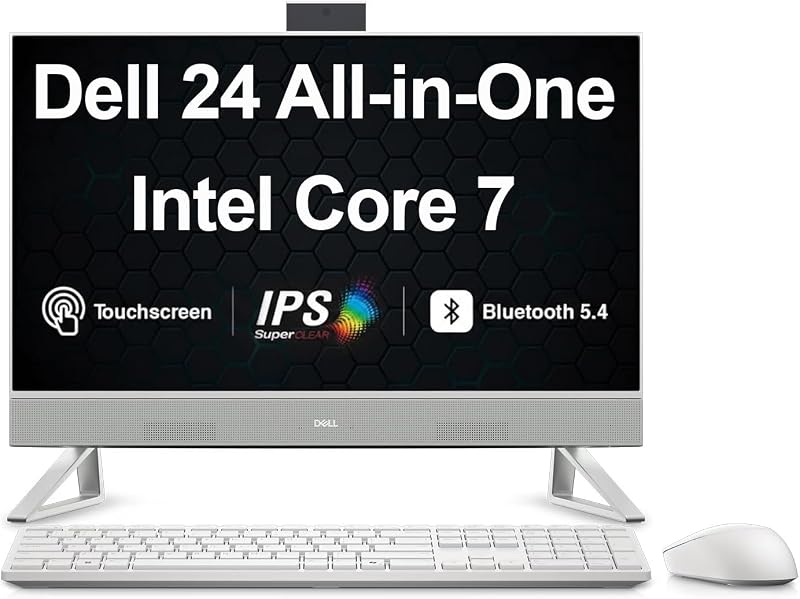
The Dell 24 All-in-One strikes a practical middle ground for families seeking high-performance everyday computing paired with a familiar consumer operating system. Built around the 10-core Intel Core 7 150U processor with a 12MB cache, this machine provides snappy responsiveness for schooling, home budgeting, and video viewing. The internal hardware includes 16GB of DDR5 SO-DIMM RAM and a 512GB PCIe solid-state drive, ensuring rapid boot sequences and dependable data access. Running Windows 11 Home 64-bit, it provides a user-friendly software environment without the business-centric management overlays found in Pro editions.
The visual centerpiece is a 23.8-inch Full HD 1920×1080 IPS touchscreen that refreshes at 60Hz, providing wide viewing angles so multiple family members can gather around the screen to watch movies or look through photo albums. For shoppers looking specifically for an intuitive dell all in one desktop computer 24 inch touchscreen experience, this model makes tap, swipe, and scroll gestures feel natural. The white chassis houses a front-facing webcam, Wi-Fi 6E AX211 wireless, Bluetooth 5.4, hardwired RJ-45 Ethernet, HDMI, a dedicated USB 3.2 Type-C port, a built-in SD card reader, and an external 90W power supply. A matching grey wireless keyboard and mouse arrive in the packaging.
This model is ideal for shared living rooms, student desks, and home command centers where multiple household members share a single screen for school projects and entertainment. Its straightforward Windows 11 Home system makes it welcoming for casual users. If your work requires strict corporate network joining or Microsoft BitLocker drive encryption, you will want to look toward one of the Windows 11 Pro alternatives in the lineup.
Dell Pro 24 All-in-One
- Best for Ergonomic corporate desks and spreadsheet work
- Color Dark Gray
- Weight 15.69 pounds
- Dimensions 21.26 x 2.28 x 13.95 inches

Our score: 9.2/10
Pros
- 90-degree rotating portrait stand option
- Intel Core Ultra 5 architecture
- Windows 11 Pro security suite
- Space-saving 35W thermal profile
Cons
- Listing does not specify touch capability
Designed with corporate office efficiency and ergonomic versatility in mind, the Dell Pro 24 All-in-One brings commercial-grade hardware into the 23.8-inch form factor. Designated as model QC24251, it runs on an Intel Core Ultra 5 235T processor operating at a base frequency of 2.2 GHz with a substantial 24MB cache. This architecture provides steady, energy-efficient performance while keeping operational thermals manageable within its 35-watt envelope. The system includes 16GB of DDR5 memory alongside a 512GB solid-state drive, managed securely through Windows 11 Pro.
Ergonomics and workplace communication serve as the defining focal points for this dell pro 24 all-in-one. The listing highlights versatile stand support, offering buyers the choice between a fixed base and an advanced height-adjustable stand capable of tilting, pivoting, and rotating 90 degrees clockwise into portrait orientation. This vertical rotation is particularly beneficial for programmers reading extensive lines of code, accountants reviewing long balance sheets, or legal assistants checking document drafts. The system also includes specialized conferencing hardware and integrated graphics to ensure crisp virtual meetings throughout the working day.
This desktop suits corporate telecommuters, accountants, and administrative professionals who value posture adjustments and extensive multi-angle screen positioning. Its enterprise-oriented Windows 11 Pro system integrates seamlessly with remote office domains. Where it steps back is for casual living room users who prefer direct finger navigation, as the listing emphasizes ergonomic enterprise conferencing rather than consumer multi-touch interaction.
Dell 23.8″ All-in-One Desktop
- Best for Interactive family desks wanting hands-on screen navigation
- Color White
- Size 23.8-inches
- Dimensions 1.58 x 21.86 x 14.11 inches
Pros
- Intuitive 23.8-inch multi-touch display
- Tilting 5MP HDR infrared webcam
- Speedy Intel Core 5 processor
- Includes Dell Migrate file transfer
Cons
- Exact memory and storage size unlisted
Best for: First-time computer buyers, students, and seniors
Pros
- Glare-free non-touch IPS screen
- ComfortView Plus eye comfort
- Includes 1-year onsite service
- Smooth 66% higher refresh rate
Cons
- Listing omits RAM and SSD capacity
The non-touch edition of the Dell 23.8″ All-in-One Desktop provides a dependable, distraction-free computing solution for everyday domestic activities. Powered by an Intel Core 3 100U processor, this machine is tailored to manage essential household workflows, such as checking emails, writing school reports, streaming high-definition cooking videos, and online shopping. The listing specifies solid-state drive storage for responsive program loading and quiet operation, accompanied by Windows 11 Home with its intuitive window-snapping and organizational tools.
Visual comfort takes precedence on this clean white machine. The 23.8-inch Full HD IPS non-touch screen boasts 99% sRGB color fidelity, 50% higher contrast than earlier generations, and a refresh rate that is 66% faster to deliver noticeably smoother text scrolling. Dell ComfortView Plus reduces blue light fatigue during extended evening research sessions. Above the screen sits a 5MP infrared camera with HDR processing and an adjustable tilt range between 0 and 20 degrees, ensuring a flattering camera angle regardless of desk height. Dual Bluetooth speakers tuned with Dolby Atmos spatial sound deliver surprisingly rich room audio, while physical interfaces include HDMI, Ethernet, an SD card reader, and high-speed USB 3.2 ports.
This model is arguably the best dell all-in-one desktop for beginners, retirees, or students who prefer traditional keyboard and mouse navigation without the accidental clicks or smudged screens that can accompany touch surfaces. It also includes 1 Year of Onsite Service and 6 Months of Dell Migrate software to assist first-time buyers in moving files over from an aging computer. Buyers who want active touch interaction, however, will prefer its touch-enabled sibling.
Dell 23.8″ All-in-One Desktop
- Color White
- Size 23.8-inches
- Dimensions 1.58 x 21.86 x 14.11 inches
Rounding out the family is the touch-capable variation of the Dell 23.8″ All-in-One Desktop, which upgrades everyday household computing with a faster Intel Core 5 120U processor. This processor upgrade gives the desktop an extra burst of processing power, making it better equipped for handling photo libraries, heavier web applications, and multiple open user profiles. The internal architecture features quiet solid-state storage, energy-efficient 90-watt power consumption, and Windows 11 Home pre-installed on an elegant 11.4-pound white frame.
The standout enhancement on this dell 23.8 all-in-one desktop is its interactive touchscreen, transforming the 23.8-inch Full HD IPS display into a hands-on surface for navigating family calendars, scrolling through recipes with flour on your hands, or engaging with educational children’s software. Like its sibling, the display offers 99% sRGB color reproduction, enhanced contrast, and ComfortView Plus eye-care engineering. The 5MP infrared webcam tilts up to 20 degrees and leverages HDR processing for crisp conferencing, while integrated Dolby Atmos speakers produce rich acoustic separation for background music and streaming video.
This configuration represents an ideal dell all-in-one desktop for home use where interactive screen tapping enhances shared family life. The included 1 Year Onsite Service warranty and 6 Months of Dell Migrate software simplify initial setup and long-term peace of mind. While it handles everyday entertainment and learning with ease, shoppers seeking heavy-duty processing, 32GB RAM, or Windows 11 Pro should consider the higher-tier Ultra 7 models instead.
Chip values are fields copied from the Amazon product listing. Scores are out of 10, based on listed specifications and buyer feedback.
Matching a Model to Your Setup
- Home Office Telecommuting: Choose the Dell All-in-One 24″ FHD for its 10-core Intel Core 7 processing, Windows 11 Pro business tools, and pop-up privacy webcam that retracts when meetings end.
- Creative Projects and Heavy Multitasking: Pick the Dell 24 All-in-One Desktop Computer Touchscreen to secure 32GB of DDR5 RAM, 1TB of NVMe storage, digital pen support, and next-generation Wi-Fi 7 wireless speeds.
- Shared Family Entertainment: Select the Dell 24 All-in-One with Intel Core 7 and Windows 11 Home for balanced media streaming, homework research, and built-in SD card photo transfers.
- Ergonomic Professional Workstations: Opt for the Dell Pro 24 All-in-One to take advantage of the Intel Core Ultra 5 platform, enterprise management, and an adaptable stand that rotates 90 degrees clockwise for long documents.
- Beginner and Student Essentials: Choose the non-touch Dell 23.8″ All-in-One Desktop with Intel Core 3 for a traditional, smudge-free screen, blue light reduction, and inclusive onsite hardware support.
- Interactive Family Command Desks: Pick the touch-enabled Dell 23.8″ All-in-One Desktop with Intel Core 5 to combine intuitive screen tapping with responsive everyday multitasking.
Before You Buy
Before finalizing your order, it is important to review the specific technical details that manufacturer listings may omit or leave unstated. Across the entry-level Dell 23.8-inch models powered by Core 3 and Core 5 processors, the product listings confirm solid-state drive architecture but do not specify the exact gigabyte capacity of the SSD or the installed RAM quantity. If your planned usage includes storing thousands of uncompressed family photographs or running memory-demanding applications, confirming these baseline memory allotments prior to purchase is wise. Similarly, while the flagship Ultra 7 touchscreen model specifies pen support, an active digital stylus is not explicitly listed as included in the retail box.
Shoppers should also consider physical desk placement and expandability. Because all-in-one desktop computers integrate internal logic boards, cooling fans, and speakers directly behind the display glass, traditional graphics card upgrades are not possible down the road. Furthermore, the Dell Pro model highlights both fixed stands and height-adjustable 90-degree rotating stands, meaning buyers should confirm which physical stand is bundled with their specific package. If you are comparing this form factor against alternatives like a lenovo all in one desktop, take note of rear port spacing, external power brick dimensions, and whether you require optical CD drives, which none of these modern slim-bezel models contain.
FAQ
What is the difference between Windows 11 Home and Windows 11 Pro on these Dell models?
Windows 11 Home is tailored for typical household activities, offering user-friendly media tools, parental controls, and Microsoft account integration for casual browsing and schoolwork. Windows 11 Pro adds enterprise-level capabilities, including BitLocker storage encryption, remote desktop hosting, and advanced domain joining tools required by corporate office networks. If you plan to connect your all-in-one to an employer network, choosing a Pro model saves administrative setup hurdles.
Do all Dell 24-inch all-in-one desktops feature touchscreens?
No, not every model in this lineup includes touch functionality. Dell builds both touch-enabled and traditional non-touch variants within this 23.8-inch chassis. Non-touch models are ideal for users who prefer standard keyboard and mouse navigation and want an anti-glare screen free of fingerprints. Touch-enabled models are clearly identified in their product specifications and allow direct finger tapping, swiping, and optional stylus navigation on supported screens.
How does Dell ComfortView Plus improve everyday screen time?
Dell ComfortView Plus is a built-in hardware solution that reduces potentially harmful blue light emissions produced by the display panel. Unlike software filters that tint the entire screen with a heavy yellow or amber hue, ComfortView Plus manages light spectrums at the hardware level. This maintains accurate visual colors and 99% sRGB reproduction while minimizing ocular strain during prolonged work shifts or evening study sessions.
Can a Dell all-in-one computer be used as a secondary monitor for a laptop?
These Dell 24-inch all-in-one desktop listings specify HDMI video output interfaces, which allow you to connect an external secondary display to the computer itself. However, the listings do not confirm dedicated HDMI video-input ports. This means you generally cannot plug a separate work laptop directly into the desktop via cable to use the Dell screen as a passive external monitor without network-based wireless display projection tools.
Which Dell 24-inch all-in-one desktop is easiest for first-time computer buyers?
The entry-level Dell 23.8″ All-in-One Desktop powered by the Intel Core 3 processor is particularly well-suited for beginners and seniors. It pairs a traditional, smudge-resistant non-touch display with standard wireless peripherals, straightforward Windows 11 navigation, and 1 Year of Onsite Service support. It also includes Dell Migrate software to help transfer important files from an older machine with minimal confusion.