
As Amazon Associates, we earn from qualifying purchases. This means we may receive a small commission at no extra cost to you if you click through and make a purchase.
Choosing a desktop display can be intimidating for beginners and gift shoppers because technical terms like refresh rates, panel curvature, and ultrawide resolutions often lack straightforward explanations. When exploring a primary screen for PC gaming, schoolwork, or home office tasks, finding a balance between desktop footprint and visual immersion is key. A curved screen bends slightly inward toward the viewer to match natural peripheral sightlines, which helps reduce eye strain and makes virtual game environments feel substantially wider. Looking at a gawfolk curved monitor allows buyers to evaluate several distinct form factors, from compact screens built for tight dorm desks to massive panoramic displays intended to replace multi-monitor workstations entirely.
According to current listings, the Gawfolk curved display lineup is organized around three primary screen formats: standard widescreen panels with a 16:9 aspect ratio ranging from 24.5 to 32 inches, expansive ultrawide displays with a 21:9 aspect ratio measuring 34 inches, and an extreme super-ultrawide display with a 32:9 aspect ratio measuring 49 inches. Across these categories, the brand tailors visual immersion using different curvature ratings—from subtle 3000R curves to deeper 1500R arcs—while scaling refresh rates from standard 120Hz up to ultra-responsive 240Hz panels. Conducting a thorough gawfolk curved monitor comparison based on physical desk space and daily computer habits is the most reliable way to identify which display matches your specific gaming or productivity requirements.
Gawfolk Curved Monitors Lineup at a Glance
| Model | Screen Size & Aspect Ratio | Resolution & Max Refresh Rate | Curvature & Panel Type |
|---|---|---|---|
| Gawfolk 34″ Ultrawide Curved Gaming Monitor | 34 inches (21:9) | 3440 x 1440 (165Hz) | 1500R LED |
| Gawfolk 32 Inch Curved Gaming Monitor | 31.5 inches (16:9) | 1920 x 1080 (240Hz) | 1800R VA |
| Gawfolk 24.5 Inch Gaming Curved Monitor | 24.5 inches (16:9) | 1920 x 1080 (120Hz) | 3000R VA |
| Gawfolk 49 inch Curved Gaming Monitor | 49 inches (32:9) | 5120 x 1440 (120Hz) | 1500R LED |
| Gawfolk 27″ Curved Gaming Monitor,180Hz 200Hz | 27 inches (16:9) | 1920 x 1080 (200Hz) | 1800R VA |
| Gawfolk 34 Inch Ultrawide Curved 200Hz | 34 inches (21:9) | 3440 x 1440 (200Hz) | 1500R VA |
Figures as published on the product listings.
The Models in Detail
Gawfolk 34″ Ultrawide Curved Gaming Monitor
- Best for Multitaskers needing crisp panoramic work space
- Size 34in
- Color Black
- Dimensions 4 x 31.5 x 17.01 Inches

Our score: 8.4/10
Pros
- Sharp UWQHD 3440×1440 resolution
- Smooth 165Hz DisplayPort refresh rate
- Generous four video input ports
Cons
- HDMI capped at 120Hz
- Stand lacks height adjustment
The Gawfolk 34″ Ultrawide Curved Gaming Monitor is designed for shoppers who want a vast panoramic workspace without dealing with the visual gap of two separate physical monitors. Built around an expansive 21:9 ultrawide aspect ratio and a crisp 3440 x 1440 Quad HD resolution, this panel provides approximately 34% more horizontal desktop space compared to conventional 16:9 displays. The 1500R curve draws the outer edges of the screen closer to the viewer’s peripheral vision, making wide gaming landscapes, creative timelines, and side-by-side browser windows comfortable to inspect. For color performance, the manufacturer listing highlights an 8-bit color depth, 128% sRGB color gamut coverage, 300 candelas per square meter of brightness, and HDR support for vivid visual contrast.
When it comes to motion clarity, the display provides a fluid 165Hz refresh rate over DisplayPort 1.4 connections and supports up to 120Hz when connected via HDMI 2.0 cables. It includes Adaptive Sync (AMD FreeSync) support, which synchronizes the monitor refresh rate with your computer’s graphics card to reduce screen tearing and stuttering during fast-paced play. Connectivity options are especially flexible, featuring two HDMI ports and two DisplayPort inputs, making it straightforward to transition between a gaming desktop, an Xbox console, and a work laptop. Those exploring wide displays can also compare this layout against our lg ultrawide 34 inch curved guide to see how different brands balance ultrawide desktop dimensions.
This model suits home office multitaskers, simulation players, and open-world gamers who desire broad horizontal screen real estate alongside sharp 1440p resolution. If your computer hardware struggles to output high frame rates at 1440p, or if your physical desk surface cannot comfortably fit a display measuring 31.5 inches wide, stepping down to a standard 16:9 1080p model like the 27-inch or 32-inch Gawfolk models will be more practical.
Gawfolk 32 Inch Curved Gaming Monitor
- Best for Competitive esports players wanting maximum speed
- Color Black
- Size 32 inch

Our score: 9.6/10
Pros
- Blazing 240Hz refresh rate
- Deep 4000:1 contrast ratio
- Responsive 2ms response time
Cons
- 1080p resolution on large panel
- Stand lacks height adjustment
Shoppers looking for competitive, ultra-fast gaming motion on a large screen often consider the Gawfolk 32 Inch Curved Gaming Monitor. This display incorporates a 31.5-inch VA panel that pairs a standard 16:9 aspect ratio with a blazing 240Hz refresh rate and a rapid 2ms gray-to-gray response time. Its 1800R curvature is noticeably gentler than a tight 1500R arc, providing a comfortable wrap-around sensation that pulls you into the action without distorting straight lines. Contrast is a significant strength on this model, with the listing highlighting a dynamic 4000:1 contrast ratio that delivers rich black tones and vivid shadows during dark video sequences.
To keep high-speed competitive titles clean and responsive, the panel includes AMD FreeSync technology, which minimizes motion blur, screen tearing, and input lag. Visual comfort is enhanced by integrated flicker-free dimming and low-blue-light features designed to reduce eye irritation during marathon sessions. DisplayPort connections allow the monitor to achieve its maximum 240Hz speed, while HDMI connections support up to 120Hz. For placement, the stand tilts 5 degrees forward and 15 degrees backward, and the rear chassis supports 100x100mm VESA wall mounting. Buyers curious about 32-inch curved gaming screens can reference our aoc 32 inch curved monitor overview for extra context on 1080p display sizes.
This 32-inch display is built for competitive first-person shooter fans and action gamers who prioritize exceptionally high refresh rates above ultra-sharp pixel density. Because it stretches a 1920 x 1080 Full HD resolution across a 31.5-inch viewing area, fine desktop text can look slightly pixelated when sitting close, meaning users focused on detailed spreadsheets or photo editing may prefer the sharper pixel density found on Gawfolk’s 34-inch 1440p monitors.
Gawfolk 24.5 Inch Gaming Curved Monitor
- Best for Students and compact bedroom desks
- Color Black
- Size 24.5 inch
- Dimensions 6.4 x 21.9 x 15.7 inches
Our score: 8.6/10
Pros
- Integrated desktop stereo speakers
- Subtle 3000R curve easy on eyes
- Includes HDMI and legacy VGA ports
Cons
- Refresh rate limited to 120Hz
- Smaller 24.5-inch viewing area
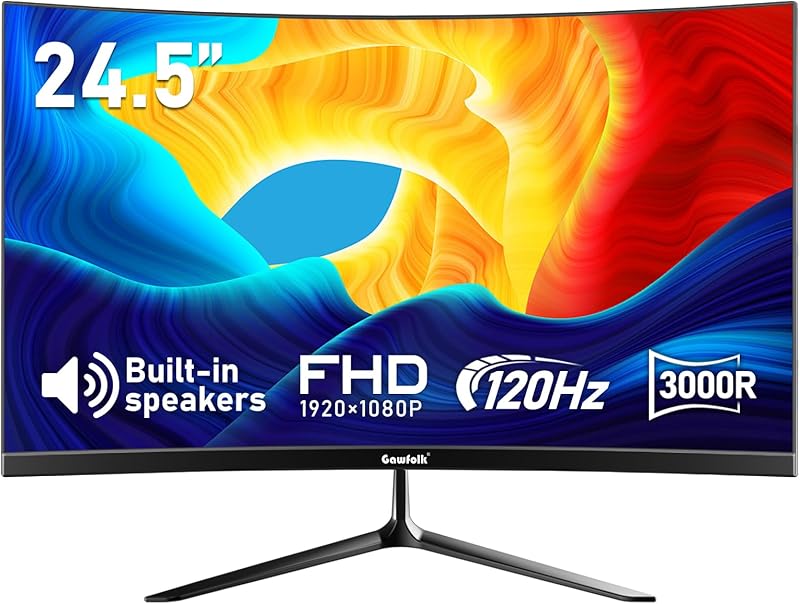
For compact bedrooms, dorm rooms, or small home study spaces, the Gawfolk 24.5 Inch Gaming Curved Monitor delivers a neat, space-conscious setup. This 24.5-inch VA display features a 1920 x 1080 Full HD resolution matched with a subtle 3000R curvature. A 3000R arc represents a very gentle bend, providing first-time curved monitor buyers with subtle ergonomic benefits without noticeably warping flat documents. The manufacturer listing highlights 98% sRGB color gamut coverage, 8-bit color depth, a 3500:1 contrast ratio, and 250 candelas per square meter of brightness for crisp, balanced imagery.
Smooth gaming motion is supported by a 120Hz refresh rate over HDMI, paired with a 1ms response time to eliminate motion ghosting and streaks during quick camera pans. A unique advantage of this model is its dual input selection: it provides a modern HDMI port alongside a traditional VGA port that operates up to 60Hz, ensuring seamless compatibility with legacy office desktops and basic student laptops. Additionally, the monitor includes integrated stereo speakers, eliminating the immediate need for external desktop speakers and keeping workspace cables minimal.
This compact display is ideal for students, younger gamers, and first-time buyers who need a reliable, space-saving screen for homework, streaming, and casual console gaming. However, enthusiastic players seeking a deep wraparound curve or refresh rates above 120Hz will find that the Gawfolk 27-inch 200Hz monitor offers a substantial boost in gaming immersion.
Gawfolk 49 inch Curved Gaming Monitor
- Best for Simulation gamers and extreme multitaskers
- Color black
- Size 49 in
- Weight 17 pounds
- Dimensions 1.9 x 46 x 19 Inches

Our score: 8.2/10
Pros
- Expansive 49-inch dual QHD screen
- Height and tilt adjustable stand
- Integrated PIP and PBP split screen
Cons
- Requires very wide desk space
- Demands powerful computer hardware
The flagship giant in the brand lineup is the Gawfolk 49 inch Curved Gaming Monitor, a super-ultrawide powerhouse designed to replace complicated multi-monitor desk setups. Featuring an expansive 32:9 aspect ratio and a Dual Quad HD resolution of 5120 x 1440 pixels, this single curved screen provides the exact horizontal workspace of two 27-inch 1440p monitors sitting side by side without any distracting plastic bezel in the middle. The tight 1500R curvature arcs the broad 46-inch panel across your peripheral vision, while the listing reports 350 candelas per square meter of brightness, an 85% NTSC1931 color gamut, a 3000:1 contrast ratio, and HDR support.
Performance specs are well-suited for demanding workloads, offering a 120Hz native refresh rate, a 1ms MPRT response time, and Adaptive-Sync / FreeSync Premium to eliminate screen stuttering. Power users can take advantage of integrated Picture-in-Picture (PIP) and Picture-by-Picture (PBP) split-screen modes, enabling video feeds from two separate computers to display side by side on one surface. Unlike smaller models, this unit includes an ergonomic stand with both height and tilt adjustment, and the back supports 100x100mm VESA arms. Shoppers comparing super-wide screen options can review our samsung ultrawide curved monitor guide to explore how dual-wide setups function in daily productivity.
This super-ultrawide display suits dedicated flight sim pilots, racing rig builders, stock traders, and digital content creators who juggle numerous active application windows. However, its broad 46-inch horizontal width and 17-pound weight require an exceptionally sturdy, wide desk, making standard 34-inch ultrawide panels a much easier fit for standard workstations.
Gawfolk 27″ Curved Gaming Monitor,180Hz 200Hz
- Best for Gamers building a stylish white setup
- Color white
- Size 27 inches
- Dimensions 26 x 17 x 7 inches
Pros
- Distinctive matte white finish
- Fast 200Hz refresh rate
- Integrated chassis speakers
Cons
- Full HD resolution on 27 inches
- Stand lacks height adjustment
Standing out with an eye-catching modern design, the Gawfolk 27″ Curved Gaming Monitor,180Hz 200Hz trades the standard black exterior for a stylish matte white chassis supported by an aluminum alloy base. This 27-inch VA display pairs a 1920 x 1080 Full HD resolution with an immersive 1800R curvature, striking a balanced footprint suitable for bedroom gaming stations. The panel reaches an ultra-responsive 200Hz refresh rate alongside a 1ms response time, ensuring fast-paced action titles and racing games remain crisp with minimal ghosting, while FreeSync technology prevents visual tearing.
Display quality is anchored by a high 4000:1 contrast ratio, ensuring deep black levels and vibrant game visuals rather than a washed-out appearance. Built-in dual speakers are included inside the monitor frame, allowing users to watch streams, attend video calls, or play console games straight out of the box without purchasing additional audio hardware. Navigating display menus is straightforward thanks to an intuitive rear joystick controller, and integrated eye care technology with flicker-free dimming protects against eye fatigue during extended study marathons or nighttime gaming sessions.
This 27-inch display is an excellent gift for teens, dorm students, and gamers who want to build a clean white desktop aesthetic with fast refresh speeds. However, professionals who require extra screen width for handling multiple spreadsheets side by side may find Gawfolk’s 34-inch ultrawide models more functional for daily workflow.
Gawfolk 34 Inch Ultrawide Curved 200Hz
- Best for Sim racers demanding maximum refresh rates
- Color Black
- Size 34 inch
- Dimensions 10.56 x 31.81 x 18.61 Inches
Pros
- Ultrawide 3440×1440 at 200Hz speed
- Rich 4000:1 contrast ratio
- Displays 1.07 billion colors
Cons
- HDMI connection limited to 100Hz
- Stand lacks height adjustment
Positioned as an elite performance choice among the brand’s wide displays, the Gawfolk 34 Inch Ultrawide Curved 200Hz combines a broad panoramic layout with high-speed gaming specs. Built with an expansive 21:9 ultrawide aspect ratio and a 3440 x 1440 UWQHD resolution, this 1500R curved VA screen envelops your field of view. The manufacturer listing notes an upgraded brightness level of 310 nits, an 8-bit FRC color depth displaying 1.07 billion colors, a 120% sRGB color gamut, and a deep 4000:1 contrast ratio for pronounced visual clarity in both bright highlights and dark shadows.
Motion capability is a standout highlight, supporting up to a 200Hz refresh rate when utilizing a DisplayPort cable connection, while HDMI inputs handle up to 100Hz (the monitor arrives with a default refresh rate of 60Hz out of the box). Built-in Adaptive Sync locks the panel refresh rate to your graphics card output to prevent stuttering and frame tearing. For long hours behind the desk, the monitor utilizes direct-current (DC) global dimming to deliver flicker-free viewing alongside a dedicated low-blue-light mode to maintain visual comfort.
This monitor is the best gawfolk curved monitor for dedicated simulation racers and enthusiast PC gamers who demand both ultrawide visual scale and elite 200Hz motion fluidity. However, users whose computer systems lack high-bandwidth DisplayPort ports or cannot push 1440p gaming past 120 frames per second will be equally well-served by the 165Hz 34-inch Gawfolk model.
Chip values are fields copied from the Amazon product listing. Scores are out of 10, based on listed specifications and buyer feedback.
Matching a Model to Your Setup
- Compact dorm rooms and budget study spaces: The Gawfolk 24.5 Inch Gaming Curved Monitor fits easily onto shallow desks while offering 120Hz motion, legacy VGA support, and built-in speakers.
- High-speed competitive esports gaming: The Gawfolk 32 Inch Curved Gaming Monitor prioritizes raw speed with a 240Hz refresh rate and a gentle 1800R curve for rapid reaction times.
- Coordinated white battlestations: The Gawfolk 27″ Curved Gaming Monitor,180Hz 200Hz pairs a clean white finish and aluminum alloy base with a 200Hz panel and integrated speakers.
- Balanced home office productivity and gaming: The Gawfolk 34″ Ultrawide Curved Gaming Monitor provides sharp 1440p resolution and a 21:9 ratio for managing multiple side-by-side windows.
- Enthusiast sim racing and flight setups: The Gawfolk 34 Inch Ultrawide Curved 200Hz delivers a panoramic 1500R curve combined with an ultra-smooth 200Hz refresh rate.
- Total multi-monitor replacement: The Gawfolk 49 inch Curved Gaming Monitor replaces dual 27-inch screens with a seamless 32:9 dual QHD surface equipped with height adjustment and split-screen features.
Before You Buy
When planning your gawfolk curved gaming monitor setup, it is crucial to review your computer’s video ports and the cables you plan to use. The product listings do not always confirm whether both HDMI and DisplayPort cables are included inside every retail box, nor do they specify the exact cable lengths provided. Furthermore, to access the highest advertised refresh rates on several models—such as 240Hz on the 32-inch screen or 200Hz on the 34-inch ultrawide—the listings state that you must connect via DisplayPort, as HDMI inputs are technically restricted to lower refresh rates like 100Hz or 120Hz. Verifying your PC or laptop outputs beforehand ensures you avoid unexpected refresh rate bottlenecks on day one.
Physical desk space and mounting capabilities also require advance planning. Several listings do not specify extensive ergonomic adjustments; the 24.5-inch, 27-inch, 32-inch, and 34-inch models feature tilt adjustments but lack height or swivel adjustments on their included factory stands. Only the 49-inch model explicitly includes height adjustment out of the box. Additionally, while multiple models support standard VESA mounting patterns (such as 75x75mm or 100x100mm), the listings explicitly state that wall mounts and desk mounting arms are not included in the package, meaning you must purchase separate mounting brackets if you plan to lift the display off your desk.
FAQ
What does the "R" rating mean on curved monitors?
The number before the letter “R” represents the curvature radius in millimeters if the screen were extended into a full circle. A smaller number like 1500R indicates a tighter curve that wraps more noticeably around your peripheral sightlines for high immersion. A larger number, such as 1800R or 3000R, signifies a much gentler curve that feels closer to a standard flat monitor while still reducing side-angle eye fatigue.
Which Gawfolk curved monitor to buy for side-by-side office multitasking?
For standard productivity, a 21:9 ultrawide screen like the Gawfolk 34″ Ultrawide Curved Gaming Monitor or the Gawfolk 34 Inch Ultrawide Curved 200Hz is the most effective choice. Their 3440 x 1440 resolution provides 34% more horizontal space than standard widescreen monitors, allowing you to comfortably snap two full-sized documents or web browsers side by side without bezel borders.
Can Gawfolk curved monitors be mounted to monitor arms?
Yes, several Gawfolk models support VESA mounting, but the pattern dimensions vary depending on screen size. For example, the 24.5-inch model uses a compact 75x75mm VESA pattern, while the 32-inch and 49-inch models utilize 100x100mm patterns. The listings clarify that mounting arms and wall brackets are not included in the packaging, so compatible hardware must be acquired separately.
Do all Gawfolk curved monitors have built-in speakers?
No, built-in speakers are only specified on select models in the lineup. The listings explicitly confirm integrated speakers on the Gawfolk 24.5 Inch Gaming Curved Monitor and the Gawfolk 27″ Curved Gaming Monitor,180Hz 200Hz. For the 32-inch, 34-inch, and 49-inch models, the listings do not specify built-in audio hardware, making a desktop soundbar or gaming headset necessary for sound.
Why is DisplayPort needed instead of HDMI for high refresh rates?
DisplayPort connections typically carry higher data bandwidth on PC monitors compared to older HDMI standards. On several Gawfolk monitors, the listings note that HDMI inputs are capped at 100Hz or 120Hz, whereas connecting through DisplayPort 1.4 unlocks the full panel refresh capability, including 165Hz, 200Hz, or 240Hz motion speeds.


