
As Amazon Associates, we earn from qualifying purchases. This means we may receive a small commission at no extra cost to you if you click through and make a purchase.
Setting up a clean, high-resolution desktop workstation often starts with finding the right display, and choosing a benq 4k monitor can feel overwhelming when several models share similar names and physical profiles. Buyers typically balance three major decisions: display size, panel finish, and connectivity. Selecting between a 27-inch screen and a 32-inch workspace dictates how comfortably you can manage multiple windows side by side. At the same time, choosing between a glare-diffusing matte panel and a high-clarity glossy surface affects how vibrant your media looks across varying room lighting conditions. For laptop users, especially those running Apple hardware, power delivery over a single cable determines whether your desk stays free of excess power bricks and messy wiring.
The BenQ lineup in this category divides cleanly into two distinct design philosophies: the creator-focused DesignVue PD series and the modern, Mac-tailored MA series. While the PD series targets studio precision with factory calibration certificates, hardware shortcut pucks, and built-in keyboard-video-mouse switches for managing multiple computers, the MA series streamlines daily operation by synchronizing native volume and brightness adjustments directly with Apple keyboard keys. When examining a monitor benq 4k selection, distinguishing between these series simplifies your shopping path. Exploring our wider benq 27 inch monitor overview highlights how these families diverge in everyday productivity environments.
BenQ 4K Monitors Lineup at a Glance
| Model | Screen Size | Screen Finish | Power Delivery | Primary Focus |
|---|---|---|---|---|
| PD2706U | 27 inches | Matte | 90W USB-C | Color-critical design and dual-PC KVM workflows |
| MA320U | 32 inches | Matte | 90W + 15W USB-C | Expansive Mac desktop with seamless keyboard sync |
| MA270U | 27 inches | Matte | 90W + 15W USB-C | Compact Mac matching with anti-glare viewing |
| MA270UP | 27 inches | Glossy | 90W + 15W USB-C | High-clarity Mac visual matching with glass-like finish |
| PD3225U | 32 inches | Anti-glare | 85W Thunderbolt 3 | Professional design with IPS Black and daisy chaining |
| MA320UP | 31.99 inches | Glossy | 90W + 15W USB-C | Large-format glossy screen paired with Mac integration |
Figures as published on the product listings.
The Models in Detail
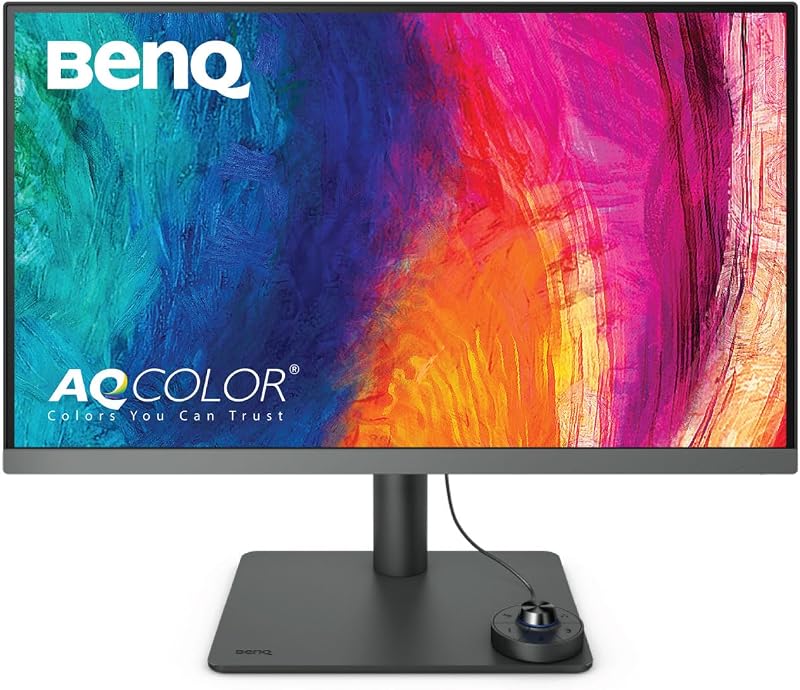
BenQ PD2706U Mac-Ready Monitor 27” 4K
- Best for Designers managing dual computers with calibrated color
- Color Black
- Weight 26 Pounds
- Dimensions 10 x 38 x 30 inches
Our score: 8.4/10
Pros
- Factory-calibrated AQCOLOR
- Integrated KVM switch
- 90W USB-C charging
- Physical HotKey Puck
Cons
- Moderate 250-nit brightness
- Narrower 170-degree viewing angle
The BenQ PD2706U Mac-Ready Monitor 27” 4K is engineered as a dedicated workstation tool for visual creators who demand certified color precision. Featuring BenQ AQCOLOR technology, this 27-inch IPS panel arrives factory-calibrated with an impressive Delta E of 3 or less, ensuring what you see on screen faithfully reflects true color standards. Delta E measures the difference between actual color input and displayed color output, where lower numbers indicate near-indistinguishable variance. The listing outlines coverage of 95% P3 alongside 99% sRGB and Rec.709 color spaces, verified by Calman and validated by Pantone and Pantone SkinTone. It operates at 250 nits of brightness with a 1000:1 contrast ratio, DisplayHDR 400 support, and a pixel pitch of 0.16.
Connectivity on the BenQ PD2706U stands out for mixed-device desks. Its 90W USB-C port transfers video signals, high-speed data, and enough wattage to keep a power-hungry laptop charged through one wire. A built-in KVM switch enables users to control two different computer systems using a single keyboard and mouse set, while BenQ ICCsync instantly harmonizes color profiles via Display Pilot software. The physical HotKey Puck allows rapid switching between color modes or inputs without fumbling with rear panel buttons. An ergonomic stand provides height, tilt, and swivel adjustments, while eye-care features combat visual fatigue during long work sessions.
This model is ideal for graphic artists, web developers, and video editors working in dual-platform environments who need calibrated accuracy in a manageable desktop footprint. However, if your work environment has strong overhead lighting or you prefer native keyboard-level volume control without third-party software, the newer MA series or a larger 32-inch panel may better suit your desk.
BenQ MA320U 32” 4K 3840×2160 Monitor
- Best for Mac users wanting a large anti-glare screen
- Size 2.00
- Color Sliver
- Dimensions 28 x 24 x 8 inches

Our score: 8.4/10
Pros
- Mac keyboard brightness controls
- Vibrant 400-nit matte screen
- Dual USB-C 90W and 15W
- Wide P3 color gamut
Cons
- Standard 60Hz refresh rate
- Matte finish reduces perceived contrast
For users who want an expansive workspace that feels like a natural extension of an Apple laptop, the BenQ MA320U 32” 4K 3840×2160 Monitor offers a generous 32-inch canvas. Built around an IPS LED panel running at a sharp 3840×2160 resolution with a 60Hz refresh rate, this display features BenQ exclusive Mac color tuning. This proprietary calibration aligns the wide P3 color gamut directly to MacBook Pro and MacBook Air screens, minimizing distracting color shifts when moving project windows between screens. It provides a bright 400-nit matte screen finish and a tight 0.08 pixel pitch, keeping fine text crisp across wide 178-degree viewing angles.
The hardware design of the BenQ MA320U simplifies desktop life by integrating controls directly with macOS. Rather than navigating on-screen menus, you can adjust screen brightness and audio volume directly using your MacBook keyboard. The connectivity suite includes dual HDMI ports and dual USB-C ports. One USB-C port provides 90W of power delivery to maintain full laptop battery levels, while the secondary USB-C port delivers 15W to quickly charge an iPad or iPhone. A multi-port USB hub accommodates desktop accessories, and the fully adjustable stand supports tilt, swivel, pivot, and height adjustments to achieve ergonomic comfort.
This 32-inch matte model suits business professionals, writers, and multitasking creators who desire significant screen real estate alongside effortless Mac integration. While some shoppers evaluating a lg ultragear 32 4k might seek higher refresh rates for gaming, the MA320U focuses strictly on productivity clarity. Shoppers who prefer a glossy, high-reflection glass style should consider its sister model, the MA320UP, instead.
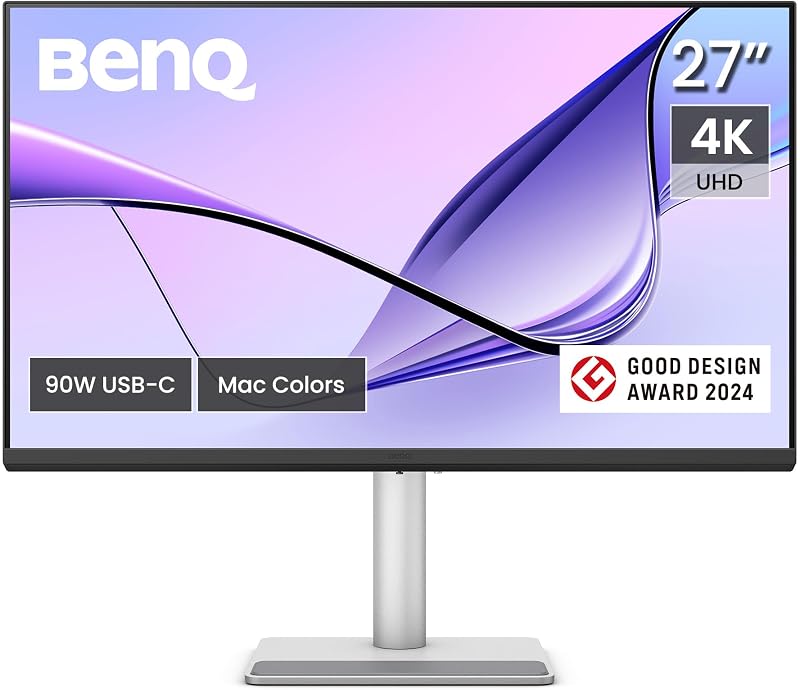
BenQ MA270U 27” 4K 3840×2160 Monitor
- Best for MacBook owners needing a compact glare-free display
- Color Sliver
- Dimensions 24 x 22 x 8.6 inches
Our score: 8.6/10
Pros
- 2000:1 contrast ratio
- Direct Mac keyboard integration
- Dual USB-C with 90W charging
- 400-nit bright IPS panel
Cons
- Standard 60Hz refresh rate
- No hardware KVM switch
The BenQ MA270U 27” 4K 3840×2160 Monitor packages Apple-centric convenience into a traditional 27-inch desktop size. Utilizing an IPS LED panel, it delivers 4K UHD 2160p resolution with a 2000:1 contrast ratio that produces deeper dark tones than conventional IPS displays. With a bright 400-nit luminance output and a matte screen coating, it diffuses harsh ambient office light and reflection from open windows, making it easy to read spreadsheets, code, or documentation throughout the day.
Like its 32-inch sibling, the BenQ MA270U relies on BenQ proprietary Mac color tuning technology to mirror the P3 color profile of Apple laptops. Mac owners will appreciate integrated keyboard control, allowing immediate adjustments to sound volume and panel brightness without touching the display bezel. Its dual USB-C configuration supplies 90W of main power delivery alongside a 15W secondary charging port for mobile devices, supported by two HDMI ports and an integrated USB hub. The stand features complete ergonomic flexibility with height, swivel, pivot, and tilt articulation.
This monitor fits home office telecommuters, college students, and office workers seeking a cohesive companion display for a MacBook Air or MacBook Pro without surrendering desk space. If your visual taste leans toward the reflective, saturated appearance characteristic of bare laptop screens, you will want to look at the glossy variant, the MA270UP.
BenQ MA270UP 27” 4K 3840×2160 Monitor
- Best for Mac users preferring a glossy glass-like finish
- Color Sliver
- Dimensions 8.6 x 24 x 22 Inches

Our score: 9.4/10
Pros
- High-clarity glossy panel
- Deep 2000:1 contrast ratio
- Mac keyboard brightness sync
- 90W USB-C power delivery
Cons
- Prone to reflections in bright rooms
- Standard 60Hz refresh rate
The BenQ MA270UP 27” 4K 3840×2160 Monitor takes the core architectural advantages of the MA series and equips the display with a glossy screen finish. While matte screens disperse light to reduce glare, a glossy panel allows light to pass directly through without diffusion, resulting in perceived deeper black levels, punchier color contrast, and crystalline image clarity. Measuring 27 inches with a 3840×2160 4K resolution, this IPS panel boasts a 2000:1 contrast ratio and a 400-nit brightness rating, ensuring vivid presentations and media playback across 178-degree viewing angles.
BenQ exclusive Mac color tuning is factory-configured to harmonize with MacBook displays, extending the P3 wide color gamut seamlessly across your dual-monitor arrangement. The BenQ MA270UP supports MacBook keyboard shortcuts for seamless brightness and audio adjustments. Cable management remains effortless thanks to dual USB-C connections, twin HDMI inputs, and an integrated USB hub. Full stand adjustability allows you to position the reflective surface away from direct glare sources.
First-time buyers who appreciate the razor-sharp aesthetic of Apple Retina displays will find this model exceptionally appealing. Those doing a asus 27 4k market search often miss out on this specific glossy coating. However, if your workstation sits directly opposite an unshaded window or underneath bright fluorescent lights, the anti-glare matte MA270U represents a more practical daily option.
BenQ PD3225U 32 Inch 4K IPS
- Best for Studio professionals requiring IPS Black and Thunderbolt
- Color Black
- Size 32 Inch
- Dimensions 7.36 x 32.28 x 26.6 inches
Pros
- Deep IPS Black 2000:1 contrast
- 40Gb/s Thunderbolt 3 daisy-chain
- Calman and Pantone validated
- Built-in KVM switch
Cons
- 250-nit standard brightness
- Higher system complexity
The BenQ PD3225U 32 Inch 4K IPS represents the highest tier of professional precision within BenQ creative lineup. It incorporates an advanced IPS Black panel that achieves a genuine 2000:1 contrast ratio, dramatically improving shadow detail and black richness compared to standard IPS monitors. Tailored specifically for Mac designers, it delivers 98% P3 and 100% sRGB/Rec.709 coverage with factory-calibrated Delta E of 2 or less. Backed by Pantone Validation and Calman Verification, it includes a dedicated M-Book mode designed to synchronize tonal response with Mac color output.
High-bandwidth productivity defines the physical connectivity of the BenQ PD3225U. Equipped with 40Gb/s Thunderbolt 3 technology, it channels high-resolution video, high-speed data, and 85W of charging capacity through a single cable while supporting daisy-chain connectivity to run dual 4K monitors in series without extra computer ports. The monitor features Display Pilot 2 software alongside BenQ physical HotKey Puck for fast input switching, auto-pivot functionality, desktop partitioning, and easy brightness tweaks. Dual-system users can leverage the built-in KVM switch, while the anodized metal stand provides robust tilt, swivel, pivot, and height adjustments.
Commercial designers, professional video editors, and animators will gain the most from this unit’s extreme color accuracy, IPS Black depth, and Thunderbolt daisy-chaining convenience. However, casual home users or writers who do not require calibrated Delta E or high-speed Thunderbolt throughput can save desk real estate and simplify operations with the MA320U.
BenQ MA320UP 32” 4K 3840×2160 Monitor
- Best for Mac creators wanting maximum glossy screen space
- Color Sliver
- Dimensions 8.6 x 28 x 24 inches
Pros
- Expansive 32-inch glossy display
- 2000:1 contrast ratio
- Native Mac keyboard control
- Dual USB-C charging ports
Cons
- Reflective in direct lighting
- Standard 60Hz refresh rate
The BenQ MA320UP 32” 4K 3840×2160 Monitor combines the expansive real estate of a 31.99-inch screen with an ultra-clear glossy panel finish. For creative professionals and visual enthusiasts who want MacBook-like glass clarity on a grand scale, this display delivers 3840×2160 UHD resolution, an elevated 2000:1 contrast ratio, and 400 nits of brightness. The glossy panel allows rich colors and deep contrast to stand out cleanly without the slight graininess that can accompany traditional anti-glare coatings in controlled lighting environments.
Operationally, the BenQ MA320UP shares the intuitive ecosystem features of the MA family. Factory-tuned Mac color reproduction mirrors the Apple P3 wide color gamut, while integrated Mac controls allow you to govern screen volume and backlight intensity straight from your keyboard. Its dual USB-C architecture provides 90W of laptop charging power alongside an auxiliary 15W port for an iPad or iPhone, eliminating multiple chargers from your desk. Dual HDMI ports and a built-in USB hub support multiple external peripherals, all resting atop a four-way ergonomic stand offering height, tilt, swivel, and pivot versatility.
This model serves designers, photographers, and general enthusiasts seeking the largest possible glossy workspace tailored to Apple hardware. If your workspace lacks light control or suffers from severe reflections, stepping over to the matte MA320U or the Thunderbolt-equipped PD3225U will offer better glare management.
Chip values are fields copied from the Amazon product listing. Scores are out of 10, based on listed specifications and buyer feedback.
Matching a Model to Your Setup
- For graphic designers and colorists running both a Mac and a Windows desktop PC, the BenQ PD2706U provides certified Delta E accuracy, a built-in KVM switch, and a HotKey Puck for fast workflow management.
- For general home office workers wanting a clean, spacious 32-inch desktop with direct Mac keyboard brightness adjustments and matte glare resistance, the BenQ MA320U is the most seamless fit.
- For college students or remote professionals with standard-sized desks who want anti-glare comfort and 90W single-cable laptop charging, the BenQ MA270U hits the sweet spot.
- For photography buffs and video viewers who love the vibrant, razor-sharp feel of an Apple Retina glass display on a 27-inch desk, choose the glossy BenQ MA270UP.
- For studio directors and digital artists requiring top-tier IPS Black shadow reproduction, certified Delta E color precision, and multi-display Thunderbolt daisy-chaining, the BenQ PD3225U is the clear standout.
- For multimedia creators who demand an immersive 32-inch glossy display with rich contrast and native MacBook volume and backlight controls, the BenQ MA320UP provides the ideal large-format solution.
Before You Buy
When performing a benq 4k monitor comparison, it is critical to note what the manufacturer product listings omit or leave flexible. While the listings emphasize USB-C and Thunderbolt connectivity, specific accessory packages—such as whether a full-bandwidth Thunderbolt cable, standard USB-C cable, or HDMI cord comes bundled in the box—are not fully detailed across every individual product listing. First-time buyers should verify their machine’s physical output ports and prepare to source an appropriate high-bandwidth display cable if their device requires dedicated adapters.
Additionally, the product specifications do not specify internal speaker wattage, audio decibel levels, or exact power draw across different brightness settings. While the MA series explicitly supports volume control through Mac keyboard shortcuts, acoustic frequency range and audio fidelity are not detailed in the product documentation. Users who require audiophile-grade sound or studio monitoring should plan to connect dedicated external speakers or studio headphones to their computer setup.
FAQ
What is the difference between BenQ PD and MA series monitors?
The BenQ PD series focuses on studio color grading and professional multi-computer workflows, providing factory Delta E validation certificates, physical HotKey Pucks, and hardware KVM switches. The BenQ MA series is designed specifically for everyday MacBook Pro and MacBook Air integration, featuring native keyboard volume and brightness synchronization alongside dual USB-C power delivery.
Should I choose a matte or glossy screen finish on a 4K display?
A matte screen finish, found on models like the MA270U and MA320U, diffuses ambient light and minimizes reflections, making it ideal for bright offices or rooms with uncovered windows. A glossy screen finish, featured on the MA270UP and MA320UP, eliminates light diffusion for deeper perceived contrast and crystalline image sharpness, but performs best in rooms where lighting angles can be controlled.
Can a benq monitor 4k charge my laptop while sending video?
Yes, all six models discussed feature high-wattage power delivery over USB-C or Thunderbolt. Models such as the PD2706U, MA320U, MA270U, MA270UP, and MA320UP provide 90W of charging power, which is sufficient for most modern laptops, while the PD3225U delivers 85W over its Thunderbolt 3 connection.
What is IPS Black technology and how does it help?
IPS Black technology, featured on the BenQ PD3225U, deepens black levels on LCD panels to achieve a 2000:1 contrast ratio, doubling the depth of conventional 1000:1 IPS screens. This eliminates the grayish cast often seen in dark scenes or shadow details during photographic retouching and high-end video editing.
Which benq 4k monitor to buy for a multi-monitor arrangement?
If you plan to connect two 4K displays to your computer using a single host port, the BenQ PD3225U is the premier choice due to its built-in 40Gb/s Thunderbolt 3 daisy-chain capability. For standard dual-monitor desks using individual cables per screen, 27-inch models like the PD2706U, MA270U, or MA270UP offer compact footprints that align neatly side by side.


