
As Amazon Associates, we earn from qualifying purchases. This means we may receive a small commission at no extra cost to you if you click through and make a purchase.
Shopping for a new laptop often leaves buyers balancing processor models, memory capacities, display dimensions, and pre-installed software suites. When looking for lenovo laptops on sale, beginners and gift-givers can easily become overwhelmed by unfamiliar technical terms like LPDDR5 RAM, eMMC storage, and CPU core counts. Choosing the right machine comes down to identifying how you or your recipient plan to use it every day, whether that involves browsing the web, handling household budgets, drafting school assignments, or managing office tasks. Knowing what each component accomplishes ensures you get responsive performance without paying extra for capabilities that sit unused.
Lenovo organizes its everyday portable catalog across several clear product lines designed for distinct computing needs and working environments. The collection spans compact Chrome OS notebooks built for cloud-centered classroom work, sleek IdeaPad models engineered for balanced home study and entertainment, and professional V-series laptops equipped with business management features. Carrying out an organized lenovo laptops comparison reveals clear distinctions in processing power, operating systems, and connectivity across the brand. By examining each configuration side by side, first-time shoppers can easily determine which device best aligns with their daily routine and software expectations.
Lenovo Laptops Lineup at a Glance
| Model | Processor | Memory & Storage | Operating System |
|---|---|---|---|
| Lenovo Laptop Computer with 1-Year Office | Intel N150 (4 cores, up to 3.6GHz) | 8GB LPDDR5 RAM, 128GB UFS 2.2 | Windows 11 Home |
| Lenovo V15 Laptop | AMD Ryzen 5 5500U (6 cores, up to 4.0GHz) | 16GB RAM, 512GB NVMe SSD | Windows 11 Pro |
| Lenovo Flagship Chromebook | MediaTek Kompanio 520 (8 cores, up to 2.0GHz) | 4GB RAM, 64GB eMMC | Chrome OS |
| Lenovo IdeaPad Slim 3i • 15.6″ | Intel N100 (4 cores, up to 3.4GHz) | 4GB LPDDR5 RAM, 128GB SSD | Windows 11 |
| Lenovo IdeaPad Slim 3 Laptop 2025 | AMD Ryzen 7 5825U (8 cores, up to 4.5GHz) | 16GB DDR4 RAM, 512GB NVMe SSD | Windows 11 Pro |
| Lenovo V15 FHD Laptop Business Student | Intel N100 (4 cores, up to 3.4GHz) | 4GB LPDDR5 RAM, 128GB UFS | Windows 11 Home in S mode |
Figures as published on the product listings.
The Models in Detail
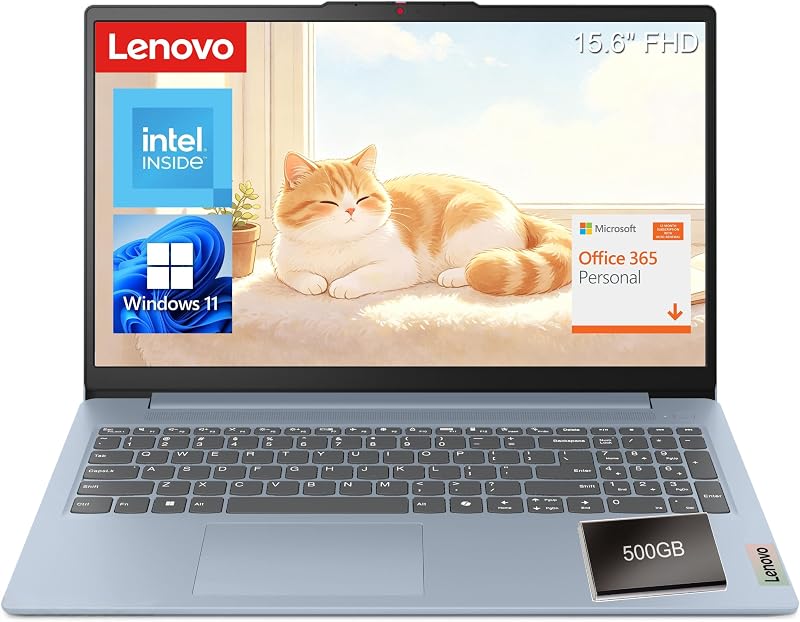
Lenovo Laptop Computer with 1-Year Office
- Best for Everyday home productivity and office tasks
- Weight 1 Pounds
- Color Luna Grey
- Dimensions 14.14 x 9.21 x 0.7 inches
Our score: 8.0/10
Pros
- Included 1-year Microsoft 365
- Wi-Fi 6 connectivity
- Full HD anti-glare display
Cons
- Modest 128GB UFS storage
- Non-backlit keyboard
The Lenovo Laptop Computer with 1-Year Office is an approachable everyday portable computer designed for smooth web browsing, media streaming, and schoolwork. At the center of the machine is an Intel N150 quad-core processor that reaches boost speeds up to 3.6GHz, working alongside 8GB of high-efficiency LPDDR5 system memory and 128GB of UFS 2.2 storage. Visuals are presented on a 15.6-inch Full HD anti-glare display with a resolution of 1920×1080, 250 nits of brightness, and a 45% NTSC color gamut to keep text sharp and minimize harsh room reflections. Physical connectivity is versatile, offering two USB-A ports, an HDMI 1.4 output, an SD card reader, a headphone and microphone combo jack, and a USB-C port that supports Power Delivery and DisplayPort 1.2 video output.
For individuals setting up a home workspace or preparing for a new academic semester, this configuration removes the friction of buying software separately by bundling a one-year subscription to Microsoft 365 Personal alongside Windows 11 Home. That package grants immediate access to essential productivity tools including Word, Excel, PowerPoint, and Outlook right out of the box. The chassis is finished in Luna Grey, measures 0.7 inches thick, and features a buttonless Precision TouchPad alongside a non-backlit keyboard with an integrated numeric keypad. The device also incorporates practical security and build protections, including a physical webcam privacy shutter, firmware TPM 2.0 data security, TÜV Rheinland Low Blue Light certification, and MIL-STD-810H military-grade durability testing.
This model serves as an ideal lenovo laptop for students and home users who need a dependable, ready-to-run computer for writing papers, managing household finances, and streaming video without software setup hurdles. With 8GB of RAM, it handles everyday multitasking far more comfortably than baseline 4GB machines. However, if your regular workflow demands heavy photo editing, extensive local media storage, or complex business management features, this model yields to more powerful options like the Ryzen-equipped V15.
Lenovo V15 Laptop
- Best for Business multitasking and office productivity
- Color Black
- Weight 3.75 Pounds
- Size 16GB RAM | 512GB SSD
- Dimensions 14.1 x 9.3 x 0.78 inches

Our score: 8.4/10
Pros
- 16GB RAM for multitasking
- Fast 512GB NVMe SSD
- Windows 11 Pro included
Cons
- Heavier 3.8-pound build
- No memory card reader listed
The Lenovo V15 Laptop steps up into serious multitasking performance and commercial capability. Powered by an AMD Ryzen 5 5500U hexa-core processor featuring 6 cores, 12 threads, and a maximum clock speed of 4.0GHz, this machine easily manages intensive workloads that slow down entry-level processors. Lenovo pairs this capable processor with 16GB of high-bandwidth system memory and a spacious 512GB PCIe NVMe M.2 solid-state drive, ensuring rapid boot times, fast application launches, and ample local room for large presentations and document archives. The 15.6-inch diagonal display delivers Full HD 1920×1080 clarity, while integrated AMD Radeon Graphics handle smooth video playback and visual processing.
Designed to serve workplace demands, this traditional clamshell notebook comes pre-installed with Windows 11 Pro. This operating system includes advanced features like Group Policy management, Mobile Device Management, Assigned Access, and Active Directory or Azure AD integration. Exterior connectivity is built around business peripherals, featuring a USB 3.0 Type-A port, a USB 2.0 Type-A port, a USB Type-C port, an HDMI video output, a 3.5mm audio combo jack, and a dedicated RJ45 Ethernet port for reliable wired office networking. A full numeric keyboard facilitates rapid data entry for accounting or inventory management, while the entire black chassis weighs in at 3.8 pounds.
Shoppers who are looking for a capable lenovo business laptop that can comfortably handle twenty open browser tabs, large spreadsheets, and virtual conferences will find this machine a strong fit. The combination of 16GB of RAM and a 512GB solid-state drive provides noticeable headroom over entry-level laptops. It gives way to lighter alternatives like the Flagship Chromebook only when extreme portability, touch navigation, and cloud simplicity take priority over desktop software compatibility.
Lenovo Flagship Chromebook
- Best for Lightweight web browsing and student notes
- Color Blue
- Weight 2.86 Pounds
- Size 4GB RAM | 64GB eMMC
- Dimensions 12.83 x 8.73 x 0.73 inches

Our score: 9.0/10
Pros
- Full HD touchscreen
- Lightweight 2.86-pound frame
- Backlit keyboard
Cons
- Limited 64GB eMMC storage
- 4GB RAM limits heavy multitasking
The Lenovo Flagship Chromebook takes a streamlined, cloud-focused approach to personal computing by running Google Chrome OS. Built around an energy-efficient MediaTek Kompanio 520 octa-core processor, this compact laptop uses an architecture of four performance A73 cores and four efficiency A53 cores running at 2.0GHz. The system includes 4GB of RAM alongside 64GB of ultracompact eMMC storage. Its defining physical feature is a 14-inch Full HD 1920×1080 touchscreen display utilizing IPS technology for wide viewing angles and natural finger-touch navigation. Weighing just 2.86 pounds and measuring 0.73 inches thin, the Abyss Blue chassis is exceptionally easy to slip into a backpack or carry around the home.
Chrome OS emphasizes fast boot times, automatic cloud backups, and built-in protection against online vulnerabilities, making it simple to maintain for users who do not want to manage operating system updates manually. The laptop includes an integrated 720p HD webcam with a physical privacy shutter and dual-array microphones for clear video calls. Users also get a backlit keyboard for working in dim environments, modern Wi-Fi 6 wireless connectivity, and Bluetooth 5.1. Peripheral support includes one USB-A 3.2 Gen 1 port, one USB-C 3.2 Gen 1 port, a microSD card reader for quick storage expansion, and a standard 3.5mm headphone and microphone combo jack.
This compact device represents one of the best lenovo laptops for elementary students, casual web surfers, and travelers whose computing lives exist entirely inside a web browser and mobile apps. It is intuitive, lightweight, and responsive for streaming media and typing notes. It gives way to the Windows-based IdeaPad Slim models if your routine requires traditional desktop software, specialized productivity suites, or extensive offline local file storage.
Lenovo IdeaPad Slim 3i • 15.6″
- Best for Demanding multitasking and creative productivity
- Color Gray
- Size Gray
- Weight 3.7 Pounds
- Dimensions 14.15 x 9.25 x 0.7 inches
Pros
- 8-core AMD Ryzen 7 processor
- Spacious 512GB SSD storage
- Responsive Full HD touchscreen
Cons
- Heavier 3.17 kg listed weight
- No open memory expansion slots

Our score: 8.6/10
Best for: Students needing fast charging and durability
Pros
- Rapid Charge Boost technology
- Fingerprint reader in power button
- Spill-resistant keyboard
Cons
- 4GB RAM limits heavy multitasking
- USB-C supports data transfer only
The Lenovo IdeaPad Slim 3i • 15.6″ brings modern chassis refinements and durable construction to an accessible home and student notebook. It runs on an Intel Processor N100 featuring 4 cores, 4 threads, and speeds up to 3.4GHz, paired with 4GB of fast LPDDR5 system memory and a 128GB solid-state drive. The 15.6-inch Full HD display utilizes an expanded 16:10 aspect ratio and an 88% active area ratio, providing extra vertical screen space that reduces scrolling when reading digital textbooks or drafting reports. The screen also features an anti-glare coating and TÜV-certified Low Blue Light engineering to help minimize eye fatigue during extended study sessions.
Lenovo engineered this ultra-portable Gray notebook to be up to 10% slimmer than its predecessor while maintaining MIL-STD-810H military-grade durability against everyday bumps and commutes. The full-size keyboard features a numeric keypad and spill resistance, protecting the internal components from accidental splashes. Rapid Charge Boost technology provides up to two hours of mobile computing from just a fifteen-minute charge, making it convenient for busy days away from power outlets. Additional features include a fingerprint reader built directly into the power button, a 720p HD webcam with a privacy shutter, Dolby Audio stereo speakers, Wi-Fi 6, Bluetooth 5.1, two USB-A 3.2 Gen 1 ports, HDMI, and a USB-C 3.2 Gen 1 port dedicated to data transfer.
Users who previously researched entry-level options like a lenovo pentium laptop will appreciate how modern N-series processors handle modern web pages and video streaming efficiently. This IdeaPad Slim 3i is an excellent choice for budget-minded high school students or family rooms needing a durable note-taking and video-calling machine. It steps aside for the Ryzen 7 IdeaPad Slim 3 when you require touch input, heavier application multitasking, or double the storage capacity.
Lenovo IdeaPad Slim 3 Laptop 2025
- Size 16GB RAM
- Color Arctic Grey
- Dimensions 14.15 x 9.25 x 0.7 inches
The Lenovo IdeaPad Slim 3 Laptop 2025 represents the top tier of performance in this comparison, packing substantial computing power into an Arctic Grey chassis. Inside, an AMD Ryzen 7 5825U octa-core processor features 8 physical cores and 16 processing threads, operating at a 2.0GHz base frequency with boost speeds reaching up to 4.5GHz. Backed by 16GB of DDR4 RAM running at 3200MHz and a large 512GB NVMe M.2 solid-state drive, this machine effortlessly manages demanding home office workflows, vast photo libraries, and dozens of browser tabs running simultaneously. Graphics tasks are handled by integrated AMD Radeon Graphics, providing dependable performance for video playback and light visual work.
The display on this 2025 model is a 15.6-inch Full HD 1920×1080 IPS panel with 300 nits of brightness and integrated touchscreen functionality, allowing users to tap, swipe, and scroll through content directly on the screen. It comes equipped with Windows 11 Pro, providing enhanced business management tools alongside web vision Microsoft Office applications including Word, Excel, OneNote, Outlook, PowerPoint, Publisher, and Access. Additional hardware highlights include a physical privacy camera shutter on the 720p webcam, a full numeric keypad, Wi-Fi 6 connectivity, and Bluetooth 5.2. Note that the listing states an item weight of 3.17 kg and indicates zero open memory expansion slots.
This model is tailored for demanding home professionals, spreadsheet analysts, and power users who want the versatility of a responsive touchscreen paired with eight powerful CPU cores. While shoppers exploring peak memory machines like a lenovo laptop 32gb ram might seek extreme limits, this 16GB setup handles serious daily productivity without hesitation. It gives way to the more modest Intel N-series laptops if your needs are strictly basic and you prefer an ultra-lightweight travel profile.
Lenovo V15 FHD Laptop Business Student
- Best for Secure student learning and family computing
- Weight 1 Pounds
- Dimensions 13.52 x 9.51 x 0.7 inches
- Size 16GB DDR5 RAM, 512GB PCIe SSD
Pros
- Windows 11 S mode security
- Microsoft 365 Personal included
- Lightweight 3.42-pound frame
Cons
- 4GB RAM for light tasks only
- Modest 128GB flash storage
The Lenovo V15 FHD Laptop Business Student combines structured security with essential daily performance in a portable package. Powered by the quad-core Intel N100 processor with clock speeds up to 3.4GHz and a 6MB Smart Cache, this notebook is built to handle online learning, word processing, and web research. It is equipped with 4GB of LPDDR5-4800 RAM and 128GB of UFS flash storage to provide quick boot times and responsive basic operation. The 15.6-inch Full HD anti-glare display provides 250 nits of brightness and an 88% screen-to-body ratio, giving students and remote workers generous screen real estate for viewing dual documents side by side.
Security is a key focus of this configuration, which arrives running Windows 11 Home in S mode. This mode restricts application installations strictly to Microsoft-verified software from the Microsoft Store, protecting the operating system against malicious downloads and background bloatware. To support academic and office tasks immediately, the package includes a one-year Microsoft 365 Personal subscription with Copilot AI tools. Connectivity remains comprehensive despite the slim 0.70-inch profile, featuring two USB 3.2 Gen 1 ports, a USB-C 3.2 Gen 1 port with Power Delivery and DisplayPort 1.2 support, HDMI 1.4, Ethernet, a memory card slot, and a numeric keypad, all while maintaining a light total weight of 3.42 pounds.
This V15 model suits parents buying a first computer for a student or small business owners seeking a locked-down, secure workstation for basic bookkeeping and document creation. The inclusion of Microsoft 365 and S mode makes it exceptionally straightforward to manage. It gives way to the standard Lenovo V15 with the Ryzen 5 processor if you need to install non-store applications, require 16GB of system memory, or need to store large local video collections.
Chip values are fields copied from the Amazon product listing. Scores are out of 10, based on listed specifications and buyer feedback.
Matching a Model to Your Setup
- Everyday Home Office and Budgeting: The Lenovo Laptop Computer with 1-Year Office is best for users who want 8GB of RAM for smooth multitasking and need Word and Excel ready to go immediately without extra subscriptions.
- Wired Office and Heavy Multitasking: The Lenovo V15 Laptop suits remote professionals who require an RJ45 Ethernet port, 16GB of RAM, and Windows 11 Pro management tools for reliable business operations.
- Simple Cloud Surfing and Travel: The Lenovo Flagship Chromebook is ideal for users who prefer an intuitive touchscreen, lightweight 2.86-pound portability, and the secure simplicity of Chrome OS for web-based work.
- Classroom Notes and Active Commutes: The Lenovo IdeaPad Slim 3i • 15.6″ fits students who need a spill-resistant keyboard, military-grade durability, and Rapid Charge Boost to quickly refuel between classes.
- Interactive Work and Intensive Applications: The Lenovo IdeaPad Slim 3 Laptop 2025 matches power users who demand an 8-core AMD Ryzen 7 processor, a 300-nit touchscreen, and 512GB of solid-state storage.
- Guarded Student Computing: The Lenovo V15 FHD Laptop Business Student is designed for families wanting the streamlined security of Windows 11 S mode paired with a bundled Microsoft 365 Personal license.
Before You Buy
When assessing these portable computers, it is essential to look closely at technical specifications that the product listings do not specify. For instance, the listings for the Lenovo V15 Laptop and Lenovo Flagship Chromebook do not state exact battery watt-hour capacities or estimated runtime hours on a single charge. Unplugged battery life can vary substantially depending on screen brightness and software demands, so buyers who require all-day battery life away from wall outlets should take note of charging features like Rapid Charge Boost on the IdeaPad Slim 3i. Additionally, the listings show notable differences in internal storage technology: while the Ryzen-based laptops feature high-speed NVMe M.2 solid-state drives, the entry-level models utilize UFS or eMMC flash memory, which provide adequate daily responsiveness but slower sustained transfer speeds for very large files.
It is equally important to examine software licenses and physical upgrade paths before deciding which lenovo laptop to buy. Both the Lenovo Laptop Computer with 1-Year Office and the Lenovo V15 FHD Laptop Business Student include a one-year Microsoft 365 Personal subscription, but the listings do not specify the ongoing renewal terms once that twelve-month period concludes. In terms of hardware longevity, the Lenovo IdeaPad Slim 3 Laptop 2025 explicitly lists zero available memory slots, confirming that its 16GB memory cannot be expanded later. Furthermore, none of these laptops come packaged with external accessories like carrying sleeves, USB mice, or dedicated external display cables, meaning shoppers should plan ahead if their daily workstation requires desktop peripherals.
FAQ
What is the difference between Windows 11 Home and Windows 11 Home in S mode?
Windows 11 Home operates as a standard desktop operating system that allows you to install software from any source, including web browsers, third-party discs, and online installers. Windows 11 Home in S mode is a specialized configuration designed for enhanced security and streamlined performance. In S mode, the operating system only allows applications downloaded directly from the Microsoft Store, preventing unverified third-party software and malware from running. While S mode improves security and preserves battery life for basic tasks, users can switch out of S mode through Windows settings if they need to install traditional desktop programs, though this switch is permanent.
Can the memory and storage be upgraded on these Lenovo laptops?
Upgrade capability varies significantly across these models based on their chassis design and motherboard configuration. The Lenovo IdeaPad Slim 3 Laptop 2025 explicitly specifies zero available memory slots, meaning its 16GB of DDR4 RAM is soldered directly to the board and cannot be expanded. Similarly, laptops utilizing LPDDR5 memory, such as the IdeaPad Slim 3i and the Intel-based V15, feature integrated memory that cannot be increased after purchase. For storage, models with M.2 NVMe solid-state drives generally allow replacement with larger drives, whereas machines utilizing embedded eMMC or UFS flash storage are fixed. For long-term peace of mind, it is best to purchase the memory and storage capacity you anticipate needing over the life of the machine.
Is Chrome OS suitable for school and business use?
Chrome OS is well suited for school and business tasks that rely primarily on web applications, Google Workspace tools like Docs and Sheets, and cloud-based storage. The operating system boots quickly, updates automatically, and includes built-in virus protection, making it very low-maintenance. However, Chrome OS cannot run traditional Windows executable files (.exe) or specialized offline desktop software like full corporate accounting packages or advanced video editing suites. If your school or workplace requires specific proprietary Windows programs, selecting a Windows 11 model is the safer choice.
What does military-grade durability mean on Lenovo laptops?
When a listing mentions MIL-STD-810H durability, it indicates that the laptop chassis design has undergone standardized environmental and stress testing developed by the military. These tests evaluate how well the computer withstands common hazards such as shock, vibration, humidity, temperature extremes, and accidental drops. On everyday laptops like the IdeaPad Slim 3i, this certification means the exterior frame and internal mounts are reinforced to better survive daily commutes, backpack pressure, and accidental bumps compared to standard plastic enclosures.
How do Intel N-series processors compare to AMD Ryzen processors?
Intel N-series processors, such as the N100 and N150, are quad-core processors engineered for energy efficiency and everyday computing tasks like web browsing, video playback, and word processing. They consume very little power, helping keep laptops cool and lightweight. In contrast, AMD Ryzen processors like the 6-core Ryzen 5 5500U and 8-core Ryzen 7 5825U are designed for higher performance and heavy multitasking. They feature more physical cores and simultaneous multithreading, allowing them to manage intense computing workloads, complex spreadsheets, and extensive background tasks without slowing down.


