
As Amazon Associates, we earn from qualifying purchases. This means we may receive a small commission at no extra cost to you if you click through and make a purchase.
Navigating the secondary market for a renewed or upgraded machine can feel overwhelming for first-time buyers and gift-givers who simply want a dependable computer for everyday life. When you shop for a refurbished asus vivobook, you are typically deciding between lightweight portability for class notes, balanced full-sized screens for family budgeting, and higher-tier multitasking power for home office projects. For standard daily tasks like web browsing, streaming high-definition video, and typing school reports, finding the best refurbished asus laptop comes down to understanding three core components: the display size, the internal memory that keeps multiple browser tabs from freezing, and the processor that acts as the engine of the entire machine. By taking the time to conduct an asus vivobook comparison before making a purchase, you can ensure that you select a system tailored to your specific daily habits without paying for capabilities you will never touch.
The Asus Vivobook family is carefully arranged into distinct tiers to serve different types of users, spanning compact entry-level machines up to advanced productivity notebooks. At the everyday entry level sits the Vivobook Go series, which includes both 14-inch and 15.6-inch designs created primarily for high portability, casual media viewing, and student assignments. These Go models prioritize energy efficiency, slim profiles, and durable chassis designs rated to military-grade standards. Further up the ladder, Asus offers larger screen form factors like the Vivobook 16, which expand the viewing area with taller aspect ratios, faster multi-core processors, and enhanced multitasking memory. Within this lineup, several models also arrive with customized secondary storage packages or professional operating systems configured by certified upgrade partners. If you are researching which asus vivobook to buy for yourself or a student in your household, understanding how these screen sizes and component tiers interact will help you quickly identify the right hardware for your daily routine.
Asus Vivobook Lineup at a Glance
| Model | Display & Resolution | Processor | Memory & Storage | Key Characteristic |
|---|---|---|---|---|
| ASUS 2023 Vivobook Go 15 Laptop | 15.6-inch Full HD (1920 x 1080) | AMD Ryzen 5 7520U | 8GB RAM, 512GB SSD | Fast charging battery reaches 50% in 30 minutes |
| ASUS Vivobook 16″ WUXGA Laptop | 16-inch WUXGA IPS | Snapdragon X – X126100 | 16GB LPDDR5X, 1.5TB Storage (512GB SSD + 1TB Dock) | Windows 11 Pro and bonus 7-in-1 docking set |
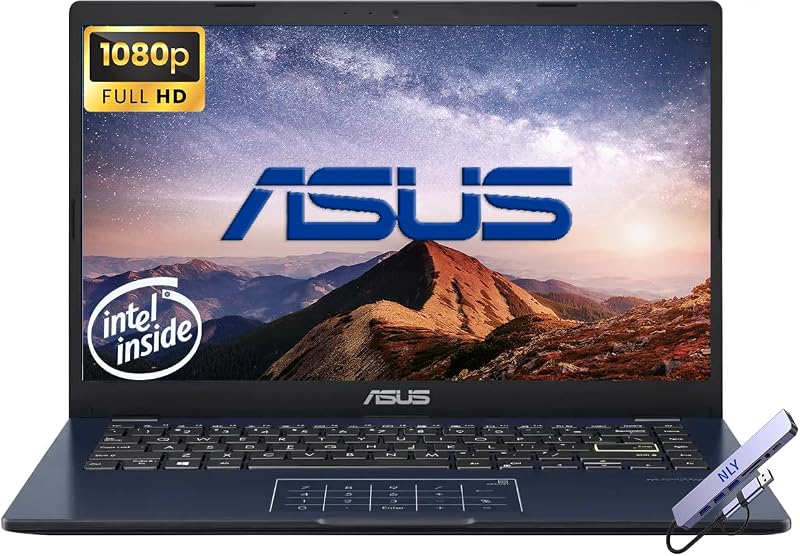
| ASUS Vivobook Go 14″ FHD Business | 14-inch Full HD LED | Intel Celeron N4500 | 4GB RAM, 256GB Storage (128GB eMMC + 128GB SSD) | Ultra-portable footprint and included docking station |
| ASUS Vivobook Go 15.6” Slim Laptop | 15.6-inch Full HD NanoEdge | AMD Ryzen 5 7520U | 8GB RAM, 512GB SSD | Military-grade durability and SonicMaster audio |
| ASUS Vivobook Go 15 15.6” FHD | 15.6-inch Full HD 60Hz | Intel Processor N150 | 8GB RAM, 128GB SSD | 180-degree lay-flat hinge and 42Wh fast charge |
| ASUS Vivobook Go 15.6” FHD Slim | 15.6-inch Full HD NanoEdge | AMD Ryzen 3 7320U | 8GB DDR5 RAM, 128GB SSD | Windows 11 Home S mode with webcam privacy shield |
Figures as published on the product listings.
The Models in Detail
ASUS 2023 Vivobook Go 15 Laptop
- Best for Students wanting rapid battery charging
- Color Mixed Black
- Weight 3.59 Pounds
- Dimensions 14.9 x 0.7 x 9.15 inches

Our score: 9.2/10
Pros
- Fast charging battery
- Ryzen 5 performance
- Military grade toughness
- Generous 512GB SSD
Cons
- Basic integrated graphics
- No bundled docking station
The ASUS 2023 Vivobook Go 15 Laptop is built around everyday balance, combining a roomy 15.6-inch Full HD display with an efficient AMD Ryzen 5 7520U processor. Designed for users who move frequently between rooms or coffee shops, it incorporates Asus fast-charge technology capable of taking the battery up to 50 percent capacity in roughly 30 minutes. The chassis weighs 3.6 pounds and passes US military-grade longevity standards, while the internal Asus IceCool thermal technology manages operating temperatures during extended streaming or research sessions. Input is handled by the ErgoSense keyboard, which is engineered to reduce wrist strain during long typing marathons.
When assessing memory for everyday workloads, having an asus laptop 8gb ram setup provides the headroom required to keep multiple web tabs, video meetings, and office documents open at the same time without annoying system stalls. This model pairs that 8GB memory footprint with a spacious 512GB solid-state drive, giving you plenty of local space for family photo albums, school projects, and program installations. Connectivity is thoroughly modern thanks to built-in Wi-Fi 6E, Bluetooth 5, HDMI, USB Type-A, and USB Type-C ports. It also includes thoughtful privacy hardware, specifically a physical webcam shield and AI noise-canceling audio for clear communications.
This particular model is best suited for students, busy remote workers, and home organizers who need a dependable daily driver with generous internal storage and rapid battery top-ups. However, if your regular workflow requires a larger display canvas with professional-tier Windows capabilities or advanced multi-monitor docking setups, this machine gives way to the more expansive Vivobook 16.
ASUS Vivobook 16″ WUXGA Laptop
- Best for Home office multitasking and desktop setups
- Color Silver
- Weight 5 pounds
- Dimensions 20 x 12 x 3 Inches
- Size 16GB | 1.5TB Storage

Our score: 9.0/10
Pros
- 16-inch WUXGA display
- Generous 16GB LPDDR5X RAM
- 5TB combined storage set
- Windows 11 Pro included
Cons
- Heavier five-pound weight
- Opened seal for upgrades
Stepping up in both screen real estate and processing architecture, the ASUS Vivobook 16″ WUXGA Laptop provides an expansive 16-inch WUXGA IPS panel that delivers wide viewing angles and balanced color. Under the hood, it features the power-efficient Snapdragon X – X126100 processor paired with Qualcomm Adreno graphics, making it an agile Copilot+ PC designed for responsive multitasking. The listing notes that the original factory seal is opened specifically for component upgrades, backed by a 1-year warranty on the upgraded RAM and SSD from SnowBell alongside the original manufacturer warranty on remaining parts.
Multitasking capabilities are significantly enhanced here through 16GB of fast LPDDR5X system memory, enabling smooth execution of heavier computing tasks. Storage is uniquely configured as a massive 1.5TB combined setup, consisting of an internal 512GB solid-state drive and an external 7-in-1 docking station equipped with a 1TB drive. The bundle also provides a 32GB MicroSD card with an adapter, a Type-C data cable, and a 3-in-1 charging cable. Running Windows 11 Pro right out of the box, the notebook includes a backlit keyboard with a dedicated numeric keypad, an FHD IR camera for crisp video conferences, and comprehensive physical ports including dual USB Type-A, dual USB Type-C, and HDMI.
This configuration is ideal for home office managers, financial organizers, and productivity enthusiasts who want a large desktop-replacement screen, a numeric pad, and ample external storage. For users who prioritize a compact bag footprint or lighter carrying weight, this five-pound system package yields to the smaller 14-inch and 15-inch Go designs.
ASUS Vivobook Go 14″ FHD Business
- Best for First-time buyers needing secure software
- Color Silver
- Weight 3.59 pounds
- Dimensions 14.19 x 0.7 x 9.15 inches
Pros
- Secure Windows 11 S mode
- Quad-core Ryzen 3 processor
- Responsive DDR5 memory
- Physical camera privacy shield
Cons
- Limited 128GB solid-state storage
- Microsoft store app restriction
Best for: Cloud-focused everyday home browsing
Pros
- Efficient Intel N150 processor
- 84% screen-to-body ratio
- 42Wh fast charging battery
- Modern DDR5 memory
Cons
- Compact 128GB internal drive
- Modest onboard webcam

Our score: 8.0/10
Best for: Everyday entertainment and remote work
Pros
- Spacious 512GB SSD storage
- Lay-flat 180-degree hinge
- SonicMaster sound system
- Webcam privacy shutter
Cons
- Standard 45% NTSC color
- Older Wi-Fi 5 standard
Our score: 9.8/10
Best for: Travelers seeking compact portability
Pros
- Compact 14-inch footprint
- 12-hour battery endurance
- Included external dock
- Sharp Full HD display
Cons
- Modest 4GB memory
- Entry-level Celeron CPU
The ASUS Vivobook Go 14″ FHD Business is the most travel-friendly option in this roundup, prioritizing a compact clamshell form factor. It features a 14-inch Full HD LED screen with a resolution of 1920 x 1080, ensuring that text and streaming media remain sharp despite the reduced screen footprint. Powering the system is an energy-efficient dual-core Intel Celeron N4500 processor with boost speeds up to 2.80GHz, supported by Intel UHD graphics. To achieve the advertised specifications, the listing explains that professional engineers open the original factory seal for upgrade purposes, covering the unit with a 1-year warranty from NLY Electronics.
Internally, this ultra-portable computer features 4GB of DDR4 RAM paired with a hybrid dual-tier storage arrangement totaling 256GB, utilizing a 128GB eMMC flash module alongside a 128GB solid-state drive. It includes an external NLY docking station in the box to expand your peripheral options at a desk. Onboard physical ports cover all essential bases, providing USB-C 3.2, USB-A 3.2, USB-A 2.0, HDMI 1.4, and an audio combo jack. With wireless support for Wi-Fi 5 and Bluetooth 5.0, this machine is listed with an impressive battery endurance rating of up to 12 hours on a single charge.
This compact machine is an excellent match for elementary school children, travelers who need a lightweight secondary notebook, or users with modest demands focused on typing documents and checking email. However, users who frequently juggle dozens of browser tabs or run heavy productivity suites will quickly outgrow its 4GB memory, making the 8GB Vivobook Go 15 a more practical alternative.
ASUS Vivobook Go 15.6” Slim Laptop
- Color Black
- Weight 4.75 Pounds
- Dimensions 14.19 x 0.7 x 9.15 inches
The ASUS Vivobook Go 15.6” Slim Laptop comes finished in a modern Cool Silver chassis and combines robust physical durability with everyday computing agility. It features a 15.6-inch NanoEdge Full HD display with ultra-slim bezels, offering a 60Hz refresh rate, 250 nits of brightness, and a 45 percent NTSC color gamut. Processing is handled by an AMD Ryzen 5 7520U quad-core processor with integrated AMD Radeon Graphics, providing dependable muscle for everyday web browsing, video conferences, and personal organization.
When searching for value across seasonal promotions like asus laptops on sale clearance, finding a computer that carries both 8GB of memory and a 512GB solid-state drive is a significant milestone. This laptop supplies plenty of fast internal storage so you do not have to rely constantly on external thumb drives or cloud subscriptions. Thoughtful chassis touches include a 180-degree lay-flat hinge that makes screen sharing simple, a physical privacy shutter for the webcam, and US military-grade durability testing to endure daily bumps. Built-in stereo speakers powered by SonicMaster audio and an array microphone round out its media profile.
This laptop is ideally suited for college students and remote workers who want a balanced full-sized screen, substantial local file storage, and durable construction. Where it gives way is in raw storage scale; users who require over a terabyte of docked archival space will find the Vivobook 16 bundle more appropriate.
ASUS Vivobook Go 15 15.6” FHD
- Color Silver
- Weight 3.59 Pounds
- Dimensions 14.19 x 0.7 x 9.15 inches
Featuring a clean aesthetic and an efficient modern architecture, the ASUS Vivobook Go 15 15.6” FHD is designed for streamlined home and personal use. Its 15.6-inch Full HD screen boasts an 84 percent screen-to-body ratio, minimizing distracting border plastic to maximize visual real estate for streaming movies or reviewing school assignments. Inside, the notebook is driven by an Intel Processor N150 and integrated Intel UHD Graphics, supported by 8GB of responsive DDR5 SDRAM to keep daily multitasking smooth and snappy.
Storage on this model is set at a modest 128GB solid-state drive, making it a great match for users who conduct most of their work within web browsers and cloud storage ecosystems. The laptop incorporates an ASUS ErgoSense keyboard for comfortable typing sessions and a precision-engineered 180-degree lay-flat hinge for easy desk collaboration. Portable productivity is supported by a 42Wh battery equipped with fast charging capabilities that reach 60 percent battery capacity in 49 minutes, ensuring you spend less time tethered to an electrical outlet.
This Intel-based Vivobook is an exceptional choice for casual home users, retirees, or students who prioritize fast battery recharging and modern DDR5 memory over massive onboard drive capacity. However, if your workload includes saving hundreds of video files or extensive personal photo libraries directly to the internal hard disk, stepping up to the 512GB storage capacity of the Ryzen 5 models is strongly advised.
ASUS Vivobook Go 15.6” FHD Slim
- Color Black
- Weight 4.6 Pounds
- Dimensions 14.14 x 9.31 x 0.78 inches
The ASUS Vivobook Go 15.6” FHD Slim delivers a reliable entry-level computing experience wrapped in an understated Black finish. Driven by an AMD Ryzen 3 7320U quad-core processor and integrated AMD Radeon Graphics, this machine delivers dependable performance for research papers, web browsing, and video streaming. It sports a 15.6-inch NanoEdge display with 250 nits of brightness and a smooth 60Hz refresh rate, complemented by an ErgoSense keyboard with a precision touchpad for accurate cursor control.
Shoppers tracking the broader landscape of modern computing through an asus laptop 2026 buying perspective will appreciate the forward-looking hardware choices here, notably the inclusion of 8GB of DDR5 RAM. Internal file storage is handled by a 128GB SSD, while software operations run on Windows 11 Home in S mode, a streamlined operating system environment designed to prioritize security and vetted applications. The laptop weighs an easy-to-carry 3.59 pounds, features SonicMaster audio, incorporates a 720p HD camera with a physical privacy shutter, and includes a full suite of connection ports such as USB-C 3.2 Gen 1, USB-A, HDMI 1.4, and an audio combo jack.
This notebook is well tailored for middle school or high school students who need a secure, focused computer environment for daily homework assignments. Because it operates in Windows 11 Home S mode and features a 128GB drive, users who require unrestricted third-party software installations or vast local project storage should look instead toward the standard Windows 11 Home or Pro models with 512GB drives.
Chip values are fields copied from the Amazon product listing. Scores are out of 10, based on listed specifications and buyer feedback.
Matching a Model to Your Setup
- For frequent commuters and middle school students: The ASUS Vivobook Go 14″ FHD Business fits easily into small backpacks, offers up to 12 hours of battery life, and provides an included docking station for working at a home desk.
- For dedicated home office professionals needing multi-drive storage: The ASUS Vivobook 16″ WUXGA Laptop offers an expansive 16-inch screen, 16GB of memory, Windows 11 Pro, and a combined 1.5TB storage package with a 7-in-1 dock.
- For college students seeking balanced daily performance: The ASUS 2023 Vivobook Go 15 Laptop combines a Ryzen 5 processor, 8GB of memory, a generous 512GB SSD, and 30-minute rapid charging to keep up with full days on campus.
- For budget-conscious media streamers and web browsers: The ASUS Vivobook Go 15 15.6” FHD features an 84 percent screen-to-body ratio, an efficient Intel N150 processor, and DDR5 memory for snappy navigation.
- For beginners who want built-in software security: The ASUS Vivobook Go 15.6” FHD Slim provides Windows 11 Home in S mode, physical webcam privacy controls, and a dependable Ryzen 3 quad-core processor.
- For shared family productivity with durable construction: The ASUS Vivobook Go 15.6” Slim Laptop provides military-grade drop resistance, a 180-degree lay-flat hinge, and SonicMaster stereo sound for family zoom calls.
Before You Buy
When shopping for refurbished or upgraded laptops online, it is essential to understand how warranty coverage and internal configurations differ from standard sealed retail units. Several listings in this collection, such as the Vivobook 16 and the 14-inch business model, state plainly that the original factory seal is opened by certified third-party technicians to install upgraded memory or storage components. While these machines offer enhanced utility, their warranties are split between the original manufacturer and the third-party upgrade provider, such as SnowBell or NLY Electronics. The listings do not specify individual cosmetic condition grades or battery cycle counts, meaning buyers should expect minor handling signs consistent with renewed hardware while enjoying fully verified internal performance.
It is equally important to plan for software and peripheral needs before your package arrives. The product listings do not specify bundled Microsoft 365 or Office productivity suite subscriptions, so you will need to supply your own software licenses or utilize free web-based alternatives for document editing. Additionally, while certain packages bundle external multi-port docking stations, the listings do not specify included protective carrying sleeves or external mice. Paying attention to drive capacities is also crucial: machines equipped with 128GB of internal storage are engineered primarily for cloud-focused workflows, whereas 512GB drives provide the room necessary to store large local libraries without immediate drive management.
FAQ
What is the difference between an SSD and eMMC storage on Asus Vivobook laptops?
A solid-state drive (SSD) is a fast internal drive that reads and writes data through high-speed interfaces, allowing your computer to boot up in seconds and launch demanding programs smoothly. In contrast, eMMC (embedded MultiMediaCard) storage uses flash memory similar to what is found in smartphones or memory cards; it is slower than a solid-state drive but very energy efficient. Some entry-level models use eMMC storage for basic files while utilizing an SSD for the operating system to keep the overall machine responsive.
Can an Asus Vivobook handle student schoolwork and video calls?
Yes, all the models in this lineup include built-in webcams, integrated microphones, and Wi-Fi connectivity suitable for remote classes and family video calls. Furthermore, several models in the Go series feature dedicated AI noise-canceling technology to filter out background ambient sounds, as well as physical sliding webcam shutters that give students and parents complete visual privacy when the camera is not actively in use.
What does Windows 11 Home in S mode mean for everyday use?
Windows 11 Home in S mode is a specialized version of Windows engineered for heightened security and performance. In S mode, the operating system only permits application downloads directly from the official Microsoft Store and requires the use of Microsoft Edge for web browsing. This setup prevents malware from infiltrating the system, making it an ideal choice for young students or first-time computer users. If you need to install standard software from external websites, Windows allows you to switch out of S mode permanently through the system settings.
Why do some listings state that the original factory seal was opened?
Certain renewed and custom Vivobook packages are modified by professional electronics distributors to offer better specifications than the base factory model. Technicians carefully open the original packaging to upgrade the internal RAM, add secondary solid-state storage drives, or include companion hardware like multi-port docking stations. These listings clearly state that the upgraded components are supported by a dedicated warranty from the upgrade company.
How does fast charging work on Asus Vivobook Go models?
Asus fast charging technology delivers accelerated power flow to the internal battery when connected to the included wall adapter. Depending on the specific Vivobook model, this feature can recharge a depleted battery up to 50 percent in just 30 minutes, or up to 60 percent in approximately 49 minutes. This capability is especially helpful for students and mobile professionals who have limited time near an electrical outlet between classes or business meetings.


