
As Amazon Associates, we earn from qualifying purchases. This means we may receive a small commission at no extra cost to you if you click through and make a purchase.
Finding the right pc monitor samsung produces for your workspace means weighing screen dimensions, panel curvature, and visual responsiveness against your daily habits. Choosing between a flat screen and an arced display transforms how visual content fills your field of view, while specifications such as refresh rate and contrast ratio influence everyday reading clarity, eye comfort, and entertainment quality. For first-time shoppers and gift-givers, deciphering these technical terms is essential for selecting a display that feels comfortable during long hours of web browsing, document editing, and multimedia viewing.
When evaluating which samsung pc monitor to buy, understanding the brand structure simplifies the decision process. Samsung divides its consumer catalog into distinct product lines with dedicated engineering goals. The Essential and S3 series focus on practical home office productivity, everyday versatility, and comfortable media consumption through balanced refresh rates and dedicated eye-care modes. In contrast, the Odyssey series targets high-performance gaming setups, featuring rapid response times, elevated refresh rates, and aggressive curvature designed to immerse players directly into virtual worlds.
Samsung PC Monitors Lineup at a Glance
A comprehensive samsung pc monitor comparison highlights distinct panel technologies, refresh speeds, and curvature profiles across the product line. The table below outlines how each display balances size, panel type, refresh rate, and core capabilities.
| Model | Screen Size and Shape | Panel and Resolution | Refresh Rate | Primary Highlight |
|---|---|---|---|---|
| Samsung 27″ Essential S3 | 27 inches, 1800R Curved | VA, FHD (1080p) | 100Hz | 3000:1 contrast and TÜV eye comfort |
| Samsung 32″ Flat Computer Monitor | 32 inches, Flat | LED LCD (16:9) | 75Hz | 4000:1 contrast and AMD FreeSync |
| Samsung 32” Odyssey G5 | 32 inches, Flat | IPS, QHD (2560 x 1440) | 180Hz | 1ms GtG response and ergonomic stand |
| Samsung 32″ S3 | 32 inches, 1800R Curved | VA, FHD (1080p) | 100Hz | Built-in speakers and 3000:1 contrast |
| Samsung 24″ S3 | 24 inches, Flat | IPS, FHD (1080p) | 120Hz | 120Hz fluid motion and slim bezels |
| Samsung 32″ Odyssey | 32 inches, 1000R Curved | LED, QHD (2560 x 1440) | 165Hz | Deep 1000R curve and 1ms MPRT |
Figures as published on the product listings.
The Models in Detail
Samsung 27″ Essential S3
- Best for Everyday home computing and media streaming
- Color Black
- Size 27 inch
- Dimensions 9.2 x 24.5 x 18.4 Inches

Our score: 9.6/10
Pros
- 1800R curved screen wraps field of view
- Smooth 100Hz refresh rate reduces motion blur
- TÜV-certified eye comfort reduces flicker
Cons
- FHD 1080p resolution limits fine text clarity
The Samsung 27 Essential S3 balances desktop space and immersive design with an 1800R curved profile. According to the listing specifications, this display features a 27-inch VA panel delivering Full HD 1080p resolution with a 16:9 aspect ratio and a matte screen finish. The 1800R curvature wraps gently around your field of vision, helping to improve depth perception while minimizing peripheral distractions during prolonged sessions. It also delivers a static contrast ratio of 3000:1 and a brightness rating of 250 candelas per square meter, producing deep blacks and distinct separation between dark and light tones.
Daily productivity and casual gaming benefit from the 100Hz refresh rate, which reduces motion blur and cursor lag compared to traditional entry-level screens. The Samsung 27″ Essential S3 incorporates Game Mode, allowing users to adjust color profiles and image contrast to spot shadow details in gaming environments. For everyday wellness, the monitor includes TÜV-certified eye comfort technology that reduces irritating screen flicker and minimizes blue light emission to limit eye strain during extended work or study marathons.
This model suits home office workers, college students, and casual entertainment seekers who want a comfortable curved screen without needing high-end graphics hardware. Shoppers exploring mid-sized displays can read our monitor samsung 27 breakdown to see how curved options contrast with conventional panels. When desk arrangements demand higher pixel density for intricate graphic design or faster response times for competitive esports, this 1080p display gives way to more specialized models such as the Odyssey lineup.
Samsung 32″ Flat Computer Monitor
- Best for Spacious multi-window home office productivity
- Color Black
- Size 32-inch
- Weight 11.02 pounds
- Dimensions 8.71 x 28.09 x 20.97 Inches
Our score: 8.4/10
Pros
- Spacious 32-inch flat display area
- Deep 4000:1 contrast ratio
- AMD FreeSync synchronizes frame rates
- Three-sided borderless aesthetic
Cons
- Modest 75Hz refresh rate
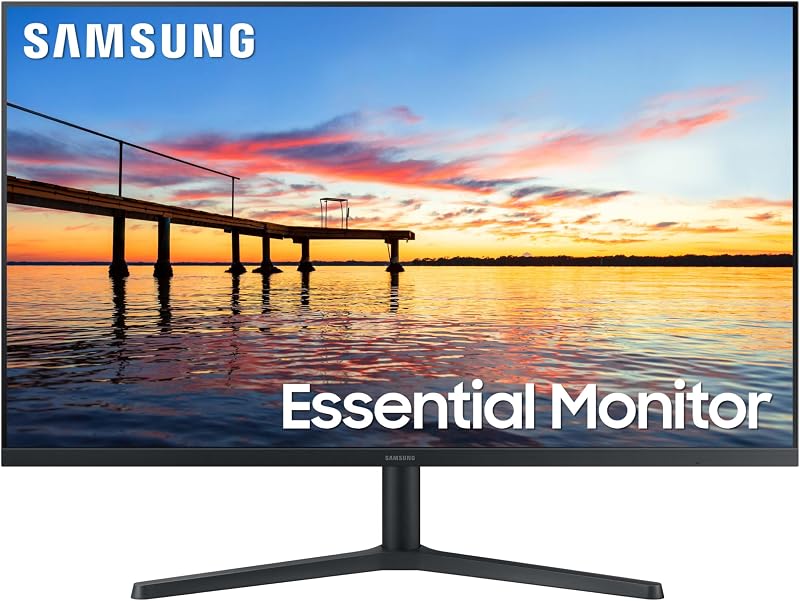
For workspaces requiring maximum flat screen area, the Samsung 32 Flat Computer Monitor provides an expansive viewing surface with a clean visual presentation. Built with an LCD panel and LED display technology, this 32-inch screen offers a three-sided borderless frame that maintains a modern desk aesthetic and facilitates multi-monitor arrangements with minimal visual gap. Listing details show a 16:9 aspect ratio, a flat screen finish, a brightness level of 250 candelas per square meter, and an impressive 4000:1 contrast ratio that ensures rich dark shades across spreadsheets, media files, and text documents.
Motion handling on the Samsung 32″ Flat Computer Monitor is managed by a 75Hz refresh rate paired with AMD FreeSync technology, which synchronizes the display refresh rate with compatible graphics cards to prevent screen tearing and frame stutter during video streaming or light gaming. Eye comfort remains a central focus through Samsung Eye Saver Mode and Flicker Free technology, which actively eliminate irritating backlight flicker and limit blue light exposure. The unit weighs 11 pounds and provides rear connectivity through HDMI and DisplayPort inputs.
This display serves users who manage multiple side-by-side browser windows, large spreadsheets, or video conferences and prefer an uncurved, expansive screen. The flat glass profile avoids the geometric curvature that some CAD operators or photo editors find distracting. However, users seeking elevated refresh rates for fast-paced gaming or integrated desktop audio will find those features better served by the Odyssey family or the curved S3 series.
Samsung 32” Odyssey G5
- Best for Competitive gamers wanting ergonomic adjustability
- Color Black
- Size 32-Inch
- Dimensions 9.9 x 28.1 x 24.6 inches

Our score: 9.2/10
Pros
- Fast 180Hz refresh rate and 1ms response
- Sharp QHD 2560 by 1440 resolution
- Fully adjustable stand tilts swivels and pivots
- Vivid IPS panel with wide viewing angles
Cons
- 1000:1 contrast ratio produces lighter blacks
Fast gaming demands high refresh rates and low latency, which the Samsung 32 Odyssey G5 delivers through its rapid IPS panel. The listing specifies a 32-inch flat matte display boasting QHD resolution at 2560 x 1440 pixels, which yields more than 1.7 times the pixel density of standard Full HD monitors. Visuals remain crisp and color-accurate across wide 178-degree viewing angles with a 99 percent color gamut, while HDR10 high dynamic range processing enhances luminous highlights and nuanced shadow gradients with a peak brightness of 300 candelas per square meter.
Performance capabilities on the Samsung 32” Odyssey G5 center on an ultra-smooth 180Hz refresh rate and an instantaneous 1-millisecond gray-to-gray response time. G-Sync compatibility synchronizes the panel with your graphics processor to eliminate choppiness and image tearing. Tactical gaming tools include a Black Equalizer for spotting targets concealed in deep shadows, a Virtual Aim Point for aiming precision, and Auto Source Switch+ for automatic detection of newly powered devices. It also incorporates an ergonomic stand capable of height adjustment, tilt, swivel, and pivot.
This monitor is crafted for competitive PC gamers, streamers, and creative professionals who require pin-sharp QHD clarity paired with versatile physical adjustability. The 1000:1 contrast ratio represents the typical characteristic of high-speed IPS technology, yielding slightly lighter blacks than VA panels. Shoppers seeking deep curvature to fill their peripheral vision will naturally look toward curved Odyssey variants instead.
Samsung 32″ S3
- Best for Clutter-free desks needing integrated audio
- Color Black
- Size 32 inch
- Dimensions 10.3 x 28.2 x 20.7 inches

Our score: 8.4/10
Pros
- Integrated built-in stereo speakers
- 1800R curved screen enhances viewing depth
- High 3000:1 contrast ratio
- 100Hz refresh rate keeps motion smooth
Cons
- FHD 1080p resolution on a large 32-inch screen
Combining built-in audio with panoramic sightlines, the Samsung 32 S3 curved display creates an all-in-one entertainment setup. This model pairs a 32-inch VA panel with an 1800R screen arc that wraps gently around your vision to deepen visual engagement and reduce peripheral distractions. The listing indicates Full HD 1080p resolution, a matte finish, a 3000:1 contrast ratio, and 250 candelas per square meter of brightness. The high contrast ratio renders deep black levels, making movies, video streams, and daily computing tasks visually striking.
A key distinction of the Samsung 32″ S3 is its integrated built-in speakers, which eliminate the need for standalone desktop speakers and free up valuable workspace. Visual fluidness is supported by a 100Hz refresh rate that curbs lag and ghosting during video playback and casual gaming sessions. Eye safety is backed by TÜV-certified comfort features, including Eye Saver Mode to suppress blue light emissions and flicker-reduction technology that prevents eye fatigue during extended screen use.
This model suits home office workers, casual gamers, and college dorm residents who want an expansive screen with convenient built-in sound on a clean, uncluttered desk. While the 1800R arc provides comfortable immersion, the Full HD resolution spread over a 32-inch panel yields larger pixel spacing than QHD displays. Users engaged in intensive photo retouching or ultra-dense text editing may prefer stepping up to higher-resolution alternatives.
Samsung 24″ S3
- Best for Compact desks and secondary screen setups
- Total Number of HDMI Ports 2
- Display Type LCD
- Display Technology IPS
- Aspect Ratio 16:9
- Color Gamut 0.72
Pros
- Space-saving 24-inch slim profile
- Fluid 120Hz refresh rate
- Wide-viewing IPS panel with consistent color
- Ultra-thin border bezels
Cons
- Glossy screen finish can catch room reflections
For smaller desks or secondary screen setups, the Samsung 24 S3 offers a space-saving footprint without compromising visual fluidity. The listing highlights a 24-inch flat IPS display with Full HD resolution, delivering consistent color vibrancy and clarity across wide 177-degree viewing angles. The panel features a sleek modern aesthetic with ultra-thin border bezels that complement clean minimalist setups, alongside a glossy screen finish that enhances image crispness, a 1000:1 contrast ratio, and a brightness rating of 250 candelas per square meter.
Despite its compact chassis, the Samsung 24″ S3 boasts a responsive 120Hz refresh rate that provides smooth scrolling and reduced motion blur across office tasks, video content, and gaming. Gamers can utilize Game Picture Mode and optimizable settings to adjust contrast and visibility for different game genres. Eye protection is addressed via Eye Saver Mode, which limits harmful blue light and curbs screen flicker to keep users comfortable during prolonged computing sessions.
This display represents an ideal choice for compact workstations, student study spaces, or secondary vertical monitor mounts. It delivers smooth 120Hz performance in an unobtrusive form factor. However, users who manage wide financial spreadsheets side by side or who desire deeper multimedia immersion will find the larger 27-inch and 32-inch screens in the Samsung catalog far more accommodating.
Samsung 32″ Odyssey
- Best for Immersive simulation and action PC gaming
- Color Black
- Size 32-inch
- Weight 11.5 pounds
- Dimensions 10.7 x 28 x 21.01 inches
Pros
- Intense 1000R curve fills peripheral vision
- Crisp QHD resolution with HDR10 support
- Fast 165Hz refresh rate and 1ms MPRT
- AMD Radeon FreeSync prevents screen tearing
Cons
- Glossy finish may reflect ambient lighting
Featuring an intense wraparound screen, the Samsung 32 Odyssey G55C maximizes gaming immersion with high-speed performance. The listing outlines a 32-inch LED panel with a tight 1000R curvature designed to closely match the human field of view and draw the player directly into the center of the action. It features QHD resolution (2560 x 1440), offering 1.7 times the pixel density of standard Full HD displays for razor-sharp game textures, alongside HDR10 support, a 2500:1 contrast ratio, and 300 candelas per square meter of brightness.
Fast reflexes are enabled on the Samsung 32″ Odyssey through a 165Hz refresh rate and a 1-millisecond response time (MPRT), minimizing ghosting and blur in rapid action sequences. AMD Radeon FreeSync keeps the display refresh rate synchronized with the graphics card to eliminate stuttering and frame tearing. The screen features a glossy finish, while eye comfort is maintained through Eye Saver Mode and flicker-reduction technology that prevents ocular strain during late-night gaming sessions.
Players looking for full field-of-view immersion can explore samsung odyssey curved hardware to understand how deep screen arcs reduce visual distraction. This monitor is tailored specifically for sim racers, flight enthusiasts, and action gamers seeking maximum visual enclosure and crisp QHD detail. For productivity workflows involving shared viewing angles across a room, the tight 1000R curve gives way to flatter screens with broader communal sightlines.
Chip values are fields copied from the Amazon product listing. Scores are out of 10, based on listed specifications and buyer feedback.
Matching a Model to Your Setup
Choosing the best samsung computer monitor for your home office or entertainment space depends on available desk space, computing priorities, and ergonomic requirements. Consider how these specific usage scenarios align with each display profile:
- Everyday Home Office Work on Medium Desks: The Samsung 27″ Essential S3 provides a balanced 27-inch screen with a gentle 1800R curve and eye-care certification, making it ideal for spreadsheets, correspondence, and web research without overwhelming your workspace.
- Large-Format Productivity and Document Multitasking: The Samsung 32″ Flat Computer Monitor delivers expansive flat screen space with 4000:1 contrast and borderless edges, suiting users who arrange multiple windows side by side and prefer an uncurved display.
- Competitive Esports and Fully Adjustable Ergonomics: The Samsung 32” Odyssey G5 features a blistering 180Hz refresh rate, 1ms GtG response time, QHD clarity, and a versatile stand that tilts, swivels, pivots, and adjusts height for tournament-grade setups.
- Minimalist Workstations Needing Integrated Audio: The Samsung 32″ S3 combines an expansive 1800R curved display with built-in stereo speakers, eliminating separate desktop speakers to keep study desks and small offices clutter-free.
- Compact Workspaces and Secondary Screen Displays: The Samsung 24″ S3 delivers a compact footprint with ultra-thin bezels and a fluid 120Hz IPS panel, making it a dependable choice for tight student desks or secondary monitor arms.
- Deep Simulation and Action Gaming Immersion: The Samsung 32″ Odyssey envelops your peripheral vision with an aggressive 1000R curve, 165Hz refresh rate, and sharp QHD resolution for driving, flying, and open-world titles.
If you are debating larger screen sizes for entertainment, review our guide to samsung odyssey 32 inch displays to align panel dimensions with your seating distance.
Before You Buy
Reviewing the manufacturer listings reveals several omitted hardware specifications that buyers should keep in mind before purchasing. While several models mention HDMI or DisplayPort connections, the listings do not specify the exact revision versions of these ports, nor do they state whether connection cables are supplied in the retail packaging. Buyers planning their setups should verify their computer video outputs and consider securing appropriate cables in advance.
Mounting compatibility and stand adjustability also show notable gaps across the product data. While the Odyssey G5 listing explicitly outlines an ergonomic stand supporting height adjustment, tilt, swivel, and pivot functions, the listings for the S3 series and the flat 32-inch monitor do not specify whether their included stands support height or swivel adjustments. Furthermore, the listings do not specify whether these models incorporate standard VESA wall-mounting hole patterns, making it advisable to confirm rear mounting dimensions if you plan to use an aftermarket monitor arm.
FAQ
What is the difference between 1000R and 1800R screen curvature?
The number preceding the letter R denotes the radius of the screen curve measured in millimeters. An 1800R curve represents a gentle arc matching an imaginary circle with an 1800-millimeter radius, providing subtle depth perception without altering straight lines significantly. In contrast, a 1000R curve is significantly deeper, matching a 1000-millimeter circle to wrap closely around your natural peripheral vision for intense gaming immersion.
How does an IPS panel compare to a VA panel in everyday use?
IPS panels, featured on models like the Odyssey G5 and 24-inch S3, prioritize wide viewing angles and consistent color rendering across different vantage points. VA panels, found on the Essential S3 and curved 32-inch S3, provide significantly higher static contrast ratios of 3000:1 or 4000:1, allowing them to display deeper black levels and richer shadow definition in dimmer viewing environments.
Is a 100Hz or 120Hz refresh rate noticeable compared to standard 60Hz screens?
Yes, higher refresh rates such as 100Hz or 120Hz update the on-screen image significantly more times per second than a standard 60Hz display. This results in visibly smoother mouse cursor movements, fluid web scrolling, and reduced motion blur when watching videos or playing action games, creating a more responsive computing experience during daily tasks.
Do these Samsung computer displays include integrated speakers?
Among the six models covered, only the Samsung 32″ S3 listing explicitly confirms built-in stereo speakers. The listings for the remaining five models do not specify integrated internal audio, meaning users should plan to connect headphones, external desktop speakers, or computer audio devices for sound reproduction.
What does QHD resolution offer over standard Full HD displays?
QHD resolution measures 2560 x 1440 pixels, providing approximately 1.7 times the total pixel count of a Full HD 1080p screen. This higher pixel density produces noticeably sharper text, clearer fine details, and substantially more desktop workspace for placing multiple documents or browser windows side by side without visual crowding.


