
As Amazon Associates, we earn from qualifying purchases. This means we may receive a small commission at no extra cost to you if you click through and make a purchase.
Shopping for computer storage can quickly become intimidating when navigating technical terms like PCIe generations, transfer speeds, and unfamiliar form factors. If you are preparing for your first PC upgrade or looking for a practical technology gift, selecting a western digital m.2 drive is one of the most effective ways to make a computer feel instantly faster. Traditional mechanical hard drives rely on spinning platters and bulky cables that clutter computer cases and slow down overall system responsiveness. In contrast, modern M.2 solid-state drives resemble small, flat sticks of gum that mount directly onto the motherboard without cables. For first-time buyers, understanding how these compact drives work demystifies the difference between basic system responsiveness and professional-grade throughput, ensuring you choose the right balance of speed and space without overpaying.
Western Digital organizes its solid-state portfolio into distinct product tiers designed for specific user needs and budgets. In this western digital m.2 comparison, we examine three prominent models spanning the entry-level Green series and the mainstream Blue series across PCIe Gen3 and PCIe Gen4 standards. The Green line focuses on everyday personal computing, delivering snappy system boots, durable shock resistance, and dependable storage for schoolwork, web browsing, and office tasks. Stepping up to the Blue tier introduces significantly higher sustained data endurance, faster PCIe Gen4 data transfer rates, and massive storage pools tailored for content creators and demanding multitasking workflows. Understanding how these drives balance raw transfer speed, physical design, and capacity makes determining which western digital m.2 to buy straightforward and rewarding.
Western Digital M.2 SSD Lineup at a Glance
| Model | PCIe Interface | Max Read Speed | Listed Capacity | Key Features |
|---|---|---|---|---|
| WD Green SN3000 | PCIe Gen4 x4 NVMe | Up to 5,000 MB/s | 500 GB | nCache 4.0, Acronis Software, Slim Single-Sided 2280 |
| WD Green SN350 | PCIe Gen3 NVMe | Up to 3,200 MB/s | 2 TB (2000 GB) | QLC Flash, Shock Resistance, WD SSD Dashboard, 3-Year Warranty |
| WD Blue SN5000 | PCIe Gen4 x4 NVMe | Up to 5,500 MB/s | 4 TB | nCache 4.0, 1,200 TBW Endurance, Acronis Software, Creator Focus |
Figures as published on the product listings.
The Models in Detail
Western Digital 500GB WD Green SN3000
- Best for Budget upgraders needing fast everyday boot speeds
- Color Green
- Size 500GB
- Dimensions 3.15 x 0.866 x 0.09 inches

4.0 average rating left by Amazon buyers
Pros
- Up to 5,000 MB/s PCIe Gen4 read speeds
- Slim single-sided M.2 2280 form factor
- Free downloadable Acronis data migration software
- Western Digital nCache 4.0 responsiveness
Cons
- Modest 500GB capacity fills up quickly
- Listing does not specify sustained write speeds
The Western Digital 500GB WD Green SN3000 is an accessible PCIe Gen4 solid-state drive built to energize sluggish desktop computers and laptops. By tapping into PCIe Gen4 x4 bandwidth, the listing indicates read speeds reaching up to 5,000 MB/s, which noticeably shortens boot times and launches operating system applications with crisp responsiveness. The physical layout utilizes a single-sided M.2 2280 form factor, meaning the memory chips are mounted strictly on one side of the circuit board. This slender architecture makes it an ideal fit for compact desktop builds and thin laptops where interior socket clearance is tightly constrained. For users accustomed to an older mechanical western digital hard drive, shifting to this solid-state design delivers an immediate boost in daily computing fluidity.
To maintain smooth performance under everyday multitasking, the drive integrates Western Digital nCache 4.0 technology, which optimizes data caching during file transfers and frequent application switching. In addition, the listing specifies that buyers receive access to free downloadable Acronis True Image for Western Digital data migration software. This cloning utility takes the headache out of PC upgrades by allowing you to duplicate your existing boot drive, transferring your operating system, programs, and files over to the new drive without requiring a tedious clean installation.
This 500GB drive is best suited for students, home office workers, and general users seeking an affordable, fast dedicated boot drive for basic daily productivity, web browsing, and personal tasks. However, because modern operating systems demand substantial disk space, 500GB provides limited room for large media archives or heavy gaming installations. If you need extensive local space to store massive personal libraries, this entry-level model naturally gives way to the higher-capacity offerings in Western Digital’s solid-state family.
Western Digital 2TB WD Green SN350
- Best for Everyday users seeking large 2TB personal storage
- Size 2TB
- Color Green
- Formats Digital
- Dimensions 3.15 x 0.87 x 0.09 inches
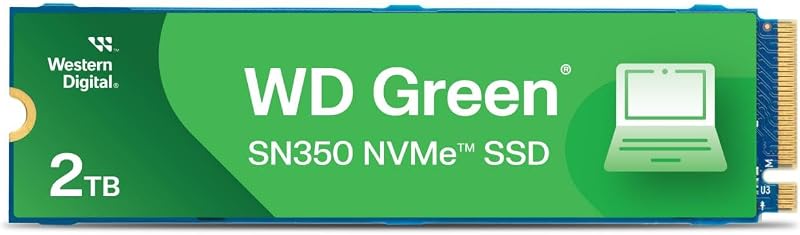
4.4 average rating left by Amazon buyers
Pros
- Generous 2TB storage capacity
- Shock-resistant solid-state design with no moving parts
- Western Digital SSD Dashboard health monitoring
- Included 3-year limited warranty
Cons
- Older PCIe Gen3 speeds up to 3,200 MB/s
- Acronis cloning software download not mentioned
The Western Digital 2TB WD Green SN350 takes a capacity-first approach to everyday storage upgrades, offering an expansive 2000 GB volume paired with PCIe Gen3 NVMe connectivity. The listing highlights read speeds up to 3,200 MB/s, allowing this drive to perform up to four times faster than traditional SATA solid-state hardware. Built with QLC flash memory in the standard M.2 2280 form factor, this western digital nvme drive slots cleanly into any compatible computer motherboard featuring an NVMe connection. Because solid-state drives contain no moving parts, the manufacturer emphasizes built-in shock resistance that safeguards critical files against accidental bumps and drops that could damage mechanical media.
Monitoring drive health and maintaining operational reliability are straightforward with the SN350. The listing notes that users can download the Western Digital SSD Dashboard, a dedicated utility that allows you to observe drive temperature, monitor overall health, and evaluate performance over time. Western Digital also backs the unit with a 3-year limited warranty for added peace of mind. While some users opt for external storage like a portable wd 4tb drive for backups, having this 2TB drive installed internally ensures instant access to secondary files without occupying external USB ports.
This 2TB drive is particularly suited for budget-conscious upgraders and families who need abundant space for photo collections, school assignments, and personal files. It is also an excellent match for older PCs limited to PCIe Gen3 architecture that cannot utilize newer Gen4 bandwidth. However, because it relies on PCIe Gen3 speeds and QLC flash memory, sustained heavy file writing will perform more slowly than newer PCIe Gen4 drives. Users who handle intensive creative rendering or rapid multi-gigabyte exports will find that the SN350 yields to the higher endurance of the WD Blue series.
Western Digital 4TB WD Blue SN5000
- Best for Content creators needing massive capacity and endurance
- Size 4TB
- Color Blue
- Dimensions 3.15 x 0.87 x 0.1 Inches
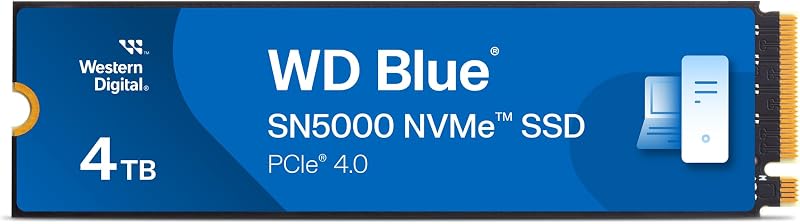
4.1 average rating left by Amazon buyers
Pros
- Massive 4TB storage capacity
- Fast PCIe Gen 4 speeds up to 5,500 MB/s
- High 1,200 TBW endurance rating
- Free Acronis True Image software download
Cons
- Performance exceeds basic office and casual needs
Designed for creators, multimedia professionals, and power users, the Western Digital 4TB WD Blue SN5000 stands as a high-capacity, high-throughput solution within the brand’s lineup. Operating on the PCIe Gen 4.0 interface across a standard PCI Express x4 connection, this drive achieves read speeds of up to 5,500 MB/s. The listing highlights Western Digital nCache 4.0 technology, engineered to streamline workflows and facilitate smooth switching between demanding applications, AI-enabled software tasks, and creative projects. While shoppers frequently compare smaller capacities like a 1tb wd drive, upgrading to this 4TB tier offers vast local storage headroom that handles expansive creative archives with ease.
Endurance is a crucial metric for creators who write massive files daily, and the listing states that this 4TB model delivers an endurance rating of up to 1,200 TBW (terabytes written). This robust endurance ensures the drive can sustain years of relentless video rendering, high-resolution photo editing, and extensive file overwriting. To ensure a seamless installation, the product listing includes a free download of Acronis True Image for Western Digital data migration software, allowing professionals to duplicate their existing boot configurations and project directories onto the new drive with minimal downtime.
The WD Blue SN5000 is the best western digital m.2 ssd for creative professionals, video editors, and power users who need massive local storage alongside dependable PCIe Gen4 speed. Its 4TB capacity accommodates sprawling video footage, digital art assets, and demanding multi-application workflows. For shoppers with straightforward everyday needs such as basic web surfing or word processing, however, both the 4TB capacity and the 1,200 TBW endurance rating far exceed standard requirements, making the more economical WD Green drives a more practical choice.
Chip values are fields copied from the Amazon product listing. Star figures are the average rating left by Amazon buyers, not a score given here.
Matching a Model to Your Setup
- Choose the wd green sn3000 if you are upgrading a thin laptop or small desktop that needs a fast, energy-efficient PCIe Gen4 boot drive for everyday school, business, and web browsing tasks without paying for unused capacity.
- Choose the wd green sn350 if you want to revitalize an older computer featuring a PCIe Gen3 M.2 slot and need an expansive 2TB storage pool for personal multimedia files, document archives, and family photos.
- Choose the wd blue sn5000 if you are building or upgrading a creative workstation where high-bandwidth PCIe Gen4 speeds up to 5,500 MB/s and massive 4TB capacity are essential for editing high-resolution video and managing complex projects.
- Choose the wd green sn3000 if you are gifting an internal drive to a first-time PC upgrader who needs the included Acronis True Image cloning software to easily migrate their Windows installation without complex manual setup.
- Choose the wd green sn350 if you want shock-resistant local storage for a family desktop and value using the downloadable Western Digital SSD Dashboard utility to monitor drive health over a 3-year warranty period.
- Choose the wd blue sn5000 if you regularly run AI-assisted creative software and write extensive amounts of data that demand high physical endurance backed by a 1,200 TBW rating.
Before You Buy
Before purchasing any western digital m.2 ssd, it is essential to check what hardware comes in the box and what your computer requires for installation. None of the product listings indicate that mounting hardware is included with these drives. Specifically, the packages do not supply the small M.2 standoff screw or retaining screw needed to anchor the drive flat against your motherboard. In addition, the listings do not include an installation screwdriver, thermal pads, or physical heatsinks. Most desktop motherboards include these tiny screws in their original packaging or have them pre-installed in the drive standoffs, but if you are working with an older machine or a bare laptop slot, you may need to source an M.2 screw separately before beginning your installation.
It is also important to note the technical specifications that the product listings omit. While each product page clearly highlights peak read speeds—such as 5,000 MB/s for the SN3000, 3,200 MB/s for the SN350, and 5,500 MB/s for the SN5000—the listings do not specify sustained sequential write speeds or random input/output operations per second. Furthermore, the listings do not provide details regarding operational temperature limits, thermal throttling thresholds, or whether hardware-based data encryption protocols are supported. If your computing needs depend on specific sustained write benchmarks or enterprise security encryption features, the manufacturer listings do not specify those parameters, meaning you should assess whether standard consumer-grade performance aligns with your workflow.
FAQ
Will a PCIe Gen4 Western Digital M.2 drive work in an older PCIe Gen3 motherboard slot?
Yes, PCIe technology is backward compatible. A PCIe Gen4 drive like the WD Green SN3000 or WD Blue SN5000 will function inside a PCIe Gen3 M.2 slot, provided your motherboard supports the NVMe protocol. However, the drive will be constrained by the bandwidth limits of the Gen3 interface, meaning you will not reach the maximum advertised 5,000 MB/s or 5,500 MB/s read speeds until the drive is installed in a native PCIe Gen4 slot.
What does the M.2 2280 form factor mean for installation compatibility?
The term M.2 2280 refers to the physical dimensions of the drive circuit board. The drive measures 22 millimeters in width and 80 millimeters in length. This is the standard size used in the vast majority of modern desktop motherboards and mainstream laptops that feature M.2 slots. The WD Green SN3000 listing specifically notes a single-sided layout, ensuring the back of the circuit board is flat and fits neatly into ultra-thin laptops with minimal socket clearance.
Do these Western Digital M.2 drives include cloning software to transfer my existing data?
Both the Western Digital 500GB WD Green SN3000 and the Western Digital 4TB WD Blue SN5000 listings confirm access to a free download of Acronis True Image for Western Digital data migration software. This application allows you to clone your current boot drive directly onto the new SSD. In contrast, the WD Green SN350 listing does not mention Acronis migration software, highlighting instead the downloadable Western Digital SSD Dashboard for monitoring overall drive health and storage capacity.
How does Western Digital nCache 4.0 technology assist everyday computing?
According to the product listings for both the WD Green SN3000 and the WD Blue SN5000, Western Digital nCache 4.0 technology is an internal caching architecture designed to boost responsiveness. It streamlines file transfers, enhances responsiveness when switching between open applications, and helps smooth out multitasking workflows, ensuring your system remains fluid when juggling business tools, web browsers, and media files.
What is the primary difference between WD Green and WD Blue solid-state drives?
Based on the listings, the WD Green series is designed for everyday personal computing and general productivity, emphasizing basic responsiveness, shock resistance, and reliable app launching for home and school tasks. The WD Blue series represents next-generation storage targeted at creators and professionals, featuring faster PCIe Gen 4 transfer speeds up to 5,500 MB/s, massive capacities reaching up to 4TB, and robust endurance ratings up to 1,200 TBW for intensive rendering and creative workloads.


