
As Amazon Associates, we earn from qualifying purchases. This means we may receive a small commission at no extra cost to you if you click through and make a purchase.
Shopping for a high-performance computer display can feel overwhelming when confronted with endless technical terms like refresh rates, panel technologies, and curve radiuses. First-time shoppers and gift-givers often struggle to identify which features genuinely elevate everyday play and which ones simply drive up complexity. If you are exploring an acer predator monitor 240hz, the central decision involves balancing display sharpness, physical screen dimensions, and rapid motion clarity. A display refreshing at 240Hz redraws the screen image 240 times every second, creating buttery smooth animations and providing clear advantages in competitive, fast-moving games where split-second visual reactions matter most.
Acer arranges its high-speed gaming displays across distinct sub-categories to meet varying player habits, physical room layouts, and hardware capabilities. The flagship Predator series focuses on premium gaming engineering, incorporating high-end OLED and Quantum Dot OLED screens, immersive curvatures, and cutting-edge connection ports for modern consoles and desktop rigs. Alongside these flagships sits the Nitro series, engineered for balanced everyday reliability with durable IPS screens that perform admirably across both gaming and daily productivity. Whether you are searching for an 240hz gaming monitor acer model with ultrawide cinema proportions or a standard flat esports display, this guide simplifies the manufacturer’s lineup so you can decide with complete confidence.
Acer Gaming Monitors Lineup at a Glance
| Model | Screen Size & Resolution | Panel Type & Form | Max Refresh & Speed | Key Connectivity |
|---|---|---|---|---|
| Acer Predator 31.5in Curved 4K 3840×2160 | 31.5″ 4K UHD (3840×2160) | QD-OLED (1700R Curved) | 240Hz, 0.03ms GTG | USB Type-C, KVM Switch |
| Acer Predator 34in WQHD 3440×1440 OLED | 34″ Ultrawide (3440×1440) | OLED (800R Curved) | 240Hz, 0.01ms | HDMI 2.1, USB-C 90W PD |
| Acer Predator Gaming Monitor | 27″ WQHD (2560×1440) | QD-OLED (Flat) | 240Hz, 0.03ms GTG | DisplayPort 1.4, 2x HDMI 2.1 |
| MONITOR Acer Nitro 27in QHD 2560×1440 | 27″ WQHD (2560×1440) | IPS (Flat) | 240Hz DP / 144Hz HDMI, 1ms | DisplayPort 1.4, 2x HDMI 2.0 |
| Acer Predator 27″ 4K 3840×2160 IPS | 27″ 4K UHD (3840×2160) | IPS (Flat) | 160Hz 4K / 320Hz FHD, 0.5ms | DisplayPort, HDMI, Smart Dial |
| Acer Predator 27″ Gaming Monitor | 27″ WQHD (2560×1440) | QD-OLED (Flat) | 280Hz, 0.03ms GTG | DisplayPort 1.4, 2x HDMI 2.1 |
Figures as published on the product listings.
The Models in Detail
Acer Predator 31.5in Curved 4K 3840×2160
- Best for Cinematic 4K gaming and visual immersion
- Color Black
- Size 31.5-inch
- Weight 21.4 pounds
- Dimensions 13.62 x 28.11 x 21.5 inches

Our score: 9.4/10
Pros
- Stunning 4K QD-OLED panel
- Gentle 1700R wraparound curvature
- Built-in KVM switch and Type-C
Cons
- Large desktop footprint
- Substantial physical weight
The Acer Predator 31.5in Curved 4K 3840×2160, also recognized in retail listings as the Acer Predator X32 X, represents the pinnacle of large-format visual luxury. Built around a Quantum Dot OLED panel that outputs a pristine 3840×2160 4K Ultra HD resolution, this screen combines intense pixel density with self-illuminating pixels. This means individual pixels switch off completely to produce infinite contrast and inky true blacks, certified under VESA DisplayHDR True Black 400 with a peak brightness reaching 1000 nits. Its expansive 31.5-inch viewing area features a gentle 1700R curvature, subtly arcing around your natural peripheral vision to keep every corner equidistant from your eyes without causing distortion.
Motion clarity on this flagship display reaches extraordinary speeds thanks to a 240Hz refresh rate paired with an instantaneous 0.03ms gray-to-gray response time. Fast-moving action sequences render with practically zero ghosting or blur trail artifacts, supported by AMD FreeSync Premium to synchronize frame rates smoothly with your computer’s graphics card. Beyond raw gaming prowess, the listing confirms thoughtful modern workstation amenities: an integrated KVM switch allows you to control two connected systems using a single keyboard and mouse, while a versatile USB Type-C port handles video input and peripheral data smoothly.
This powerhouse display is specifically tailored for dedicated enthusiasts who want cinematic beauty and blisteringly fast motion in a single premium package. If your gift recipient or personal setup features a high-end desktop gaming machine capable of rendering modern titles at full 4K resolutions, this display delivers unmatched picture quality. However, if your desk is limited on surface space or your computer hardware cannot drive high frame rates at ultra-high resolutions, more compact standard widescreen alternatives lower down in the range may prove much easier to accommodate.
Acer Predator 34in WQHD 3440×1440 OLED
- Best for Ultrawide sim racing and console play
- Color Black
- Size 34-inch
- Dimensions 12.02 x 30.94 x 19.5 inches
Our score: 8.8/10
Pros
- Dramatic 800R curved panoramic view
- 90W USB-C device charging
- Dual HDMI 2.1 console ports
Cons
- Requires wide desk clearance
- Modest 275-nit typical SDR brightness
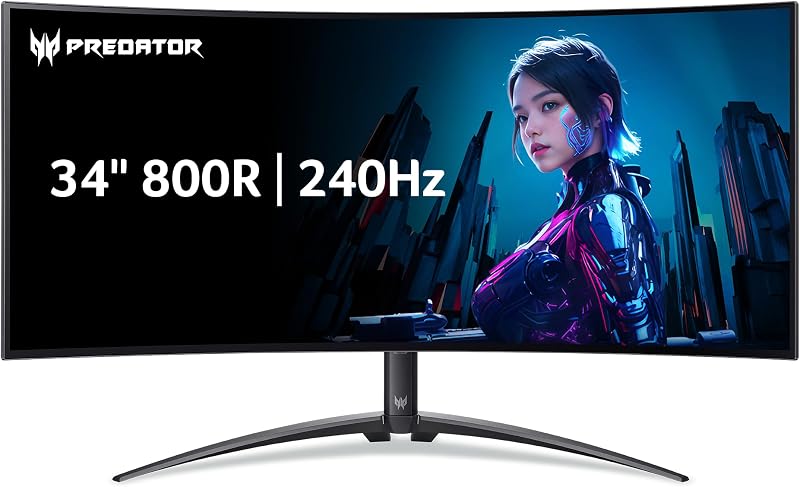
Designed for those who crave deep peripheral immersion, the Acer Predator 34in WQHD 3440×1440 OLED, designated in specifications as the Acer Predator X34, brings an ultrawide 21:9 aspect ratio to your desk. Rather than using the traditional 16:9 widescreen layout, this ultrawide panel expands horizontally to give you approximately thirty-three percent more screen real estate. The listing details an aggressive 800R curvature, which creates an intimate wrap-around cockpit feel that draws your visual focus entirely into racing simulators, flight games, and vast open-world landscapes.
Underneath the sweeping curvature lies an OLED panel running at a 240Hz refresh rate with a near-instantaneous 0.01ms pixel response time, ensuring rapid motion remains crisp without smearing. AMD FreeSync Premium Pro validation guarantees variable refresh rate gaming without tearing, screen jitter, or color degradation. For modern console players, the monitor includes HDMI 2.1 connections ready for platforms like the PlayStation 5 and Xbox Series X. Versatility continues with a powerful USB Type-C port capable of 90W Power Delivery, allowing laptop users to transmit display signals, route peripheral data through the built-in KVM switch, and charge their computer using a single cable. Players connecting a high-powered preditor gaming laptop will find this single-cable docking capability incredibly convenient.
This ultrawide curved monitor is an outstanding match for simulator drivers, open-world adventurers, and multi-taskers who enjoy arranging multiple windows side-by-side without needing dual physical screens. Integrated dual 5-watt speakers provide immediate desktop audio without requiring external desk speakers right away. If the user strictly plays competitive esports games where tournament regulations mandate standard 16:9 screens, this ultrawide footprint yields to Acer’s standard 27-inch models instead.
Acer Predator Gaming Monitor
- Best for Competitive esports players wanting true blacks
- Color Black
- Size 27-inch
- Dimensions 12.32 x 24.04 x 19 inches

Our score: 9.0/10
Pros
- Blazing 0.03ms pixel response time
- High-clarity 1440p QD-OLED display
- Two HDMI 2.1 input ports
Cons
- Flat panel without wrap curvature
The Acer Predator Gaming Monitor, also listed under model code Acer Predator X27U, delivers an optimal balance of competitive size and breathtaking visual fidelity. Featuring a classic 27-inch flat panel with a WQHD resolution of 2560×1440, this screen hits what competitive PC gamers widely regard as the display sweet spot. The 1440p resolution provides crisp graphic detail without overburdening your computer’s graphics card, making it far easier to achieve full 240 frames per second during competitive matches.
Equipped with a Quantum Dot OLED panel, this monitor delivers true blacks, a 1,000,000:1 contrast ratio, and wide 99% DCI-P3 color reproduction with factory-calibrated Delta E<2 accuracy. Like its curved siblings, it features an ultra-low 0.03ms gray-to-gray response time and 240Hz fluid motion, backed by AMD FreeSync Premium Pro to eradicate screen tearing. Integrated Image Retention Refresh routines work automatically behind the scenes to maintain screen health and protect the OLED panel from prolonged static image burn-in over years of use.
This display shines as a versatile hub for hybrid gamers. With two HDMI 2.1 ports and a DisplayPort 1.4 connection, users can plug in a high-end gaming PC alongside multiple home gaming consoles simultaneously without juggling video cables behind the desk. It suits shoppers who want exceptional OLED color depth and high-speed motion clarity on a traditional flat form factor that fits neatly onto standard desks.
MONITOR Acer Nitro 27in QHD 2560×1440
- Best for Daily productivity and fast 1440p gaming
- Color Black
- Size 27-inch
- Dimensions 9.2 x 24.2 x 18 Inches

Our score: 8.2/10
Pros
- Durable IPS panel with zero burn-in risk
- Versatile ErgoStand with 360-degree swivel
- DisplayPort and HDMI cables included
Cons
- HDMI connection limited to 144Hz
- Modest built-in 2W speakers
The MONITOR Acer Nitro 27in QHD 2560×1440, carrying the model designation Acer Nitro XV272U, shifts the focus from specialized OLED screens to a durable, practical IPS display panel. In-Plane Switching (IPS) technology has long been the gold standard for desktop computer monitors due to its wide 178-degree viewing angles, stable color reproduction, and immunity to static image retention. This makes it an ideal option for gamers who also use their screen for all-day office tasks, homework, and web browsing with static taskbars.
This 27-inch display sports a crisp 2560×1440 WQHD resolution and achieves a blisteringly fast 240Hz refresh rate when connected via the included DisplayPort 1.4 cable, alongside a 1ms to 0.5ms gray-to-gray response speed. The listing notes that connecting via HDMI supports refresh rates up to 144Hz, providing flexible pairing for secondary devices. Gamers will appreciate the inclusion of AMD FreeSync Premium technology for tear-free gameplay, as well as integrated dual 2-watt speakers for everyday system sounds and video calls. When outfitting an everyday setup or pairing the monitor with an accessible machine like an acer predator refurbished unit, this screen provides straightforward, reliable performance.
Ergonomics are a major highlight of this Nitro display. Its versatile ErgoStand base offers comprehensive adjustability, including height adjustments across 4.7 inches, tilt angles from -5 to 15 degrees, a full 360-degree swivel, and 90-degree pivot capability to rotate the screen into a vertical portrait orientation. For gift-givers seeking high refresh rate performance without worrying about OLED maintenance, this durable IPS workhorse makes a sensible, worry-free choice.
Acer Predator 27″ 4K 3840×2160 IPS
- Best for Reflex-heavy gamers needing peak refresh speeds
- Color Black
- Weight 9.92 pounds
- Size 27-inch 320Hz
- Dimensions 9.69 x 24.19 x 19.5 inches
Pros
- Ultra-fast 280Hz refresh speed
- Instant 0.03ms pixel transition time
- Rich DCI-P3 99% color gamut
Cons
- Modest 250-nit SDR brightness rating
Best for: Gamers switching between 4K and 320Hz
Pros
- Dual-mode 4K and 320Hz DFR support
- Convenient desktop Acer Smart Dial
- Sturdy ErgoStand adjustability
Cons
- Native 4K capped at 160Hz
For shoppers seeking ultra-sharp image density alongside innovative refresh engineering, the Acer Predator 27″ 4K 3840×2160 IPS, formally known as the Acer Predator XB273K, offers a unique dual-personality display. Built with an IPS screen featuring 90% DCI-P3 color gamut coverage and VESA DisplayHDR 400 certification, this monitor delivers crisp Ultra HD 4K detail across standard games, creative photo editing, and high-definition video playback at a native 160Hz refresh rate.
What sets this monitor apart in an acer predator 240hz comparison is its Dynamic Frequency and Resolution (DFR) technology. When a player transitions from visually rich cinematic titles to reflex-driven esports games where maximum frame rates are essential, the monitor can switch from 4K at 160Hz into a ultra-responsive Full HD (1920×1080) mode running at an astonishing 320Hz. Combined with response times dropping down to 0.5ms gray-to-gray, it completely eliminates smearing and ghosting during frenetic competitive gameplay.
Physical convenience is another strong suit of this model. It features the Acer Smart Dial, an external desktop controller that lets you adjust monitor settings, volume, and picture brightness from an ergonomic tabletop grip without reaching behind the bezel. Equipped with an adaptable ErgoStand that tilts, swivels, and pivots into portrait mode, plus Acer VisionCare eye protection suite, this model is built for gamers who demand high 4K fidelity by day and competitive refresh speeds by night.
Acer Predator 27″ Gaming Monitor
- Color Black
- Size 27-inch
- Weight 12.21 pounds
- Dimensions 12.32 x 24.04 x 19.5 inches
The Acer Predator 27″ Gaming Monitor, identified in manufacturer specs as the X27U Z1, represents the highest refresh rate OLED display in this lineup. While sharing the identical 27-inch flat chassis, 2560×1440 WQHD resolution, and premium QD-OLED panel construction of the standard X27U, this upgraded model boosts maximum refresh performance all the way to 280Hz. That slight extra speed headroom provides fluid frame rendering for serious competitive gamers looking to extract every fraction of a millisecond from their setup.
Visual quality matches its incredible speed, delivering 99% DCI-P3 color gamut saturation, Delta E<2 color accuracy, HDR10 capabilities, and a 1,000,000:1 contrast ratio backed by VESA DisplayHDR True Black 400 certification. The pixel response time is rated at a lightning-quick 0.03ms gray-to-gray, virtually eliminating motion blur. AMD FreeSync Premium Pro validation ensures that even when frame rates fluctuate slightly during heavy action, the monitor seamlessly matches output frames to prevent screen stuttering.
Equipped with two HDMI 2.1 ports and a DisplayPort 1.4 input, this model handles modern game consoles and top-tier PCs simultaneously. Built-in Image Retention Refresh cycles safeguard the panel against image burn-in over prolonged gaming marathons. This display serves as the ultimate choice for competitive enthusiasts who want the purest OLED contrast available paired with tournament-grade 280Hz motion clarity.
Chip values are fields copied from the Amazon product listing. Scores are out of 10, based on listed specifications and buyer feedback.
Matching a Model to Your Setup
- For cinematic story games and expansive 4K immersion: Choose the Acer Predator 31.5in Curved 4K 3840×2160, which wraps a gentle 1700R curve around your field of view with stunning 4K OLED clarity.
- For sim racing, cockpit flight games, and wide multi-tasking: Select the Acer Predator 34in WQHD 3440×1440 OLED, utilizing its wide 21:9 aspect ratio, tight 800R curve, and 90W USB-C docking power.
- For peak competitive esports speed on an OLED screen: Opt for the Acer Predator 27″ Gaming Monitor, delivering an elite 280Hz refresh rate and near-instant 0.03ms response times on a tournament-standard flat 27-inch panel.
- For all-day office productivity mixed with fast 1440p gaming: Pick the MONITOR Acer Nitro 27in QHD 2560×1440, offering durable IPS reliability, zero burn-in concerns, and an ErgoStand with complete 360-degree rotation.
- For versatile players who want both 4K detail and ultra-fast 320Hz modes: Go with the Acer Predator 27″ 4K 3840×2160 IPS, utilizing dual-mode Dynamic Frequency and Resolution alongside the desktop Smart Dial controller.
- For standard desktop desks connecting multiple consoles and a PC: Rely on the Acer Predator Gaming Monitor, featuring a flat 27-inch 1440p QD-OLED display with dual HDMI 2.1 ports and true black contrast.
Before You Buy
Before completing your purchase, carefully measure your available desktop surface area and check cable compatibility. High-performance gaming monitors feature substantial desktop stands engineered to support wide panels and prevent wobbling during intense gameplay. Ultrawide models like the 34-inch curved screen and deep 31.5-inch displays occupy significant desk depth, often requiring twelve inches or more of clearance from front to back. If your desk space is narrow, ensure your workspace has room for the stand legs, or verify that your chosen monitor supports VESA wall or arm mounting standards to preserve valuable desktop real estate.
You must also verify the video output capabilities of your personal computer or gaming console. Achieving 240Hz or higher frame rates requires adequate bandwidth from modern video outputs such as DisplayPort 1.4 or HDMI 2.1. Some displays, such as the Nitro model, cap refresh rates at 144Hz when connected over standard HDMI ports while reserving the full 240Hz speed for DisplayPort connections. Review the ports on your computer graphics card to ensure you have the appropriate connection type available before setting up your new display.
FAQ
What is the difference between OLED and IPS panel technologies?
OLED displays feature self-illuminating pixels that turn off entirely to create true black levels and infinite contrast, resulting in vivid, lifelike colors and near-instantaneous response times. IPS displays use a constant LED backlight shining through liquid crystals; while their contrast ratio is lower, they offer long-term durability, excellent viewing angles, and zero risk of static image retention during all-day office tasks.
Do I need a DisplayPort connection to achieve 240Hz?
It depends on the specific monitor and port version. On several models, reaching the maximum 240Hz refresh rate requires using a DisplayPort 1.4 cable, as older HDMI revisions may limit output to 144Hz. However, Predator models equipped with modern HDMI 2.1 ports can support high refresh rates over both HDMI and DisplayPort connections when connected to compatible source hardware.
Can I connect a PlayStation 5 or Xbox Series X to an Acer Predator monitor?
Yes. Acer Predator displays equipped with HDMI 2.1 ports connect seamlessly to modern gaming consoles. These ports allow the console to deliver high-resolution gameplay at high refresh rates, and models featuring variable refresh rate support help ensure smooth gameplay without tearing.
What does the monitor curvature rating mean?
Curvature is measured in millimeters of radius, denoted by an ‘R’ value such as 1700R or 800R. A smaller number indicates a tighter, more pronounced curve. An 800R display features an aggressive curve designed to wrap tightly around your peripheral vision for deep immersion, while a 1700R curve offers a subtle, gentle bend suited for wider viewing distances.
How does AMD FreeSync Premium benefit the gaming experience?
AMD FreeSync Premium synchronizes the monitor’s refresh cycles directly with the frames rendered by your computer’s graphics card. Instead of running at a fixed speed, the monitor adjusts dynamically, eliminating horizontal screen tearing, reducing input lag, and preventing stuttering when game action becomes graphically demanding.


