
As Amazon Associates, we earn from qualifying purchases. This means we may receive a small commission at no extra cost to you if you click through and make a purchase.
Shopping for an alienware curved gaming monitor can feel overwhelming when you encounter a wall of technical jargon like QD-OLED, hertz ratings, millisecond response times, and curvature radii. If you are buying a display for yourself or selecting a gift for a dedicated PC player, understanding how these features translate to real-world gaming makes all the difference. Curved monitors are designed to follow the natural field of view of the human eye, reducing distortion at the screen edges and pulling players deeper into their favorite digital worlds. Choosing the right display comes down to balancing screen curvature, panel technology, motion responsiveness, and the physical space available on the desk.
Alienware organizes its desktop gaming lineup across distinct panel types, aspect ratios, and speed tiers. Most of the brand’s curved catalog focuses on the expansive 34-inch ultrawide format using a 21:9 aspect ratio, which provides roughly one-third more horizontal viewing area than a standard monitor. Within this size, Alienware separates models into traditional LED-backlit displays and advanced Quantum Dot OLED (QD-OLED) panels, while also offering different curve ratings like 1500R and 1800R. In this alienware curved gaming monitor comparison, we break down each model in the lineup so first-time buyers and gift-givers can easily determine which alienware curved gaming monitor to buy for any gaming setup.
Alienware Curved Gaming Monitors Lineup at a Glance
| Model | Screen Size & Panel Type | Refresh Rate & Response | Curvature & Aspect Ratio |
|---|---|---|---|
| Alienware 34 Curved Gaming Monitor (AW3425DWM) | 34-inch LED (VA) | 180Hz, 1ms gray-to-gray | 1500R curve, 21:9 ultrawide |
| Alienware 34 240Hz QD-OLED Curved Gaming (AW3425DW) | 34.2-inch QD-OLED | 240Hz, 0.03ms | 1800R curve, 21:9 ultrawide |
| Alienware 34 Gaming Monitor AW3426DWM | 34-inch LED (VA) | 240Hz, 1ms | 21:9 ultrawide (curve unspecified) |
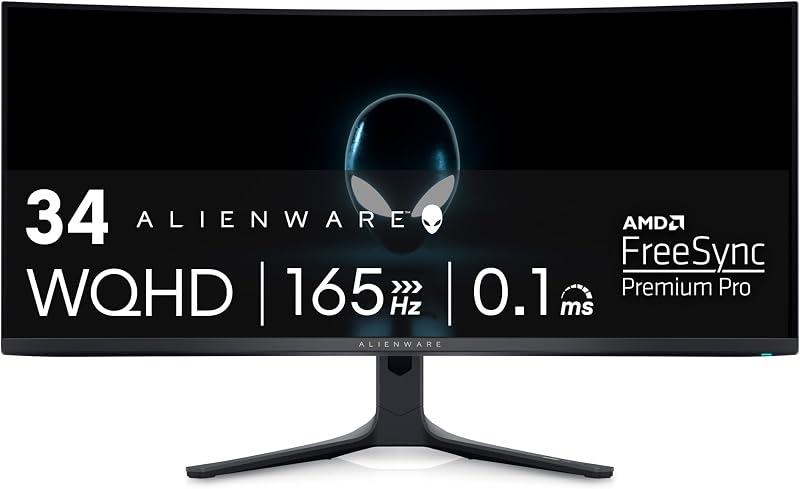
| Alienware AW3423DWF Curved QD-OLED Gaming Monitor | 34-inch QD-OLED | 165Hz, 0.1ms | 1800R curve, 21:9 ultrawide |
| Alienware 34 Gaming Monitor AW3426DW | 34-inch QD-OLED | 280Hz, 0.03ms | 21:9 ultrawide (curve unspecified) |
| Alienware 27 Gaming Monitor AW2725DM | 27-inch Fast IPS | 180Hz, 1ms gray-to-gray | Standard 16:9 widescreen |
Figures as published on the product listings.
The Models in Detail
Alienware 34 Curved Gaming Monitor
- Best for First-time ultrawide gamers seeking immersive value
- Color Black
- Weight 20.97 Pounds
- Dimensions 31.71 x 9.13 x 21.84 inches

Our score: 9.8/10
Pros
- Deep 1500R immersive curve
- Fluid 180Hz refresh rate
- Hardware-based low blue light
Cons
- Standard LED contrast level
- Modest DisplayHDR 400 ceiling
The Alienware 34 Curved Gaming Monitor (model AW3425DWM) serves as an inviting entry point into ultrawide gaming. Built around an expansive 34-inch WQHD panel with a 21:9 aspect ratio, this display provides crisp landscape views across a wide field. The 1500R curvature is a standout characteristic here: the ‘R’ stands for radius in millimeters, meaning a 1500R rating curves more tightly than an 1800R panel. This tighter curve pulls the outer edges of the display inward, creating a wrap-around visual effect that lets players scan open-world maps and flight simulators without moving their heads excessively.
Performance on this model is powered by a reliable LED panel that delivers a 3,000:1 contrast ratio and 400 nits of brightness. Fast action stays crisp thanks to a 180Hz refresh rate and a 1ms gray-to-gray response time, bolstered by AMD FreeSync Premium and VESA AdaptiveSync to eliminate screen tearing. Visuals are treated to 95% DCI-P3 color coverage alongside VESA DisplayHDR 400 support. Alienware also integrates a dedicated console mode and hardware-based low blue light technology to reduce eye strain during extended gaming sessions without washing out colors.
This display is ideal for newcomers who want the sweeping panoramic perspective of an alienware ultrawide gaming monitor without managing the specialized care routines of an OLED screen. It offers plenty of speed for casual and multiplayer adventures alike. However, it gives way to the QD-OLED models when a shopper demands perfect black levels, higher contrast, or competitive refresh rates above 180Hz.
Alienware 34 240Hz QD-OLED Curved Gaming
- Best for Gamers wanting fluid 240Hz QD-OLED visuals
- Color Black
- Weight 20.04 pounds
- Size 34.2" QD-OLED
- Dimensions 31.71 x 9.13 x 21.84 inches

Our score: 8.2/10
Pros
- Vibrant QD-OLED panel
- Ultra-fast 0.03ms response
- Smooth 240Hz refresh rate
- Infinite contrast ratio
Cons
- Gentler 1800R curvature arc
- Lower standard SDR brightness
Stepping up into premium display engineering, the Alienware 34 240Hz QD-OLED Curved Gaming monitor (model AW3425DW) features a 34.2-inch screen utilizing Quantum Dot OLED technology. QD-OLED merges the ultra-pure color reproduction of semiconductor quantum dots with the individual pixel illumination of OLED. Because each pixel turns on and off independently, this monitor delivers true blacks, an astonishing 1,500,000:1 contrast ratio, and a peak HDR brightness of 1,000 nits certified under VESA DisplayHDR TrueBlack 400.
Motion clarity is exceptionally crisp. Backed by a blisteringly fast 240Hz refresh rate and a microscopic 0.03ms response time, fast-moving targets remain razor-sharp without ghosting or motion smear. The monitor incorporates NVIDIA G-SYNC Compatible certification, AMD FreeSync Premium Pro, and VESA AdaptiveSync to ensure seamless synchronization with your graphics card. Its 1800R curvature delivers a gentler, wider arc across the 21:9 frame, paired with cinema-grade 99.3% DCI-P3 color gamut coverage and factory-calibrated Delta E<2 accuracy.
This display is the ultimate match for enthusiasts who want cutting-edge visual fidelity and lightning-quick motion handling. If you want to compare how high-end panels behave across competitive setups, reading about the alienware 34 240hz qd-oled gaming monitor category shows how higher refresh speeds change the gaming experience. This model easily eclipses traditional LED screens in contrast and color, giving way only to specialized ultra-high-refresh panels like the 280Hz AW3426DW.
Alienware 34 Gaming Monitor AW3426DWM
- Best for Elite gamers seeking maximum QD-OLED speed
- Weight 20.59 pounds
- Color Interstellar Indigo
- Dimensions 9.13 x 31.71 x 21.84 Inches
Pros
- Blistering 280Hz refresh rate
- Instantaneous 0.03ms response
- Rich 99% color gamut
Cons
- Demands high-end PC hardware
- Listing omits specific curvature

Our score: 8.0/10
Best for: High-speed competitive play on a VA panel
Pros
- Rapid 240Hz refresh rate
- Bright 400-nit VA display
- Expansive 21:9 ultrawide view
Cons
- 1ms response time rating
- Listing omits curvature radius
The Alienware 34 Gaming Monitor AW3426DWM brings top-tier motion performance to an LED platform. Rather than using organic light-emitting diodes, this 34-inch ultrawide display utilizes a Vertical Alignment (VA) LED panel. VA panels are celebrated for their strong native contrast and bright output, listed here at a solid 400 nits with 95% DCI-P3 color coverage. The monitor presents a detailed WQHD resolution across an ultrawide 21:9 format, measuring 31.71 inches wide and 21.84 inches high on its stand.
What sets the AW3426DWM apart is its high-velocity 240Hz refresh rate paired with a 1ms response time. Rendering up to 240 frames every second makes navigating fast-paced first-person shooters, racing titles, and competitive battle royales feel remarkably fluid. Gamers get the speed advantage usually reserved for boutique esports screens while retaining the sweeping width of a 34-inch ultrawide desktop footprint.
This monitor is tailor-made for gamers who want 240Hz speed and vibrant ultrawide gaming but prefer the worry-free longevity of a traditional LED panel. Because it relies on standard LED illumination, users never need to consider image retention routines. It gives way to Alienware’s QD-OLED counterparts if the buyer prioritizes true pitch-black shadows and microsecond pixel response over sheer LED brightness.
Alienware AW3423DWF Curved QD-OLED Gaming Monitor
- Best for Content creators and visual gaming enthusiasts
- Color Black
- Size 34.0" OLED
- Weight 20.5 Pounds
- Dimensions 32.1 x 12 x 20.7 inches
Our score: 9.4/10
Pros
- Dedicated Creator Mode controls
- 3-year burn-in warranty
- Cinema-grade 99.3% DCI-P3
Cons
- 165Hz lower refresh ceiling
- Large 12-inch stand depth
The Alienware AW3423DWF Curved QD-OLED Gaming Monitor has earned legendary status among PC enthusiasts. Built with a 34-inch Quantum Dot OLED panel, it marries infinite contrast and true black reproduction with a vibrant color volume that outperforms standard WOLED panels. It operates at a smooth 165Hz refresh rate with an ultra-responsive 0.1ms gray-to-gray response time, backed by AMD FreeSync Premium Pro and VESA AdaptiveSync Display certifications.
Designed around Alienware’s striking Legend 2.0 industrial chassis, this monitor includes customizable RGB AlienFX lighting, 360-degree ventilation for quiet heat dissipation, and a smooth 1800R curve. Content creators and game developers will particularly appreciate the dedicated Creator Mode integrated into the centralized 5-axis on-screen joystick menu. This feature lets users easily swap between the native wide DCI-P3 color gamut and the standard sRGB color space with precise gamma adjustments, making it a powerful hybrid display for work and play.
Alienware backs this model with a comprehensive 3-year premium warranty that explicitly includes coverage for OLED burn-in, providing substantial peace of mind for first-time OLED buyers. It is the premier choice for creators and gamers who want peerless cinematic visuals. It gives way to newer siblings like the AW3425DW and AW3426DW only if you require faster refresh rates beyond 165Hz.
Alienware 34 Gaming Monitor AW3426DW
- Weight 16.58 pounds
- Color Interstellar Indigo
- Dimensions 9.13 x 32.06 x 21.85 Inches
For players who refuse to compromise between pristine image quality and blistering competitive frame rates, the Alienware 34 Gaming Monitor AW3426DW pushes performance boundaries. Featuring an ultrawide 34-inch UWQHD Quantum Dot OLED display, it operates at a stunning 280Hz refresh rate. Combining 280Hz motion clarity with an instantaneous 0.03ms pixel response time delivers virtually zero perceptible blur during high-speed gaming action.
The AW3426DW features NVIDIA G-SYNC synchronization to ensure tear-free visuals across dynamic framerates. Its QD-OLED panel provides rich, saturated imagery with a wide 99% color gamut and a calibrated brightness rating of 300 nits. The chassis measures 32.06 inches wide by 21.85 inches tall, fitting comfortably on dedicated gaming desks while providing the expansive peripheral immersion inherent to the 21:9 ultrawide format.
This monitor suits esports players and competitive enthusiasts who want the maximum possible refresh rate on an ultrawide screen. While competitive esports arenas frequently utilize a dedicated alienware 360hz monitor in a smaller flat form factor, this 280Hz ultrawide provides an exceptionally close motion experience while maintaining a sweeping 34-inch panoramic view. It represents the absolute performance ceiling in Alienware’s 34-inch QD-OLED series.
Alienware 27 Gaming Monitor AW2725DM
- Best for Players with compact desks seeking QHD speed
- Total Number of HDMI Ports 2
- Total Usb Ports 3
- Color Gamut 95
- Display Type QHD
- Display Technology QHD
Pros
- Fast IPS panel technology
- Smooth 180Hz refresh rate
- Integrated console mode
Cons
- Standard flat 16:9 format
- Lower 1,000:1 contrast ratio
While ultrawide displays command plenty of attention, the Alienware 27 Gaming Monitor AW2725DM provides a classic alternative for tighter setups. Built in a traditional 16:9 widescreen aspect ratio with a 27-inch Fast IPS panel, this display delivers crisp QHD resolution. Fast IPS technology ensures consistent color reproduction and wide 178-degree viewing angles without sacrificing gaming responsiveness, achieving a 180Hz refresh rate and a rapid 1ms gray-to-gray response time.
The screen provides vibrant visuals with 95% DCI-P3 color coverage, a 1,000:1 contrast ratio, and a bright 400-nit luminance certified under VESA DisplayHDR 400. Like its larger siblings, it incorporates hardware-based low blue light filtration to protect eyesight during marathon gaming sessions without degrading color temperature. It also features a dedicated console mode, allowing gaming consoles to communicate smoothly with the QHD screen resolution.
This model is the ideal choice for shoppers with compact desks, players who prefer traditional 16:9 aspect ratios for streaming and esports, or console gamers who do not benefit from ultrawide 21:9 formatting. It gives way immediately to the 34-inch models whenever a buyer desires panoramic peripheral immersion, curved panel geometry, or the deep ink-black contrasts of QD-OLED technology.
Chip values are fields copied from the Amazon product listing. Scores are out of 10, based on listed specifications and buyer feedback.
Matching a Model to Your Setup
- For first-time ultrawide gamers seeking deep immersion: The Alienware 34 Curved Gaming Monitor offers an accessible entry point with an aggressive 1500R curve and smooth 180Hz speed on a durable LED panel.
- For competitive esports enthusiasts craving top speed: The Alienware 34 Gaming Monitor AW3426DW delivers a blazing 280Hz refresh rate and 0.03ms response time on a gorgeous QD-OLED display.
- For digital creators and cinematic gamers: The Alienware AW3423DWF Curved QD-OLED Gaming Monitor features flexible sRGB and DCI-P3 Creator Mode color controls alongside a reassuring 3-year burn-in warranty.
- For high-velocity action without OLED upkeep: The Alienware 34 Gaming Monitor AW3426DWM combines an ultrawide 21:9 frame with a fluid 240Hz refresh rate on a bright, robust VA LED panel.
- For all-around luxury visual performance: The Alienware 34 240Hz QD-OLED Curved Gaming strikes a stellar balance with an 1800R curve, 240Hz speed, DisplayHDR TrueBlack 400, and Delta E<2 color accuracy.
- For compact desks and dedicated console setups: The Alienware 27 Gaming Monitor AW2725DM delivers responsive 180Hz Fast IPS gaming in a space-saving 16:9 widescreen form factor.
Before You Buy
Before adding an ultrawide display to your shopping cart, carefully evaluate the physical dimensions of your desk space. A 34-inch ultrawide display spans nearly 32 inches across and features substantial stand depth, measuring up to 12 inches deep on select models like the AW3423DWF. The product listings do not specify whether mounting hardware or VESA adapter plates are bundled in every box, so if you plan to use an articulating monitor arm rather than the included desktop stand, check that your third-party arm can accommodate displays weighing up to 20 pounds.
It is equally important to confirm that the recipient’s computer hardware can support these advanced monitors. Running graphics at WQHD resolution (3440 x 1440 pixels) at refresh rates between 180Hz and 280Hz requires a capable modern graphics card with appropriate DisplayPort or HDMI outputs. The listings do not specify the complete selection of video connection cables included inside each individual retail carton, so purchasing a certified high-bandwidth DisplayPort cable alongside the monitor is a smart precaution to guarantee immediate out-of-the-box performance.
FAQ
What does the curvature rating like 1500R or 1800R mean on an Alienware monitor?
The ‘R’ rating measures curvature by describing the radius of the circle the monitor arc would create if extended all the way around, measured in millimeters. An 1800R curve forms a circle with a radius of 1,800 millimeters, resulting in a subtle, gentle bend. A 1500R curve forms a smaller 1,500-millimeter circle, producing a noticeably deeper curve. A 1500R curve wraps closer around your peripheral vision, while an 1800R curve feels slightly more natural for mixed office productivity and content creation.
What is the visual difference between QD-OLED and traditional LED panels?
Traditional LED and VA panels utilize backlights positioned behind the liquid crystal layer to illuminate the screen. While they achieve high brightness and durable longevity, they cannot fully block light in dark scenes. QD-OLED displays use self-illuminating organic pixels paired with quantum dots. Because individual pixels can turn completely off, QD-OLED monitors achieve true ink-black darks, an infinite contrast ratio, and zero backlight bleeding, making dark gaming environments look extraordinarily lifelike.
Can I connect a gaming console to an Alienware curved ultrawide monitor?
Yes, modern gaming consoles can connect via HDMI, but consoles do not natively render games in the 21:9 ultrawide aspect ratio used by 34-inch models. When connected to an ultrawide screen, console games will typically display black vertical bars on the left and right sides to preserve their native 16:9 output. Models like the AW3425DWM and AW2725DM include a dedicated console mode designed to optimize video signal communication and blue light filtering when paired with modern consoles.
Is a 240Hz or 280Hz refresh rate noticeably better than 165Hz or 180Hz?
All of these refresh rates provide a major upgrade over standard 60Hz displays. Jumping from 60Hz to 165Hz or 180Hz delivers the most dramatic visual improvement in motion clarity and input responsiveness. Stepping up further to 240Hz or 280Hz provides incremental smoothness that gives competitive first-person shooter players a split-second advantage in tracking moving targets, provided their computer hardware can generate that many frames per second.
Do Alienware QD-OLED monitors require special care to prevent burn-in?
QD-OLED monitors feature pixel-refreshing algorithms designed to maintain panel health automatically. To provide additional confidence, Alienware includes a 3-year premium warranty that explicitly covers OLED burn-in on models such as the AW3423DWF. For general maintenance, allowing the monitor to run its automated pixel maintenance cycles when put into standby mode ensures lasting image clarity.


