
As Amazon Associates, we earn from qualifying purchases. This means we may receive a small commission at no extra cost to you if you click through and make a purchase.
Shopping for a dedicated graphics processing unit can feel intimidating for beginners, especially when choosing a computer part as a thoughtful gift or assembling a creative workstation for the very first time. Most desktop graphics cards look like flashy gaming components packed with aggressive shrouds and bright lighting, but creative professionals require something distinct: quiet acoustic operation, clean industrial lines, and dependable stability for video editing, photo retouching, and digital rendering. When you explore the options for an asus proart gpu, you quickly notice a refined focus on subtle black aesthetics, high airflow, and streamlined card dimensions that fit into practical workstations. Choosing the right model comes down to matching your software requirements to the right memory capacity, making sure your desktop chassis has enough physical room, and selecting the video ports your monitors require.
The creative range from ASUS is systematically structured across performance tiers and technological generations, making an asus proart gpu comparison straightforward once you understand how the naming corresponds to workload intensity. The family spans from accessible entry-level models utilizing the power-efficient NVIDIA Ada Lovelace architecture up to cutting-edge Blackwell generation flagships. Across this lineup, ASUS maintains a signature 2.5-slot physical thickness, triple Axial-tech cooling fans, and advanced thermal interfaces designed to maintain lower operating temperatures under continuous export workloads. Whether you are searching for the best asus proart graphics card for an advanced visual design studio or assessing asus compact graphics cards for a space-conscious desktop case, this guide details every specification plainly so you know which asus proart gpu to buy.
ASUS Graphics Cards Lineup at a Glance
| Model | Video Memory | GPU Architecture | Key Dimensions or Slot Size |
|---|---|---|---|
| ASUS ProArt GeForce RTX 5080 16GB | 16GB GDDR7 | NVIDIA Blackwell | 2.5-Slot (12.0″L x 5.0″W) |
| ASUS ProArt GeForce RTX 4070 Super | 12GB GDDR6X | NVIDIA Ada Lovelace | 2.5-Slot (11.8″L x 4.7″W) |
| ASUS ProArt GeForce RTX 4080 Super | 16GB GDDR6X | NVIDIA Ada Lovelace | 2.5-Slot Form Factor |
| ASUS ProArt GeForce RTX 4060 OC | 8GB GDDR6 | NVIDIA Ada Lovelace | Compact 2.5-Slot Profile |
| ASUS SFF-Ready Prime NVIDIA GeForce RTX | 12GB GDDR7 | NVIDIA Blackwell | 2.5-Slot SFF-Ready |
Figures as published on the product listings.
The Models in Detail
ASUS ProArt GeForce RTX 5080 16GB
- Best for Entry-level creative desks and compact towers
- Color BLACK
- Weight 2 pounds
- Size RTX4060|OC
- Dimensions 11.8 x 4.7 x 2 inches

Our score: 8.0/10
Pros
- Power-efficient Ada Lovelace architecture
- Quiet triple Axial-tech cooling
- Factory overclocked boost speeds
Cons
- Limited to 8GB video memory

Our score: 8.2/10
Best for: Multi-monitor setups and 4K content creation
Pros
- Generous 16GB GDDR6X memory
- Four native display outputs
- DLSS 3 AI frame generation
Cons
- Listing is for renewed condition
- Dimensions not specified in listing

Our score: 8.2/10
Best for: Balanced photo and video editing workstations
Pros
- 12GB GDDR6X video memory
- Durable dual-ball fan bearings
- Slim 2.5-slot build compatibility
- 21% increased airflow fans
Cons
- Lacks USB Type-C connectivity
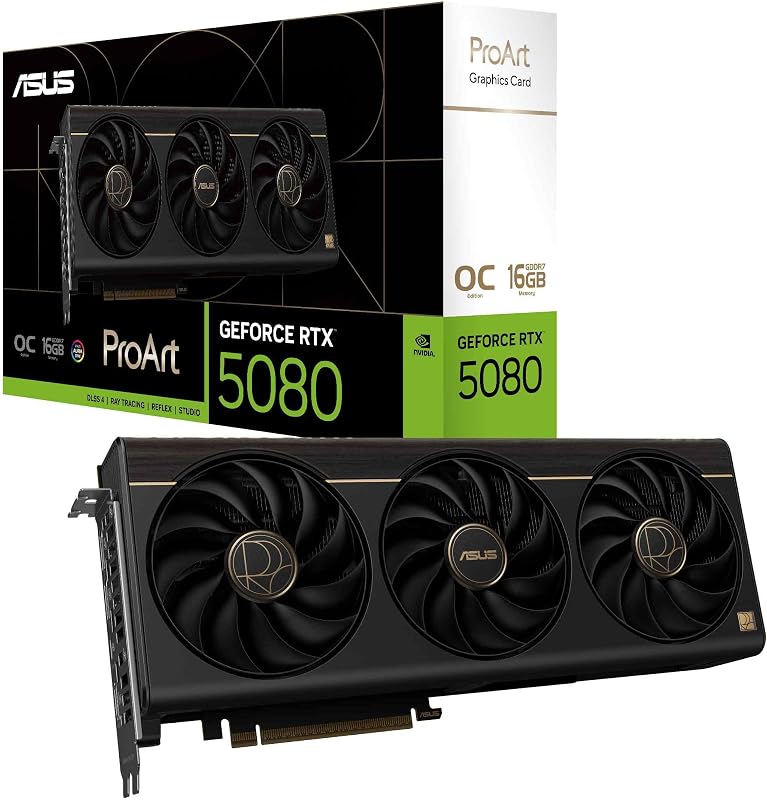
Our score: 8.2/10
Best for: Demanding creative studios and 3D rendering
Pros
- 16GB GDDR7 video memory
- Integrated USB Type-C port
- MaxContact vapor chamber cooling
- 1858 AI TOPS performance
Cons
- Requires 12-inch case clearance
The ASUS ProArt GeForce RTX 5080 16GB stands at the top of the creative family, powered by the next-generation NVIDIA Blackwell architecture and DLSS 4. Delivering an extraordinary 1858 AI TOPS of computational throughput and reaching an overclocked engine speed of 2730 MHz, this asus proart rtx 5080 is engineered to handle complex 3D environments, generative machine learning models, and heavy visual effects rendering without hesitation. ASUS equips this model with 16GB of ultra-fast GDDR7 memory, an advanced MaxContact heatsink paired with a vapor chamber, and a phase-change GPU thermal pad to keep operating temperatures optimal under sustained production loads. The exterior features a 2.5-slot profile measuring 12 inches long by 5 inches wide, complemented by an elegant wood-patterned trim that adds organic warmth to a creative studio desk.
Connectivity on this high-end asus proart graphics card includes an integrated USB Type-C port alongside one native HDMI 2.1b connection and two native DisplayPort 2.1b outputs. That integrated USB Type-C port provides direct connection versatility for modern creative pen displays and specialized studio monitors without requiring awkward dongles. If you plan to connect multiple high-resolution screens such as dedicated asus 4k monitors, the card natively supports a maximum resolution of 7680×4320 pixels across modern display interfaces.
This flagship card is the ideal match for professional animators, commercial video editors managing uncompressed 8K files, and technical studios requiring immense local AI processing power. However, if your projects center on lighter 1080p or 1440p photo and graphic layouts, the expansive physical footprint and heavy processing output of the RTX 5080 might exceed your workstation needs, making the mid-tier RTX 4070 Super a more practical option.
ASUS ProArt GeForce RTX 4070 Super
- Color BLACK
- Weight 2.2 pounds
- Dimensions 11.8 x 4.7 x 2 inches
- Size RTX4070 Super|OC|GDDR6X
The ASUS ProArt GeForce RTX 4070 Super represents a sweet spot of performance, thermal control, and physical compatibility for creators. Featuring 12GB of high-speed GDDR6X video memory and built upon the efficient Ada Lovelace architecture, this asus proart rtx 4070 super incorporates 4th Generation Tensor Cores for DLSS 3 frame generation and 3rd Generation RT Cores for accelerated ray-traced rendering. In OC mode, the card runs at 2565 MHz, manufactured using ASUS Auto-Extreme automated assembly to maintain consistent reliability for project deadlines.
Cooling is handled by three scaled-up Axial-tech fans engineered to push 21 percent more airflow through the internal radiator fins, spinning on dual-ball fan bearings rated to last up to twice as long as conventional sleeve designs. With physical dimensions of 11.8 inches long, 4.7 inches wide, and a slim 2.5-slot width, it slips easily into mid-tower cases while leaving space for airflow. The card provides both DisplayPort and HDMI outputs supporting up to 7680×4320 pixels, allowing creators to view their projects with sharp fidelity on an asus 27 4k display.
This model is an outstanding choice for independent video producers, motion designers, and serious digital illustrators who want snappy performance in DaVinci Resolve or Adobe Premiere Pro. Creators who regularly handle memory-heavy 3D production pipelines with massive texture caches, however, may eventually require the larger 16GB memory capacity offered by the RTX 4080 Super.
ASUS ProArt GeForce RTX 4080 Super
- Color black
The ASUS ProArt GeForce RTX 4080 Super provides serious computational power for professionals who demand a large 16GB video memory buffer without stepping up to newest-generation prices. Offered in renewed condition, this asus proart rtx 4080 super utilizes the NVIDIA Ada Lovelace architecture with full support for DLSS 3 technology, allowing video colorists and 3D animators to render preview scenes smoothly. The card connects through a PCIe 4.0 interface and pairs its 16GB of GDDR6X memory with high-bandwidth rendering pipelines.
Display connectivity is well-equipped for multi-monitor workstations, offering one native HDMI 2.1a port and three DisplayPort 1.4a outputs, driving a listed maximum display resolution of 3840×2160. While the renewed listing does not state the exterior millimeter dimensions, this model retains the ProArt hallmark minimalist black shroud and triple-fan configuration that operates quietly during heavy computing tasks.
This card suits demanding creative freelancers, boutique post-production houses, and high-end workstation users who want proven 16GB Ada Lovelace performance. On the other hand, if you are purchasing a card for a beginner who primarily edits web photos or lighter streaming video, the smaller, lighter RTX 4060 OC provides an easier entry point.
ASUS ProArt GeForce RTX 4060 OC
- Color BLACK
- Size RTX5080|OC
- Weight 3.1 Pounds
- Dimensions 12 x 5 x 0.1 Inches
The ASUS ProArt GeForce RTX 4060 OC brings the understated elegance and low acoustic footprint of the ProArt series to entry-level creative desktops. Operating on the Ada Lovelace architecture, this asus proart rtx 4060 delivers substantial power efficiency while boosting up to 2580 MHz in OC mode. It features 8GB of GDDR6 memory, 4th Generation Tensor Cores for DLSS 3 acceleration, and 3rd Generation RT Cores, providing first-time desktop builders with modern creative capabilities without excessive electrical consumption.
Even though the graphics processor runs cool, ASUS equips this model with a full triple-fan Axial-tech cooling solution, providing 21 percent more airflow than standard fan designs to ensure quiet operation in home offices. For users transitioning from a portable machine like an asus laptop 32gb ram setup to a dedicated home workstation, this desktop card provides consistent graphical acceleration with quiet acoustic comfort.
This compact card suits design students, digital painters, and entry-level video creators working on standard 1080p timelines. When your workflow expands to heavy 4K timelines or layered multi-camera video edits, the 8GB memory ceiling can become a limitation, pointing advanced builders toward the 12GB GDDR7 capacity of the Prime RTX 5070.
ASUS SFF-Ready Prime NVIDIA GeForce RTX
- Best for Small form factor builds and quiet studios
- Color BLACK
- Size RTX5070|OC
- Weight 2.3 pounds
- Dimensions 12 x 5 x 2 Inches
Pros
- Modern 12GB GDDR7 memory
- Certified SFF-Ready compact design
- Silent 0dB fan technology
- Phase-change thermal pad
Cons
- Maximum resolution listed at 4K
The ASUS SFF-Ready Prime NVIDIA GeForce RTX combines modern Blackwell architecture with an official SFF-Ready design built for compact desktop enclosures. Powered by the GeForce RTX 5070 processor, this card delivers 1005 AI TOPS of processing power alongside 12GB of modern GDDR7 memory. Operating across a PCIe 5.0 interface with clock speeds up to 2587 MHz in OC mode, this card balances high-speed computing with advanced small form factor compatibility.
Thermal management is engineered specifically for smaller enclosures, using a 2.5-slot profile with a carefully arranged shroud, heatsink, and heat pipes that allow three Axial-tech fans to pull cooling air through case side panels. The fans use dual-ball bearings for extended operational life and include 0dB technology that halts the fans during light computing tasks for complete silence. Heat transfer from the processor core is managed by an integrated phase-change GPU thermal pad, maintaining lower core temperatures under sustained workloads.
This card is built for builders who prioritize compact PC cases and want cutting-edge Blackwell architecture and GDDR7 memory in an SFF-compatible frame. For users who prefer dedicated studio features like an integrated USB Type-C display port and wood-accent styling, the ProArt RTX 5080 remains the specialized studio alternative.
Chip values are fields copied from the Amazon product listing. Scores are out of 10, based on listed specifications and buyer feedback.
Matching a Model to Your Setup
- Advanced 3D animation and high-resolution visual effects suites: choose the ASUS ProArt GeForce RTX 5080 16GB for its cutting-edge GDDR7 memory speed, 1858 AI TOPS processing, and built-in USB Type-C creator port.
- Balanced 4K video editing and creative workstations: select the ASUS ProArt GeForce RTX 4070 Super for its 12GB GDDR6X capacity and proven Ada Lovelace efficiency in mid-tower cases.
- Multi-monitor color grading desks using renewed hardware: choose the ASUS ProArt GeForce RTX 4080 Super to gain a generous 16GB frame buffer across four total display outputs.
- Beginner illustration, web design, and casual video editing desks: opt for the ASUS ProArt GeForce RTX 4060 OC for whisper-quiet triple-fan cooling and modest power requirements.
- Compact mini-ITX enclosures and space-conscious creator setups: select the ASUS SFF-Ready Prime NVIDIA GeForce RTX for its certified small form factor layout, GDDR7 memory, and silent 0dB fan mode.
Before You Buy
Before purchasing any graphics card, double-check what is omitted from the retail box. The product listings do not include external display cables, such as DisplayPort or HDMI cords, meaning you will need to supply your own cables to connect your monitors. In addition, the listings do not include internal power supply units or auxiliary mounting brackets, so you must verify that your desktop computer has the required PCIe power cables ready to connect to your new card.
It is also essential to check physical chassis clearance that the product listings do not fully specify. While the specifications clearly state slot thickness—all five options feature a 2.5-slot profile—some listings omit exact clearance requirements for front-mounted case fans or liquid cooling radiators. Verifying your computer case interior length and confirming your power supply wattage before ordering will ensure a smooth, trouble-free installation.
FAQ
What makes an ASUS ProArt graphics card different from a standard gaming card?
An ASUS ProArt graphics card focuses on a clean, professional aesthetic that replaces bright RGB lighting with understated black shrouds, clean metallic accents, or refined trim. In addition to visual design, ProArt cards emphasize standardized 2.5-slot profiles for broad case compatibility, quiet Axial-tech cooling fans, and creator-oriented connectivity such as USB Type-C on select models.
How much video memory do you need for creative content work?
Video memory, or VRAM, holds the visual textures, timelines, and geometry your software uses during active editing. An 8GB graphics card is well-suited for digital illustration, photo retouching, and standard 1080p video projects. If you frequently edit multi-stream 4K footage, work with 3D animation, or apply heavy visual effects, a 12GB or 16GB card prevents timeline stuttering and memory bottlenecks.
What does a 2.5-slot design mean for desktop computer cases?
A 2.5-slot design indicates the physical depth of the graphics card along the expansion slots on the back of your computer case. While a standard card occupies two slots, a 2.5-slot cooler extends slightly into a third expansion space. This extra depth provides a thicker cooling heatsink and quieter airflow while remaining compact enough to fit into most standard mid-tower and compact cases.
Can you connect creative monitors using USB Type-C on these cards?
USB Type-C connectivity depends on the specific card model you select. Among the cards in this lineup, the ASUS ProArt GeForce RTX 5080 16GB features an integrated native USB Type-C port specifically designed for modern creator monitors and pen tablets. The other models provide video connectivity through standard native HDMI and DisplayPort connections.
Are ASUS compact graphics cards compatible with small form factor cases?
Yes, models that carry official small form factor certifications, such as the ASUS SFF-Ready Prime NVIDIA GeForce RTX, are engineered to match strict dimensional guidelines for compact cases. Furthermore, the 2.5-slot profile used across the ProArt range makes them substantially easier to install in small enclosures compared to bulky three-slot gaming cards.


