
As Amazon Associates, we earn from qualifying purchases. This means we may receive a small commission at no extra cost to you if you click through and make a purchase.
Shopping for video monitoring equipment can be surprisingly confusing for first-time buyers and gift-givers because the industry uses the term monitor for two fundamentally different types of hardware. When exploring options for a blackmagic monitor 4k, you will encounter portable on-camera displays with built-in recorders as well as internal and external computer playback devices. An on-camera display attaches directly to a camera shoe or cage to give videographers a bright, accurate preview of their shot while capturing digital media. In contrast, a desktop playback card or interface connects to a computer system to send clean, uncompressed video signals to an external television or reference screen during video editing and color grading. Understanding whether the person you are buying for needs a screen in the field or an output device for an editing suite is the most critical first step.
Blackmagic Design organizes its monitoring catalog around these distinct production phases. The Video Assist family represents the portable, all-in-one approach where high-resolution touchscreens double as standalone digital recorders. Meanwhile, the DeckLink and UltraStudio families serve studio and post-production environments by handling hardware-level video output directly from editing software like DaVinci Resolve. In this blackmagic design monitor comparison, we examine four prominent options to help you determine which blackmagic monitor to buy based strictly on manufacturer specifications, hardware connections, and intended production workflows.
Blackmagic Design 4K monitors Lineup at a Glance
| Model | Device Category | Connections | Primary Function |
|---|---|---|---|
| Blackmagic Design Video Assist 4K | On-Camera Display and Recorder | HDMI Video Input, Microphone Audio Input | Field Monitoring and SD Card Recording |
| Blackmagic Design DeckLink Mini Monitor 4K | PCIe Video Playback Card | 6G-SDI, HDMI 2.0a Output | Desktop Computer Video Playback up to 2160p30 |
| Blackmagic Design UltraStudio Express Monitor 3G | External Playback Device | 3G-SDI, HDMI 2.0 Output | Laptop and Desktop Playback via USB4 or Thunderbolt 4 |
| Blackmagic Design Video Assist 5″ 12G | On-Camera HDR Display and Recorder | Micro BNC 12G-SDI, HDMI 2.0a Input and Output | High-Brightness 2500 Nits Field Monitoring and Recording |
Figures as published on the product listings.
The Models in Detail
Blackmagic Design Video Assist 4K
- Best for Outdoor cinematographers needing bright HDR
- Color Black
- Size 5-inch(3 pack)
- Dimensions 8.3 x 7.8 x 3.3 inches

Our score: 8.6/10
Pros
- Ultra-bright 2500 nits LED panel
- 12G-SDI and HDMI 2.0a connectivity
- Supports 12G HDR video workflows
Cons
- SDI ports require micro BNC connectors

Our score: 8.2/10
Best for: Camera operators wanting a 7-inch recorder
Pros
- 7-inch high resolution display
- 10-bit ProRes and DNxHD recording
- Uses standard SD card storage
Cons
- Listing indicates open box condition
The Blackmagic Design Video Assist 4K is an all-in-one 7-inch high-resolution field monitor paired with an Ultra HD video recorder. Designed as a dedicated blackmagic on camera monitor, this unit mounts directly to camera rigs to solve a common problem faced by filmmakers: tiny built-in camera screens that make checking focus, exposure, and framing difficult. By expanding the viewing surface to seven inches, operators can see and capture fine details with confidence while filming. The hardware features HDMI connectivity technology, receiving video input directly from camera HDMI ports, and includes microphone audio inputs with four dedicated audio channels.
Beyond displaying video feeds, this unit acts as a professional recording deck. The listing specifies support for broadcast-standard 10-bit 4:2:2 ProRes and DNxHD recording straight to SD cards, offering high-performance digital video storage that is widely accessible. Weighing 790 grams under model number W-VASS-02, the unit provides substantial physical build quality. Editors working between studio environments with an asus 27 4k display and on-location filming will appreciate that recorded files can be transferred directly into editing timelines without lengthy transcoding steps. Note that the listing specifies the software update support to date is unknown and labels this specific unit package as open box.
This unit is ideal for camera operators, interview videographers, and studio shooters who need a spacious 7-inch screen to judge framing alongside reliable SD card recording. However, it gives way to smaller and brighter units like the 5-inch 12G model when extreme daylight visibility in direct sun is paramount or when a lighter camera rig is required.
Blackmagic Design DeckLink Mini Monitor 4K
- Best for Desktop video editors needing clean output
- Color ブラック
- Weight 0.35 Pounds
- Dimensions 6 x 6 x 6 Inches

Our score: 9.4/10
Pros
- Supports playback up to 2160p30
- 6G-SDI and HDMI 2.0a outputs
- Includes low profile and full height shields
Cons
- Output only with no video capture input
The Blackmagic Design DeckLink Mini Monitor 4K is not a physical display screen, but rather a low-profile PCI Express playback card engineered for desktop computer workstations. As a dedicated blackmagic video playback card, this hardware installs directly into a computer motherboard slot to provide professional monitoring outputs. It features 6G-SDI and HDMI 2.0a connections, allowing editors and colorists to monitor all video formats up to 2160p30 directly from their desktop software to an external television or reference monitor.
The technical design of this card ensures that SDI and HDMI outputs automatically detect and switch between all video formats without manual intervention. It delivers high dynamic range playback and metadata over HDMI, making it capable of feeding modern HDR-capable displays such as a dell ips g sync monitor or dedicated studio TV. Measuring 6 by 6 by 6 inches in packaging, weighing 5.6 ounces, and including two PCI Express shields for both full-height and low-profile computer slots, it fits various desktop tower chassis. The product supports Windows and Linux operating systems, with custom playback development enabled via the Blackmagic Desktop Video SDK for Mac OS, Windows, and Linux. Crucially, the listing states that this is an output card only and does not support video input.
This model suits desktop video editors, animators, and color grading artists who need broadcast-grade video playback output sent to an external evaluation screen without relying on computer operating system color management. It gives way to external devices like the UltraStudio line for users who edit on laptops lacking internal PCIe slots.
Blackmagic Design UltraStudio Express Monitor 3G
- Best for Mobile laptop editors needing broadcast playback
- Color Black
Our score: 9.0/10
Pros
- 10-bit SDI and HDMI video output
- 16-channel embedded SDI audio
- Compact external form factor
Cons
- Playback resolution limited to 3G SD and HD
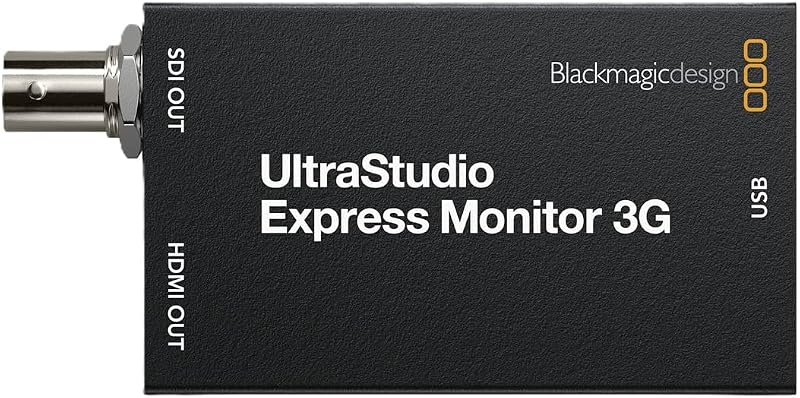
The Blackmagic Design UltraStudio Express Monitor 3G provides a compact external video playback solution tailored for laptops and desktop computers featuring USB4 or Thunderbolt 4 ports. Like the DeckLink, this unit is not a display panel; instead, it serves as an external interface that feeds video signals from editing suites like DaVinci Resolve or broadcast graphics applications to professional reference screens. For editors building mobile editing suites, pairing dedicated video playback hardware with accurate studio audio equipment like mackie studio monitors establishes a complete post-production monitoring environment.
According to the listing specifications, the unit features broadcast-quality 10-bit SDI and HDMI video outputs. The SDI video output is switchable between SD and HD at speeds of 270Mb, 1.5G, and 3G, accompanied by 16 integrated SDI audio channels. The HDMI connection utilizes an HDMI 2.0 Type A connector supporting 8 built-in audio channels. Finished in black under manufacturer part number BM-BDLKULSDMBEXMON3G, the device provides four ports in a portable form factor that does not require opening a computer case for installation.
This model suits traveling editors, independent filmmakers, and broadcast graphics designers who work from modern Thunderbolt 4 laptops and need reliable 10-bit SD and HD playback in hotel rooms or client suites. It gives way to PCIe cards or 12G devices when Ultra HD 4K playback or camera-mounted recording capabilities are required.
Blackmagic Design Video Assist 5″ 12G
- Color Black
The Blackmagic Design Video Assist 5″ 12G is a high-performance on-camera recording monitor engineered for demanding production environments. Recognized by many cinematographers seeking the best blackmagic 4k monitor setup for camera rigs, this model integrates a 5-inch glossy LED display with a 16:9 aspect ratio and a wide 178-degree viewing angle. Its defining specification is an extraordinary screen brightness of 2500 nits (candela per square meter), which allows operators to view clear video images outdoors even under intense, direct sunlight without needing a bulky sunhood.
In addition to its daylight-viewable screen, this unit delivers advanced connectivity and recording capabilities. It supports 12G HDR video formats through Micro BNC SDI video input/output connections and an HDMI 2.0a video input/output port. Audio capabilities are equally comprehensive, providing 16 embedded audio channels via 12G-SDI and 8 embedded audio channels via HDMI 2.0a. Video professionals moving footage between field rigs and stationary workstations with an hp laptop docking station dual monitor setup will benefit from having reliable, high-bandwidth master recordings created directly on set. The listing identifies the unit under model number OB02408.
This monitor suits documentary filmmakers, outdoor cinematographers, and gimbal operators who need an ultra-bright, compact 5-inch display that handles 12G HDR workflows. It gives way to the 7-inch Video Assist for studio operators who prioritize a larger screen surface over extreme 2500-nit daylight brightness.
Chip values are fields copied from the Amazon product listing. Scores are out of 10, based on listed specifications and buyer feedback.
Matching a Model to Your Setup
- Outdoor daylight field production: The Blackmagic Design Video Assist 5″ 12G is the recommended choice because its 2500 nits brightness ensures clear visibility in direct sunlight alongside 12G HDR support.
- Fixed desktop editing and color grading workstation: The Blackmagic Design DeckLink Mini Monitor 4K is ideal because it installs directly into a PCIe slot to deliver clean 6G-SDI and HDMI video output up to 2160p30.
- Mobile laptop video editing on location: The Blackmagic Design UltraStudio Express Monitor 3G provides 10-bit SD/HD playback over 3G-SDI and HDMI via USB4 or Thunderbolt 4 ports without needing internal cards.
- Studio camera rig requiring a large viewing display: The Blackmagic Design Video Assist 4K offers a 7-inch touchscreen with 10-bit ProRes and DNxHD recording to standard SD cards.
- HDR television preview from an editing suite: The Blackmagic Design DeckLink Mini Monitor 4K allows video editors to send high dynamic range playback and metadata over HDMI directly to consumer televisions.
Before You Buy
When reviewing the product listings for these Blackmagic Design monitoring devices, shoppers should be aware of hardware accessories that are not included. The listings do not specify that video cables, such as standard HDMI, Micro BNC, or SDI cables, come packaged with the devices. Similarly, the on-camera Video Assist monitors do not list included camera mounting arms, hot shoe adapters, or batteries. The DeckLink Mini Monitor 4K listing specifically mentions including full-height and low-profile PCIe shields, but desktop users will still need to supply their own HDMI or SDI cabling to reach their external display.
In addition to missing accessories, several listings leave certain technical parameters unspecified. For example, the Video Assist 4K listing explicitly states that software update support to date is unknown and notes an open box condition in its description. Furthermore, the UltraStudio Express Monitor 3G listing truncates the computer interface specification as “Computer int” without detailing the included cable type. Buyers should carefully evaluate their host system ports, operating system compatibility, and required cable lengths before completing their purchase.
FAQ
What is the difference between a Video Assist monitor and a DeckLink playback card?
A Video Assist monitor is an external physical screen with a built-in digital video recorder that mounts onto a camera rig for framing and recording in the field. A DeckLink card is an internal computer expansion card that installs inside a desktop PC motherboard to output video signals from editing software to an external reference display.
Does the Blackmagic Design DeckLink Mini Monitor 4K record video from a camera?
No. The listing explicitly states that the Blackmagic Design DeckLink Mini Monitor 4K is an output card only and does not support video input. It is designed solely for video playback from a computer to an external screen.
Can the Blackmagic Design UltraStudio Express Monitor 3G output 4K video?
No. The listing indicates that the UltraStudio Express Monitor 3G is a 3G-SDI and HDMI video playback solution switchable between SD and HD formats with SDI speeds of 270Mb, 1.5G, and 3G. It does not support 4K video formats.
Why is 2500 nits brightness important on the Video Assist 5" 12G?
Screen brightness measured at 2500 nits allows camera operators to see video clearly outdoors in direct sunlight. Standard camera monitors often wash out under bright ambient daylight, making high-nit displays essential for outdoor cinematography.
What media cards does the Blackmagic Design Video Assist 4K use for recording?
The listing specifies that the Blackmagic Design Video Assist 4K records 10-bit 4:2:2 ProRes and DNxHD digital video onto standard SD cards, providing accessible, high-performance storage.
Integrating dedicated playback interfaces and accurate reference displays into an editing suite requires deliberate workstation planning. Consulting resources like Standing Desk Judge can help optimize your edit bay ergonomics to comfortably support heavy monitor arms and peripheral hardware. Pairing proper signal routing with a tailored physical workspace ensures both visual precision and long-term comfort during intensive post-production sessions.


