
As Amazon Associates, we earn from qualifying purchases. This means we may receive a small commission at no extra cost to you if you click through and make a purchase.
Finding the right portable storage drive can feel surprisingly confusing when several options from the same manufacturer look almost identical. When choosing a seagate 1tb portable hard drive, you are generally deciding between simple plug-and-play devices meant for quick drag-and-drop file transfers and more advanced drives that feature hardware security or scheduled backup utilities. For first-time buyers and gift-givers, the primary goal is usually finding dependable storage that safeguards precious family photos, school assignments, or work spreadsheets without demanding complicated software installations or technical troubleshooting.
The Seagate catalog organizes its portable drives into distinct tiers that cater to different user requirements. At the entry level, models like the seagate basic 1tb and seagate expansion portable 1tb focus purely on no-fuss manual storage using lightweight plastic enclosures. Moving up the family tree, the seagate one touch 1tb models introduce premium brushed metal designs, password protection with hardware encryption, and complimentary creative software bundles. Finally, the standard Seagate Portable line provides straightforward external capacity with included data recovery coverage, extending to a higher-capacity 2TB variant when standard 1TB storage is not enough. This seagate portable hard drive comparison will break down each option so you can decide which seagate portable hard drive to buy for your personal computer routine.
Seagate Portable Hard Drives Lineup at a Glance
| Model | Capacity | Security & Software | Primary Enclosure Style |
|---|---|---|---|
| Seagate Portable 1TB External Hard Drive | 1 TB | 1-Year Rescue Data Recovery Services | Black compact casing |
| Seagate One Touch (Black) | 1 TB | Hardware encryption, Mylio Photos, Dropbox trial, Rescue Services | Black brushed metal |
| Seagate One Touch (Space Gray) | 1 TB | Hardware encryption, Mylio Create, Adobe Photography plan, 2-Year Rescue Services | Space Gray brushed metal |
| Seagate Expansion Portable | 1 TB | Rescue Data Recovery Services | Textured sleek casing |
| Seagate Basic | 1 TB (1000 GB) | Standard drag-and-drop, no bundled software | Minimalist lightweight black casing |
| Seagate 2TB Portable Hard Drive | 2 TB | Standard drag-and-drop, no bundled software | Black compact casing |
Figures as published on the product listings.
The Models in Detail
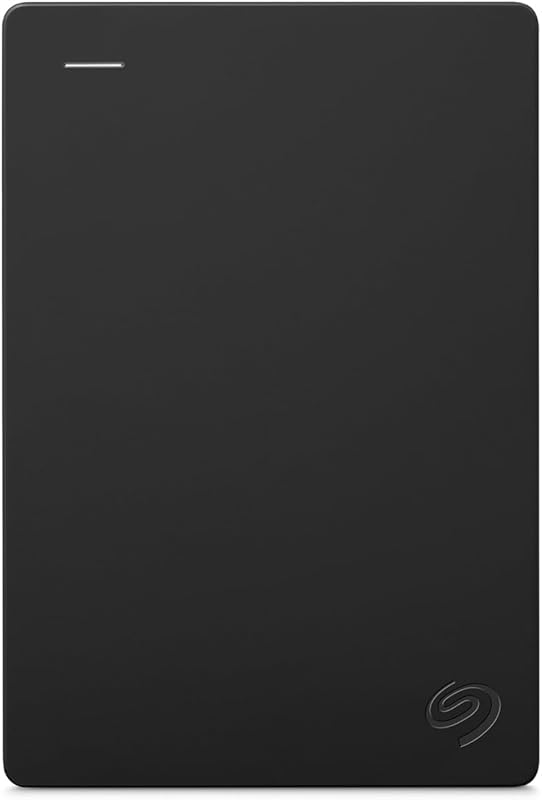
Seagate Portable 1TB External Hard Drive
- Best for Console gamers and casual computer users
- Size 1TB
- Color PORTABLE
4.3 average rating left by Amazon buyers
Pros
- 18-inch USB 3.0 cable included
- 1-Year Rescue Data Recovery Services
- Plug-and-play console and PC support
Cons
- Lacks hardware password encryption
- Requires reformatting for Time Machine
The Seagate Portable 1TB External Hard Drive is designed as a direct, no-fuss storage solution for users who want to plug in a cable and start moving files immediately. The listing highlights its plug-and-play simplicity, utilizing an included 18-inch USB 3.0 cable that connects directly to your computer without requiring any external power bricks or software installation steps. It is built to work across desktop computers, laptops, and gaming consoles like the PlayStation and Xbox. For computer users, it functions as a seagate 1tb external hard drive for mac and pc, though the listing notes that Mac users may need to reformat the drive before standard file saving begins. With a 7200 RPM rotational speed and a read speed of 120 megabytes per second, it quickly handles everyday personal file transfers.
This model is an ideal pick for students, home office workers, or parents looking for an uncomplicated backup device. A key highlight in its listing is the inclusion of a 1-year Rescue Data Recovery Service plan, providing an extra safety net should physical damage or unexpected drive failure occur. It serves as a dependable baseline drive, but it yields to the One Touch line if you require built-in password security or automated scheduling tools for hands-off backups. If your primary goal is manually copying documents or expanding gaming console storage, this model provides straightforward functionality right out of the package.
Seagate One Touch (Black)
- Best for Hobbyist photographers and design students
- Size 1TB
- Color Space Grey

4.4 average rating left by Amazon buyers
Pros
- Hardware encryption security
- Adobe Photography plan included
- 2-Year Rescue Data Recovery plan
Cons
- No USB-C cable in box
- Software trials require registration

4.2 average rating left by Amazon buyers
Best for: Users needing password protection and backups
Pros
- Password-activated hardware encryption
- Brushed metal enclosure
- Scheduled backup software included
Cons
- USB-C adapter sold separately
- Reformatting needed for Mac Time Machine
The black Seagate One Touch elevates the portable drive experience by combining sleek exterior aesthetics with robust data security. Featuring a minimalist brushed metal enclosure, this model looks refined sitting next to modern notebooks and desktops. Beyond its stylish exterior, the listing emphasizes password-activated hardware encryption, ensuring that private family documents, banking records, and sensitive work files remain inaccessible if the drive is ever lost or misplaced. It connects via USB 3.0 and supports Windows, Mac, and Chromebook laptops, though shoppers using newer USB-C laptops will need to purchase an adapter separately. If you are comparing this drive against alternatives from other brands, you might also consider reviewing a wd 1tb external hard drive to see how alternative backup utilities match up.
Where this drive truly stands out for beginners is its versatile seagate portable hard drive backup setup. Instead of manually dragging files every weekend, the included utilities allow you to back up files with a single click or schedule automatic daily, weekly, or monthly routines. The listing also includes value-added digital services, specifically a complementary subscription to Mylio Photos for organizing image libraries and a Dropbox Backup Plan free trial. Supported by Rescue Data Recovery Services and a limited warranty, this black One Touch drive is the best seagate external hard drive for beginners who prioritize peace of mind, automated routines, and strong password protection.
Seagate One Touch (Space Gray)
- Color HDD
- Size 1TB
- Formats Digital
The Space Gray version of the Seagate One Touch offers the same high-end hardware encryption and minimalist brushed metal styling as its black sibling, but tailors its bundle specifically toward creative enthusiasts and media managers. Built with a 2.5-inch form factor, this drive offers plug-and-play connectivity via an included USB 3.0 cable and provides 120 megabytes per second read speeds. As with other models in the lineup, reformatting is required if you intend to use Apple Time Machine on macOS. While traditional spinning drives like this excel at cost-effective file storage, shoppers seeking solid-state speeds can read our seagate external ssd guide to understand the differences between solid-state and mechanical storage architectures.
This particular listing includes a compelling software package: a one-year complimentary subscription to Mylio Create and a four-month membership to the Adobe Creative Cloud Photography plan. Furthermore, the listing specifies a two-year limited warranty paired with a two-year Rescue Data Recovery Service plan, giving it a longer safety window than standard entry-tier models. This drive is best suited for hobbyist photographers, design students, or anyone who values a sleek Space Gray aesthetic that complements contemporary laptops while utilizing industry-standard photo editing tools.
Seagate Expansion Portable
- Best for Simple drag-and-drop file archiving
- Size 1TB
- Color Black
- Formats Digital
- Weight 0.4 pounds

4.1 average rating left by Amazon buyers
Pros
- Automatic PC and Mac recognition
- Rescue Data Recovery Services included
- Lightweight 2.5-inch form factor
Cons
- No password protection features
- No automated backup software
The Seagate Expansion Portable represents Seagate’s dedication to clean, stripped-down file archiving. Sporting a sleek, textured 2.5-inch casing, this drive is built to give desktop and laptop users an easy way to instantly add 1TB of external capacity. Setup requires zero technical know-how: you connect the included USB 3.0 cable to your computer, and the drive is automatically recognized by both Windows and Mac operating systems without launching setup wizards. Like the other models, reformatting is necessary if you intend to configure it as an Apple Time Machine destination.
Operating at read speeds up to 120 megabytes per second, the Expansion Portable focuses purely on drag-and-drop file saving. It does not include automated backup management software or password encryption, which makes it less suitable for users who want hands-off scheduled syncing. However, it still includes Seagate’s Rescue Data Recovery Services alongside its limited warranty. This makes the Expansion Portable an excellent match for casual users who simply want to offload vacation photos, movie collections, or system image files to free up internal computer storage.
Seagate Basic
- Best for Budget-focused Windows PC users
Pros
- Minimalist lightweight design
- Plug-and-play simplicity
- Powered directly via USB
Cons
- No bundled data recovery plan
- Requires reformat for Mac use
The Seagate Basic is engineered for pure utilitarian simplicity, cutting out extra software utilities and design flourishes to deliver dependable, lightweight storage. Enclosed in a compact, black minimalist housing, the Basic connects through a standard USB 3.0 cable that draws all necessary operating power directly from your computer, eliminating the clutter of dedicated wall adapters. The listing specifies compatibility across Windows laptops, mini PCs, desktop towers, and even gaming consoles and smartphones. While pre-formatted for seamless use on Windows machines, Mac users can easily use it after a quick drive reformat.
This drive is aimed directly at budget-conscious buyers, students, or anyone seeking a spare file vault without unnecessary extras. With 120 megabytes per second read performance and a 5400 RPM rotational speed, it delivers reliable transfer rates for day-to-day document and media management. It gives way to the One Touch line if you require hardware-level password locking, and to the Expansion line if you want bundled data recovery services. For straightforward, manual drag-and-drop archiving on a Windows PC, the Basic remains an approachable and practical solution.
Seagate 2TB Portable Hard Drive
- Best for Users with large media libraries
- Size 2TB
- Color PORTABLE
- Dimensions 4.6 x 3.15 x 0.58 inches
Pros
- Spacious 2TB storage capacity
- Plug-and-play USB 3.0 operation
- Works with Windows and Mac
Cons
- No built-in encryption utility
- USB-C adapter not included
The Seagate 2TB Portable Hard Drive takes the proven plug-and-play blueprint of the 1TB Seagate Portable and doubles the available storage space. Built for users whose digital libraries have outgrown standard 1TB limits, this drive provides ample room for extensive video archives, extensive photo collections, and large gaming installations. It connects via an included 18-inch USB 3.0 cable, requiring no setup software or external power supplies. The drive functions across Windows and Mac environments, with simple drag-and-drop file organization and automatic recognition upon connection.
With a 7200 RPM rotational speed and 120 megabytes per second read speed, this 2TB model balances generous capacity with dependable performance. If you are weighing capacity against competing brands, our 1tb wd drive article illustrates how drive capacity impacts long-term storage planning. The 2TB Portable is the ideal choice for content collectors, video editors, or gift shoppers buying for someone with extensive storage demands who prefers an identical, uncomplicated user experience without the need to manage multiple smaller hard drives.
Chip values are fields copied from the Amazon product listing. Star figures are the average rating left by Amazon buyers, not a score given here.
Matching a Model to Your Setup
- For budget-conscious Windows laptop users: Choose the Seagate Basic for its lightweight design, plug-and-play simplicity, and straightforward drag-and-drop operation without background utilities.
- For privacy-minded professionals and families: Select the Seagate One Touch (Black) to take advantage of password-activated hardware encryption and automated daily, weekly, or monthly backup scheduling.
- For photo enthusiasts and digital creators: Pick the Seagate One Touch (Space Gray) to benefit from the included four-month Adobe Creative Cloud Photography plan and one-year Mylio Create subscription.
- For console gamers and casual media collectors: Opt for the Seagate Portable 1TB External Hard Drive for hassle-free compatibility with PlayStation and Xbox consoles alongside included 1-year Rescue Data Recovery Services.
- For users with large video or project archives: Upgrade to the Seagate 2TB Portable Hard Drive to double your available storage capacity while retaining simple, software-free USB 3.0 connectivity.
Before You Buy
Before purchasing any portable hard drive, it is important to understand what the product listings do not include. None of the drives in this roundup come packaged with a USB-C cable or a USB-C to USB-A adapter. While all of these models work seamlessly with standard rectangular USB-A ports, modern laptops—such as recent Apple MacBooks, Chromebooks, and ultra-thin Windows machines—frequently feature only smaller USB-C ports. If your computer lacks standard USB-A connections, you will need to purchase a separate USB-C adapter or compatible cable to connect the drive.
Additionally, the listings state that using these hard drives with Apple computers, particularly for automated backups using Apple Time Machine, requires reformatting. Formatting erases all existing data on the drive to prepare its file system for macOS. While reformatting is a standard procedure that takes only a couple of minutes using built-in computer utilities, first-time users should be aware that the drive will not function as an automated Mac backup disk straight out of the box without this initial configuration step.
FAQ
Can I use these Seagate portable hard drives on both Windows and Mac?
Yes, all of the featured Seagate portable drives can work with both Windows and Mac computers. However, because Windows and macOS utilize different default file systems, reformatting the drive may be required depending on your intended use. If you want to use the drive with Apple Time Machine for automated system backups, macOS will prompt you to format the drive specifically for Mac. If you plan to alternate between both operating systems, you can format the drive using a cross-compatible format like exFAT.
What is the difference between Seagate Basic and Seagate Expansion?
While both drives provide straightforward drag-and-drop file storage without complex software, they differ in design and included service coverage. The Seagate Basic features an ultra-minimalist, lightweight enclosure targeted primarily at Windows PC users who need simple storage without bundled extras. The Seagate Expansion Portable features a distinct textured casing and includes Seagate’s Rescue Data Recovery Services, giving you professional data recovery assistance if the drive suffers unexpected physical or mechanical failure.
What is Seagate Rescue Data Recovery Service?
Rescue Data Recovery Service is an included protection plan that assists in recovering your lost files if your drive experiences unexpected physical damage, water exposure, or mechanical breakdown. If the drive fails, Seagate provides access to professional data recovery specialists in secure laboratory facilities to attempt file retrieval. Several models in this lineup, including the Seagate Portable, One Touch, and Expansion, include a 1-year or 2-year rescue plan as stated in their product specifications.
Do these portable hard drives require an external power adapter?
No, none of these portable hard drives require an external power adapter or wall plug. All six models are bus-powered, meaning they draw the electrical power needed to spin the internal disk and transfer data directly through the included USB 3.0 cable. This makes them highly portable and convenient for mobile use with laptops, travel bags, and workstations with limited power outlets.
How does the password encryption work on the Seagate One Touch?
The Seagate One Touch models feature password-activated hardware encryption built directly into the drive’s controller chip. When enabled, your files are protected by secure encryption standards, and the drive prompts you for a custom password whenever it is plugged into a computer. Unlike software-only locking methods, hardware encryption ensures that data cannot be accessed simply by bypassing the host computer’s operating system, providing essential security for private personal or business files.


