
As Amazon Associates, we earn from qualifying purchases. This means we may receive a small commission at no extra cost to you if you click through and make a purchase.
Choosing the right pointer for a desktop or portable workstation involves balancing hand posture, connection flexibility, and acoustic comfort. Everyday computer users often face stiff wrists, cluttered cords, or loud clicking noises that disrupt shared home offices and quiet study spaces. When evaluating modern options, shoppers primarily weigh whether they prefer a traditional flat shape, a neutral vertical handshake posture, or a stationary trackball that avoids moving across a desk pad entirely. Understanding how cursor sensitivity, button customization, and dual-mode wireless protocols function is essential for first-time buyers and gift-givers alike.
Within this lineup, UGREEN organizes its peripheral offerings around distinct ergonomic postures and communication methods to address different computing routines. Entry-level models prioritize straightforward 2.4GHz radio frequency dongles that plug directly into standard USB-A ports for effortless plug-and-play operation. Meanwhile, advanced models combine 2.4GHz wireless with Bluetooth connectivity, allowing users to pair with up to three different devices such as laptops, tablets, and desktop workstations. Furthermore, the catalog splits between standard contoured grips, steep vertical shapes designed to minimize forearm pronation, and specialized trackball controls. This structured ugreen wireless mouse comparison will help you determine which ugreen wireless mouse to buy for your daily setup.
UGREEN Wireless Mice Lineup at a Glance
| Model | Form Factor & Ergonomics | Connectivity | DPI Range | Power Source |
|---|---|---|---|---|
| UGREEN Wireless Mouse 2.4G with USB | Contoured Full-Size (Right-Hand) | 2.4GHz USB Receiver | 800 to 4000 DPI (5 Levels) | 1 AA Battery |
| UGREEN Ergonomic Wireless Mouse | Vertical Handshake Design | Bluetooth & 2.4GHz Wireless | 1000 to 4000 DPI (4 Levels) | 1 AA Battery |
| UGREEN 2.4GHz Wireless Mouse Ergonomic 1600 | Sculpted Grip with Finger Rests | 2.4GHz USB Receiver | Up to 1600 DPI (3 Levels) | 2 AA / AAA Batteries |
| UGREEN Wireless Mouse | Contoured Full-Size (Right-Hand) | Bluetooth 5.0 & 2.4GHz Wireless | 1000 to 4000 DPI (4 Levels) | 1 AA Battery |
| UGREEN Vertical Wireless | 57-Degree Neutral Handshake | Bluetooth 5.0 & 2.4GHz Wireless | 1000 to 4000 DPI (4 Levels) | 1 AA Battery |
| UGREEN M785DR Wireless Trackball Mouse | Thumb-Operated Stationary Trackball | Bluetooth & 2.4GHz Wireless | 400 to 2000 DPI (5 Levels) | Built-in 500mAh Rechargeable |
Figures as published on the product listings.
The Models in Detail
UGREEN Wireless Mouse 2.4G with USB
- Best for Right-handed laptop users switching between systems
- Color White

4.6 average rating left by Amazon buyers
Pros
- Dual-mode Bluetooth 5.0 and 2.4G
- Quiet click design
- Up to 4000 DPI sensor
Cons
- Right-hand ergonomic shape only
4.1 average rating left by Amazon buyers
Best for: Right-handed desktop users wanting long battery life
Pros
- 18-month battery life
- 90% quieter clicks
- 5 adjustable DPI levels
Cons
- USB-A receiver only
- Requires disposable AA battery
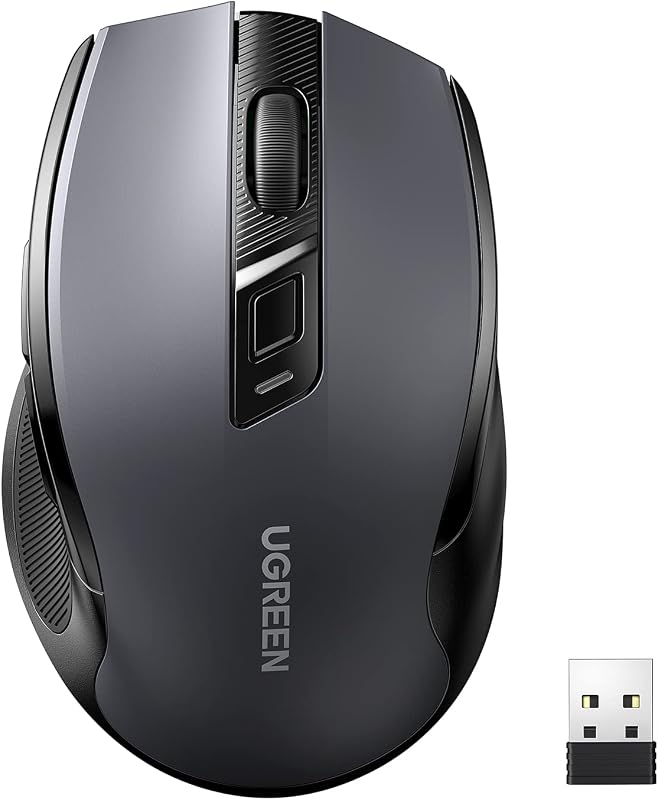
The UGREEN Wireless Mouse 2.4G with USB is a full-size pointer engineered specifically for right-handed comfort during lengthy office sessions. Its physical shell follows the natural curve of the hand, incorporating soft rubber side grips, sculpted edges, and an expanded palm rest to reduce muscular tension in the palm and fingers. For precision tracking across various display resolutions, it provides five adjustable DPI levels spanning 800, 1200, 1600, 2400, and 4000 dots per inch. It functions as an ultra-quiet click mouse by dampening operational click sound by approximately 90 percent, making it an excellent companion for quiet office spaces, study libraries, and bedroom desks. Power is supplied by a single AA battery that can deliver up to 18 months of operating life thanks to an integrated smart power-saving chip and auto-sleep feature.
This model operates via a dedicated 2.4GHz radio frequency connection using a compact USB receiver that neatly docks into a storage slot on the underside of the mouse. The receiver delivers wide hardware compatibility across Windows 11, 10, 8, 7, XP, macOS, Linux, Chrome OS, and Android platforms, requiring no third-party driver installations. Shoppers who have explored our acer wireless mouse for laptop, 2.4ghz computer mouse 3 adjustable dpi office cordless usb mice with overview will find a similar dedicated dongle approach here. It is best suited for individuals working on a single PC or desktop computer who want a dependable ugreen 2.4g wireless mouse without dealing with Bluetooth pairing menus. However, if your workstation requires toggling between multiple computers or a tablet, this unit gives way to multi-device models like the dual-mode options below.
UGREEN Ergonomic Wireless Mouse
- Best for Multi-device workers needing vertical wrist relief
- Color Black
- Size Large
4.5 average rating left by Amazon buyers
Pros
- Dual Bluetooth and 2.4G
- Pairs with 3 devices
- Low-friction PTFE feet
Cons
- Requires separate AA battery
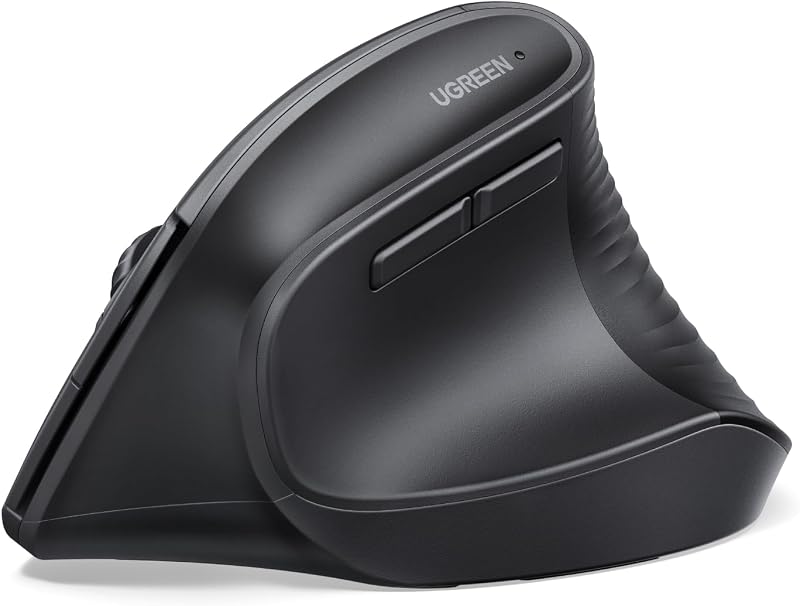
Designed to promote physical wellness during long computer days, the UGREEN Ergonomic Wireless Mouse features an upright vertical architecture. By placing the wrist in a natural vertical handshake position, this ugreen ergonomic wireless mouse decreases forearm twisting and muscle tension, serving as an effective tool for users with larger hands or repetitive strain concerns. Underneath, durable Teflon (PTFE) glide feet ensure smooth, low-friction tracking across mouse mats and wooden desktops alike. It offers four switchable DPI steps at 1000, 1600, 2000, and 4000, catering equally to detailed spreadsheets and fast cross-screen navigation. The quiet-click mechanism maintains a peaceful environment, while the functional five-button layout simplifies everyday web browsing.
Versatility is a major strength of this unit, as it includes both 2.4GHz wireless and Bluetooth connectivity with an effective operating radius of up to 10 meters. The dual wireless engineering allows shoppers to connect and switch between up to three separate devices seamlessly, supporting Windows, macOS, Linux, ChromeOS, and Android ecosystems. Running on a single AA battery, the mouse utilizes an automated sleep mode to achieve an estimated 12-month operational lifespan. It is ideal for office workers seeking relief from traditional wrist rotation who need to juggle work between a desktop tower and a mobile tablet. Readers wanting a traditional flat mouse profile rather than an upright stance may prefer the standard horizontal models in the family.
UGREEN 2.4GHz Wireless Mouse Ergonomic 1600
- Best for Students needing simple plug-and-play navigation
- Color Black

4.9 average rating left by Amazon buyers
Pros
- Ergonomic carved thumb grip
- 33-foot wireless range
- Auto-sleep energy saver
Cons
- 1600 maximum DPI
- Unclear battery type in listing
The UGREEN 2.4GHz Wireless Mouse Ergonomic 1600 provides an accessible, straightforward navigation option designed around everyday computing tasks. Its chassis incorporates sculpted thumb carving and supportive finger rests that grant a secure grip, letting users rest their palm comfortably through extended study sessions. Tracking relies on an optical sensor with three adjustable DPI settings topping out at 1600 DPI, which provides smooth cursor pacing for web browsing, schoolwork, and standard office software. For fast document and page navigation, integrated side forward and backward buttons allow users to flick through browser tabs with minimal thumb travel.
Connectivity is handled exclusively by an included 2.4GHz USB receiver providing a reliable 33-foot cordless range with zero configuration required across Windows, macOS, Linux, Chrome OS, and Android. The listing notes that its power-saving chipset achieves up to 12 months of operation, entering a sleep state after ten minutes of inactivity, with the listing text specifying power from either AA or AAA cells across its bullet points and technical specifications table. Readers who reference our acer ergonomic mouse guide will recognize the value of sculpted contours on entry-level mice. This model is best suited for students and casual home users needing an uncomplicated, portable peripheral. It gives way to the higher-DPI and dual-connectivity models if you need Bluetooth pairing or higher sensor speeds for high-resolution displays.
UGREEN Wireless Mouse
- Color Black
Finished in an elegant white colorway, the UGREEN Wireless Mouse merges an ergonomic right-handed shape with versatile dual-mode wireless technology. Built specifically to match the natural curvature of the right palm, its full-size chassis provides substantial support that prevents cramping during continuous office hours. The optical tracking engine accommodates four sensitivity levels—1000, 1600, 2000, and 4000 DPI—giving users granular control whether editing digital media or scanning expansive documents. It also functions as a quiet click wireless mouse, suppressing click noise to ensure silent operation in shared coworking spots, quiet coffee houses, and university libraries.
A defining feature of this ugreen bluetooth mouse is its effortless dual-mode flexibility, combining Bluetooth 5.0 with a 2.4GHz wireless USB receiver. A single toggle button allows immediate switching between paired equipment, complemented by automatic pairing pop-up support on compatible systems. Broad OS compatibility covers Windows 7 through 11, macOS 10.15 and newer, iOS 13.4 and higher, Android 5.0 and above, ChromeOS, and Linux. For users who recently reviewed our bluetooth mouse logi guide, having both connection protocols provides remarkable flexibility when alternating between a laptop with limited ports and a desktop. It is an outstanding pick for hybrid professionals who want a traditional mouse body with modern multi-device freedom, though it gives way to the 57-degree vertical variant for those suffering severe forearm fatigue.
UGREEN Vertical Wireless
- Best for Office workers correcting posture with handshake angle
- Color Black
Pros
- 57-degree ergonomic angle
- Connects up to 3 devices
- Dedicated Mac and Windows modes
Cons
- Requires free USB-A port for 2.4G
The UGREEN Vertical Wireless mouse is engineered around an anatomically optimized 57-degree vertical incline that positions the arm in a handshake posture. This calculated angle actively reduces wrist strain and forearm muscle pronation, directly targeting the prevention of common repetitive strain issues often referred to as mouse arm. It features an optical sensor with four selectable DPI presets (1000, 1600, 2000, and 4000 DPI), allowing rapid adjustment between pixel-precise design tasks and swift multi-monitor cursor sweeps. The soundless switch mechanism guarantees that frequent clicking remains completely unobtrusive in quiet domestic or professional environments.
This ugreen vertical wireless mouse excels at multi-platform flexibility through dual Bluetooth 5.0 and 2.4GHz wireless connectivity, accommodating simultaneous links with up to three devices. Users can cycle through channels via a dedicated selector button with distinct LED indicators, while a dedicated system switch on the base optimizes button mapping for Mac or Windows. In Mac mode, the forward and back thumb keys intuitively translate to Command+] and Command+[ application shortcuts. Powered by a single AA battery, it maintains a stable 10-meter wireless link. It represents the best ugreen wireless mouse for ergonomically conscious desk workers seeking maximum posture correction. However, for those working on unstable surfaces or tight desk spaces without room to glide, the trackball model is the logical alternative.
UGREEN M785DR Wireless Trackball Mouse
- Best for Compact desks and multi-screen spreadsheet navigation
Pros
- Stationary thumb-control trackball
- Built-in rechargeable battery
- 4D hyper-fast scroll wheel
Cons
- Requires monthly socket cleaning
- Steeper learning curve
The UGREEN M785DR Wireless Trackball Mouse departs from conventional optical movement by utilizing an ergonomic vertical chassis paired with smooth thumb-controlled trackball navigation. Because the mouse remains entirely stationary on your desk, your forearm and wrist remain at rest while your thumb directs the cursor with high precision. It boasts an advanced 4D hyper-fast scroll wheel that delivers both vertical and horizontal scrolling along with speed switching, proving invaluable for navigating massive financial spreadsheets and detailed editing timelines. The sensor offers five distinct DPI levels ranging from 400 to 2000 DPI, enabling precise cursor manipulation that eliminates hand shaking on multi-monitor setups.
Equipped with eight buttons, this ugreen m785dr wireless trackball mouse supports customizable controls, allowing operators to map productivity shortcuts like copy, paste, or task switching directly to their fingers. Unlike its battery-swapping siblings, it houses a built-in 500mAh rechargeable cell charged through modern USB-C. Multi-device connectivity enables pairing with up to three systems simultaneously over Bluetooth and 2.4GHz wireless across Windows, macOS, Linux, Android, and ChromeOS. For shoppers interested in comprehensive desk ergonomics alongside a seenda wireless keyboard and mouse setup, a stationary trackball conserves significant desk real estate. It is the definitive solution for users with restricted desk space or chronic wrist pain, though users who prefer gliding a traditional mouse across a pad will lean toward the standard ergonomic models.
Chip values are fields copied from the Amazon product listing. Star figures are the average rating left by Amazon buyers, not a score given here.
Matching a Model to Your Setup
- For quiet open-plan offices and shared library desks, the UGREEN Wireless Mouse 2.4G with USB delivers a 90 percent noise reduction and dependable single-receiver simplicity.
- For users experiencing wrist discomfort or forearm strain, the UGREEN Vertical Wireless offers a tailored 57-degree handshake posture and three-device pairing.
- For cluttered workstations, narrow podiums, or mobile lap usage, the UGREEN M785DR Wireless Trackball Mouse eliminates the need to glide across a mouse pad.
- For hybrid workers alternating between a Bluetooth-only ultrabook and an office PC, the UGREEN Wireless Mouse offers seamless dual-mode switching in a right-hand profile.
- For larger hands requiring vertical support with teflon glide feet, the UGREEN Ergonomic Wireless Mouse provides smooth dual-mode connection for up to three devices.
- For students and casual home users wanting basic browsing controls on a modest desk, the UGREEN 2.4GHz Wireless Mouse Ergonomic 1600 provides carved thumb rests and plug-and-play ease.
Before You Buy
Before finalizing your selection, review the specific battery and charging provisions across these models. While the stationary trackball model integrates a built-in 500mAh rechargeable battery with USB-C recharging, the remaining five mice rely on replaceable alkaline cells. The listings for the single-AA and multi-battery models explicitly state that replacement batteries are not included in the packaging, meaning you will need to supply fresh batteries before initial use. Furthermore, for the UGREEN 2.4GHz Wireless Mouse Ergonomic 1600, the listing states conflicting power requirements between its bullet points, which describe two AA batteries, and its technical specification table, which lists two AAA batteries.
Shoppers should also take note of physical port requirements and software specifications. Each model utilizing a 2.4GHz connection includes a standard USB-A receiver stored in the base of the mouse, but the listings do not specify or include USB-C adapter hardware for modern ultrabooks lacking legacy USB-A ports. In addition, while several models boast programmable buttons or customizable controls, the product listings do not specify dedicated configuration software suites or direct download links for remapping keys on non-standard operating systems. Checking your computer’s available ports and verifying whether your setup supports direct Bluetooth pairing will ensure an effortless setup experience.
FAQ
What is the difference between 2.4GHz wireless and Bluetooth on UGREEN mice?
A 2.4GHz wireless connection uses a dedicated USB-A receiver dongle plugged into your computer, offering quick plug-and-play operation without any pairing menus. Bluetooth connects directly to your device’s internal wireless antenna, keeping your physical USB ports open and allowing you to pair with tablets, laptops, and phones. Dual-mode UGREEN models incorporate both technologies, giving you the freedom to switch between multiple computers using a single button.
How do I switch between connected computers on multi-device UGREEN mice?
Multi-device UGREEN models feature a hardware switch button located on the mouse casing. By pressing this toggle button, the internal controller cycles through connection channels represented by designated numbered indicator lights. This allows you to alternate control between up to three paired devices across Bluetooth and 2.4GHz wireless without repeating the initial pairing process.
What does DPI mean and why are there multiple levels?
DPI stands for dots per inch, which measures how sensitive the mouse sensor is to physical motion. A lower DPI setting, such as 800 or 1000 DPI, moves the cursor slowly across the screen, making it ideal for fine photo editing or detailed spreadsheet data entry. A higher DPI setting, such as 2000 or 4000 DPI, allows the cursor to traverse high-resolution 4K monitors or multiple displays with minimal hand movement.
Are UGREEN silent click buttons completely soundproof?
The quiet-click switches on UGREEN silent mouse models are engineered to reduce click sound by approximately 90 percent compared to standard mechanical computer mice. While not completely mute, the actuation produces a soft, muffled sound rather than a sharp, metallic click. This makes them exceptionally well suited for shared bedrooms, quiet office cubicles, classrooms, and libraries.
How do you clean and maintain a UGREEN trackball mouse?
Regular maintenance of the trackball ensures smooth and responsive tracking performance over time. The ball can be easily pushed out through an access hole on the bottom of the mouse chassis. Once removed, wipe the exterior of the ball with a soft cloth and gently clean the interior optical socket and contact bearings using a cotton swab or soft brush to remove collected dust and skin oils.


